

Can DeepSeek generate images? The answer depends on which DeepSeek product you mean. The standard DeepSeek web chat and mobile app, along with the deepseek-flash API model, support image understanding, but their documented output remains text. The deepseek-v4-pro API model accepts text only. DeepSeek’s separate Janus-Pro model can generate images from text through an official Hugging Face demo or a local installation.
In practical terms, typing an image prompt into the normal DeepSeek chat is not currently the documented way to receive a newly generated PNG or JPG. You need to use Janus-Pro separately, connect DeepSeek to an external image-generation tool, or ask DeepSeek to write a prompt that another generator will render.
DeepSeek image capabilities at a glance
| DeepSeek product | Can accept images? | Can generate image files? | Best use |
|---|---|---|---|
| DeepSeek web chat and mobile app | Yes, through current vision features | No native image-generation feature is documented | Describing images, reading screenshots, OCR, and visual analysis |
DeepSeek API with deepseek-flash | Yes | No; current model metadata lists text output | Automated image understanding and visual agent workflows |
DeepSeek API with deepseek-v4-pro | No image input in the current model catalog | No; text output only | Text, reasoning, coding, and tool-based tasks |
| Janus-Pro | Yes | Yes | Text-to-image generation and multimodal research |
| Third-party “DeepSeek image generator” | Depends on the service | Possibly, but often through another model or wrapper | Use only after verifying the provider, model, costs, and privacy policy |
This distinction prevents the most common misunderstanding: being able to analyze an uploaded image is not the same as being able to create a new image.
Can DeepSeek Chat generate images directly?
As of November 6, 2026, DeepSeek’s official app and model documentation do not describe a native image-generation feature in the standard DeepSeek chat. The app supports vision mode and image uploads, but those features are designed for understanding images rather than rendering new ones.
You can upload a screenshot, photograph, diagram, chart, or document page and ask DeepSeek to explain it. Depending on the content, it may identify objects, extract text, summarize a visual, interpret a chart, or answer questions about what it sees.
If you enter a prompt such as “Generate a cinematic image of a city on Mars,” the standard chat may write a description, an improved image prompt, SVG code, HTML, or instructions for another tool. That is not the same as returning a rendered raster image.
DeepSeek’s current mobile app release history confirms support for vision mode and improved image uploads, but it does not list native text-to-image output. The company’s original app announcement also focused on chat, web search, file uploads, and text extraction rather than image generation.
Can the DeepSeek API generate images?
The current DeepSeek API does not provide a documented image-generation output through its general model catalog. The official model metadata lists the available output modality as text.
The current deepseek-flash model accepts both text and images as input, but it returns text. The deepseek-v4-pro model currently accepts text input and also returns text.
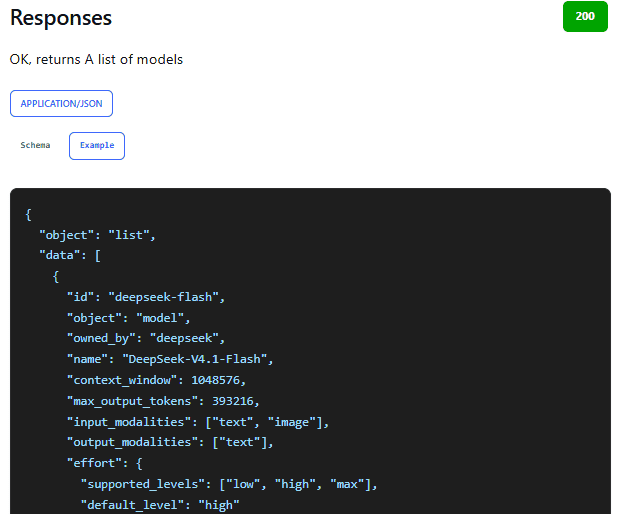
| Capability | Current DeepSeek API support |
|---|---|
| Send an image for analysis | Yes, with deepseek-flash |
| Describe a photograph | Yes |
| Read text from a screenshot | Yes |
| Analyze a chart or diagram | Yes |
| Return text or structured JSON | Yes |
| Return a generated PNG, JPG, or WebP image | Not listed as a current output modality |
| Call a separate image tool through your application | Possible when the developer supplies and manages that external tool |
The official DeepSeek Vision guide explains how to send JPEG, PNG, GIF, and WebP files for visual understanding. Its examples ask the model to describe images or read their contents; they do not expose a native text-to-image endpoint.
A developer can still build an application in which DeepSeek writes or improves a prompt and an external image service renders the result. In that workflow, however, the external service—not the DeepSeek language model—creates the image.
Image understanding vs. image generation
The phrase “multimodal model” can cause confusion because it does not automatically mean that a model can produce every media type. A model may accept several input types while supporting only one output type.
| Task | What happens | Does it create a new image? |
|---|---|---|
| Image understanding | The model examines an uploaded image and responds with text | No |
| OCR | The model extracts visible words or numbers from an image | No |
| Visual question answering | The model answers questions about a photograph, screenshot, or chart | No |
| Prompt writing | The model writes instructions for an image generator | No |
| SVG or HTML generation | The model writes code that another program may render visually | Not natively |
| Text-to-image generation | A visual generation model converts a text prompt into image pixels | Yes |
| Image editing | A model changes an existing image using a mask, reference, or instruction | Yes, but this requires dedicated editing support |
DeepSeek’s current Flash model belongs in the image-understanding category. Janus-Pro adds actual text-to-image generation, but it is a separate model family and is not presented as a built-in mode inside the standard DeepSeek chat.
What is DeepSeek Janus-Pro?
Janus-Pro is an official DeepSeek-developed multimodal model that combines visual understanding and visual generation. It can analyze images and generate new images from text prompts.
The model belongs to the broader Janus family:
- Janus: the original unified multimodal understanding and generation model.
- JanusFlow: an experimental unified model that combines autoregressive language modeling with rectified-flow image generation.
- Janus-Pro: an improved version of Janus with expanded data, an updated training strategy, and 1B and 7B model sizes.
The official Janus repository provides model downloads, inference examples, and links to hosted demonstrations. The main official online demo uses Janus-Pro-7B.
Janus-Pro should not be confused with the model running inside the normal DeepSeek chat. It is accessed separately through its model files, code repository, or official Hugging Face Space.
How to generate images with the official Janus-Pro demo
The easiest current route for a nontechnical user is the official Janus-Pro-7B Hugging Face Space. The Space was running when this article was verified, although availability, queue time, and hosted capacity can change.
- Open the official Janus-Pro-7B Space under the
deepseek-aiHugging Face organization. - Select the Text-to-Image Generation tab rather than the Multimodal Understanding tab.
- Enter a detailed prompt describing the subject, composition, environment, lighting, colors, and visual style.
- Open the advanced options only when you need more control.
- Set an optional seed if you want to reproduce the same sampling conditions.
- Adjust CFG Weight or temperature cautiously rather than changing several controls at once.
- Select Generate Images and review the resulting gallery.
- Save the result only after checking details, text, anatomy, composition, and suitability for its intended use.
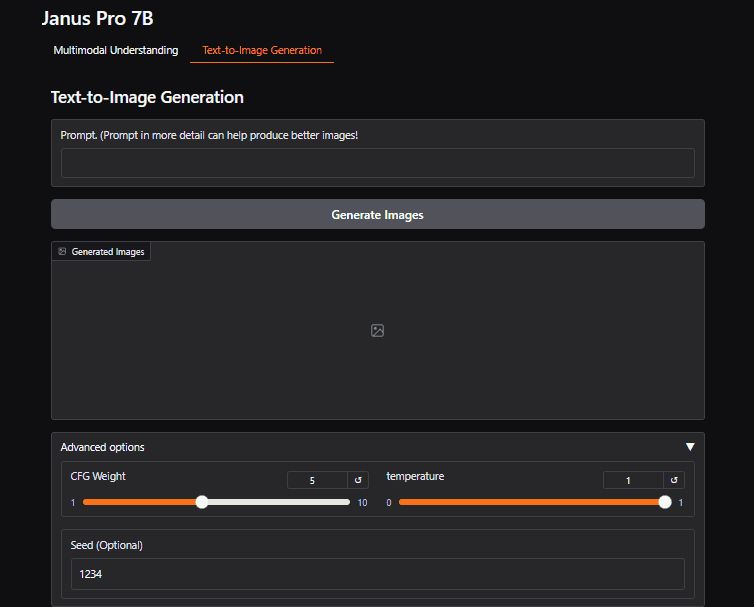
The current demo exposes three generation controls:
- CFG Weight: controls how strongly the generation follows the text condition.
- Temperature: affects randomness during image-token sampling.
- Seed: helps reproduce a generation when the remaining settings and software environment stay the same.
The official Space states that it applies 2× Real-ESRGAN upscaling after Janus-Pro generates an image. This improves the displayed size and apparent clarity, but it does not mean that the underlying model originally generates at that enlarged resolution.
Because the demo is hosted on Hugging Face rather than inside the normal DeepSeek chat, treat it as a separate service. Do not submit confidential prompts, private photographs, client assets, or regulated data without reviewing the applicable hosting and privacy terms.
How to run Janus-Pro locally
Local installation is intended for developers and technical users who want direct access to the model, code, settings, and generated files. The current official repository requires Python 3.8 or newer.
Clone the official repository and install its standard dependencies:
git clone https://github.com/deepseek-ai/Janus.git
cd Janus
pip install -e .
To install and launch the local Gradio interface for Janus-Pro, use the repository’s documented commands:
pip install -e ".[gradio]"
python demo/app_januspro.py
The official Janus-Pro inference example loads deepseek-ai/Janus-Pro-7B, converts it to torch.bfloat16, and moves it to CUDA. The example therefore targets a compatible GPU environment.
DeepSeek does not publish a minimum RAM or VRAM figure in the repository’s basic installation instructions. Avoid relying on precise hardware numbers from an unrelated tutorial unless they were measured using the same model size, precision, batch size, software version, and generation settings.
Users with limited hardware can investigate the smaller Janus-Pro-1B model, but the official repository does not guarantee that every feature, output quality level, or community optimization will behave identically across both sizes.
What the official local example produces
The repository’s current Janus-Pro generation example uses a base image size of 384 × 384 pixels and saves generated samples as JPG files. It also exposes temperature and CFG Weight in the generation function.
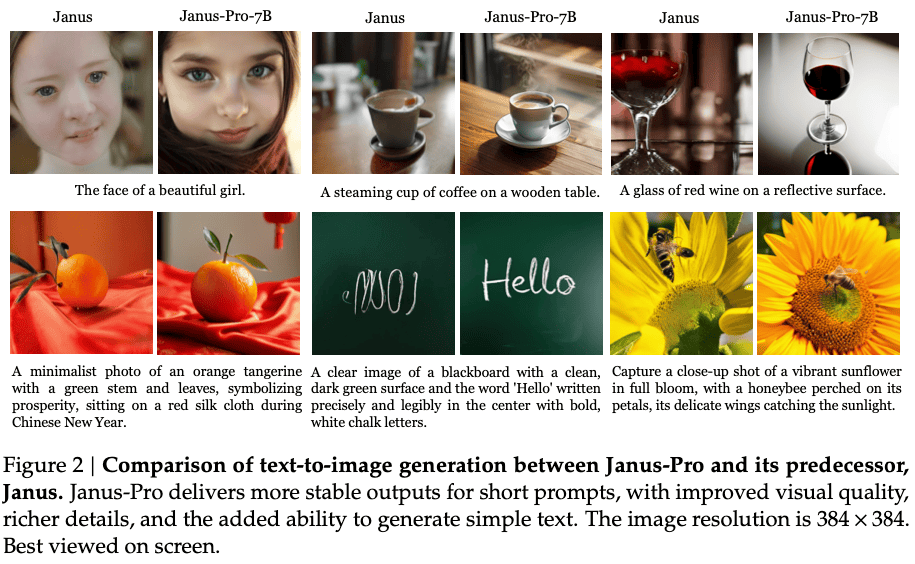
The 384 × 384 base size is important when evaluating Janus-Pro against newer dedicated image platforms. Upscaling can enlarge an output, but it cannot reliably recreate every fine detail that was absent from the original generation.
What Janus-Pro can and cannot replace
Janus-Pro is useful for research, experimentation, local model workflows, prompt testing, and basic text-to-image generation. It is less suitable when the job depends on a polished commercial editing workflow or highly controlled production assets.
| Requirement | Current Janus-Pro position |
|---|---|
| Generate an image from text | Supported |
| Understand an uploaded image | Supported |
| Use a fixed seed | Available in the official hosted demo |
| Adjust CFG Weight and temperature | Available in the official demo and generation code |
| Generate multiple aspect ratios | Not documented as a standard control in the official Janus-Pro demo |
| Inpainting with a mask | Not documented in the official Janus-Pro demo |
| Outpainting | Not documented in the official Janus-Pro demo |
| Background removal | Not documented as a native Janus-Pro feature |
| Transparent PNG generation | Not documented as a native control |
| Reference-image character consistency | Not documented as a dedicated workflow |
| Professional typography and logo production | Should be reviewed and corrected manually rather than assumed reliable |
The model’s technical report discusses improved instruction following and the ability to generate simple text, but a research benchmark or selected example does not guarantee dependable typography in logos, packaging, advertisements, or branded assets.
Use a dedicated image editor or specialized generation platform when you need masking, precise layout control, repeatable characters, large native dimensions, transparent backgrounds, or a managed production API.
Can DeepSeek edit an existing image?
The normal DeepSeek app can analyze an uploaded image and provide text instructions about how it could be changed. That does not mean it edits and returns the modified image.
The current official Janus-Pro demo provides separate tabs for multimodal understanding and text-to-image generation. It does not document a complete image-editing workflow with masks, inpainting, outpainting, layer controls, background removal, or reference-image preservation.
A third-party interface may add those features by connecting Janus or DeepSeek to another model. When that happens, identify which model performs the actual edit instead of attributing every result to DeepSeek.
Use DeepSeek to write prompts for another image generator
Even when you do not run Janus-Pro, the standard DeepSeek chat can help build a more structured prompt for another image-generation tool. This is often the easiest option for a nontechnical user who already has access to a dedicated generator.
You can ask DeepSeek to improve a rough idea with a prompt such as:
Turn the following idea into a detailed image-generation prompt.

Idea: A small solar-powered library in a desert village at sunset.

Include:
- the main subject
- environment and background
- composition and camera angle
- lighting
- color palette
- material details
- mood
- realistic visual constraints
- elements to avoid

Return only the finished image prompt.
DeepSeek produces the text in this workflow. The external image generator converts that text into pixels. Any image-generation costs, usage limits, content rules, storage policies, and licensing conditions come from the external service.
Are DeepSeek image generator websites official?
Do not assume that a website is operated by DeepSeek merely because its domain, title, or logo contains the words “DeepSeek Image Generator.” Many sites are independent wrappers, community deployments, affiliate pages, or interfaces connected to unrelated image models.
Before entering a prompt or uploading an image, check:
- Who owns and operates the website.
- Whether it links to an official DeepSeek repository or model card.
- Which model actually generates the image.
- Whether the model is Janus-Pro, a modified version, or an unrelated generator.
- Where prompts and uploaded images are stored.
- Whether submitted data may be used for training.
- What pricing, credit, or subscription rules apply.
- Which license governs the model and generated output.
The official Janus repository is published under the deepseek-ai GitHub organization, and the official Janus-Pro model and hosted Space appear under the deepseek-ai Hugging Face organization.
Is Janus-Pro free and can it be used commercially?
The Janus repository code is licensed under the MIT License, but the Janus and Janus-Pro model weights are governed by the separate DeepSeek Model License.
The official repository states that commercial usage is permitted under the model-license terms. The license also says that DeepSeek generally claims no rights in the output generated with the model, while making the user responsible for the output and its subsequent use.
That permission is not unlimited. The model license includes use restrictions, redistribution conditions, trademark limits, and obligations relating to applicable laws, personal information, and intellectual-property rights.
Downloading model weights also does not eliminate operating costs. A local deployment may require suitable hardware, storage, electricity, maintenance, and engineering work. A hosted third-party deployment may impose its own fees and terms.
Review the current license yourself before using Janus-Pro in a commercial product, client campaign, hosted service, or regulated workflow. This article does not provide legal advice.
Which DeepSeek image workflow should you choose?
| Your goal | Best current route | Why |
|---|---|---|
| Understand a screenshot or photograph | DeepSeek Chat or deepseek-flash | Current vision features are designed for image input and text analysis |
| Try official DeepSeek image generation without local setup | Official Janus-Pro Hugging Face Space | It exposes text-to-image generation in a browser |
| Experiment with DeepSeek image generation locally | Janus-Pro repository and model weights | You control the code, model files, settings, and generated outputs |
| Create a better prompt for another platform | Standard DeepSeek chat | It can structure and refine the prompt even though it does not render the final image |
| Build an application that returns images | Self-host Janus-Pro or connect an external image API | The current general DeepSeek API catalog exposes text output rather than native image output |
| Perform professional inpainting, outpainting, or background removal | A dedicated image-generation and editing platform | Those workflows are not documented as native Janus-Pro demo features |
| Create large production assets with strict typography | A specialized generator plus manual design review | Janus-Pro’s documented base generation size and editing controls are limited |
Frequently asked questions
Can DeepSeek return a PNG or JPG from a normal chat prompt?
The standard DeepSeek chat does not currently document native image-file generation. Use the separate Janus-Pro demo or another image-generation service when you need rendered image output.
Can the DeepSeek API return generated images?
The current official model catalog lists text as the output modality for its available general API models. The Flash model accepts images for understanding but returns text.
Is Janus-Pro an official DeepSeek model?
Yes. Janus-Pro is published through DeepSeek’s official Janus GitHub repository and the official deepseek-ai organization on Hugging Face.
Does Janus-Pro require a GPU?
The official inference example uses CUDA and bfloat16, so the provided workflow targets a compatible GPU. The repository does not publish one universal minimum VRAM requirement, and actual memory use depends on the model size, precision, batch size, and implementation.
Can Janus-Pro remove a background or edit part of an image?
The current official demo does not document dedicated masking, inpainting, outpainting, or background-removal controls. A third-party tool may provide them by adding a separate editing model.
Final answer
DeepSeek can generate images, but not through the standard DeepSeek chat or current general API in the same way that some consumer AI assistants provide built-in image output. The official route is the separate Janus model family, especially Janus-Pro, which supports text-to-image generation through an official hosted demo or local deployment.
Use DeepSeek Chat or deepseek-flash when you need image understanding. Use Janus-Pro when you want to experiment with DeepSeek-developed image generation. Choose a dedicated image platform when you need advanced editing, higher native resolution, strict aspect-ratio control, transparent backgrounds, repeatable characters, or a production-ready image API.
Official sources checked
Information verified on November 6, 2026. Model capabilities, hosted demos, application features, and API output formats can change, so check the official sources again before publishing technical instructions or building a production workflow.