

Published: November 7, 2026.
Useful DeepSeek prompts specify the task, provide the material needed to complete it, and describe the answer you want. For an email, that means the recipient, purpose, and facts. For a coding problem, it means the code, environment, error, and expected behavior.
These 20 original DeepSeek prompt examples cover writing, work, coding, research, learning, and data. Each includes a check you can apply to the answer. The two worked examples use fictional inputs and illustrative outputs.
Choose a DeepSeek prompt for your task
Open DeepSeek’s official chat, choose a template below, and replace every bracketed field with your details. Paste the source material the task needs, then send the completed prompt. Remove unused fields instead of leaving instructions such as [PASTE TEXT] in your message.
| Your task | Examples | What to provide |
|---|---|---|
| Writing and editing | 1–4 | A draft, brief, audience, or verified facts |
| Work and planning | 5–8 | Meeting notes, tasks, options, or requirements |
| Coding and debugging | 9–12 | Code, environment, expected behavior, and errors |
| Research and source analysis | 13–15 | Source passages, document labels, and claims |
| Learning and practice | 16–17 | Your level, learning goal, and study material |
| Tables and structured data | 18–20 | Source text, field definitions, or a small dataset |
Use material you are authorized to share, and remove passwords, API keys, and unnecessary personal information. Start with a small sample so you can check the result before applying the same prompt to a larger task.
DeepSeek prompts for writing and editing
1. Edit a draft without changing its meaning
Use this when the facts are already in your draft and you want clearer wording.
Edit the draft below for [AUDIENCE] in American English.

Goal: [WHAT THE READER SHOULD UNDERSTAND OR DO]
Tone: [DESIRED TONE]

Preserve names, numbers, factual claims, and qualifications.
Remove repetition and unnecessary jargon.
Do not add evidence, benefits, promises, or examples I did not provide.
Flag unclear passages instead of guessing what they mean.

Return the revised draft first, followed by up to three important
changes or unresolved questions.

Draft:
[PASTE DRAFT]
Check: Compare the original and revised claims. Words such as “may,” “estimated,” and “up to” should not disappear if they affect the meaning.
2. Write a professional email from your notes
Provide the relationship and requested action so the email fits the situation.
Write an email in American English using only these details.

Recipient and relationship: [DETAILS]
Purpose: [WHY I AM WRITING]
Facts to include: [FACTS]
Action I want the recipient to take: [ACTION]
Tone: [TONE]
Maximum length: [WORD LIMIT]

Return a subject line and the email.
Do not invent deadlines, attachments, discounts, or commitments.
If a missing fact prevents a usable draft, ask one focused question
before writing it.
Customize: Specify whether you are contacting a client, coworker, or someone for the first time. Check dates and promises before sending.
3. Build an article outline around reader questions
Use a real audience and purpose to keep the outline focused.
Create an article outline for this brief.

Topic: [TOPIC]
Reader: [AUDIENCE AND EXPERIENCE LEVEL]
Reader's main question: [QUESTION]
Outcome: [WHAT THE READER SHOULD BE ABLE TO DO]
Available evidence or notes: [MATERIAL]
Scope boundaries: [WHAT TO INCLUDE OR EXCLUDE]

Propose a title and a logical H2/H3 structure.
Under each section, state the question it answers and the practical
example, explanation, or evidence it needs.
Mark unsupported factual points as "evidence needed."
Merge sections that would repeat the same information.
Check: Each heading should serve a different reader need. Treat suggested statistics or claims as research tasks until you verify them.
4. Adapt technical text for a different audience
This prompt changes the explanation while preserving important limitations.
Rewrite the text below for [NEW AUDIENCE].

Their existing knowledge: [WHAT THEY ALREADY KNOW]
What they need to understand: [GOAL]
Output format and length: [FORMAT AND LIMIT]

Explain essential technical terms in plain English.
Preserve the original facts, uncertainty, and limitations.
Use an analogy only if it helps; label it as an analogy and explain
where it stops being accurate.
Do not invent a mechanism or remove a qualification to simplify
the explanation.

Text:
[PASTE TEXT]
Check: Read the simplified version against the source, especially its exceptions. An accessible explanation still needs to preserve the original boundaries.
DeepSeek prompts for work and planning
5. Turn meeting notes into decisions and action items
Use the actual notes or transcript so assignments and deadlines remain traceable.
Use only the meeting notes below.

Return:
1. Confirmed decisions.
2. An action-item table: Action | Owner | Deadline.
3. Open questions and unapproved suggestions.

Record an owner or deadline only when the notes state it.
Write "Not specified" for a missing value.
Do not turn a suggestion into a decision or assign a task that
nobody accepted.
Preserve any disagreement that remains unresolved.

Meeting notes:
[PASTE MEETING NOTES]
Check: Match each owner and deadline to the source. A person mentioning a task does not necessarily mean that person agreed to do it.
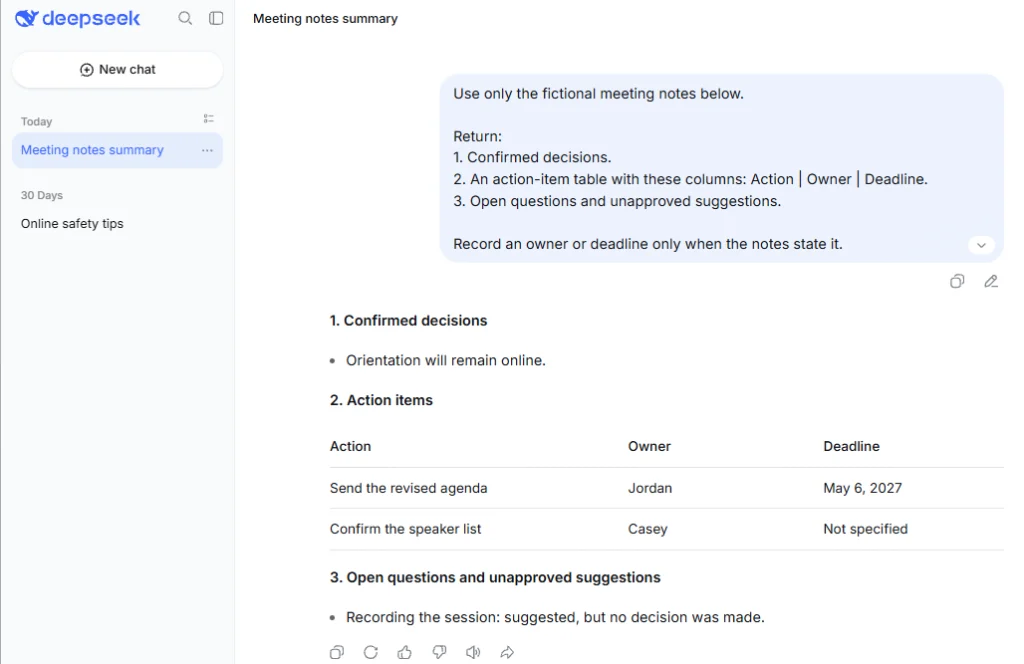
Illustrative example: fictional meeting notes
The team agreed to keep orientation online.
Jordan will send the revised agenda by May 6, 2027.
Casey agreed to confirm the speaker list; no deadline was set.
Recording the session was suggested, but no decision was made.
Using these notes in the template, an illustrative result is:
Confirmed decision: Keep orientation online.
| Action | Owner | Deadline |
|---|---|---|
| Send the revised agenda | Jordan | May 6, 2027 |
| Confirm the speaker list | Casey | Not specified |
Open questions: When is the speaker list due? Will the session be recorded? The missing deadline remains visible, and the recording suggestion stays unapproved.
6. Make a work plan that fits your available time
Give DeepSeek your actual capacity and dependencies before asking it to schedule tasks.
Build a work plan from the information below.

Goal and definition of done: [DETAILS]
Available work periods: [DATES OR DAYS AND HOURS]
Tasks and known duration estimates: [TASK LIST]
Hard deadlines and dependencies: [DETAILS]
People or resources available: [DETAILS]

Fit the plan within the stated capacity.
Label any new duration as an estimate.
Do not assign owners I have not provided.
Show dependencies, proposed work periods, and the next action.
List work that does not fit and identify which constraint would
need to change. Do not silently shorten tasks to make the plan fit.
Check: Add up the scheduled time and confirm that prerequisite tasks happen first. Review estimates with the people who will do the work.
7. Compare options using your own criteria
Use this for a decision where you already have evidence about the available options.
Help me compare [OPTIONS] for [DECISION].

My criteria, in priority order: [CRITERIA]
Nonnegotiable requirements: [REQUIREMENTS]
Evidence about each option: [FACTS OR SOURCE EXCERPTS]

Create a comparison table using only the supplied evidence.
Mark missing information as "Not provided."
Do not invent ratings, prices, capabilities, or numerical weights.
Explain the main trade-off and make a conditional recommendation.
State which missing fact could change that recommendation.
If the evidence is insufficient, identify the next question to answer.
Check: Make sure the recommendation reflects your priorities. A missing feature description should remain unknown, rather than becoming a claim that the feature is absent.
8. Find ambiguity in a project requirement
This is useful before a vague request becomes a development task or commitment.
Review the requirement below for ambiguity.

Project context: [CONTEXT]
Users affected: [USERS]
Known constraints: [CONSTRAINTS]

Return a table with:
Original requirement | Ambiguity | Clarifying question |
Proposed acceptance criterion

Keep approved requirements separate from your suggestions.
Make proposed acceptance criteria observable and testable.
Do not invent stakeholder approval, technical limits, or business rules.
Prioritize questions whose answers would change the scope.

Requirement:
[PASTE REQUIREMENT]
Check: Have the relevant owner confirm proposed criteria. A clear-looking acceptance condition is still a proposal until it is agreed.
DeepSeek prompts for coding and debugging
Give each coding prompt enough context to check the answer: language and version, relevant dependencies, sample inputs, and expected behavior. Review generated changes and run the relevant checks in your own environment.
9. Understand an unfamiliar function
Ask for a concrete walkthrough to connect the explanation to the code.
Explain this code to a developer who knows [BACKGROUND].

Language and version: [DETAILS]
Relevant dependencies or surrounding behavior: [DETAILS]
Example input: [INPUT]

Describe its purpose, inputs, outputs, and side effects.
Walk through the example input and show the resulting output.
Identify edge cases, assumptions, and external functions whose behavior
is not visible here.
Distinguish what the code actually does from what it may have been
intended to do. Do not rewrite it yet.

Code:
[PASTE CODE]
Check: Run the sample input when practical. Pay attention to mutations, external calls, and error behavior that a high-level explanation might overlook.
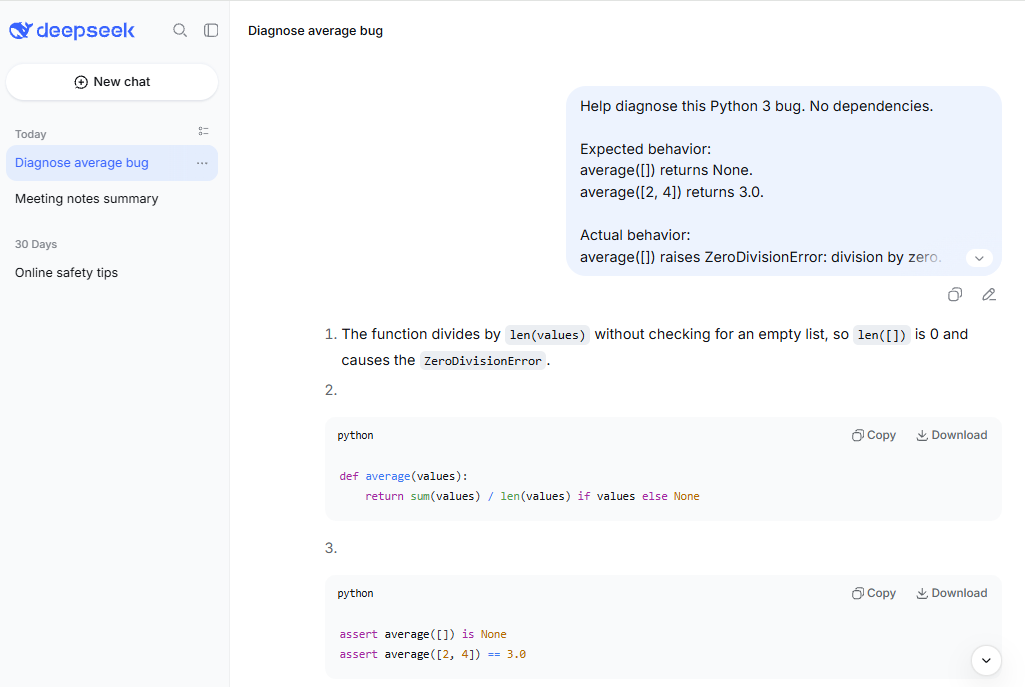
10. Diagnose a reproducible bug
A minimal failing case gives the model something specific to investigate.
Help diagnose this bug.

Language, runtime, and dependencies: [VERSIONS]
Expected behavior: [EXPECTED RESULT]
Actual behavior: [ACTUAL RESULT]
Exact error or traceback: [ERROR]
Steps and input that reproduce it: [DETAILS]
Relevant code: [CODE]

Identify the most plausible cause and the evidence for it.
If the cause cannot be established, state the next diagnostic check.
Propose the smallest relevant fix and explain what it changes.
Include a regression test or verification step for the failing case.
Do not claim you executed the code unless you actually did.
Check: Reproduce the original failure, apply the proposed change, and rerun that case plus a relevant boundary case. Preserve the full error message in your follow-up.
11. Generate a small function with an explicit contract
Define behavior before requesting implementation, especially for empty or invalid input.
Write a function that satisfies this contract.

Language and version: [DETAILS]
Function name and signature: [SIGNATURE]
Inputs and valid types: [DETAILS]
Expected output: [DETAILS]
Behavior for empty, invalid, or missing input: [RULES]
Allowed dependencies and restrictions: [DETAILS]
Example input/output pairs: [EXAMPLES]

Return the implementation, a short usage example, and a brief
explanation of assumptions.
Do not add features outside this contract.
If two requirements conflict or a boundary behavior is unspecified,
identify the issue before choosing behavior.
Check: Try the supplied examples and the invalid-input cases. Confirm that the implementation uses dependencies available in your environment.
12. Design tests around expected behavior
Start from the function’s contract so the tests do not simply repeat an implementation mistake.
Create tests for the behavior specified below.

Language and version: [DETAILS]
Test framework: [FRAMEWORK]
Function contract: [EXPECTED BEHAVIOR]
Code under review: [CODE]
Existing tests, if relevant: [TESTS]

First list the cases and their expected outcomes.
Cover normal use, meaningful boundaries, and specified error behavior.
Flag any expected outcome that cannot be determined from the contract.
Then write the tests for the agreed behavior.
Identify any mismatch you notice between the contract and the code.
Do not report test results unless the tests were actually run.
Check: Review the expected results before running the tests. A passing suite is less useful if its assertions encode the wrong requirement.
DeepSeek prompts for research and source analysis
The research templates below work from material you provide. For current information, first collect relevant sources using a search feature available in your setup, or open the sources yourself and supply the passages. Keep document titles and dates with the text so differences in scope remain visible.
13. Summarize a source without overstating it
Set a question for the summary so it preserves the details that matter to you.
Summarize the supplied source for [AUDIENCE].

Question the summary should answer: [QUESTION]
Desired length or format: [LIMIT OR FORMAT]
Source title, date, and section labels: [DETAILS]

Use only the supplied text.
Preserve important numbers, definitions, exceptions, and uncertainty.
Separate the source's findings from its recommendations.
Identify relevant questions that the supplied passage does not answer.
Use existing section labels for references; do not invent page numbers.

Source text:
[PASTE SOURCE TEXT]
Check: Compare the summary’s main conclusion and numerical claims with the source. If you supplied an excerpt, the summary should not imply that the full document was reviewed.
14. Compare two sources without flattening disagreements
This helps distinguish conflicting claims from differences in date, population, or definition.
Compare these sources on [QUESTION].

Source A — title, date, scope, and text:
[DETAILS AND PASSAGE]

Source B — title, date, scope, and text:
[DETAILS AND PASSAGE]

Return a table of:
Issue | Source A's position | Source B's position |
Agreement or difference | Supporting passage

Check whether apparent contradictions come from different dates,
definitions, populations, or conditions.
Do not choose a winner merely because one source is more confident.
Finish with the evidence needed to resolve any remaining disagreement.
Check: Locate each supporting passage in the original. A conclusion about one audience or time period may not apply to the other.
15. Check a draft against its supporting evidence
Use this before publishing a source-based draft or sending a factual briefing.
Audit the factual claims in this draft against the supplied sources.

Draft:
[PASTE DRAFT]

Labeled source passages:
[PASTE SOURCES]

Create a table with:
Claim | Supporting source | Status | Required correction

Use these statuses:
Supported; Partly supported; Contradicted; Not established by these sources.

Explain each status briefly.
Treat missing evidence as "Not established," not automatically false.
Do not invent citations or search results.
Suggest a correction only when the supplied evidence supports it.
List claims that still require external verification.
Check: Verify the citations yourself. This audit can organize a review, but another model-generated assessment is not independent confirmation.
DeepSeek prompts for learning and practice
16. Learn a concept at the right level
Tell the model what you already understand and where your explanation breaks down.
Help me understand [CONCEPT].

My current level: [LEVEL]
What I already understand: [BACKGROUND]
What confuses me: [SPECIFIC QUESTION]
Source material or course terminology, if available: [MATERIAL]

Explain the idea in plain language, then give one worked example.
Define unfamiliar terms.
If you use an analogy, explain its limits.
Use the supplied material where available and flag any uncertainty.
End with one question that checks my understanding.
Wait for my answer before giving feedback.
Customize: Replace “beginner” with something concrete, such as “I understand percentages but have not studied probability.” Check technical explanations against your course material.
17. Practice from your own study notes
This keeps the practice tied to the material you are actually studying.
Create an interactive practice session using the notes below.

Learning goal: [GOAL]
Difficulty: [LEVEL]
Question format: [SHORT ANSWER, SCENARIO, OR OTHER FORMAT]

Ask one question at a time and wait for my answer.
Do not reveal the answer in the question.
After I respond, explain what I got right and what needs correction,
using the relevant part of the notes.
If my answer is ambiguous, ask a clarifying question before grading it.
Adjust the next question to the skill I need to practice.

Notes:
[PASTE STUDY NOTES]
Check: Make sure the feedback is grounded in your notes. If the model introduces a new fact, verify it before adding it to your study material.
DeepSeek prompts for tables and structured data
18. Extract defined fields as JSON
Specify the keys, types, and missing-value rules before asking for structured output.
Extract one record from the source text.

Return valid JSON only, with exactly these keys:
- customer_name: string or null
- order_id: string or null
- item: string or null
- quantity: integer or null
- requested_delivery_date: string or null

Use null when a value is not provided.
Preserve the delivery date as written if one is stated.
Do not infer a date from shipping instructions.
Do not add keys, commentary, or Markdown fences.

Source text:
[PASTE SOURCE TEXT]
Check: Parse the JSON, verify the keys and value types, then compare every value with the source. Valid syntax does not establish factual accuracy.
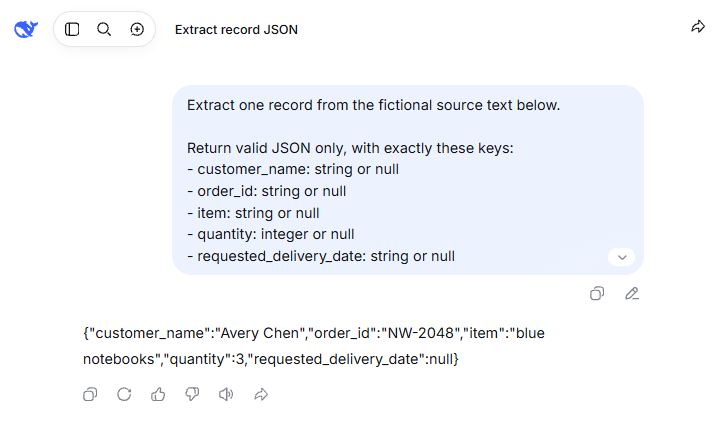
Illustrative example: fictional order note
Avery Chen ordered three blue notebooks under order NW-2048.
Ship them in one package.
With that note as the source text, the illustrative JSON output is:
{
  "customer_name": "Avery Chen",
  "order_id": "NW-2048",
  "item": "blue notebooks",
  "quantity": 3,
  "requested_delivery_date": null
}
The quantity is a number, and the missing delivery date is null, without quotation marks. The shipping instruction provides no delivery date.
For developers, DeepSeek’s JSON Output documentation describes a separate API configuration using response_format, JSON instructions, and an example format. It also addresses truncated or blank responses. A chat instruction asking for JSON is separate from enabling that API feature.
19. Classify feedback into defined categories
Give the model your category definitions so similar records can be reviewed consistently.
Classify each feedback record using the definitions below.

Allowed labels and definitions:
[DEFINE LABELS]

Choose one primary label per record.
If two labels fit equally well or the text is insufficient, use "Unclear."
Preserve each record's ID.
Return a table: ID | Label | Short supporting excerpt | Review note.
Do not invent categories, merge records, or add unstated sentiment.
Use the review note only when clarification is needed.

Feedback:
[PASTE RECORDS WITH IDS]
Check: Review a sample from each category, plus the records marked “Unclear.” Similar wording can describe different problems, so inspect the supporting excerpts.
20. Analyze a small dataset with visible calculations
Use this for a bounded question where you can independently check the calculations.
Analyze the dataset below to answer [QUESTION].

Column definitions, units, and time period: [DETAILS]
Known limitations: [LIMITATIONS]
Dataset:
[PASTE DATA]

First identify missing values, duplicate records, or inconsistent units
that could change the answer.
State how each issue affects the calculation; do not silently fill gaps.
Show the relevant formula, input values, result, and units.
State any rounding used.
Separate observed patterns from possible explanations.
Do not infer causation from a pattern alone.
Finish with the main finding and the next check needed.
Check: Recalculate the key result in a spreadsheet or calculator. Confirm the denominator, time period, and treatment of missing records before using the conclusion.
How to improve a DeepSeek prompt when the answer misses the mark
A useful prompt structure is task + relevant context + source material + constraints + output format. Use the parts the task needs. A simple rewrite may need only the text and audience; a debugging request needs a reproducible problem.
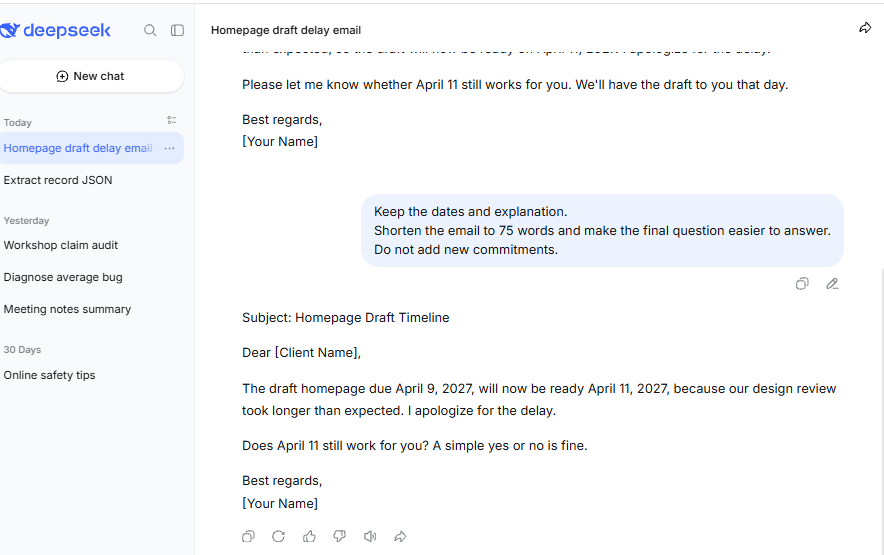
For example, “Write an email about the delay” leaves the recipient, facts, and requested action unspecified. This more complete fictional brief gives the model those details:
Write an email to a client whose draft homepage was due April 9, 2027.

The draft will be ready April 11, 2027 because our design review took
longer than expected. Apologize once and ask whether April 11 still works.

Use a calm, direct tone and stay under 120 words.
Do not promise a discount or invent additional project details.
If the facts are right but the message is too long, use a focused follow-up:
Keep the dates and explanation.
Shorten the email to 75 words and make the final question easier to answer.
Do not add new commitments.
Match the correction to the failure. For a generic answer, add the missing context. For a formatting problem, specify the exact fields or layout. For an unsupported claim, provide evidence or request its removal. For a wrong calculation, supply the inputs and ask for a checkable calculation.
A role such as “act as an editor” can describe the perspective you want, but it does not supply missing facts or credentials. Likewise, “check your work” is a request for another review, not proof that the answer has been independently verified.
What changes between DeepSeek chat, models, and the API?
The templates above are written as user messages. Their task instructions can be adapted to other AI assistants, but check whether the new tool can access the same sources and support the same workflow. Product controls and API configuration require separate attention.
- System messages: DeepSeek’s API quick start demonstrates separate
systemandusermessages. Typing “SYSTEM:” into an ordinary chat message does not configure an API message role. - Model-specific advice: The official R1 repository provides recommendations for the R1 model family. Check a guide’s model and context before applying its advice to another DeepSeek product.
- Thinking settings: The current Thinking Mode documentation says the API’s
temperaturesetting has no effect in thinking mode. Do not assume a parameter recommendation applies to every mode or is exposed in your chat interface. - Web access: DeepSeek documents separate Search and Fetch APIs for finding and retrieving pages. A request to read a URL is not evidence that retrieval succeeded. Use tools available in your setup, and provide the relevant text when a source cannot be accessed.
Choose one task you can check against real inputs, run the matching prompt, and revise the part that needs improvement. Keep a version only after its output meets the requirements you care about.
Sources last checked: November 5, 2026.