

Published: November 7, 2026.
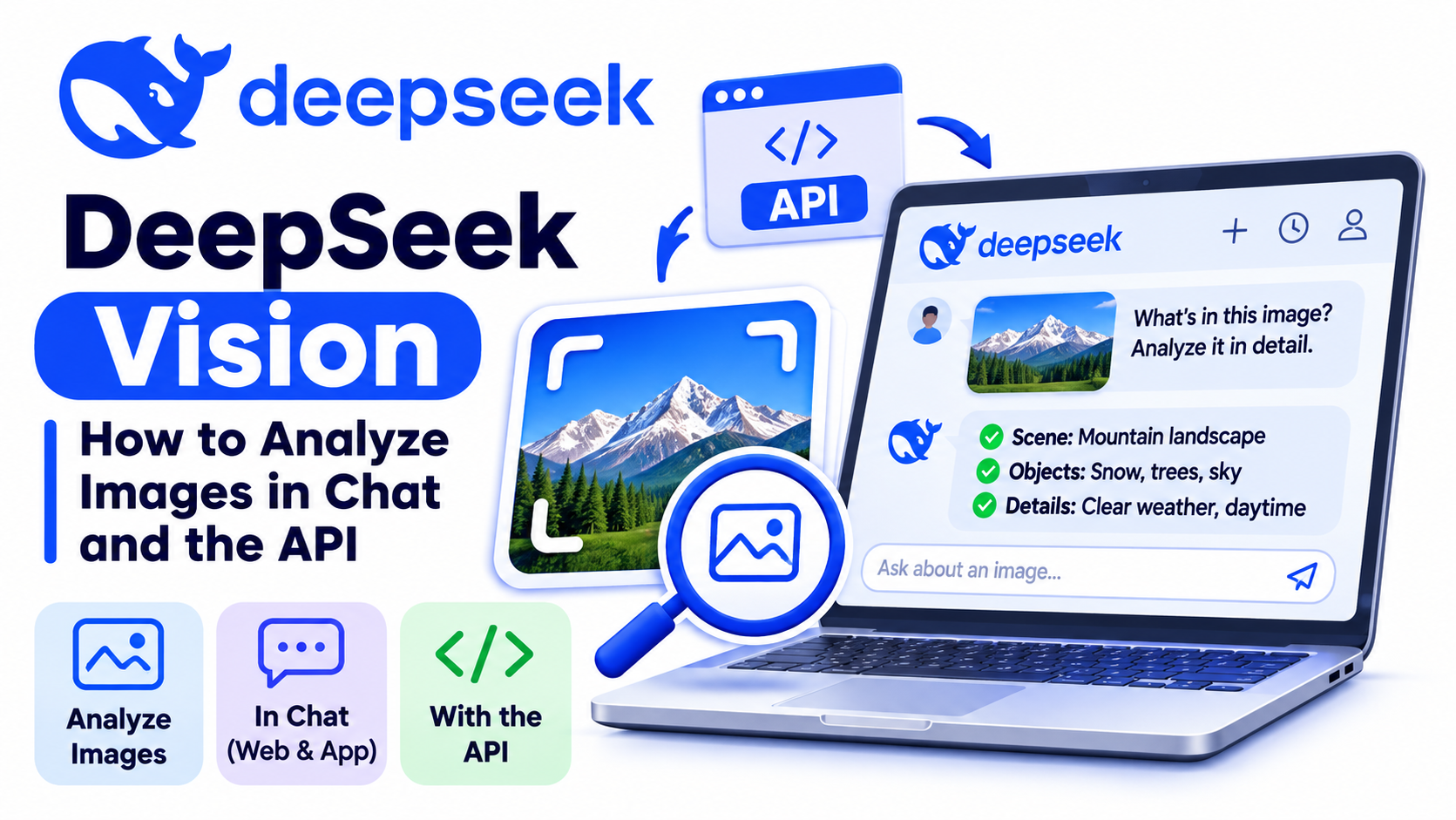
DeepSeek Vision is the image-understanding capability built into DeepSeek’s current deepseek-flash model. It is not the name of a separate current API model. You can send the model an image with a text prompt and receive a text response that describes the image, reads visible text, analyzes a chart, compares screenshots, or answers questions about visual content.
The production model ID is deepseek-flash, which currently serves DeepSeek-V4.1-Flash-1017. The retired deepseek-v4-flash-vision-exp name is still accepted for compatibility, but new integrations should not use it. The official DeepSeek Vision guide and Models & Pricing page are the best places to confirm the current model, limits, and rates. Last verified: November 6, 2026.
Quick answer: Use the official DeepSeek app for a no-code image workflow, or call deepseek-flash through the API. The hosted API accepts JPEG, PNG, GIF, and WebP images through Base64, a public image URL, or a Files API file_id. It analyzes images and returns text; it does not generate an image through the standard hosted Vision endpoint.
What “DeepSeek Vision” means now
The phrase “DeepSeek Vision” is widely used as shorthand for DeepSeek’s visual-understanding features. The current hosted API does not list a model named deepseek-vision. Instead, vision is one of the capabilities of deepseek-flash.
| Model name or term | Current status | Image input | What to do |
|---|---|---|---|
deepseek-flash | Current hosted API model | Supported | Use this ID for new Vision integrations. |
deepseek-v4-flash-vision-exp | Retired legacy alias | Requests are routed to the latest Flash model | Migrate to deepseek-flash. |
deepseek-v4-flash | Retired legacy alias | Requests are routed to the latest Flash model | Migrate to deepseek-flash. |
deepseek-v4-pro | Current hosted API model | Not supported | Do not select it for image analysis. |
DeepSeek’s official change log says the web and app models were also updated to DeepSeek-V4.1-Flash-1017. Consumer interfaces can change more often than the API, so a separate “Vision” button may not always appear even when photo input is available.
What DeepSeek Vision can do
DeepSeek Vision is most useful when the task requires both visual inspection and a written explanation. Practical use cases include:
- Screenshot analysis: read error messages, identify visible settings, and suggest the next debugging step.
- OCR and text extraction: transcribe printed text from screenshots, signs, forms, or photographed pages.
- Chart and table interpretation: summarize trends, compare categories, or extract visible values.
- Document understanding: explain the layout and content of a page that has been converted to an image.
- UI review: inspect a screen for visible usability problems, inconsistent labels, or missing states.
- Image comparison: compare two or more images and report specific differences.
- Structured extraction: return visible information as JSON, CSV-style rows, a checklist, or Markdown.
- Visual question answering: answer a focused question about objects, labels, relationships, or events visible in an image.
The model’s output is text. The current hosted Vision API does not return a newly rendered image. DeepSeek’s Janus-Pro research model can perform image generation, but that is a separate open-weight model and not the same product as the hosted deepseek-flash Vision endpoint.
What it should not be trusted to do automatically
Image understanding is probabilistic. DeepSeek may misread small type, handwriting, rotated text, dense charts, low-contrast labels, unusual layouts, exact counts, or fine spatial relationships. It may also produce a plausible explanation for something that is not actually visible.
- Do not use one response as the sole basis for a medical, legal, financial, identity, compliance, or safety decision.
- Verify numbers from charts and invoices against the original source.
- Ask the model to quote visible text before asking it to interpret that text.
- Require it to mark unreadable areas as uncertain instead of guessing.
- Crop or enlarge the relevant region when the image contains small details.
How to use DeepSeek Vision without code
The official DeepSeek mobile app supports photo and file uploads. Its App Store release notes show Vision support and later say the former Instant, Expert, and Vision modes were unified, so the current interface may analyze an attached image without showing a separate Vision mode. If the web chat displays an image attachment control, the same no-code workflow applies there.
- Open the official DeepSeek app, or a web chat version that exposes image attachments, and start a new conversation.
- Select the attachment or photo control, then choose a clear image.
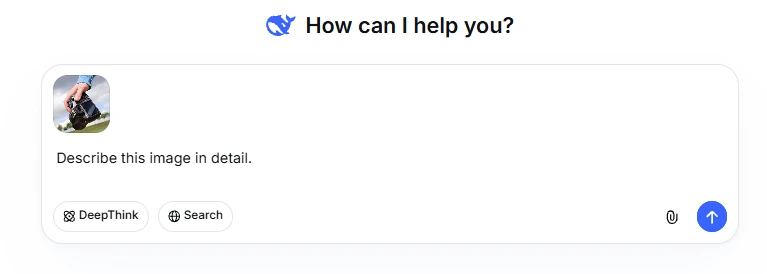
- Ask one focused question instead of writing “analyze this” with no goal.
- Specify the required output, such as verbatim text, a table, a diagnosis checklist, or a list of visible differences.
- Ask DeepSeek to identify uncertain or unreadable details.
- Check critical text, measurements, and numbers against the source image.
A strong first prompt is: Transcribe every visible error message exactly. Then separate confirmed observations from possible causes and recommend the next three checks.
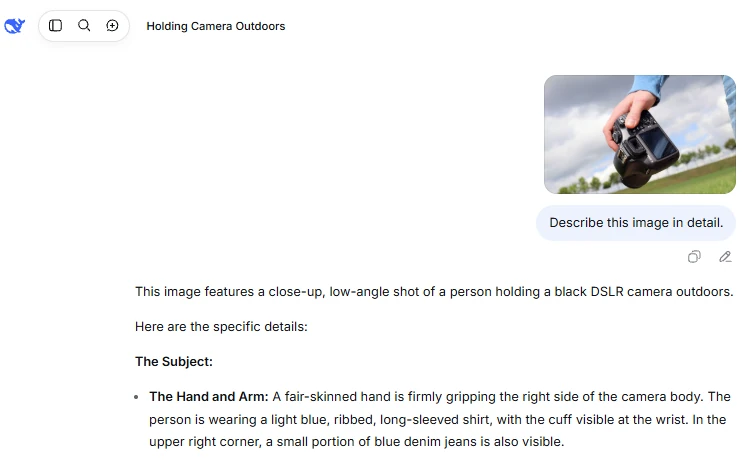
The consumer app’s file limits and behavior may differ from the developer API. The numerical limits later in this guide apply to the documented API, not necessarily to every version of the public chat interface.
How to use the DeepSeek Vision API
The API supports OpenAI-compatible Chat Completions, the Responses API, and an Anthropic-compatible Messages endpoint. For a straightforward Python integration, Chat Completions is a practical starting point.
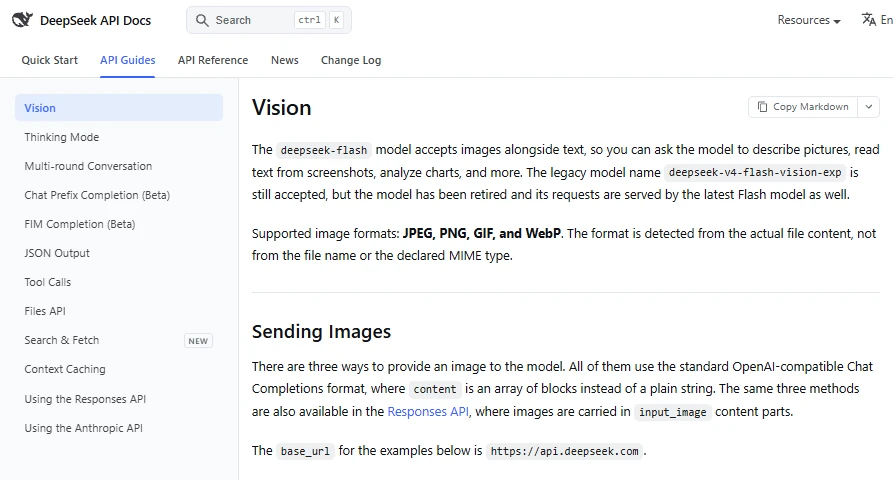
Choose an image input method
| Method | Best for | Main advantage | Main constraint |
|---|---|---|---|
| Base64 data URL | A local image used once | No public hosting is required | The encoded image counts toward the 48 MiB request-body limit; one image can be up to 32 MiB. |
| External HTTP(S) URL | An image already available online | Small request payload | The URL must be publicly reachable, no longer than 8,192 characters, and the image can be up to 32 MiB. |
Files API file_id | Reusing an image or sending a larger file | Upload once and reference it in later requests | Requires an upload step; one referenced image can be up to 64 MiB. |
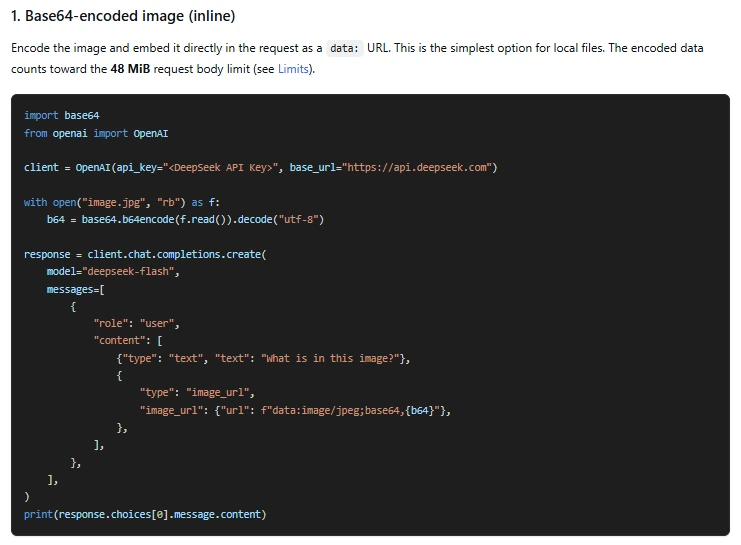
Base64 avoids exposing the image at a public URL, but it does not make the image private from the API provider. DeepSeek still receives and processes the uploaded content.
Python example: analyze a local image
Install the current OpenAI Python SDK with python -m pip install --upgrade openai. Create a DeepSeek API key, store it in the DEEPSEEK_API_KEY environment variable, and place a supported image next to the script.
import base64
import os
from pathlib import Path

from openai import OpenAI


image_path = Path("screenshot.png")

mime_types = {
    ".jpg": "image/jpeg",
    ".jpeg": "image/jpeg",
    ".png": "image/png",
    ".gif": "image/gif",
    ".webp": "image/webp",
}

mime_type = mime_types.get(image_path.suffix.lower())
if mime_type is None:
    raise ValueError("Use a JPEG, PNG, GIF, or WebP image.")

api_key = os.environ.get("DEEPSEEK_API_KEY")
if not api_key:
    raise RuntimeError("Set the DEEPSEEK_API_KEY environment variable.")

encoded_image = base64.b64encode(image_path.read_bytes()).decode("utf-8")

client = OpenAI(
    api_key=api_key,
    base_url="https://api.deepseek.com",
    timeout=60.0,
)

response = client.chat.completions.create(
    model="deepseek-flash",
    messages=[
        {
            "role": "user",
            "content": [
                {
                    "type": "text",
                    "text": (
                        "Read every visible error message exactly. "
                        "Then list confirmed observations, likely causes, "
                        "and the next three troubleshooting steps. "
                        "Mark anything unreadable as uncertain."
                    ),
                },
                {
                    "type": "image_url",
                    "image_url": {
                        "url": f"data:{mime_type};base64,{encoded_image}",
                        "detail": "original",
                    },
                },
            ],
        }
    ],
)

answer = response.choices[0].message.content
if not answer:
    raise RuntimeError("DeepSeek returned an empty response.")

print(answer)
This request uses the correct current model ID, places the image in a user message, and sends the prompt and image as separate content blocks. The detail value is set to original because small text matters in a screenshot.
For production code, add retry handling for transient network errors, log the API’s returned usage data, validate file size before encoding, and avoid writing API keys or raw sensitive images to application logs.
When to use the Files API
Use the DeepSeek Files API when the same image will be referenced repeatedly, when Base64 would make the request body too large, or when the image is larger than the 32 MiB inline limit. Uploads use the purpose user_data and return an ID such as file-api-.... The detail option is ignored when an image is supplied through file_id.
You can set an uploaded file to expire between one hour and 30 days. If you omit the expiration fields, the file is retained until it is deleted or otherwise removed under the service’s rules. Delete files when an application no longer needs them.
Responses API and Anthropic-compatible requests
The same three image sources are available through the Responses API, but the content types are named input_text and input_image. The Anthropic-compatible endpoint uses an image block with a source object. Use the protocol that matches the rest of your application rather than translating between formats unnecessarily.
Supported formats, limits, and image detail
| API limit | Current documented value | Practical implication |
|---|---|---|
| Supported formats | JPEG, PNG, GIF, WebP | The service detects the real file content, not only the extension or declared MIME type. |
| Request body | 48 MiB | Base64 increases payload size, so a file below 48 MiB can still produce an oversized request. |
| Single Base64 or URL image | 32 MiB | Use the Files API for a larger image. |
| Single Files API image | 64 MiB | The uploaded file must still fit the Files API limit. |
| Images per request | 600 | This is a protocol ceiling, not a recommendation for reliable visual reasoning. |
| Total image size | 64 MiB without file_id; up to 200 MiB including file_id images | Mixed requests must stay within the applicable total. |
| Maximum dimension | 8,192 px per side | When a request contains 15 or more images, the maximum falls to 4,096 px per side. |
| External URL | 8,192 characters; download must finish within 60 seconds | Signed, private, slow, or redirect-heavy URLs may fail. |
Although GIF is accepted, the current Vision documentation does not promise frame-by-frame animation analysis. Test the behavior for your specific GIF instead of assuming that every frame will be interpreted.
Choose the right detail setting
detail value | Behavior | Use it when |
|---|---|---|
low | Downscales the image to 512 × 512 before inference | You need a fast, lower-cost overview and fine text is not important. |
original | Keeps the original image before the model’s normal resizing process | You need to inspect text, charts, UI details, or small objects. |
high | Currently equivalent to original | You need compatibility with a client that uses a “high” option. |
auto | Currently equivalent to original | You want the default-compatible option, while recognizing that its behavior may change later. |
How image tokens are calculated
DeepSeek converts each image into input tokens based on its dimensions. Images with a total pixel count below roughly 544 × 544 are scaled up while preserving aspect ratio. Larger images are scaled down so their total pixel count is roughly equivalent to 1,300 × 1,300. The documented upper bound is 1,024 tokens per image.
A 5,000 × 5,000 image therefore does not keep consuming more tokens than a 2,000 × 2,000 image after the resize ceiling is reached. Multiple images are counted separately. Use DeepSeek’s image token calculator for an estimate, then treat the usage returned by the API as the source of truth.
DeepSeek Vision pricing
There is no separate flat “Vision fee.” Image tokens are included with input tokens, and generated text is billed as output tokens. Current deepseek-flash rates are listed per one million tokens:
| Token category | Off-peak price | Peak price |
|---|---|---|
| Input, cache hit | $0.003 per 1M tokens | $0.006 per 1M tokens |
| Input, cache miss | $0.15 per 1M tokens | $0.30 per 1M tokens |
| Output | $0.60 per 1M tokens | $1.20 per 1M tokens |
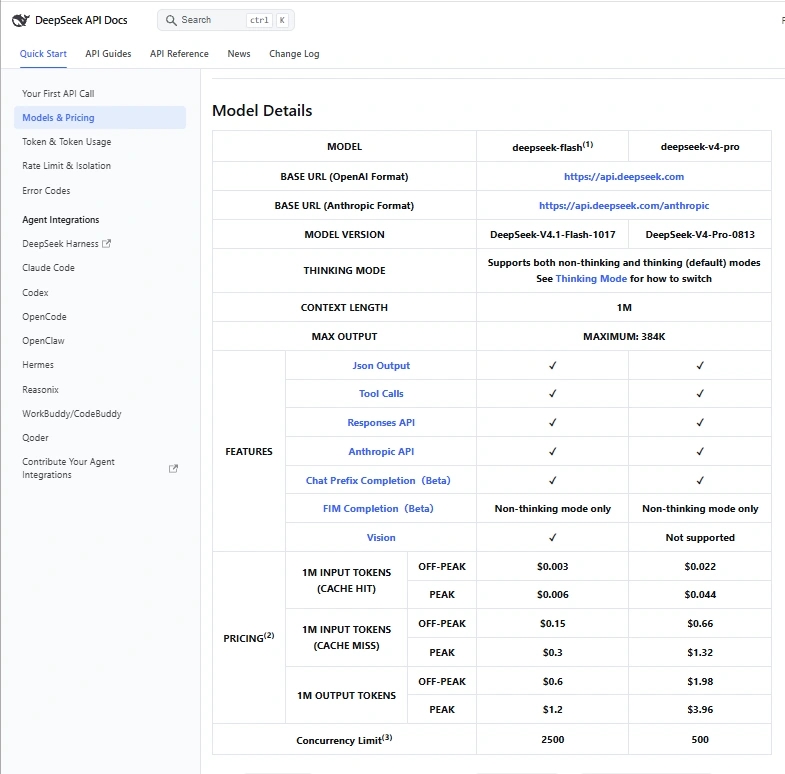
Peak hours are 01:00–04:00 UTC and 06:00–10:00 UTC, Monday through Friday, excluding Chinese public holidays. Other hours are off-peak, including weekends and Chinese public holidays. Because DeepSeek can change pricing, check the official pricing page before estimating a production budget.
To estimate one request, add the image tokens and prompt tokens, apply the applicable input rate, then add the response tokens at the output rate. The final API response reports actual usage, which is more reliable than a pre-request estimate.
Prompts that produce more reliable image analysis
A useful image prompt defines the task, required evidence, output format, and uncertainty rule. These examples are more dependable than a vague request to “look at this image.”
Read a screenshot accurately
Transcribe every visible message exactly, preserving capitalization and numbers. Then explain the likely issue. Separate visible evidence from your inference, and write “unreadable” for any text you cannot confirm.
Extract a document into a table
Extract the visible rows into a table with the columns Date, Description, Quantity, Unit Price, and Total. Do not calculate missing values. Put null where a field is absent or unreadable.
Analyze a chart without inventing values
State the chart title, axes, units, legend, and the three clearest trends. Quote exact values only when the labels are legible. For estimates, label them as approximate and explain how you estimated them.
Review a user interface
Audit this screen for visible usability and accessibility issues. For each issue, identify the exact element, explain the user impact, and propose a specific fix. Do not assume interactions that are not visible.
Compare multiple images
Treat the images in upload order as Image A, Image B, and Image C. List only observable differences in text, layout, objects, and state. Put uncertain differences in a separate section.
Request machine-readable output
Return valid JSON with the keys visible_text, confirmed_objects, uncertain_details, and follow_up_checks. Use arrays for all values. Do not include commentary outside the JSON.
Accuracy and privacy precautions
For important OCR or visual measurements, use a two-pass workflow. First ask DeepSeek to transcribe or describe only what is visible. Then ask it to interpret the confirmed information. This makes it easier to spot where an incorrect conclusion started.
- Upload the highest-quality image that still fits your privacy and cost requirements.
- Crop irrelevant areas so the model can focus on the evidence that matters.
- Use
originaldetail for small text and dense diagrams. - Label multiple images explicitly in the prompt.
- Ask for quotes, coordinates, labels, or row references that let a person verify the answer.
- Run deterministic validation on structured output before saving it to a database.
- Keep a human reviewer in the loop for high-impact decisions.
DeepSeek’s privacy policy says user input can include uploaded files and photos, that inputs may be used to improve and train its technology, and that users may have an option to opt out of model-training use. It also says personal data is directly collected, processed, and stored in the People’s Republic of China.
Do not upload confidential business material, protected health information, financial records, identity documents, biometric images, private customer data, unreleased product designs, or legally privileged content unless your organization has reviewed the current terms, security controls, data location, retention, and applicable law. A Base64 payload is an encoding method, not encryption or a privacy control.
DeepSeek Vision vs. VL2, Janus-Pro, and OCR2
Several DeepSeek projects accept images, but they solve different deployment and product needs. Treating them as interchangeable leads to incorrect model IDs and unrealistic expectations.
| Option | Primary role | How it is used | Image generation |
|---|---|---|---|
deepseek-flash | Current hosted general-purpose model with native image understanding | DeepSeek API, web, and app surfaces | No through the standard hosted Vision endpoint; output is text. |
| DeepSeek-VL2 | Open-weight vision-language model family for visual question answering, OCR, charts, documents, and grounding | Download and run through your own infrastructure or a compatible host | No; it is focused on understanding. |
| Janus-Pro | Open-weight unified multimodal understanding and image generation research model | Self-hosted or supported third-party environments | Yes, as part of the separate Janus-Pro model. |
| DeepSeek-OCR2 | OCR-specialized model for document parsing and visual text extraction | Self-hosted workflows, including document and PDF processing | No; it is optimized for OCR and document understanding. |
Choose deepseek-flash when you want a managed API and general visual reasoning. Consider DeepSeek-VL2 when you need an open-weight vision-language model, Janus-Pro when local image generation is part of the research workflow, or DeepSeek-OCR2 when document extraction is the primary task and you can operate the required infrastructure.
Common DeepSeek Vision errors and fixes
| Problem | Likely cause | Fix |
|---|---|---|
| The model ignores the image | The request uses deepseek-v4-pro, a text-only client configuration, or the wrong content-block shape. | Use deepseek-flash and the documented image block for your API protocol. |
| HTTP 400 for an image message | The image was placed in a system or assistant message. | Put image content in a supported user message. Follow the Responses API rules when using tool output. |
| Unsupported image format | The file is not JPEG, PNG, GIF, or WebP, or its actual content does not match its apparent format. | Decode and re-export the image in a supported format. |
| Request body too large | Base64 expansion pushed the request past 48 MiB. | Resize or compress the image, split the request, or use a Files API file_id. |
| External URL fails | The URL is private, expired, too long, blocked, or slow to download. | Use a direct public URL, Base64, or the Files API. |
| Fine text is missed | The image is blurred, too wide, or sent with detail: low. | Crop the relevant area and use original detail. |
Responses API rejects input_image | Both image_url and file_id were supplied, or neither was supplied. | Provide exactly one image source. |
A file_id stops working | The file expired, was deleted, or belongs to another account. | Retrieve or list the file, then upload it again if necessary. |
| PDF input is rejected | The hosted Vision API documents image formats, not PDF, as image input. | Convert the relevant PDF pages to PNG or JPEG, or use a document-focused workflow such as a self-hosted OCR model. |
Frequently asked questions
Which DeepSeek model supports images?
Use deepseek-flash. It currently maps to DeepSeek-V4.1-Flash-1017 and supports image input. The hosted deepseek-v4-pro model does not currently support Vision.
Is DeepSeek Vision free?
The official consumer app is presented as free to use, although availability and usage policies can change. The developer API is paid by token usage. Image tokens are billed as input tokens, and generated text is billed as output tokens.
Can DeepSeek Vision read text from images?
Yes. The official Vision guide lists reading text from screenshots as a supported use case. Accuracy still depends on image quality, text size, layout, language, and handwriting. Verify critical text against the original image.
Can DeepSeek Vision analyze multiple images?
Yes. The API allows multiple images in one request, subject to image-count, size, and dimension limits. Label the images in upload order and ask for a structured comparison so the response stays traceable.
Can DeepSeek Vision analyze a PDF?
The hosted Vision API lists JPEG, PNG, GIF, and WebP rather than PDF as supported image formats. Convert the pages you need into images for layout-aware visual analysis. For large-scale PDF extraction, consider a dedicated document pipeline or DeepSeek-OCR2 in a self-hosted environment.
Does DeepSeek Vision generate images?
No, not through the standard hosted deepseek-flash Vision API. It accepts text and images and returns text. Janus-Pro is a separate open-weight DeepSeek project that supports both multimodal understanding and image generation.
Which DeepSeek image workflow should you choose?
Use the official app when you need a quick, no-code explanation of a photo or screenshot. Use Base64 in the API for a local image used once, an external URL for a stable public asset, and the Files API when the image will be reused or is too large for inline input.
For reliable results, give the model a narrow task, require visible evidence, define the output format, and tell it not to guess. Keep deepseek-flash in configuration rather than a retired alias, monitor the returned token usage, and recheck DeepSeek’s official documentation before shipping a workflow that depends on pricing, limits, retention, or privacy terms.