

Published: November 7, 2026.
DeepSeek for students can help turn a specific sticking point into a study activity: request a clearer explanation, practice questions from your notes, or feedback on an answer you have already tried. Start with one topic and keep your course materials nearby so you can check what the assistant tells you.
A useful session should leave you able to explain an idea or solve a problem yourself. The guide below shows how to set up that kind of session, gives you copyable DeepSeek study prompts, and explains what to check before relying on the results.
Get started with the official DeepSeek assistant
Open DeepSeek’s official web chat, or follow the mobile-app links on its official download page. Follow the account and sign-in instructions shown there. A website with “DeepSeek” in its name may be operated by a different company, so use the links from DeepSeek’s own website.
Is DeepSeek free for students?
The official download page advertises free use of the mobile assistant for general users. Students do not need a developer account to start using that consumer app. The developer API is billed separately for model input and output tokens. Free app access does not establish unlimited usage or free API credits.
The official product pages checked for this guide did not establish a separate student subscription or student discount. Verify any advertised education offer through the official website before supplying school credentials. This guide focuses on the consumer assistant; desktop agents, locally hosted models, and third-party services can have different requirements.
Prepare one task before you open the chat
- Check permission. Look at the assignment instructions and course AI policy before using AI on coursework. If the intended use is unclear, ask your instructor.
- Choose a small goal. For example, explain one unfamiliar term, find the error in one calculation, or practice one lecture topic.
- Bring useful context. State your course level, supply a permitted excerpt or your own attempt, and identify where you got stuck.
- Choose a check. Keep the relevant textbook explanation, class notes, rubric, or other reliable reference available.
You can request the study routines below through ordinary conversation prompts. They do not depend on finding a dedicated “Study Mode” button. Treat any similarly named third-party plugin as a separate product, and follow the current app’s instructions for optional tools and attachments.
Work through a problem with hints and an independent check
Begin by attempting the task yourself. Then ask for the smallest piece of help that lets you continue: a question about your method, an explanation of a term, or a hint about the next step. After checking your answer, try a fresh problem with the chat closed.
This approach gives you something concrete to practice. Cornell’s study-strategy guidance describes retrieval practice as recalling information from memory and using the attempt to identify gaps. The exercise below applies that recall step in a chat session.
Illustrative practice example: find a distribution error
Suppose you are solving 2(3x − 4) + 5 = 4x + 13, and your first line is 6x − 4 + 5 = 4x + 13. You want help locating the mistake before receiving the solution.
I’m practicing linear equations. My problem is:
2(3x − 4) + 5 = 4x + 13

My first step was:
6x − 4 + 5 = 4x + 13

Check only that first step. Do not solve the equation yet. Ask one question that helps me find any mistake, then wait for my reply. After I correct it, ask me to do the next step.
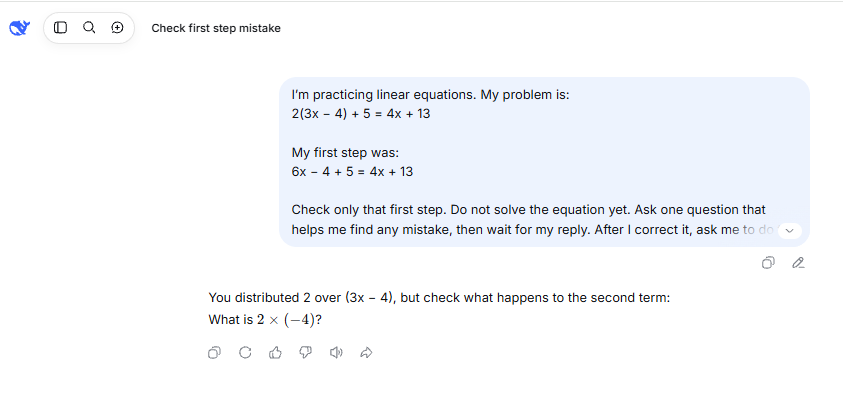
A useful hint would direct your attention to multiplying both terms inside the parentheses by 2. Correct the expansion and finish the equation on paper before reading the check below.
Correct expansion: 6x − 8 + 5 = 4x + 13
Combine terms:     6x − 3 = 4x + 13
Subtract 4x:       2x − 3 = 13
Add 3:             2x = 16
Divide by 2:       x = 8

Check in the original equation:
Left side:  2(3 × 8 − 4) + 5 = 45
Right side: 4 × 8 + 13 = 45
The original error was leaving −4 unchanged when distributing the 2. If an AI response approves that incorrect step, compare the two products, 2 × 3x and 2 × (−4), with your course’s distributive-property rule.
Now practice independently: close the chat and solve 3(2y − 1) + 2 = 4y + 9. Finish your attempt before reading the answer below.
Check after trying: the solution is y = 5, which makes both sides equal 29. If you still need help, identify the exact operation you cannot justify and take that question to your instructor or tutor.
DeepSeek study prompts for common college tasks
Choose the prompt that matches your immediate task. Replace the bracketed fields with your own context and remove information you do not have permission to share. These templates guide the conversation; you still need to check the answers.
Understand a concept and explain it back
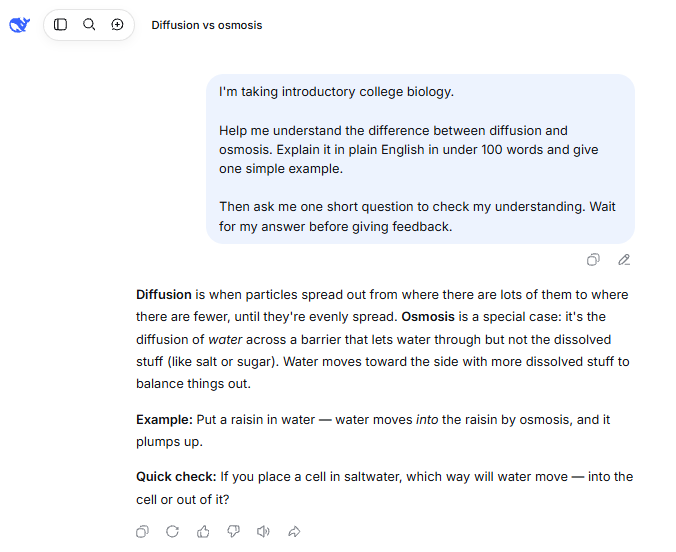
Use this when a definition sounds familiar but you cannot explain why it matters or apply it. Provide the course definition so the explanation uses the same terminology as your class.
I’m taking [course and level]. I’m confused about [concept], specifically [point of confusion].

Here is the definition or explanation from my permitted course material:
[paste a short excerpt]

Explain the difficult part in plain English, keeping the meaning of this excerpt. Give one small example and identify where any analogy stops working. Then ask me to explain the idea in my own words. Wait for my answer before giving feedback.
Your next step: write your explanation without looking at the chat. Compare it with the assigned definition, including any conditions or exceptions. Ask about a specific disagreement instead of accepting a simpler explanation that changes the meaning.
Turn class notes or a PDF into questions you can trace
DeepSeek’s official app announcement documents file upload and text extraction. Check the supported formats and limits shown in your current app before attaching a document. For a PDF, begin with a short section you are permitted to share.
First check whether the content was read correctly. Ask for a small sample containing an important paragraph, formula, or table entry, then compare it with the original. If symbols disappear or columns are mixed together, correct the text or paste a clean excerpt before generating study materials. An uploaded file should not be treated as proof of accurate extraction.
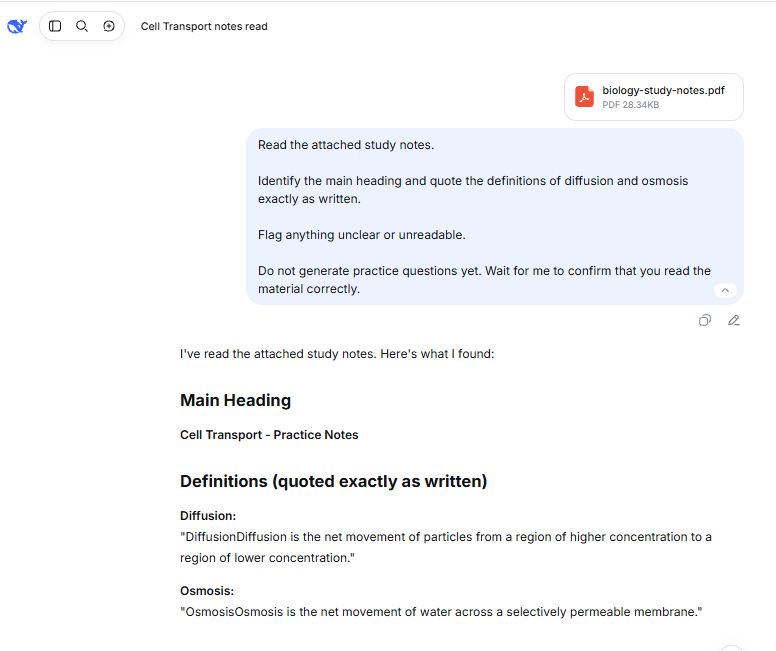
Use only the course material I provide below or attach. First identify the section you can read and flag anything unclear or unreadable.

After I confirm the material, create five practice questions about its main ideas. Include a mix of recall and application. Ask one question at a time and wait for my answer.

After each attempt, explain the correction using a short supporting passage or a section label I can locate. If the material does not contain the answer, say so. Do not add outside facts unless I ask.
Your next step: locate the supporting passage for each answer before adding it to your notes. Check any claimed page number against the actual document. A generated page reference can be wrong even when the surrounding explanation sounds plausible.
Use quizzes for recall practice
A quiz is useful only if you attempt the questions before reading the answers. Once you have checked a small set of facts against your notes, use it to practice remembering them. Keep an error list so you know what needs another attempt.
Quiz me on the verified material below:
[paste your checked notes or question set]

Ask one short-answer question at a time. Do not show the answer or give clues until I respond or ask for help. After my attempt, explain what is correct, what is missing, and which part of the supplied material supports the answer.

At the end, list the concepts I missed and give me a new question for each one. Do not turn my performance on this small quiz into a predicted exam grade.
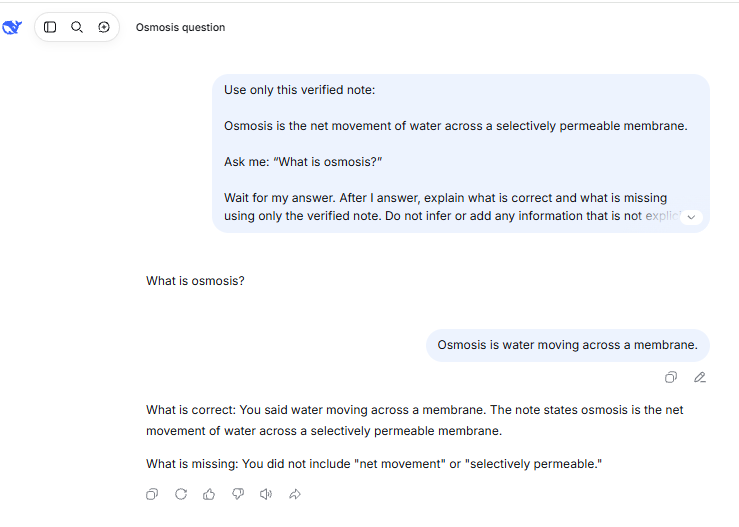
Your next step: revisit the missed questions in a later session with the answers covered. Cornell’s guidance also describes spaced practice, which spreads studying across separate sessions. Save the checked questions somewhere you control so you can practice without reopening the AI conversation. If you prefer flashcards, put each question on the front and its verified answer on the back; attempt the answer before turning the card over.
Build an exam plan around the time you actually have
Give DeepSeek your topic list, exam date, available study blocks, and the concepts you struggle with. Leave out identifying details such as your student ID or room number. Ask it to plan specific activities you can complete within those blocks.
Help me plan preparation for [exam or course].

Time until the exam: [number of days]
Available study blocks: [days and minutes available]
Topics and course objectives: [list]
Topics I can already explain or solve: [list]
Topics I struggle with: [list]
Materials I can use: [notes, textbook sections, permitted practice problems]

Build a schedule that fits the available time. Include practice without notes, checking mistakes, and revisiting weak topics. Leave room to adjust after the first practice session. Do not invent exam topics or predict my grade.
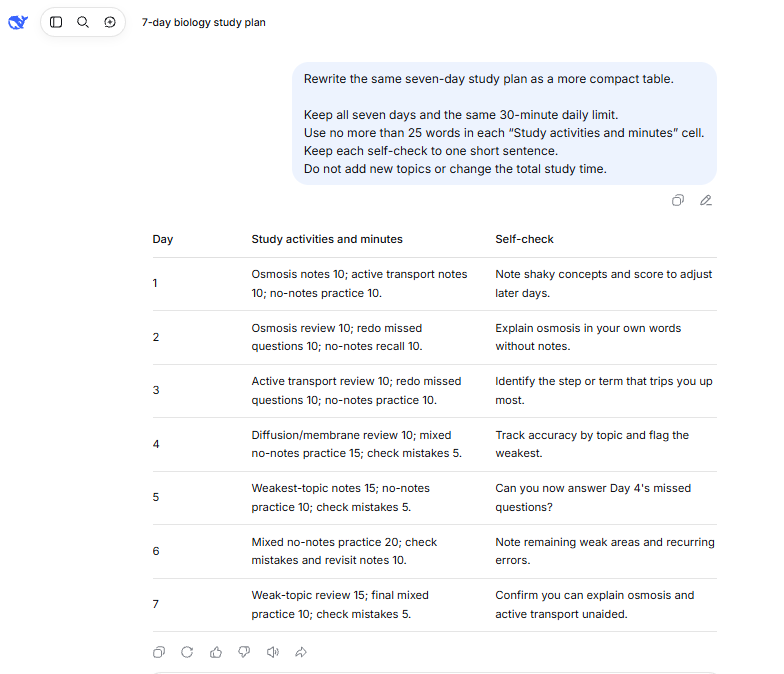
Your next step: add up the suggested study minutes and compare the coverage with the syllabus. After your first practice attempt, move time toward the concepts you actually missed. Remove tasks that do not support the course objectives.
Get feedback on an argument you wrote
When your instructor permits AI feedback, provide your own draft and the relevant rubric. Ask for specific weaknesses and revision questions. You should make the decisions about your argument and write the revised version.
My course permits feedback on a draft. Review my writing against the rubric below.

Rubric: [paste the relevant permitted criteria]
My draft: [paste your own writing]

Identify the two most important problems with my argument or organization. For each, point to the relevant sentence and ask a question that would help me revise it. Do not rewrite the draft or invent evidence, quotations, or references.
Your next step: compare each suggestion with the rubric and assigned sources. Reject feedback that changes your position without justification or adds a claim you cannot support. Keep any disclosure or revision record your instructor requires.
Find a coding mistake while keeping control of the solution
For permitted programming help, supply a small piece of your own code, the expected behavior, the actual result, and the relevant error message. Remove passwords, API keys, personal data, and restricted project material.
I’m learning [language] in [course level]. My assignment allows debugging help.

Expected behavior: [describe it]
Actual behavior or error: [describe it]
My code: [paste a small relevant example]

Identify the first likely cause of the problem and explain the concept involved. Ask me to propose a correction before showing one. Suggest a small test case and its expected result so I can check my change. Do not replace the entire program.
Your next step: run your version in the environment required by the course. Check an ordinary case and an edge case that matters to the specification. A program that runs once may still handle other inputs incorrectly, so compare its behavior with the assignment requirements.
Check explanations and references before you study from them
Use your assigned materials as the starting point for course-specific definitions, notation, and expectations. For a calculation, recompute it and check units or substitute the result into the original problem. For a generated answer key, inspect a sample before using the whole set.
Research references need a separate check. UT Austin Libraries warns that AI tools can invent convincing citations and advises students to locate and read the source before using it. You can ask DeepSeek to suggest search terms or research questions, then conduct the source search yourself.
- Locate the publication. Search a library catalog, publisher’s website, or the stated DOI. A reference that cannot be found is not ready to cite.
- Match the details. Confirm the title, authors, publication year, and DOI or URL against the actual publication.
- Read the relevant passage. Check that it supports your specific claim and that you have not lost an important condition or limitation.
- Build the citation from the real source. Do not ask the chatbot to fill in a missing page number, quotation, or publication detail by guessing.
Web search can help you discover material, but it does not finish the verification. DeepSeek’s Terms of Use explicitly warn that inaccuracies can remain when Search is enabled. Open the underlying page and inspect the evidence.
When an answer conflicts with your notes, state the exact disagreement, supply the relevant permitted passage, and request a correction. Then check the revised answer yourself. Repeated agreement from the same chatbot is not an independent source.
Follow course rules and protect the material you share
Permission and disclosure are separate questions
Rules can differ between courses and between assignments in the same course. Cornell’s guidance on AI for learning tells students to check their syllabus and ask the instructor when the permitted use is unclear.
Ask about the activity you intend to perform: generating practice questions, receiving feedback on a draft, or debugging a particular assignment. Permission for one activity does not establish permission for all three. Follow the instructor’s required attribution or disclosure; acknowledging AI use does not make otherwise prohibited assistance acceptable.
For work meant to assess your unaided ability, use the resources the assignment allows. Avoid submitting generated work as your own or trying to hide assistance. If you publish or distribute DeepSeek output, also review the platform’s requirements for checking and labeling that output.
Keep personal and confidential information out of prompts
DeepSeek’s Privacy Policy describes collecting inputs such as prompts, uploaded files, and chat history; using information to improve and train its technology; and processing and storing personal data in China. Consider those terms before sharing course or research material.
Use short excerpts with identifying details removed. Keep student IDs, grades linked to names, classmates’ information, private accommodations, passwords, and confidential research out of the chat. For restricted data, ask your institution which tools and processes it authorizes.
Review the current policy and available account controls for data requests and training opt-out options, which can depend on where you live. Deleting a visible conversation should not be treated as proof that every retained copy was immediately erased.
Review a conversation before sharing its link. Under DeepSeek’s sharing terms, anyone with access to that link can view the linked dialogue.
Check eligibility before recommending it to younger students
DeepSeek’s Terms of Use say the service is primarily for adults and require users under 18 or the applicable minimum age to review the terms with a legal guardian and obtain consent. Its privacy policy also says the service is not aimed at children. Younger students should check current eligibility with a guardian and their school; an app-store rating is not sufficient permission.
Know when to move beyond the chat
If a conversation stops helping, choose the resource that can resolve the specific problem. Keep your own attempt and the disputed step so you can explain what you need.
| Situation | Useful next step | What to bring |
|---|---|---|
| You still cannot explain a method after several exchanges | Ask your instructor or a tutor to work through the misunderstanding. | Your attempted solution and the first step you cannot justify. |
| A reference is missing or does not support the claim | Use your university library or ask a librarian for help finding evidence. | Your research question, search terms, and any reference details you have. |
| The material is confidential or your course restricts AI use | Follow your institution’s approved tools and assignment rules. | A description of the task without disclosing the restricted material. |
| Uploads or chat are failing | Check the official DeepSeek status page. If appropriate, work from a short permitted text excerpt or continue with your course materials. | The error message and a local copy of the material you need. |
For your next study session, choose one confusing point, write down what you already understand, and decide how you will check the answer. Finish by attempting a similar question without the chat. That gives you a concrete way to see what you can do independently.
Last verified: November 6, 2026.