


Published: November 7, 2026.
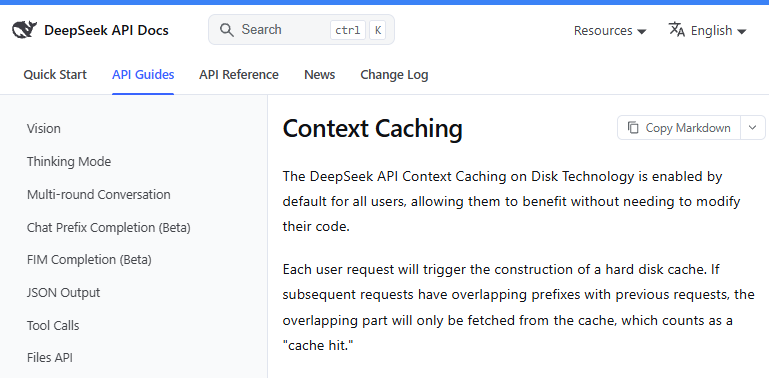
DeepSeek Context Caching is an automatic, disk-based prefix cache built into the DeepSeek API. It can reduce the cost of repeated input when a later request fully matches a prefix unit that DeepSeek has already persisted. You do not enable it with a special endpoint, header, or cache-write call; the practical work is keeping reusable material at the front of the request and measuring the cache-hit tokens that the API actually reports.
Last verified: November 6, 2026. Model names, prices, API fields, and cache behavior can change, so recheck the official Context Caching guide and Models & Pricing page before committing a production budget.
What DeepSeek Context Caching does—and what it does not do
DeepSeek caches reusable work associated with the beginning of an API input. When a later request matches a persisted prefix unit, the matching input tokens count as a cache hit and are billed at the lower cache-hit input rate. The model still processes the variable remainder and generates a new output.
| Concept | What it means |
|---|---|
| Context caching | Reuses eligible processing for a repeated input prefix. |
| Cache hit | Input tokens fully match a prefix unit that DeepSeek previously persisted. |
| Cache miss | Input tokens were not served from a matching persisted prefix unit. |
| Output generation | The model generates a fresh response; the completed answer is not returned from the context cache. |
| Conversation state | Your application still stores and resends the required message history. |
| Context window | The maximum request capacity; caching does not enlarge it. |
This distinction matters. DeepSeek Context Caching is not a response cache, a database of previous conversations, or a way to omit context from later requests. If you need to return an identical saved answer without calling the model again, that is an application-side response-caching problem.
How DeepSeek decides whether a prefix can hit the cache
A shared beginning is not enough by itself. Under DeepSeek’s current rules, the matching portion must already exist as an independent, complete cache prefix unit. A later request can hit only by fully matching one of those persisted units.
The three ways a cache prefix unit is persisted
- At request boundaries: a request produces prefix units at the end of the user input and at the end of the model output. A later request that extends a complete earlier sequence can reuse it.
- After common-prefix detection: when multiple requests share the same beginning but diverge later, DeepSeek can identify and persist their common prefix as its own unit.
- At fixed intervals in long sequences: DeepSeek creates units within long inputs or outputs so a long reusable prefix does not remain entirely uncacheable merely because it has not reached an end boundary.
The current documentation attributes these matching rules to DeepSeek’s Sliding Window Attention implementation. It does not publish the size of the fixed intervals, so application logic should not depend on an assumed interval.
Why two similar requests can miss before the third hits
| Request | Sequence | Likely result in the documented example |
|---|---|---|
| 1 | Stable prefix A + task B | No reusable unit from this sequence exists yet. |
| 2 | Stable prefix A + task C | It does not fully match the persisted A + B unit, so it misses; DeepSeek can now detect and persist common prefix A. |
| 3 | Stable prefix A + task D | It can fully match the newly persisted A unit and record a hit for that portion. |
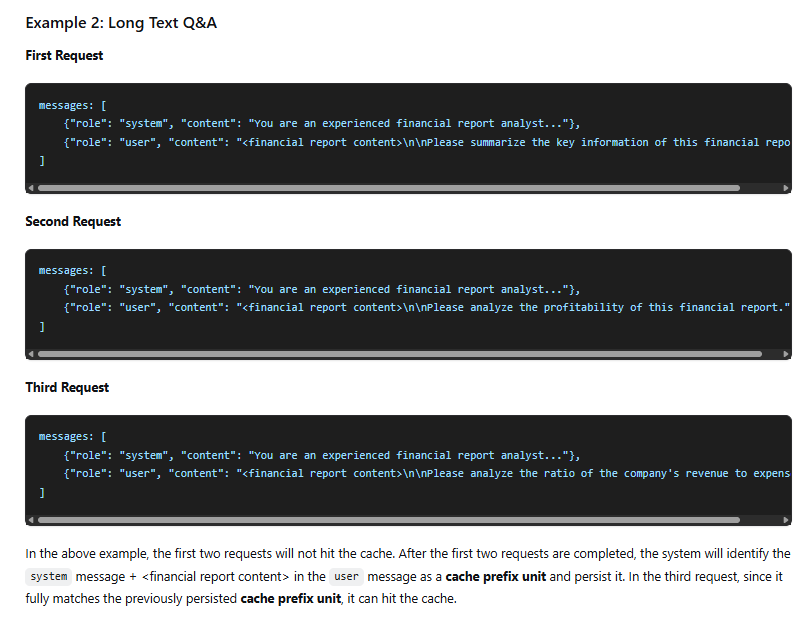
This is why a long-document test may show two initial misses even though the document is identical. The second request can help establish the reusable common prefix, while the third request is the first one able to use that newly persisted unit. Cache construction also takes seconds, and the system operates on a best-effort basis, so an eligible request is not guaranteed to hit every time.
Do you need to enable DeepSeek Context Caching?
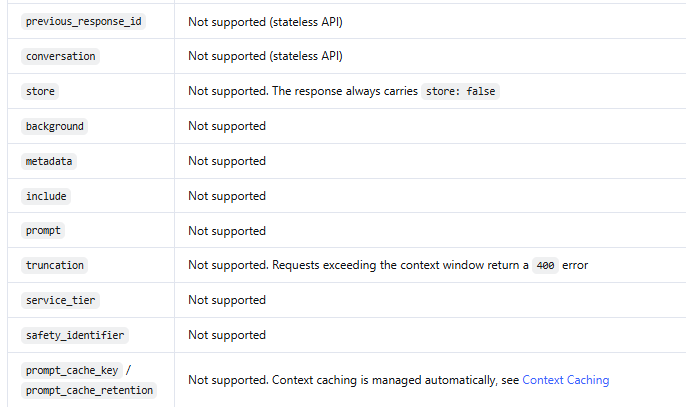
No. DeepSeek enables disk context caching by default for API users. The current implementation does not require a separate cache endpoint, an opt-in header, a manual write operation, or a particular SDK.
- Do not add an Anthropic-style
cache_controldirective unless another service in your stack explicitly requires it. - Do not assume an OpenAI-style cache key is supported by DeepSeek.
- For DeepSeek’s Responses API,
prompt_cache_keyandprompt_cache_retentionare currently unsupported. - Unsupported Responses API parameters can be silently ignored, so the absence of an error does not prove that a cache-control parameter worked.
Use the normal DeepSeek base URL, send a supported model ID, and inspect usage data. The two current model IDs listed by DeepSeek are deepseek-flash and deepseek-v4-pro.
Context caching does not give the API conversation memory
DeepSeek’s Chat Completions API is stateless. Your application must keep the conversation history and send the relevant messages again on every turn. Context caching may make the repeated beginning cheaper to process, but it does not let the client send only the newest message and rely on the server to remember everything else.
The same principle applies to the Responses API. DeepSeek currently does not support previous_response_id, a server-side conversation object, or stored responses. The client must submit the required input history with each request.
| Need | Where it is handled |
|---|---|
| Preserve conversation history | Your application or database |
| Reduce the cost of repeated prefixes | DeepSeek’s automatic context cache |
| Return an already generated answer | An application-side response cache |
| Keep requests within the model context limit | Your context-management, truncation, or summarization logic |
How to check cache hits in DeepSeek API responses
Do not infer caching from a fast response or from two prompts looking similar. Read the usage object returned by the API and record the observed hit and miss counts.
Chat Completions usage fields
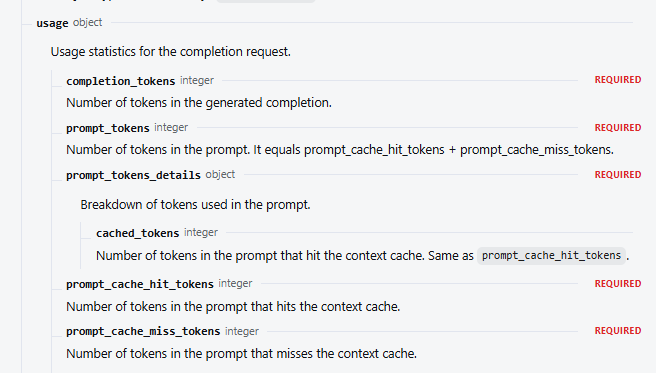
| Field | Meaning |
|---|---|
usage.prompt_cache_hit_tokens | Input tokens that hit the context cache. |
usage.prompt_cache_miss_tokens | Input tokens that missed the context cache. |
usage.prompt_tokens | Total prompt tokens; DeepSeek documents this as hit tokens plus miss tokens. |
usage.prompt_tokens_details.cached_tokens | The cached prompt-token count, documented as the same value as prompt_cache_hit_tokens. |
A basic observed cache-hit rate is:
cache_hit_rate = hit_tokens / (hit_tokens + miss_tokens)Track the rate by prompt template, workload, model, endpoint, and end-user isolation key. An account-wide average can hide one template that performs well and another that continually changes near the beginning.
Responses API usage fields
For the Responses API, DeepSeek reports total input in usage.input_tokens and cached input in usage.input_tokens_details.cached_tokens. In a streaming request, read usage from the final response event rather than from early events where usage may be null.
Python example: send repeated context and inspect cache usage
The following Chat Completions example sends the same report with three different questions. It reads the API key from an environment variable, caps output length, preserves a stable prefix, waits briefly between requests, and handles usage fields defensively. Running it creates billable API requests, and a cache hit is still not guaranteed.
import os
import time
from typing import Any

from openai import OpenAI

api_key = os.getenv("DEEPSEEK_API_KEY")
if not api_key:
    raise RuntimeError("Set DEEPSEEK_API_KEY before running this script.")

client = OpenAI(
    api_key=api_key,
    base_url="https://api.deepseek.com",
)

SYSTEM_MESSAGE = (
    "You are an operations analyst. Answer only from the supplied report. "
    "State when the report does not contain enough information."
)

STABLE_REPORT = """
Quarterly operations report:
- On-time delivery improved from 91% to 94%.
- Supplier A caused 38% of delayed orders.
- The company added a second supplier for two critical components.
- Support-ticket volume rose 12%, mainly from installation questions.
- Management plans weekly supplier-risk and ticket-category reviews.
""".strip()

QUESTIONS = [
    "What are the two largest operational risks?",
    "Which action addresses supplier concentration?",
    "What should management monitor next quarter?",
]


def as_dict(value: Any) -> dict[str, Any]:
    if value is None:
        return {}
    if isinstance(value, dict):
        return value
    if hasattr(value, "model_dump"):
        return value.model_dump()
    return vars(value)


for number, question in enumerate(QUESTIONS, start=1):
    response = client.chat.completions.create(
        model="deepseek-flash",
        max_tokens=180,
        messages=[
            {"role": "system", "content": SYSTEM_MESSAGE},
            {
                "role": "user",
                "content": f"{STABLE_REPORT}\n\nQuestion: {question}",
            },
        ],
        extra_body={"thinking": {"type": "disabled"}},
    )

    usage = as_dict(response.usage)
    prompt_details = as_dict(usage.get("prompt_tokens_details"))

    hit_tokens = int(
        usage.get("prompt_cache_hit_tokens")
        or prompt_details.get("cached_tokens")
        or 0
    )
    prompt_tokens = int(usage.get("prompt_tokens") or 0)
    miss_tokens = int(
        usage.get("prompt_cache_miss_tokens")
        or max(prompt_tokens - hit_tokens, 0)
    )

    print(
        f"Request {number}: hit={hit_tokens}, "
        f"miss={miss_tokens}, total_prompt={prompt_tokens}"
    )
    print(response.choices[0].message.content)

    if number != len(QUESTIONS):
        time.sleep(3)
The sample context is intentionally short enough to read. For a useful cost test, substitute a real repeated document or instruction set, keep its serialized form stable, and compare multiple calls. In the documented common-prefix pattern, the first two varying questions may miss before a later request can use the shared persisted prefix.
How to structure requests for more cache reuse
The safest design rule is stable prefix, variable suffix. Put the content that repeats across requests first, and move request-specific values as late as practical.
- Keep stable instructions first. Preserve the same system message, policies, tool descriptions, response schema, and few-shot examples when their meaning has not changed.
- Place the reusable document before the current task. For report Q&A, send the report first and the new question last.
- Avoid dynamic values near the front. Timestamps, random IDs, request traces, changing dates, and session metadata can split an otherwise reusable prefix.
- Serialize structured data consistently. Keep JSON key order, whitespace, message order, tool definitions, and delimiters deterministic when possible.
- Append multi-turn history instead of rewriting it. Rephrasing or reformatting earlier messages changes the prefix that later turns need to match.
- Measure after every prompt-template change. A harmless-looking refactor can reduce hits without producing an API error.
Use user_id isolation deliberately
DeepSeek documents user_id as a way to isolate KV cache data between end users under the same account. Requests using different values should not be expected to share the same cache. Keep a user’s value stable when appropriate, but do not weaken privacy boundaries merely to raise a cache-hit rate. DeepSeek also says not to place personal information in the identifier.
If you call DeepSeek through a gateway, cloud marketplace, or reseller, verify that provider’s cache behavior, fields, and prices separately. The official DeepSeek rules described here do not automatically establish how an intermediary bills or routes requests.
Current DeepSeek cache-hit and cache-miss pricing
DeepSeek lists prices per one million tokens. The following rates were verified on November 6, 2026.
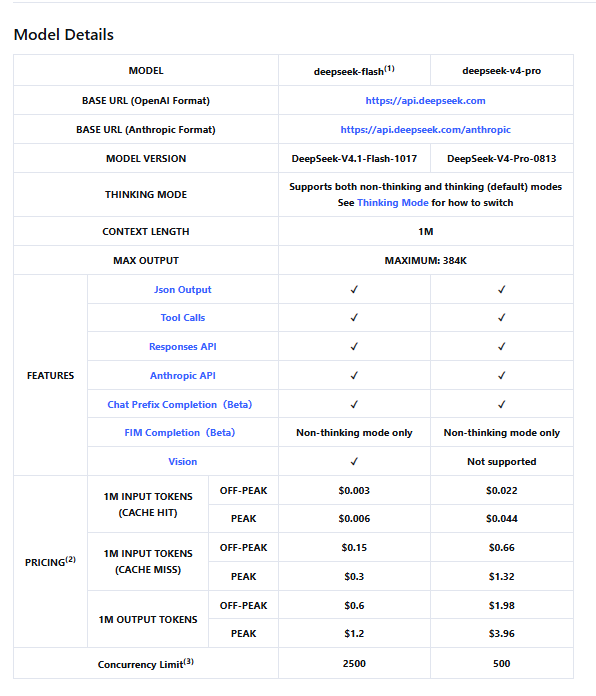
| Model ID and current version | Billing period | Cache-hit input | Cache-miss input | Output |
|---|---|---|---|---|
deepseek-flashDeepSeek-V4.1-Flash-1017 | Off-peak | $0.003 | $0.15 | $0.60 |
deepseek-flashDeepSeek-V4.1-Flash-1017 | Peak | $0.006 | $0.30 | $1.20 |
deepseek-v4-proDeepSeek-V4-Pro-0813 | Off-peak | $0.022 | $0.66 | $1.98 |
deepseek-v4-proDeepSeek-V4-Pro-0813 | Peak | $0.044 | $1.32 | $3.96 |
Peak hours are 01:00–04:00 and 06:00–10:00 UTC, Monday through Friday, excluding Chinese public holidays. All other times are off-peak, including weekends and Chinese public holidays. Use the current official page as the source of truth because DeepSeek can revise prices and model versions.
Cost formula
input_cost = (
    hit_tokens × cache_hit_rate
    + miss_tokens × cache_miss_rate
) ÷ 1,000,000

total_request_cost = input_cost + (
    output_tokens × output_rate ÷ 1,000,000
)
Hypothetical cost example
Assume a peak-hour deepseek-flash request reports 80,000 cache-hit input tokens, 20,000 cache-miss input tokens, and 5,000 output tokens.
- Input cost:
((80,000 × $0.006) + (20,000 × $0.30)) ÷ 1,000,000 = $0.00648 - Output cost:
(5,000 × $1.20) ÷ 1,000,000 = $0.006 - Total request cost:
$0.00648 + $0.006 = $0.01248
If all 100,000 input tokens had missed, the same request would cost $0.03 for input and $0.036 in total. The observed 80% token hit rate therefore produces a 78.4% input-cost reduction but a 65.3% total-request reduction in this example. Output charges are unchanged, which is why a cache-hit percentage must not be presented as the same percentage saved on the entire bill.
Real savings depend on prompt composition, observed hit rate, model, billing period, output volume, retries, idle time, and whether requests preserve the same prefix. Build forecasts from logged usage rather than a headline discount.
Workloads that benefit most from context caching
| Workload pattern | Cache fit | Why |
|---|---|---|
| Append-only multi-turn chat | Strong | Later turns repeat and extend the earlier message sequence. |
| Repeated Q&A over one long document | Strong | The document can remain the stable prefix while each question changes at the end. |
| Agents with stable instructions and tool definitions | Strong | A large instruction prefix can repeat across many tasks. |
| Few-shot classification or extraction | Strong | Examples and output rules remain stable while the item being processed changes. |
| Codebase analysis with the same repository context | Strong | Repository context can be reused across multiple questions. |
| A completely different document on every call | Weak | There is little repeated prefix to reuse. |
| Dynamic timestamp or ID at the beginning | Weak | The prefix diverges before reaching otherwise stable content. |
| Output-heavy generation with little repeated input | Limited | Caching discounts repeated input, not generated output. |
| Infrequent jobs after long idle periods | Uncertain | The previously built cache may have been cleared. |
Why you may see zero cache-hit tokens
| Possible cause | What to check |
|---|---|
| The prefix has not been persisted yet | Run a controlled sequence of related requests and allow seconds for construction. In a common-prefix test, the third request may be the first eligible hit. |
| Content changes near the beginning | Compare the exact serialized system message, message order, tools, document, whitespace, timestamps, and IDs. |
| The request extends a different sequence | Confirm that it fully matches a complete persisted unit rather than merely sharing a vague beginning. |
Different user_id values | Check whether intentional per-user KV-cache isolation separates the requests. |
| The cache went cold | DeepSeek says unused caches are normally cleared within a few hours to a few days. |
| You are reading the wrong usage path | Use Chat Completions hit/miss fields or Responses API input_tokens_details.cached_tokens, depending on the endpoint. |
| An unsupported cache parameter was ignored | Remove assumptions about prompt_cache_key or prompt_cache_retention and inspect actual usage. |
| The system missed on a best-effort request | Retry only when appropriate, monitor a sample rather than one call, and budget for cache misses. |
For production diagnosis, log a hash of the stable serialized prefix, the endpoint, model, prompt-template version, user_id category, hit tokens, miss tokens, output tokens, request time, and task success. Avoid logging raw confidential content merely to debug caching.
Limits, retention, latency, and output behavior
- Hits are best effort. DeepSeek does not guarantee a 100% cache-hit rate.
- Construction is not immediate. The official guide says cache construction takes seconds.
- Retention is not a fixed TTL contract. An unused cache is normally cleared within a few hours to a few days.
- Matching is prefix-based. Repeated text in the middle of otherwise different requests does not provide the same reusable leading sequence.
- Output is generated again. Sampling and inference still occur, so a cache hit does not guarantee identical wording.
- Output tokens remain billable. The cache-hit rate applies to qualifying input tokens, not generated tokens.
- No current minimum is published in the main guide. Do not build production logic around older launch-era token-unit claims that the current guide no longer states.
- The current Context Caching guide does not promise a specific latency reduction. Measure time to first token and end-to-end latency in your own workload instead of quoting an old launch benchmark.
Security and data-handling considerations
A cache lifetime is not the same thing as a complete data-retention policy. Do not conclude that information disappears from every DeepSeek system when a cache unit is cleared. Review the current DeepSeek Open Platform terms and privacy disclosures, follow your organization’s data-classification rules, and avoid sending confidential, regulated, or personal data without an approved legal and security basis.
When serving multiple end users, use the documented user_id isolation mechanism according to your privacy design. Keep the identifier non-sensitive, stable where appropriate, and within DeepSeek’s documented format limits. A higher cache-hit rate is not a reason to combine users who should remain isolated.
DeepSeek Context Caching implementation checklist
- Use a currently supported model ID and the official API endpoint.
- Keep reusable instructions, examples, tool definitions, and documents at the beginning.
- Move the current question, request ID, timestamp, and other changing values toward the end.
- Serialize messages and structured data deterministically.
- Store and resend required conversation history; do not treat caching as memory.
- Read cache usage from the correct endpoint-specific fields.
- Log hit, miss, input, output, model, time period, and task-success data.
- Calculate input and output costs separately using current prices.
- Expect initial misses, construction delay, expiration, and occasional best-effort misses.
- Preserve appropriate per-user isolation and review data-handling requirements.
The useful goal is not the highest possible cache-hit percentage. It is a lower cost per successful task without weakening answer quality, context correctness, privacy boundaries, or operational reliability.