

Published: November 7, 2026.
The official DeepSeek API docs contain the current quickstart, model specifications, API references, pricing, rate limits, error codes, and feature guides. You can create and manage an API key through the DeepSeek API Platform.
This independent guide is not the official DeepSeek documentation. It explains how the documentation is organized, which API format to choose, how to make a working request, and what to check before moving an integration into production.
DeepSeek API Docs: Official Links by Task
Use this table to go directly to the official page that matches what you are trying to do.
| Task | Official documentation | What it covers |
|---|---|---|
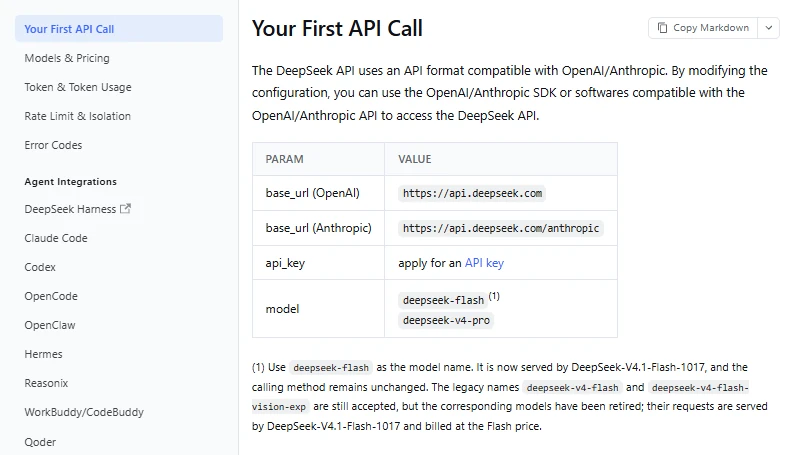
| Start a new integration | Your First API Call | Base URLs, current model IDs, cURL, Python, and Node.js examples |
| Create an API key | API Keys | Key creation and account access |
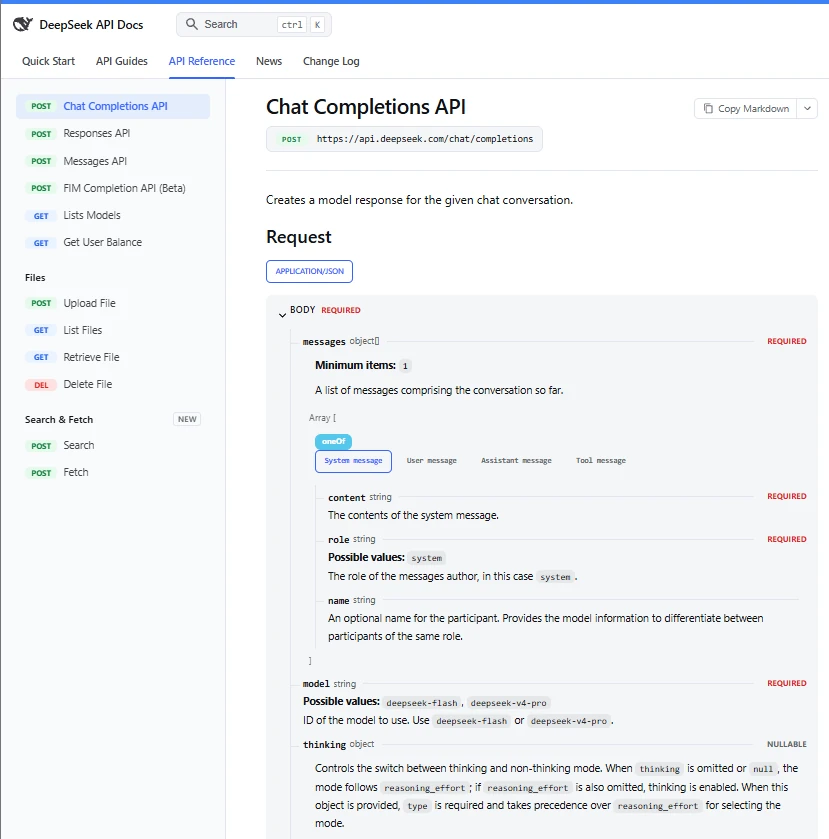
| Send chat messages | Chat Completions API | Messages, thinking controls, streaming, tools, JSON output, and response fields |
| Use the OpenAI Responses format | Responses API Guide | Supported parameters, compatibility limits, streaming events, tools, and image input |
| Use the Anthropic SDK or Messages format | Anthropic API Guide | Anthropic base URL, model mapping, tool behavior, and compatibility details |
| Compare models and prices | Models & Pricing | Current model versions, features, token prices, peak hours, and concurrency |
| Understand account limits | Rate Limit & Isolation | Account concurrency, HTTP 429 behavior, user isolation, and connection keep-alives |
| Troubleshoot a failed request | Error Codes | Official causes and fixes for 400, 401, 402, 422, 429, 500, and 503 errors |
| Send images | Vision Guide | Image URLs, base64 data, uploaded images, formats, sizes, and token use |
| Add live web retrieval | Search & Fetch Guide | Standalone search and page-fetch endpoints for agents and retrieval systems |
| Check recent changes | DeepSeek API Changelog | Model upgrades, retired names, new APIs, and pricing changes |
Before Your First Request: API Key, Balance, and Security
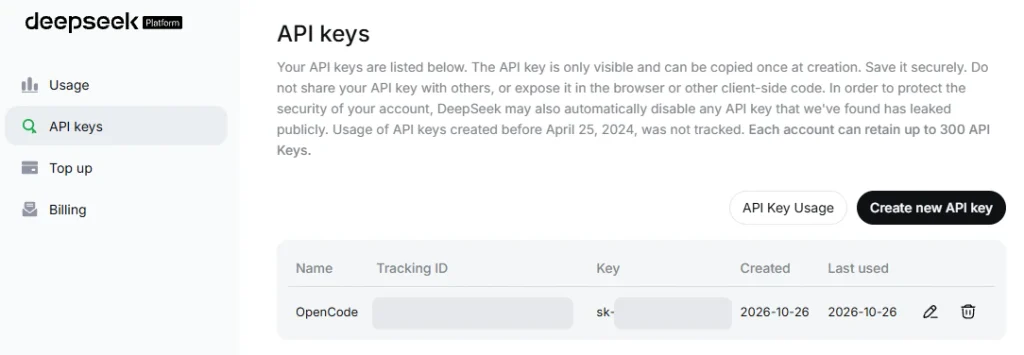
Sign in to the DeepSeek platform, open the API Keys page, and create a key for your application. Treat the key as a secret: anyone who obtains it may be able to make billable requests through your account.
For local development, place the key in an environment variable instead of pasting it directly into source code.
Set the key on macOS or Linux
export DEEPSEEK_API_KEY="replace_me"Set the key in Windows PowerShell
$env:DEEPSEEK_API_KEY="replace_me"In production, use the secret-management system provided by your hosting platform or cloud provider. Do not expose the key in browser-side JavaScript, a mobile application bundle, a public repository, a screenshot, or a client-visible error message.
API charges are deducted from topped-up or granted account balance. DeepSeek also documents a GET /user/balance endpoint that reports whether the available balance is sufficient. An HTTP 402 response means the account does not currently have enough balance for the request.
Choose the Right DeepSeek API Format
DeepSeek currently supports OpenAI-style Chat Completions, the OpenAI Responses format, and an Anthropic-compatible Messages format. They use the same hosted models, but their request bodies, streaming events, and compatibility details differ.
| API format | Base URL or endpoint | Best starting point | Important caveat |
|---|---|---|---|
| Chat Completions | https://api.deepseek.com/chat/completions | Standard chat applications and existing OpenAI Chat Completions integrations | Some OpenAI parameters are unsupported, ignored, or behave differently in thinking mode |
| Responses API | https://api.deepseek.com/responses | Responses-format clients, Codex-style workflows, function tools, and supported server-side web search | The API is stateless, and several OpenAI Responses features are unsupported or silently ignored |
| Anthropic Messages | https://api.deepseek.com/anthropic | Anthropic SDK applications and tools built around the Messages API | Compatibility is partial; fields such as service tiers, MCP servers, and some tool options are ignored or mapped differently |
For a new general-purpose integration, Chat Completions is the simplest place to start. Use the Responses API when your application is already designed around that format, and use the Anthropic endpoint when you need the Anthropic SDK or a compatible coding-agent workflow.
Do not interpret “compatible” as “identical.” Review the official compatibility table for the format you choose, especially before relying on conversation storage, background jobs, built-in tools, strict tool selection, or provider-specific metadata.
Current DeepSeek API Models
The current API reference lists two primary model IDs. Use these IDs in new code rather than copying older identifiers from outdated tutorials.
| API model ID | Current model version | Context length | Maximum output | Vision | Account concurrency |
|---|---|---|---|---|---|
deepseek-flash | DeepSeek-V4.1-Flash-1017 | 1 million tokens | 384K tokens | Supported | 2,500 concurrent requests |
deepseek-v4-pro | DeepSeek-V4-Pro-0813 | 1 million tokens | 384K tokens | Not supported | 500 concurrent requests |
Both model IDs support thinking and non-thinking modes, JSON output, tool calls, the Responses API, and the Anthropic API format. Vision input is limited to deepseek-flash.
Thinking mode is enabled by default, with a default effort level of high. For a fast, predictable quickstart request, it is useful to select non-thinking mode explicitly. You can enable reasoning later when the task benefits from it.
Avoid old model names in new code
The current reference uses deepseek-flash and deepseek-v4-pro. Older identifiers such as deepseek-chat and deepseek-reasoner should not be used as the basis for a new integration.
The legacy aliases deepseek-v4-flash and deepseek-v4-flash-vision-exp are temporarily accepted, but their original models have been retired. Requests using those aliases are routed to the current Flash model and billed at the Flash price. Use deepseek-flash directly to avoid depending on temporary compatibility behavior.
Make Your First DeepSeek API Request
The following examples use Chat Completions, the current deepseek-flash model ID, an environment variable for authentication, and non-thinking mode for a simple first response.
cURL example
curl https://api.deepseek.com/chat/completions \
  -H "Content-Type: application/json" \
  -H "Authorization: Bearer ${DEEPSEEK_API_KEY}" \
  -d '{
    "model": "deepseek-flash",
    "messages": [
      {
        "role": "system",
        "content": "You are a concise technical assistant."
      },
      {
        "role": "user",
        "content": "Explain idempotency in two sentences."
      }
    ],
    "thinking": {
      "type": "disabled"
    },
    "stream": false
  }'
The response is a chat-completion object. The generated answer is located in choices[0].message.content.
Python example with the OpenAI SDK
DeepSeek’s OpenAI-compatible endpoint works with the regular OpenAI Python package after you change the base URL and model ID.
python -m pip install openaiimport os
from openai import OpenAI
client = OpenAI(
api_key=os.environ["DEEPSEEK_API_KEY"],
base_url="https://api.deepseek.com",
)
response = client.chat.completions.create(
model="deepseek-flash",
messages=[
{
"role": "system",
"content": "You are a concise technical assistant.",
},
{
"role": "user",
"content": "Explain idempotency in two sentences.",
},
],
stream=False,
extra_body={
"thinking": {
"type": "disabled",
}
},
)
print(response.choices[0].message.content)
print(response.usage)Using os.environ["DEEPSEEK_API_KEY"] makes the script fail immediately when the environment variable is missing. That is usually safer than silently sending an empty key and diagnosing a later authentication error.
Fields to inspect in the response
choices[0].message.content: the final answer intended for the user.choices[0].finish_reason: why generation stopped, such asstop,length, ortool_calls.usage.prompt_tokens: total input tokens, including cache-hit and cache-miss tokens.usage.completion_tokens: generated output tokens.usage.prompt_cache_hit_tokens: input tokens served from context cache.usage.completion_tokens_details.reasoning_tokens: tokens used for reasoning when thinking mode is active.choices[0].message.reasoning_content: reasoning output returned by Chat Completions in thinking mode.
Do not assume a successful HTTP response always contains a complete answer. Check finish_reason, validate required output fields, and handle truncated or filtered responses according to your application’s needs.
Thinking Mode, Streaming, and Conversation State
Control thinking mode explicitly
In Chat Completions, thinking can be enabled or disabled with the thinking object. Effort levels include low, high, and max. The OpenAI SDK requires the provider-specific thinking object to be passed through extra_body.
response = client.chat.completions.create(
    model="deepseek-flash",
    messages=[
        {
            "role": "user",
            "content": "Find the flaw in this distributed lock design.",
        }
    ],
    reasoning_effort="high",
    extra_body={
        "thinking": {
            "type": "enabled",
        }
    },
)
Thinking mode does not respond to every familiar sampling control. For example, temperature has no effect while thinking is active. The current Chat Completions reference also marks presence and frequency penalties as unsupported, so do not rely on those fields to change behavior.
Use the correct streaming parser
Chat Completions streams data-only server-sent events and ends with data: [DONE]. The Responses API uses semantic event names and ends with a final response.completed, response.incomplete, or response.failed event instead.
The Anthropic-compatible endpoint follows Anthropic-style message events and ends with message_stop, not data: [DONE]. A parser built for one format should not be reused blindly for another.
Send conversation history on every turn
DeepSeek’s Chat Completions and Responses APIs are stateless. The service does not automatically preserve your previous conversation, so your application must send the relevant system, user, assistant, and tool messages again on each request.
Long conversations therefore increase input-token usage. Store conversation state in your own application, remove irrelevant history, summarize older turns when appropriate, and preserve any tool-call information required for the next request.
Context caching is enabled automatically. Reusing an exact prompt prefix can produce cache hits, but merely sending similar text does not guarantee one. Use the cache-token fields in the API response to measure actual behavior.
Advanced DeepSeek API Features
| Feature | When it is useful | Important implementation detail | Official guide |
|---|---|---|---|
| Vision | Reading screenshots, describing images, analyzing charts, or extracting visual information | Use deepseek-flash. The Pro model does not accept image input. | Vision |
| JSON output | Returning data that your application can parse | For Chat Completions, set response_format to json_object, include the word “json” in the prompt, provide the desired shape, and handle blank content. | JSON Output |
| Tool calls | Allowing the model to request actions from your application | The model proposes a function and arguments; your code must validate the arguments, execute the function, and return the result. | Tool Calls |
| Files API | Reusing uploaded images or avoiding large inline image payloads | The documented Files API is for image files used with deepseek-flash. Uploaded files are referenced by file_id. | Files API |
| Context caching | Reducing the cost of repeated prompt prefixes | Caching is automatic. A later request must match a persisted prefix unit to receive a cache hit. | Context Caching |
| Standalone Search and Fetch | Giving an agent ranked web results or page content | These are raw JSON endpoints billed per successful request, separately from model-token usage. | Search & Fetch |
| Responses API web search | Allowing a Responses-format model call to search the web as a server tool | The built-in web_search tool is supported with deepseek-v4-pro and ignored with deepseek-flash. | Responses API |
Do not execute tool arguments without validation
Tool-call arguments are model-generated data. Parse them defensively, validate them against an allowlist or schema, enforce authorization in your application, and reject unexpected fields before calling a database, payment service, shell command, or external API.
The model should never be the final authority for whether a user is allowed to perform an action. Keep permissions, business rules, input validation, rate controls, and audit logging in deterministic application code.
DeepSeek API Pricing
Model usage is billed per 1 million tokens. Prices differ by model, input-cache status, and whether the request runs during peak or off-peak hours.
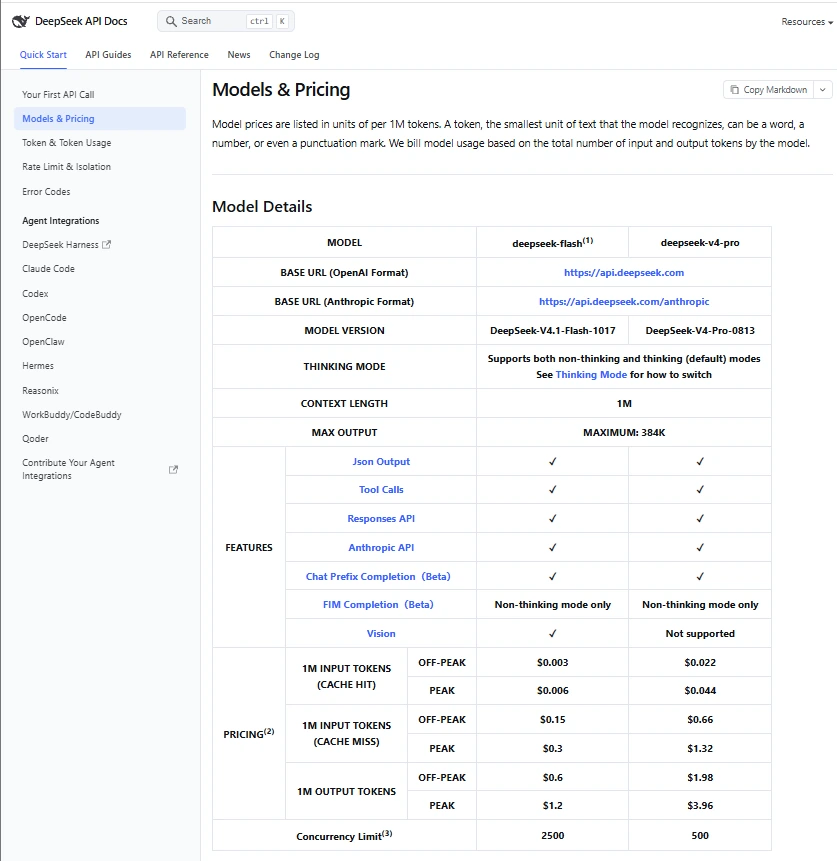
| Model | Cache-hit input, off-peak | Cache-hit input, peak | Cache-miss input, off-peak | Cache-miss input, peak | Output, off-peak | Output, peak |
|---|---|---|---|---|---|---|
deepseek-flash | $0.003 | $0.006 | $0.15 | $0.30 | $0.60 | $1.20 |
deepseek-v4-pro | $0.022 | $0.044 | $0.66 | $1.32 | $1.98 | $3.96 |
All figures in the table are US dollars per 1 million tokens. Peak hours are 01:00–04:00 UTC and 06:00–10:00 UTC, Monday through Friday, excluding Chinese public holidays. Other periods, including weekends and full Chinese public holidays, use off-peak rates.
Because US local time changes with daylight saving rules, use the published UTC windows rather than relying on a fixed conversion.
Worked cost example
Assume one off-peak deepseek-flash request uses 80,000 cache-hit input tokens, 20,000 cache-miss input tokens, and 10,000 output tokens:
- Cache-hit input: 0.08 × $0.003 = $0.00024
- Cache-miss input: 0.02 × $0.15 = $0.003
- Output: 0.01 × $0.60 = $0.006
- Total estimated model cost: $0.00924
This is a transparent example, not a promise about the cost of a typical application. Actual cost depends on the model, request timing, input size, output size, cache behavior, and any separate tools used.
The standalone Search and Fetch APIs are priced at $0.75 per 1,000 successful requests for each service. Those request charges are separate from model-token charges.
Pricing can change. Check the official Models & Pricing page before publishing a budget, customer quote, or long-term cost projection.
Rate Limits and Production Reliability
DeepSeek currently documents account-level concurrency limits of 2,500 for deepseek-flash and 500 for deepseek-v4-pro. A request counts as concurrent from the time it is sent until the response is complete, regardless of which API key under the account sent it.
Exceeding an applicable concurrency or QPS limit can produce HTTP 429. Do not convert the published concurrency figures into requests per minute or tokens per minute; they measure different things.
DeepSeek may send empty lines during a non-streaming wait or SSE keep-alive comments during a streaming wait. A custom HTTP parser should ignore those keep-alives without treating them as final content. The documentation also states that a connection is closed if inference has not started after 10 minutes.
Production checklist
- Set connection and response timeouts that match the workload instead of waiting indefinitely.
- Retry 429, 500, and 503 responses with exponential backoff, jitter, and a maximum retry count.
- Do not retry 400, 401, 402, or 422 indefinitely; correct the request, key, balance, or parameters first.
- Distinguish a retryable model request from an external tool action that could create duplicate side effects.
- Log the model ID, status code, finish reason, token usage, latency, and an application-generated correlation ID.
- Monitor cache-hit tokens, output size, account balance, and cost rather than estimating only from request count.
- Limit the amount of conversation history sent on every turn.
- Validate all model-generated JSON and tool arguments before using them.
- Keep API keys in a server-side secret manager and rotate exposed credentials promptly.
- Use a non-sensitive internal identifier for
user_id; do not place private user information in that field.
DeepSeek API Error Codes and Fixes
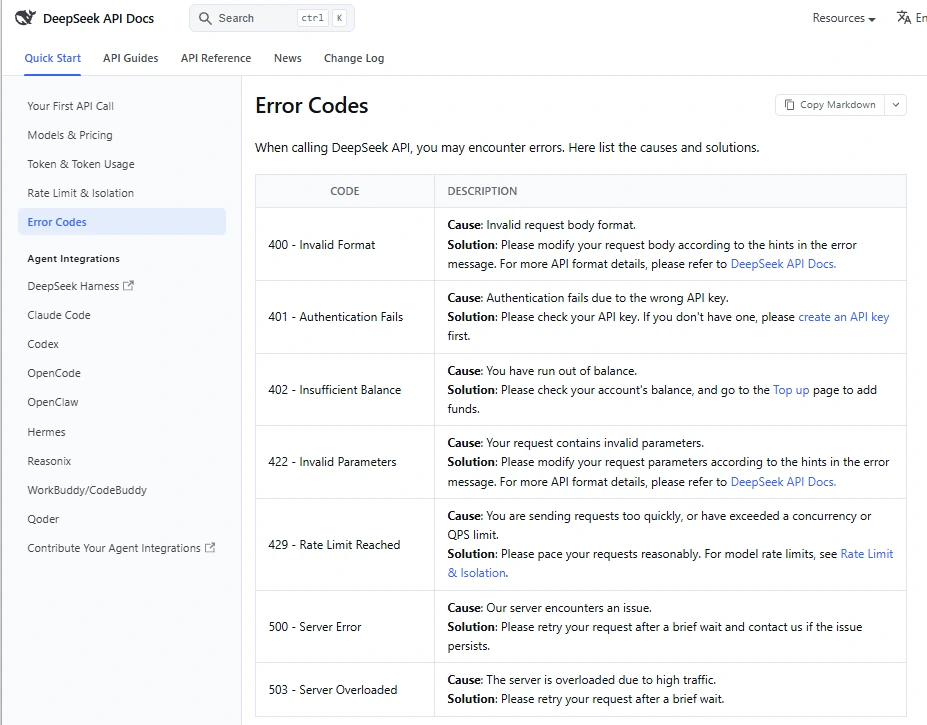
| Status | Official meaning | What to check | Recommended action |
|---|---|---|---|
| 400 | Invalid request-body format | JSON syntax, required fields, message structure, image placement, and thinking-mode tool-choice restrictions | Read the returned error message and compare the body with the relevant API reference. Do not retry unchanged. |
| 401 | Authentication failed | Missing bearer header, incorrect key, extra spaces, wrong environment variable, or an exposed key that was replaced | Load the correct key, verify the header, and create a new key if necessary. |
| 402 | Insufficient balance | Available topped-up and granted balance | Check the platform balance or /user/balance, then add funds if appropriate. |
| 422 | Invalid parameters | Model ID, parameter names, allowed ranges, and endpoint-specific parameter rules | Correct the parameters using the current reference. Do not copy an older provider example without checking compatibility. |
| 429 | Rate limit reached | Request pace, account concurrency, QPS limits, long-running requests, and retry storms | Reduce concurrency, add backoff with jitter, and prevent every worker from retrying at the same time. |
| 500 | Server error | Whether the request normally succeeds and whether the failure is temporary | Retry after a brief delay with a capped policy. Escalate persistent failures with reproducible details. |
| 503 | Server overloaded | Temporary service load | Retry after a brief delay, reduce request bursts, and preserve graceful fallback behavior. |
Why a valid-looking request may return 400 or 422
A body can be valid JSON while still containing invalid API parameters. DeepSeek’s general error guide labels invalid parameters as HTTP 422, but specific parameter combinations can have a different documented status.
For Chat Completions, using tool_choice="required" or forcing a named tool while thinking mode is active returns HTTP 400. Disable thinking mode before using either option, or keep tool_choice="auto" when thinking is needed. See the official tool-choice reference.
Always inspect the response body rather than diagnosing from the status code alone. The error message usually identifies the field or incompatibility that must be corrected.
Common DeepSeek API Integration Mistakes
- Using old model IDs: Build new examples around
deepseek-flashordeepseek-v4-pro, not names copied from an older R1, V3, or early V4 tutorial. - Assuming complete compatibility: OpenAI and Anthropic SDKs can connect, but unsupported fields may be ignored, mapped differently, or rejected.
- Forgetting that the APIs are stateless: Send the conversation history required for every new turn.
- Exposing the API key: Keep requests behind your own server rather than calling the paid API directly from public client code.
- Enabling thinking unintentionally: Thinking defaults to enabled at high effort, so choose the mode explicitly when latency and output length matter.
- Sending images to the Pro model: Current vision support belongs to
deepseek-flash. - Parsing every stream the same way: Chat Completions, Responses, and Anthropic Messages have different terminal events.
- Trusting tool arguments: Model-generated function arguments must pass the same validation and authorization as ordinary user input.
- Assuming similar prompts will hit cache: Check actual cache-hit token fields instead of estimating from visual similarity.
- Retrying permanent errors: Backoff helps with temporary capacity errors, but it will not repair a malformed body, incorrect key, empty balance, or invalid parameter.
A Practical Starting Configuration
For a first server-side integration, begin with Chat Completions, deepseek-flash, an environment-based API key, non-thinking mode, and non-streaming responses. Confirm that authentication, response parsing, usage reporting, and error handling work before adding more moving parts.
Next, enable thinking for tasks that need deeper reasoning, add streaming when the user experience benefits from incremental output, and introduce tools only after you have deterministic validation and authorization around every tool action.
Use deepseek-v4-pro when its capabilities justify the higher price and lower published concurrency for your workload. Measure quality, latency, token use, and operational behavior with your own representative test set rather than selecting a model from its name alone.
Frequently Asked Questions
Where are the official DeepSeek API docs?
The official documentation is at api-docs.deepseek.com. The API reference, pricing page, feature guides, error codes, and changelog are all available from that documentation site.
What is the current DeepSeek API base URL?
The OpenAI-compatible base URL is https://api.deepseek.com. For the Anthropic SDK, use https://api.deepseek.com/anthropic as the base URL.
Which model ID should a new integration use?
Use deepseek-flash for the current Flash model or deepseek-v4-pro for the current Pro model. Use Flash when the request includes images because the current Pro endpoint does not support vision input.
Can I use the OpenAI Python or JavaScript SDK?
Yes. Configure the SDK with your DeepSeek API key, set the base URL to https://api.deepseek.com, and use a current DeepSeek model ID. Review DeepSeek’s compatibility documentation before relying on provider-specific fields.
Is the DeepSeek API free?
The official pricing page documents token-based charges deducted from topped-up or granted balance. Do not assume access to the consumer chat interface means hosted API usage is free; check your platform balance and the current pricing page before sending production traffic.
Why does my DeepSeek API key return 401?
An HTTP 401 means authentication failed. Verify that the key is correct, the environment variable is loaded in the running process, and the request sends Authorization: Bearer YOUR_KEY without extra characters.
Why am I receiving error 402?
An HTTP 402 response means the account has insufficient balance. Check the platform balance or the documented user-balance endpoint before retrying.
Does DeepSeek remember previous API messages?
No. The documented chat and Responses interfaces are stateless. Your application must store and resend the conversation history needed for the current turn.
Should I use Chat Completions or the Responses API?
Use Chat Completions for a straightforward chat integration or an existing OpenAI Chat Completions client. Use the Responses API when your software already depends on that event and tool format, but review DeepSeek’s compatibility table because conversation storage, background mode, and several built-in tools are not supported.
Sources Checked
- DeepSeek API quickstart
- DeepSeek API reference
- Chat Completions API reference
- Responses API compatibility guide
- Anthropic API compatibility guide
- Models & Pricing
- Rate Limit & Isolation
- Error Codes
- DeepSeek API Changelog
Last verified: November 6, 2026.