

Published: November 7, 2026.
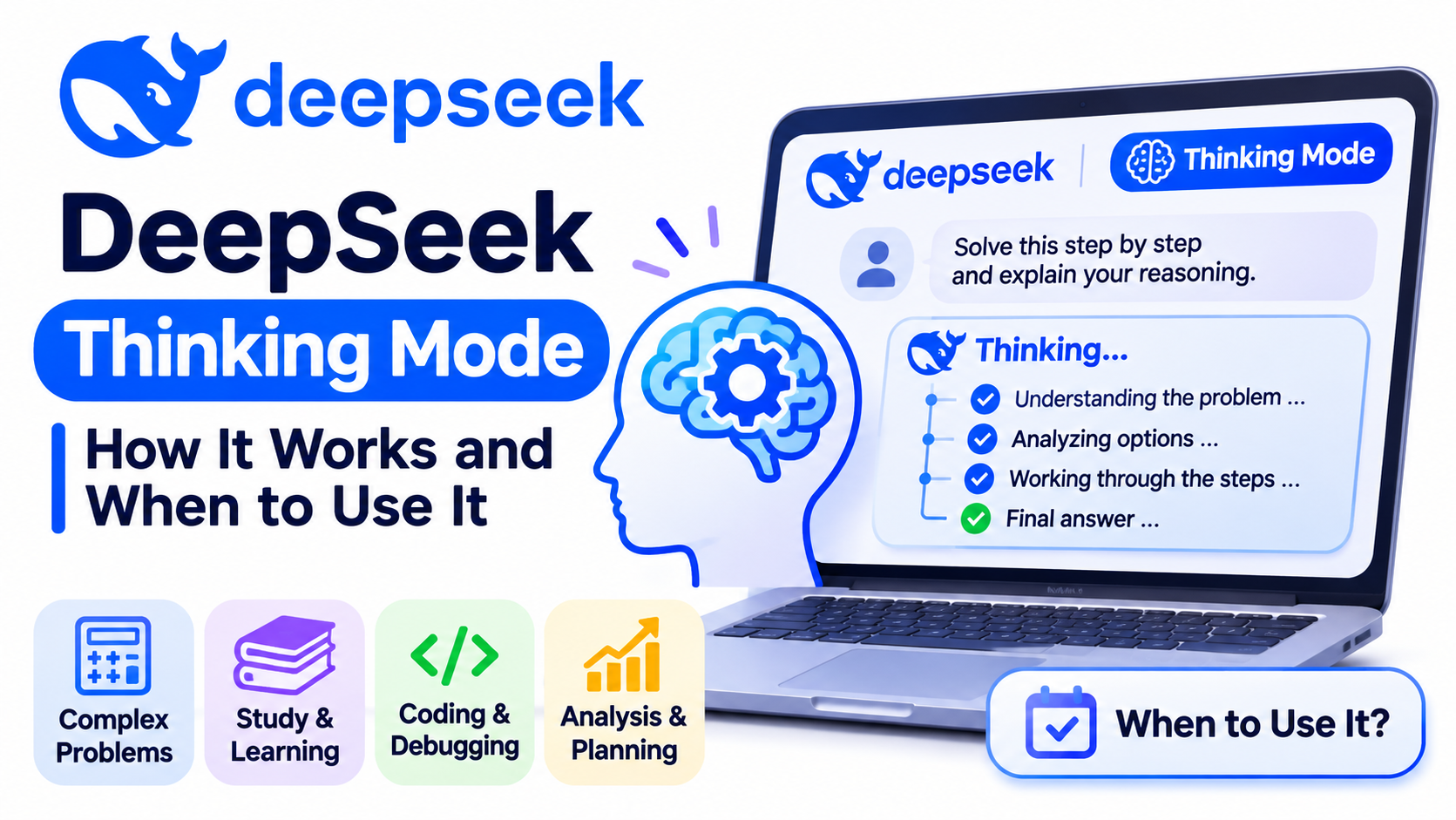
DeepSeek Thinking Mode makes the model perform a deliberate reasoning pass before it delivers its final answer. It is most useful for multi-step analysis, difficult coding problems, planning under constraints, and tool-based agent workflows. It is usually unnecessary for simple rewriting, formatting, extraction, or short factual questions.
The important distinction is that thinking is not the same as web search. Thinking can improve how DeepSeek works through a problem, but it does not automatically give the model current information. For time-sensitive questions, use Search separately and verify the sources.
- Use Thinking Mode when the task has multiple dependent steps, trade-offs, edge cases, or tool calls.
- Use non-thinking mode when speed and a direct answer matter more than extended analysis.
- Use Search with either mode when the answer depends on recent or externally verifiable information.
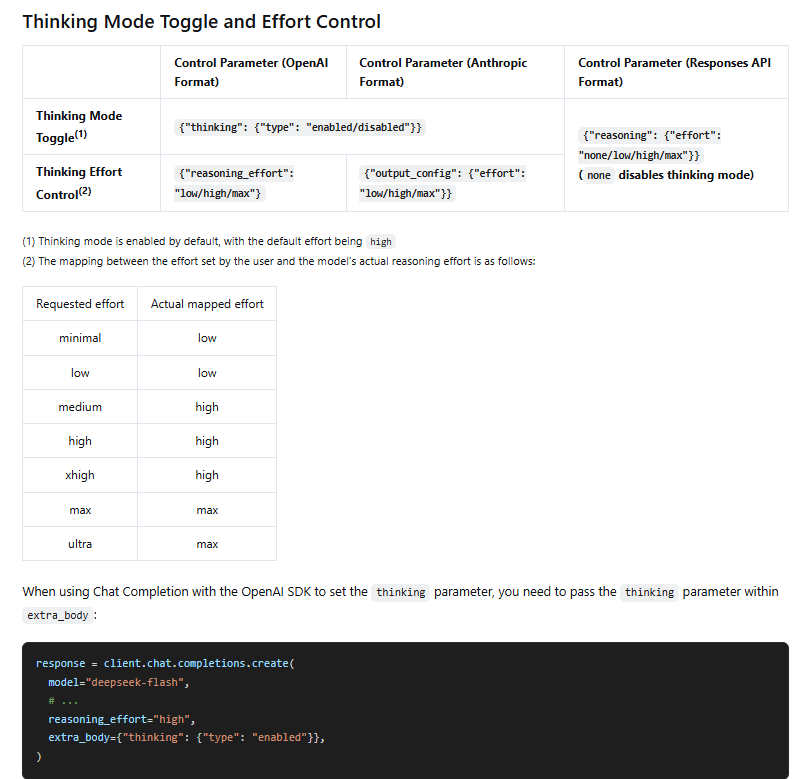
- For API requests, Thinking Mode is enabled by default at the
higheffort level, but explicitly setting the mode is safer for production applications.
What Is DeepSeek Thinking Mode?
Thinking Mode is a capability in current DeepSeek models that generates reasoning before the final response. In the Chat Completions API, the reasoning is returned in reasoning_content, while the user-facing answer is returned in content. The official Thinking Mode guide documents the switch, effort levels, output fields, streaming behavior, and tool-call requirements.
This extra reasoning can help when a task requires the model to preserve several constraints, inspect alternatives, test assumptions, or recover from intermediate mistakes. It does not guarantee correctness. A detailed reasoning trace can still contain a false assumption, and the final answer still needs verification when the stakes are high.
DeepThink, Thinking Mode, and DeepSeek R1 Are Not the Same Thing
These names are often treated as synonyms in older tutorials, but they refer to different parts of DeepSeek’s product history and current implementation.
| Term | What it means | Current relevance |
|---|---|---|
| Thinking Mode | The current capability that lets a supported model reason before producing its final answer. | This is the terminology used in the current API documentation. |
| DeepThink | A product-facing label DeepSeek has used for the thinking control in its web and mobile interfaces. | You may still see Think or DeepThink wording in the interface, depending on the version. |
| DeepSeek R1 | The reasoning-model release introduced in 2025. | R1 is historically important, but current V4-family models can switch between thinking and non-thinking behavior. |
deepseek-reasoner | A legacy API model name that previously selected the reasoning mode. | DeepSeek scheduled this legacy name for discontinuation on July 24, 2026. Current integrations should use the current model IDs and mode controls. |
As of November 6, 2026, the documented API model IDs are deepseek-flash and deepseek-v4-pro. The current Models & Pricing page maps deepseek-flash to DeepSeek-V4.1-Flash-1017 and lists DeepSeek-V4-Pro-0813 for the Pro endpoint. Both support thinking and non-thinking modes.
Thinking Mode vs Non-Thinking Mode vs Search
| Option | What it does | Best for | Main trade-off |
|---|---|---|---|
| Thinking Mode | Uses additional reasoning before the final answer. | Complex analysis, code debugging, planning, math, agents, and difficult decisions. | Usually more latency and more output-token usage. |
| Non-thinking mode | Produces a more direct response without an extended reasoning pass. | Rewriting, summaries, formatting, extraction, simple explanations, and routine chat. | May miss dependencies or edge cases in difficult tasks. |
| Search | Retrieves live web results or page content. | News, changing prices, current documentation, recent releases, and source-backed research. | Search quality and source selection still need review. |
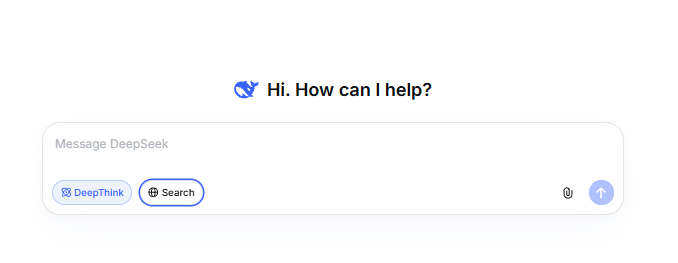
You can combine thinking and search. For example, Search can collect current documentation, while Thinking Mode compares the sources, resolves constraints, and produces a recommendation. The Search & Fetch guide documents DeepSeek’s separate live-web APIs, which confirms that retrieval is a distinct function rather than an automatic consequence of reasoning.
When Should You Use DeepSeek Thinking Mode?
| Task | Recommended choice | Why |
|---|---|---|
| Debug a failure across several files or services | Thinking: high | The model must trace dependencies and test competing causes. |
| Plan a migration with budget, downtime, and compliance constraints | Thinking: high or max | The recommendation depends on several interacting constraints. |
| Solve a difficult proof, logic puzzle, or optimization problem | Thinking: max | Extra reasoning capacity may help with long dependency chains. |
| Run an agent that calls tools repeatedly | Thinking: high | The model must decide which tool to call and interpret the results across steps. |
| Rewrite an email or shorten a paragraph | Non-thinking | The task is direct and does not benefit from extended analysis. |
| Extract fields into a fixed format | Non-thinking, usually with structured output | Deterministic formatting matters more than extra deliberation. |
| Answer a question about today’s prices or releases | Search, with optional thinking | Reasoning cannot replace current external information. |
A useful rule is to start with non-thinking mode for routine work. Move to low or high when the task contains several dependent steps, and reserve max for problems where a better answer is worth the added time and token usage.
How to Use Thinking Mode on the DeepSeek Website or App
DeepSeek’s interface changes over time, so the exact label and placement may differ by app version. DeepSeek has previously called the control DeepThink and described it as a Think/Non-Think toggle. Use the current thinking control shown in your version rather than relying on an old screenshot.
- Open the official DeepSeek web app or the current mobile app.
- Start a new chat and locate the Think or DeepThink control available in your version.
- Turn it on for a task that needs deeper analysis. Leave it off for a quick rewrite, extraction, or simple response.
- If the answer depends on current information, enable Search separately or ask DeepSeek to use an available search tool.
- Write a prompt that states the goal, evidence, constraints, and required output. Good input matters even when thinking is enabled.
A practical prompt is: “Compare these three deployment options. Check each one against the budget, two-hour downtime limit, rollback requirement, and security policy. State your assumptions, identify the main risk, and give one final recommendation.”
The current official download page describes the DeepSeek app as free. API access is separate and is billed according to the current model and token rates.
How to Enable DeepSeek Thinking Mode Through the API
DeepSeek supports the OpenAI-compatible Chat Completions format and the Responses API format. Although API thinking is enabled by default at high effort, an explicit setting makes application behavior easier to test and prevents a future default change from silently altering latency or cost.
Chat Completions example in Python
import os
from openai import OpenAI

client = OpenAI(
    api_key=os.environ["DEEPSEEK_API_KEY"],
    base_url="https://api.deepseek.com",
)

response = client.chat.completions.create(
    model="deepseek-flash",
    messages=[
        {
            "role": "user",
            "content": (
                "Analyze three database migration options. "
                "Respect a two-hour downtime limit, explain the main risks, "
                "and recommend one option."
            ),
        }
    ],
    reasoning_effort="high",
    extra_body={"thinking": {"type": "enabled"}},
)

message = response.choices[0].message
print("Final answer:\n", message.content)
print("Reasoning:\n", message.reasoning_content)
Store the API key in an environment variable, not in source code or browser-side JavaScript. The explicit thinking object selects the mode, while reasoning_effort selects low, high, or max.
To force non-thinking mode, change the request to:
response = client.chat.completions.create(
    model="deepseek-flash",
    messages=[
        {"role": "user", "content": "Summarize this text in five bullets."}
    ],
    extra_body={"thinking": {"type": "disabled"}},
)
Responses API example
response = client.responses.create(
    model="deepseek-flash",
    input="Find the safest migration plan under the listed constraints.",
    reasoning={"effort": "high"},
)

print(response.output_text)
In the Responses API, reasoning.effort accepts none, low, high, or max. Setting it to none disables thinking. The Responses API reference also documents streaming, structured output, function tools, and the returned reasoning items.
How the API Returns Reasoning and Final Answers
Chat Completions separates the two outputs:
reasoning_contentcontains the reasoning generated before the answer.contentcontains the final response intended for the user.completion_tokens_details.reasoning_tokensreports how many completion tokens were used for reasoning when that detail is returned.
The Responses API uses a similar separation: a reasoning output item appears before the final message item. In streaming mode, reasoning and final-answer text arrive through different event types. Build your interface so users can clearly distinguish the final answer from optional diagnostic reasoning.
Do not treat the reasoning field as a verified audit trail. It is model-generated text and can be incomplete or incorrect. Validate the final answer against tests, source documents, calculators, or authoritative references whenever accuracy matters.
Choosing Low, High, or Max Reasoning Effort
| Effort | Best use | Practical expectation |
|---|---|---|
low | Routine multi-step tasks, light classification, simple code review, and inexpensive retries. | Less deliberation, lower typical latency, and fewer reasoning tokens. |
high | Most technical analysis, coding, planning, and daily agent workflows. | The documented default and the best starting point for genuinely complex work. |
max | The hardest problems, long-horizon agents, difficult optimization, and cases where quality matters more than speed. | The greatest potential reasoning budget, with the highest risk of extra latency and output usage. |
Use the documented values rather than compatibility aliases such as medium or xhigh. DeepSeek maps some aliases to supported levels, but explicit current values make logs, tests, and configuration screens easier to understand.
Does Thinking Mode Use More Tokens or Cost More?
It can. DeepSeek bills API model usage by input and output tokens, and reasoning tokens are included in output usage. Thinking Mode therefore tends to cost more when it generates a substantial reasoning trace, even though the pricing page lists rates by model and token type rather than a separate Thinking Mode surcharge.
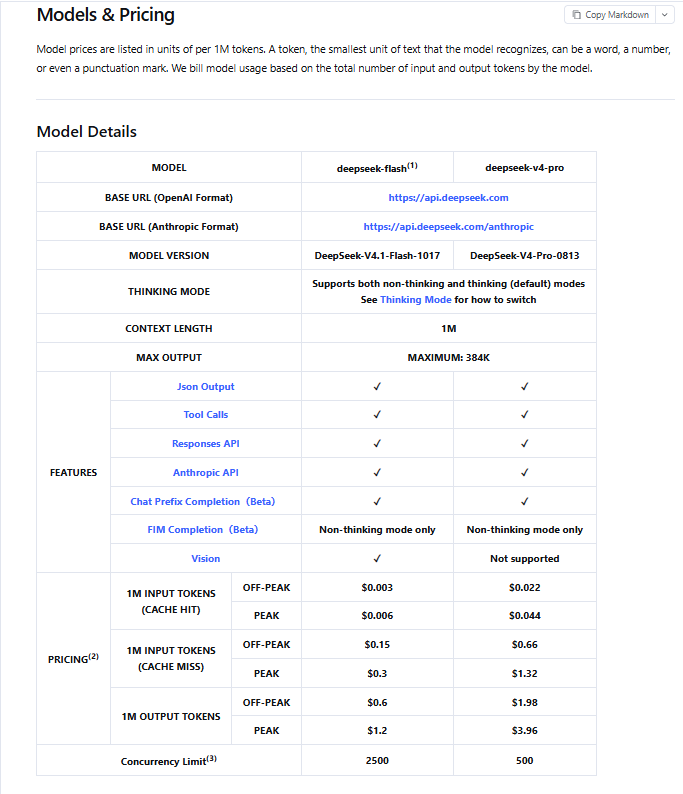
The current Chat Completions reference lists a default max_tokens value of 8K in non-thinking mode, 64K in thinking mode, and 128K when effort is max, with a documented maximum of 384K. These are ceilings, not targets. A concise prompt and a lower effort level can reduce unnecessary output.
- Log
reasoning_tokens, total output tokens, latency, and task success. - Compare
lowandhighon your own workload instead of assuming more thinking is always better. - Set an output limit that leaves enough room for both reasoning and the final answer.
- Recheck the official pricing page before publishing cost estimates or building budget alerts.
Multi-Turn Conversations, Tool Calls, and the 400 Error
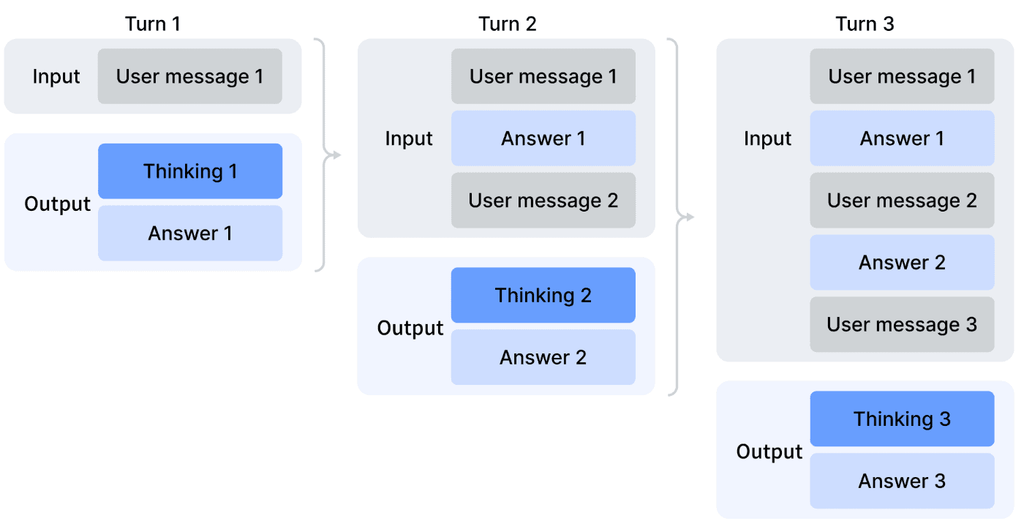
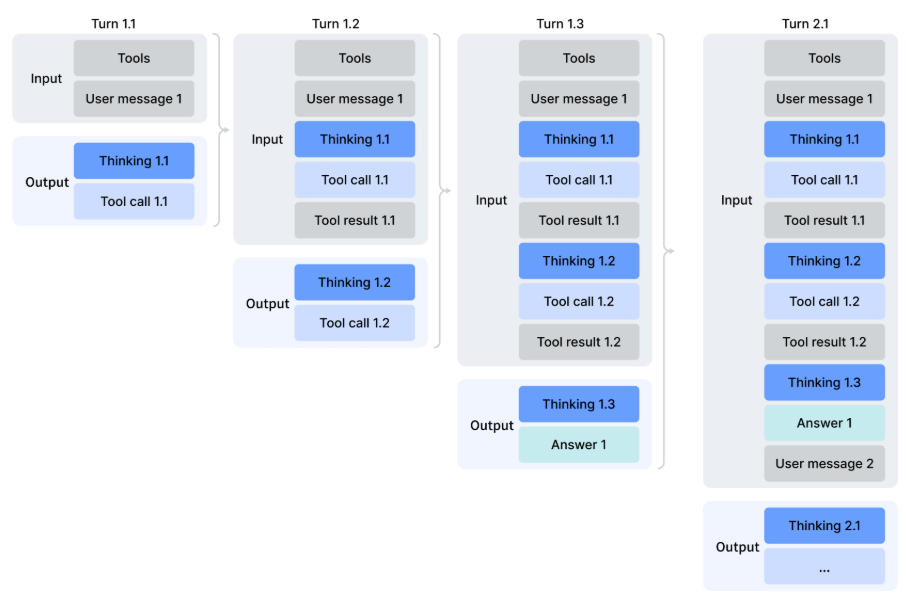
The handling of reasoning_content changes when a Chat Completions request includes tools.
- Without a
toolsparameter: previousreasoning_contentdoes not need to be passed back. If it is included, DeepSeek says it is ignored for context construction. - With a
toolsparameter: pass the completereasoning_contentfrom previous assistant messages in every subsequent request, including turns where no tool was called.
The safest pattern is to append the full assistant message object returned by the SDK instead of reconstructing only its visible content. If the reasoning field is missing during a thinking-mode tool workflow, the API can return a 400 error stating that reasoning_content must be passed back.
| Problem | Likely cause | Fix |
|---|---|---|
400 error about missing reasoning_content | A tool-enabled multi-turn request rebuilt assistant history without the reasoning field. | Append the complete returned assistant message, including reasoning and tool calls. |
Changing temperature has no effect | Thinking Mode ignores temperature, presence_penalty, and frequency_penalty. | Change the effort level, prompt, model, or mode instead. |
| A named or required tool choice returns 400 in Chat Completions | Thinking Mode does not support required or a named tool_choice in that format. | Use automatic tool selection, disable thinking, or choose a supported API pattern. |
An old tutorial uses deepseek-reasoner | The example targets a retired legacy model name. | Use deepseek-flash or deepseek-v4-pro and set the mode explicitly. |
| The answer is polished but outdated | Thinking was enabled without live retrieval. | Use Search or another trusted data source and verify the result. |
| The final answer is cut off | Reasoning and visible output consumed the configured output budget. | Raise the output limit carefully, lower effort, or narrow the task. |
Prompting Practices That Make Thinking Mode More Useful
Thinking Mode cannot repair a vague task definition. Give the model enough information to reason about the actual problem rather than forcing it to invent missing constraints.
- State the decision: Explain what must be chosen, solved, diagnosed, or produced.
- Supply the evidence: Include logs, code, requirements, documents, numbers, or source links.
- List hard constraints: Separate mandatory limits from preferences.
- Define the output: Ask for a recommendation, checklist, patch, table, or ordered plan.
- Request uncertainty: Ask the model to identify assumptions, missing evidence, and facts that require verification.
- Set a stopping rule: Tell an agent when it has enough evidence to answer instead of continuing unnecessary tool calls.
Example for code debugging
“Find the most likely cause of this intermittent timeout. Trace the request across the provided service logs, rule out explanations that conflict with the timestamps, propose the smallest safe fix, and give me a test that would confirm the diagnosis.”
Example for a business decision
“Compare the three vendors using only the attached requirements and pricing. Weight security and migration risk above feature count. State any missing information, show the decisive trade-off, and recommend one vendor.”
Example for current research
“Search the current official documentation for each product, compare the supported limits as of today’s date, cite the exact pages, flag conflicting information, and then recommend the best option for this workload.”
Limits, Accuracy, and Privacy
Thinking Mode can improve problem-solving behavior, but it does not convert a language model into a guaranteed source of truth. DeepSeek’s own privacy policy notes that generated outputs may not always be factually accurate. Verify medical, legal, financial, security, and production-engineering conclusions with qualified sources and appropriate testing.
The DeepSeek Privacy Policy, last updated February 10, 2026, says the service may collect prompts, uploaded files, photos, and chat history, and may use personal data to improve its technology. It also says the services are not designed to process sensitive personal data and describes a right to opt out of using personal data for model training or technology optimization, subject to the policy’s terms.
- Do not paste passwords, API keys, private certificates, or access tokens into a prompt.
- Avoid uploading confidential customer records, health information, unreleased source code, or regulated data unless your organization has approved the service and its data handling.
- Review the current policy and account controls rather than relying on an old privacy tutorial.
- Keep API keys on the server and rotate them immediately if they are exposed.
Frequently Asked Questions
Is DeepSeek Thinking Mode the same as DeepSeek R1?
No. R1 was a specific reasoning-model release. Thinking Mode is now a selectable capability in current DeepSeek models that support both thinking and non-thinking behavior.
Is Thinking Mode enabled by default?
In the current API documentation, yes: thinking is enabled by default at high effort when neither the mode nor effort is specified. The website and app expose a user-facing control, so check the selected state in your current interface rather than assuming it is on.
Does Thinking Mode automatically search the web?
No. Thinking changes how the model reasons. Search retrieves current external information. Use both when a difficult answer also depends on recent facts.
Can DeepSeek Thinking Mode work with tool calls?
Yes. Current DeepSeek models support tool calls in Thinking Mode. In Chat Completions tool workflows, you must preserve and pass back previous reasoning_content as documented, or the request may fail.
Does Thinking Mode support JSON or structured output?
Yes. The current model table lists JSON output support for both documented models, and the Responses API supports plain text, JSON object mode, and JSON Schema output. Validate generated data before using it in a production action.
Why does changing temperature not change the result?
DeepSeek documents that temperature, presence_penalty, and frequency_penalty have no effect in Thinking Mode. The behavior of top_p varies by model and mode, so check the current API reference before tuning it.
Is DeepSeek Thinking Mode free?
The official DeepSeek download page describes the consumer app as free. API usage is billed by tokens under the current pricing schedule, and thinking can increase output usage because reasoning tokens are counted.
The Best Default Strategy
Use non-thinking mode for fast, routine work. Use high effort when the task genuinely requires analysis, debugging, planning, or several tool steps. Use max selectively after measuring whether it improves results enough to justify the additional latency and output tokens.
For current facts, combine the appropriate reasoning level with Search and inspect the cited sources. For production API use, set the mode explicitly, log reasoning-token usage, preserve complete assistant messages in tool workflows, and keep tests around the behaviors your application depends on.
Sources Checked
- DeepSeek Thinking Mode guide
- DeepSeek Chat Completions API reference
- DeepSeek Responses API reference
- DeepSeek Models & Pricing
- DeepSeek API change log
- DeepSeek Privacy Policy
Information verified on November 6, 2026.