

To use DeepSeek, open the official web assistant or install the verified mobile app, sign in if prompted, and enter a clear request in the message box. Use web search when you need current information, attach a file or image when the answer should be based on supplied material, and select a deeper reasoning or Expert option when it is available and the task is complex.
The most important part is not finding a “perfect” prompt. Give DeepSeek a specific goal, enough context, clear constraints, and the output format you need. Then review the result, ask follow-up questions, and verify important claims rather than treating the first answer as final.
How to use DeepSeek in seven steps
- Use an official access route. Open DeepSeek Web or use the official DeepSeek download page to reach the iOS or Android app.
- Sign in if requested. Choose one of the registration or login methods currently shown in your version of the service.
- Start a new conversation. Use a separate chat when you move to a different project or subject so that unrelated context does not affect the answer.
- Describe the task clearly. State what you want, provide relevant context, add constraints, and specify the desired output.
- Select the appropriate tool or mode. Use search for recent information, attach files or images when needed, and use Expert Mode or deeper reasoning controls when they are available and the task requires multi-step analysis.
- Refine the answer. Ask DeepSeek to simplify, expand, reorganize, correct, or verify specific parts of its response.
- Check important outputs. Open cited sources, recalculate important numbers, test generated code, and compare document summaries with the original material.
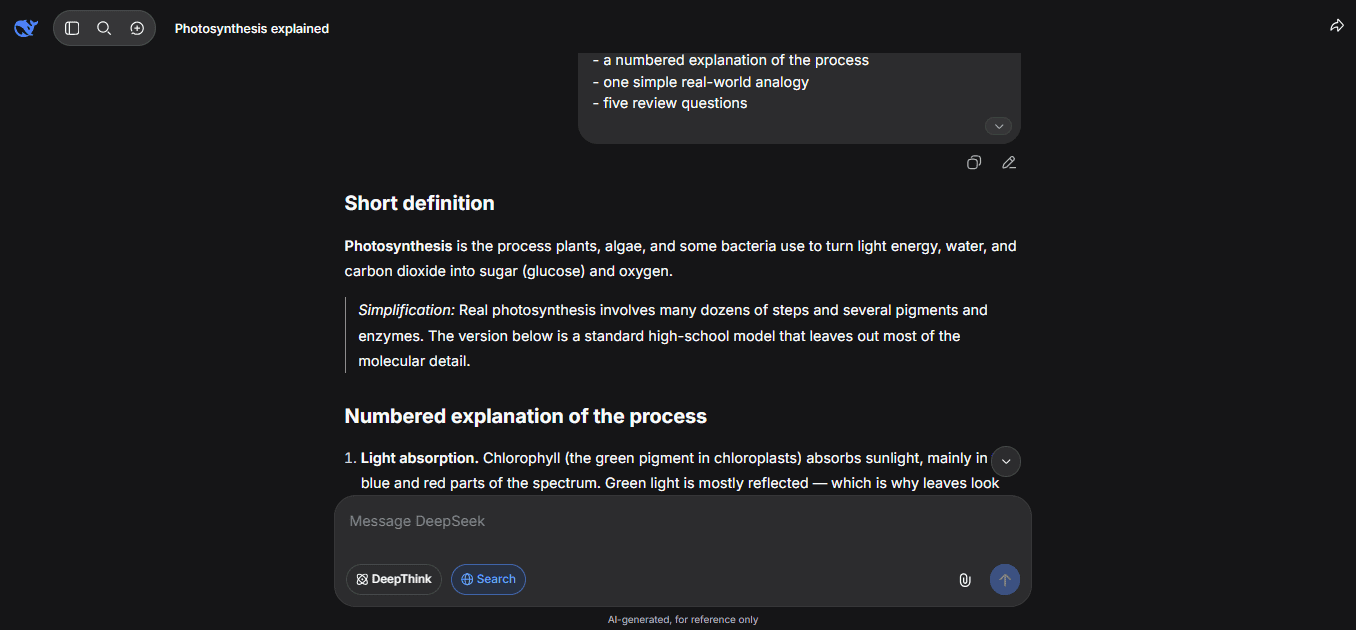
A useful first prompt could be:
Explain how photosynthesis works for a high-school student.

Use:
- a short definition
- a numbered explanation of the process
- one simple real-world analogy
- five review questions

Clearly label anything that is a simplification.
Choose the right way to access DeepSeek
DeepSeek is available through several products. They use related technology, but they are intended for different users and do not have identical features, costs, or privacy implications.
| Access method | Best for | What to know |
|---|---|---|
| DeepSeek Web | The quickest way to start chatting from a browser | No software installation is required |
| Official mobile app | Using DeepSeek on an iPhone, iPad, or Android device | Install it only through DeepSeek’s official links or verified app-store listing |
| DeepSeek API Platform | Adding DeepSeek models to websites, applications, scripts, or agent tools | Requires an API key and is billed separately from the consumer assistant |
| Official model repositories | Running selected DeepSeek models on private or self-managed infrastructure | Requires technical knowledge and suitable computing resources |
| DeepSeek Harness | Working with repositories, local files, commands, plugins, and agent workflows | It is an advanced, preview-stage product rather than the normal chatbot |
| Third-party DeepSeek service | Using a DeepSeek model through another company’s interface | The third party controls its features, pricing, storage, and privacy practices |
For most first-time users, DeepSeek Web or the official mobile app is the appropriate starting point. The API, downloadable models, and Harness are better treated as separate advanced routes.
How to use DeepSeek on the web
- Go directly to chat.deepseek.com.
- Check the domain carefully before entering login information. Avoid similarly named chat sites, advertisements, browser extensions, or unofficial clones.
- Sign in or create an account using one of the options currently offered in your region.
- Start a new chat and enter a specific task in the message box.
- Open the tool or attachment controls if you need search, a file, or an image.
- Review the response and continue the conversation with a more focused follow-up request.
DeepSeek’s official app materials describe cross-platform chat-history synchronization for signed-in users. Available login options, button locations, and interface labels can still vary by platform and software version, so follow the options actually displayed in your current interface.
How to use the DeepSeek mobile app
- Open the official download page.
- Follow its iOS or Android link rather than downloading an APK or application from an unknown site.
- Confirm that the store listing identifies DeepSeek as the developer before installing it.
- Open the app and use one of the sign-in options currently presented.
- Start a chat, type or paste your request, and attach a photo or file when the task requires one.
- Use the chat-history controls to return to an earlier conversation or begin a clean one.
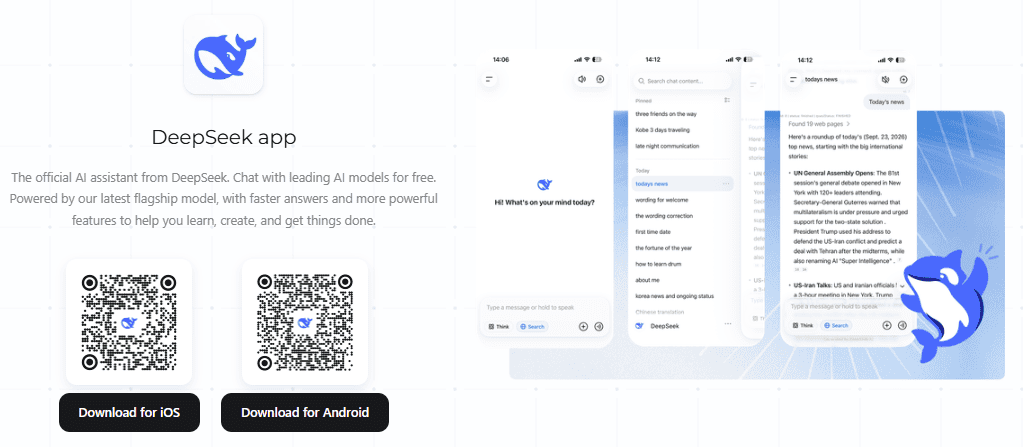
The app is currently described by DeepSeek as a free consumer assistant. This should not be interpreted as a permanent promise of unlimited messages or unrestricted access to every model and feature.
How to write an effective DeepSeek prompt
A strong prompt gives the model enough information to understand both the task and the expected result. Use the following components when they are relevant:
| Prompt component | Question to answer | Example |
|---|---|---|
| Goal | What should DeepSeek do? | Create a study plan |
| Context | What background does it need? | I have an exam in seven days |
| Input | What material should it use? | Use the attached course outline |
| Audience | Who will use the result? | A high-school biology student |
| Constraints | What limits must it follow? | I can study for 60 minutes per day |
| Output format | How should the answer be organized? | Use a seven-row table |
| Verification | What should it check or label? | Mark topics not covered by the file |
You do not need all seven parts in every request. Add only the details that remove ambiguity or materially improve the result.
Weak prompt vs. improved prompt
Weak prompt:
Help me study biology.Improved prompt:
Create a seven-day study plan for a high-school biology exam.

Context:
- I can study for 60 minutes per day.
- The exam covers cell biology, genetics, and ecology.
- Genetics is my weakest topic.

Output:
Use a table with one lesson, one active-recall activity, and three practice questions for each day.

Do not invent topics outside the subjects I listed.
Reusable DeepSeek prompt template
Task:
[State exactly what you want DeepSeek to do.]

Context:
[Provide the background needed to understand the task.]

Input:
[Paste the relevant text, data, code, or describe the attached file.]

Audience:
[State who the result is for.]

Requirements:
- [Requirement 1]
- [Requirement 2]
- [Requirement 3]

Output format:
[Specify a table, checklist, email, explanation, code patch, or another format.]

Verification:
[Ask for sources, assumptions, page references, calculations, or clearly labeled uncertainty.]
Use follow-up prompts instead of starting over
The first response is often a draft. Continue in the same conversation when the next request depends on the existing context.
Explain that in simpler language.Give me one concrete example.List the assumptions you made.Separate verified facts from suggestions.Identify the claims that need an external source.Turn the answer into a comparison table.Show only the changes you recommend.Check the calculation using a second method.Rewrite this for a nontechnical audience.State what cannot be verified from the information provided.
Start a new chat when you change to an unrelated subject, switch clients or projects, or notice that earlier instructions are interfering with the new task.
Choose the right DeepSeek mode
DeepSeek’s interface has changed during 2026. The official August release documentation says that V4 Pro is available in the app and web interface through Expert Mode. Later mobile-app release notes say that Instant, Expert, and Vision modes were unified, so screenshots in older tutorials may not match your current version.
Use the following principles rather than depending on one permanent button layout:
| Task | Suggested approach | What to expect |
|---|---|---|
| Simple rewriting, summarization, or explanation | Use the standard or faster experience | A quicker answer is usually more useful than maximum reasoning |
| Difficult mathematics, debugging, planning, or multi-step analysis | Use Expert Mode or the strongest reasoning option currently shown | The response may take longer and use more reasoning |
| Current news, prices, laws, or product information | Enable web search | The answer may include source links that still require checking |
| Screenshot, chart, or photograph analysis | Attach the image in the standard multimodal experience | DeepSeek can describe or analyze the image and return text |
| Document-specific work | Attach the file and explicitly restrict the answer to its contents | The model can summarize or extract information, but you should compare it with the original |
The current DeepSeek changelog states that the web and app use DeepSeek-V4.1-Flash-1017. The API model catalog lists vision support for deepseek-flash but not for deepseek-v4-pro. Do not assume that every mode supports the same attachments or visual tasks.
How to use DeepSeek web search
Use web search when the correct answer may depend on information that changes over time. Examples include news, prices, product specifications, laws, public office-holders, schedules, software documentation, and recent scientific findings.
- Open the search or tools control currently shown near the message composer.
- Enable Search before sending the request.
- Include the relevant country, date, product version, or other scope in the prompt.
- Ask DeepSeek to cite the source supporting each important claim.
- Open the original source rather than relying only on DeepSeek’s summary.
- Check both the publication date and the date on which the reported event occurred.
- Compare high-impact claims with a second authoritative source.
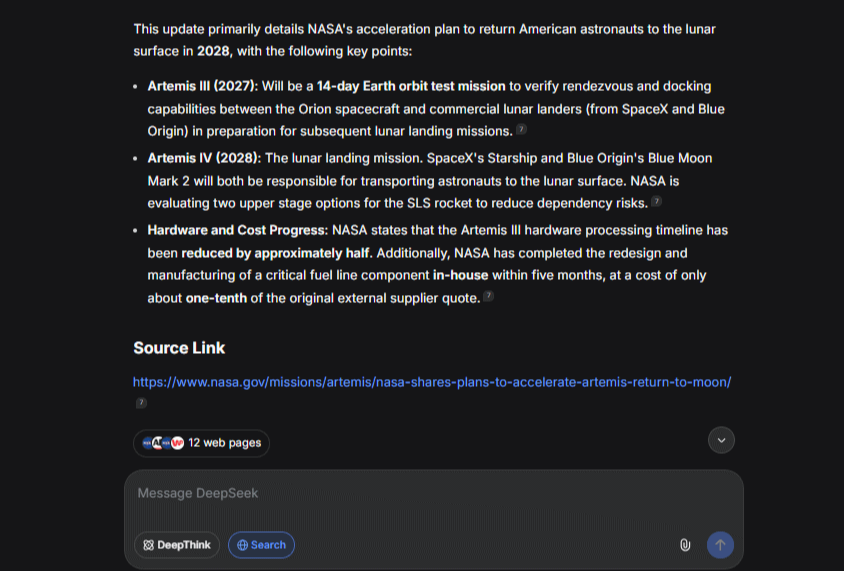
A useful research prompt is:
Research the current requirements for [topic] as of November 6, 2026.

Requirements:
- Prioritize official or primary sources.
- Cite the source beside each important factual claim.
- Distinguish the source's statement from your interpretation.
- Include the publication date and event date when relevant.
- State clearly when reliable sources disagree.
- Do not fill missing facts with assumptions.
DeepSeek opened its in-house Search and Fetch APIs to developers in October 2026, but consumer search and developer APIs are different products. Search inside the app does not mean that a separate API call is free or that every model automatically has the same search behavior.
How to upload files and images
Before attaching anything, remove passwords, API keys, personal identifiers, confidential business information, health records, legal documents, financial details, and customer data unless you are authorized to process them through the service.
- Open the attachment or upload control in the current web or mobile interface.
- Select a file or photo supported by the on-screen file picker.
- Wait for the attachment to finish processing before sending the task.
- Tell DeepSeek exactly how the attachment should be used.
- Ask for page, section, heading, row, or visible-area references where possible.
- Compare the answer with the original file before using it.
DeepSeek has not published one permanent public list covering every consumer-app file type and upload limit in the sources checked for this guide. Use the formats accepted by your current file picker, and do not assume that limits documented for the developer API also apply to the consumer app.
Prompt for analyzing a document
Use only the attached document.

Create:
1. A five-point summary of its main findings.
2. A table of important dates, amounts, and responsibilities.
3. A list of unanswered questions.

For every finding, identify the supporting page, section, or heading.

Do not add general knowledge that is not in the document. If the file does not support an answer, say so clearly.
Prompt for analyzing a screenshot or chart
Analyze the attached image.

First, describe only what is visibly present.
Then:
- extract the visible text
- explain the chart or interface
- identify any values that are unclear
- separate direct observations from your interpretation

Do not guess text or numbers that cannot be read reliably.
DeepSeek’s current Flash model supports visual understanding, including describing images, reading screenshots, and analyzing charts. Visual understanding does not automatically mean that the normal DeepSeek chat can generate or professionally edit a new image.
How to use DeepSeek for studying
DeepSeek is most useful for learning when it helps you retrieve, apply, and test knowledge instead of simply completing the work for you.
Teach me [topic] using active recall.

My level:
[Beginner, high-school, university, or professional]

Process:
1. Explain one concept at a time.
2. Ask me a question before showing the answer.
3. Wait for my response.
4. Correct the answer and explain the mistake.
5. Increase the difficulty gradually.
6. End with a five-question quiz.

Do not reveal every answer before I attempt it.
You can also ask DeepSeek to convert your own notes into flashcards, build a revision schedule, generate practice questions, or explain why an answer is incorrect. Check course rules before using AI for assignments, examinations, or graded work.
How to use DeepSeek for writing
For useful writing assistance, provide the purpose, audience, tone, length, required points, and any wording that must remain unchanged.
Rewrite the text below as a professional email.

Audience:
A client who is not technical.

Goal:
Explain that the delivery date has moved by three business days.

Tone:
Calm, accountable, and direct.

Requirements:
- Keep it under 180 words.
- Do not blame another team.
- Preserve all dates and commitments.
- End with one clear next step.

Text:
[Paste the draft here]
Review the finished text for factual accuracy, invented details, tone, and statements that could create a commitment you did not intend. Generated writing is not automatically original, legally safe, or suitable for publication without human review.
How to use DeepSeek for research
A research prompt should define the question, source quality, date range, geographic scope, and expected evidence. Search results are more useful when DeepSeek is required to show where each conclusion came from.
Research [question].

Scope:
- Region: [country or market]
- Date range: [start date to end date]
- Audience: [who will use the report]

Source rules:
- Prioritize official documents, original research, and primary data.
- Use independent reporting only for context or disputed claims.
- Exclude affiliate pages and copied summaries.
- Cite each important factual claim.
- Flag conflicting evidence.
- Do not present an inference as a confirmed fact.

Output:
1. Direct answer
2. Key evidence
3. Important limitations
4. Practical conclusion
5. Sources checked
After receiving the answer, open the cited pages and confirm that the source supports the exact claim. A source link can be real while the model’s interpretation of it is still incorrect.
How to use DeepSeek for coding
Provide enough technical context for DeepSeek to reproduce or reason about the problem. Include the programming language, framework version, operating environment, expected behavior, actual behavior, relevant code, and complete error message.
Debug the following issue.

Language and version:
Python 3.12

Framework:
FastAPI [version]

Environment:
[Operating system and deployment environment]

Expected behavior:
[Describe what should happen.]

Actual behavior:
[Describe what happens.]

Error:
[Paste the complete error message.]

Relevant code:
[Paste the smallest code sample that reproduces the issue.]

Before proposing a patch:
1. Explain the likely cause.
2. Identify any assumptions.
3. Limit the change to the relevant code.
4. Include tests for the fix.
5. Do not invent library methods.
6. Flag any security implications.
Never paste API keys, .env files, production credentials, private repositories, customer records, or logs containing personal data. Read generated code, review dependencies, and run tests in an isolated environment before using the change in production.
How to verify DeepSeek’s answers
| Type of output | How to verify it |
|---|---|
| Factual answer | Open the original sources, check dates, and compare important claims with another authoritative source |
| Calculation | Request the inputs and formula, then recalculate independently and check units |
| Code | Read the change, review dependencies, run tests, and inspect security and edge cases |
| Document summary | Request page or section references and compare each major finding with the file |
| Translation | Review terminology, names, numbers, and specialist language with a qualified speaker when accuracy matters |
| Medical, legal, or financial guidance | Use the answer only as general information and consult an appropriately qualified professional |
Reasoning modes, search tools, citations, and requests to “double-check” can improve an answer, but none of them guarantees correctness. DeepSeek’s own privacy policy states that generated words may not always be the most factually accurate.
DeepSeek privacy and safe-use settings
The current DeepSeek Privacy Policy says the covered services may collect account information, prompts, chat history, voice input, uploaded files, photos, feedback, device and network details, usage logs, and approximate location based on an IP address.
The policy says that personal data collected through the covered services is directly collected, processed, and stored in the People’s Republic of China. It also states that user input may be used to improve services and train or optimize DeepSeek’s technology.
Depending on location and applicable law, users may have the right to opt out of having personal data used for model training or technology optimization. The policy also says users can manage, copy, or delete chat history through available settings and can delete their account.
Practical privacy checklist
- Remove passwords, authentication tokens, API keys, and private encryption keys.
- Redact names, addresses, account numbers, and other personal identifiers.
- Do not upload confidential client or company documents without authorization.
- Avoid health, legal, financial, employment, or customer records unless an approved process allows it.
- Check your employer’s, client’s, or school’s AI-use policy.
- Review the privacy settings currently available in your account.
- Delete conversations or uploaded material when you no longer need them, where the relevant controls are available.
- Review the policy of a third-party DeepSeek interface separately; DeepSeek’s consumer policy may not cover it.
Is DeepSeek free to use?
DeepSeek currently markets its official web and mobile assistant as free to use. This does not mean that every DeepSeek-related service is free.
| Product | Cost structure |
|---|---|
| Official web and mobile assistant | Currently offered as a free consumer service, subject to availability and future changes |
| DeepSeek API | Usage-based billing for model input and output, with separate charges for some tools |
| Search and Fetch APIs | Charged per successful request under the current developer pricing |
| Downloadable model weights | The files may be available under their applicable licenses, while hardware and hosting still cost money |
| DeepSeek Harness | The open-source software can involve model API, web tool, plugin, or external-service costs |
| Third-party application | Controlled by the third party’s subscription, credit, and usage rules |
Developers should use the official DeepSeek API pricing page for current rates rather than relying on numbers copied from an older tutorial.
How to use the DeepSeek API
The API is intended for developers who want to use DeepSeek inside an application, script, website, coding tool, or agent. API access is separate from the free consumer chat.
- Create or sign in to an account on the DeepSeek API Platform.
- Create an API key and store it securely.
- Add funds or granted balance as required by the current platform rules.
- Store the key in a server-side environment variable named
DEEPSEEK_API_KEY. - Install a compatible SDK and make a request using a current model name.
- Log errors and usage without exposing the key or sensitive prompt content.
Install the OpenAI Python SDK:
python -m pip install openaiSet the environment variable in your shell before running the program:
export DEEPSEEK_API_KEY="your_api_key_here"On Windows PowerShell, use:
$env:DEEPSEEK_API_KEY = "your_api_key_here"Then make a basic request:
import os
from openai import OpenAI, OpenAIError

api_key = os.environ.get("DEEPSEEK_API_KEY")
if not api_key:
    raise RuntimeError("DEEPSEEK_API_KEY is not set.")

client = OpenAI(
    api_key=api_key,
    base_url="https://api.deepseek.com",
)

try:
    response = client.chat.completions.create(
        model="deepseek-flash",
        messages=[
            {
                "role": "system",
                "content": "You are a clear and careful assistant.",
            },
            {
                "role": "user",
                "content": "Explain caching to a beginner in five bullet points.",
            },
        ],
        stream=False,
    )
    print(response.choices[0].message.content)
except OpenAIError as exc:
    print(f"DeepSeek API request failed: {exc}")
The official first-call documentation currently lists https://api.deepseek.com as the OpenAI-compatible base URL. The current model aliases are deepseek-flash and deepseek-v4-pro.
deepseek-flash currently routes to DeepSeek-V4.1-Flash-1017 and supports image input. deepseek-v4-pro is intended for more demanding text and agent tasks but does not currently list vision support in the official API model table.
Never put an API key in browser-side JavaScript, a public repository, a prompt, a screenshot, or a shared document. Use server-side environment variables or an appropriate secrets-management system.
When to use a local model or DeepSeek Harness
Use a downloadable model when you need infrastructure control
DeepSeek publishes selected model weights through its official Hugging Face organization. Self-hosting may provide more control over model access and infrastructure, but it requires compatible inference software, sufficient hardware, security controls, updates, monitoring, and an understanding of the model’s license.
Hardware needs vary by model size, numerical precision, quantization, context length, and runtime. Do not assume that the largest DeepSeek models will run effectively on a normal personal computer.
Use DeepSeek Harness for agent workflows
DeepSeek Harness connects a model to workspaces, local files, commands, tools, plugins, sessions, and permissions. It is useful for repository work, coding, document processing, research, and custom agent development.
Harness is currently in public preview and its official terms describe agent technology as experimental and not fully secure or ready for production environments. It should not be treated as the easiest way for a beginner to use DeepSeek.
Common DeepSeek problems and what to check
| Problem | What to check |
|---|---|
| The web assistant does not load | Check the official DeepSeek status page and confirm that the URL is correct |
| An old tutorial shows different modes | Update the app and use the controls in the current interface; Instant, Expert, and Vision modes were reorganized during 2026 |
| Expert Mode is not visible | Check the current model selector and app version; the interface may use a unified mode rather than an older separate button |
| Search is unavailable | Confirm that the search control is enabled and that the service is operational on the official status page |
| A file or photo fails to upload | Check the current app’s accepted formats and error message; do not assume that API upload limits apply to the app |
| The answer ignores the attachment | Tell DeepSeek to use only the attached material and request page or section references |
| The response is too general | Add the audience, constraints, examples, and required output format |
| The answer contains a doubtful claim | Ask for a primary source, open it, and verify that it supports the claim |
| The API returns a 401 error | Check that the server-side API key is correct and is being read from the intended environment variable |
| The API returns a 402 or 429 error | Check account balance, request frequency, and current rate or concurrency limits |
| The API returns a 500 or 503 error | Wait briefly, retry with sensible error handling, and check the official service status |
Frequently asked questions
Do I need an account to use DeepSeek?
The current service may ask you to sign in or create an account before using or saving conversations. Use one of the login methods displayed by the official website or app rather than following an outdated tutorial.
Which DeepSeek mode should I use?
Use the standard or faster experience for simple writing, summaries, and explanations. Use Expert Mode or the deepest reasoning option currently available for difficult mathematics, coding, planning, or multi-step analysis. Enable search when the task depends on current web information.
Can DeepSeek analyze a PDF or spreadsheet?
The consumer assistant supports file uploads, but supported formats and limits may vary by current platform and version. Attach the file through the interface, specify the exact task, and ask for page, section, or row references rather than accepting an unsupported summary.
Can DeepSeek analyze an image?
Yes. The current Flash model supports visual understanding, including describing images, reading screenshots, and analyzing charts. Check visually important details yourself because small text and ambiguous elements can be interpreted incorrectly.
Can DeepSeek generate images?
The standard consumer assistant currently focuses on text output and visual understanding. DeepSeek’s separate Janus model family supports image generation, but it is not the same as a built-in image generator inside the normal chat interface.
Does DeepSeek save my conversations?
DeepSeek’s privacy policy says it may collect chat history and other user input. It also says users can manage, copy, or delete chat history through available settings. Review the current settings and policy before entering sensitive information.
The best way to use DeepSeek
The most effective DeepSeek workflow is simple: choose the official web or mobile interface, define one clear task, provide relevant context, select search or attachments only when needed, and improve the answer through focused follow-up prompts.
Use DeepSeek as an assistant rather than an unquestionable authority. Verify factual claims, inspect source documents, test generated code, review sensitive data before uploading it, and move to the API, a local model, or DeepSeek Harness only when those advanced routes solve a specific need.
Official sources checked
Information verified on November 6, 2026. DeepSeek changes its models, modes, interface, prices, and policies frequently. Recheck the official documentation before relying on a specific button, model name, limit, or price.