

DeepSeek web search lets the official DeepSeek assistant retrieve current information from the internet and use it when preparing an answer. General users can access search through DeepSeek Web or the official mobile app, while developers can use separate Search, Fetch, and server-side web_search tools.
Search can improve freshness, but it does not guarantee that every source is reliable or that DeepSeek interprets it correctly. Open the cited pages, check their dates, and confirm that each source actually supports the claim attached to it.
What does DeepSeek web search mean?
The phrase can refer to several different DeepSeek products. Understanding the difference is important because each route has a different interface, output, billing method, and intended user.
| DeepSeek search route | What it does | Best for | How access works |
|---|---|---|---|
| Search inside DeepSeek Web or the mobile app | Retrieves web information and generates a conversational answer | General users, students, and researchers | Used through the official consumer assistant |
| Search API | Returns a ranked list of structured web results in JSON | RAG systems, search interfaces, and source discovery | Requires a DeepSeek API key |
| Fetch API | Retrieves the content of one known URL as Markdown | Reading a selected source after discovering it | Requires a DeepSeek API key |
Server-side web_search | Lets a supported model run searches while generating its answer | Agents and applications that need an answer rather than raw results | Currently supported with deepseek-v4-pro |
| DeepSeek Harness search | Adds search and page retrieval to agent workflows involving files, tools, and workspaces | Developers and advanced agent users | Uses configured search providers and credentials |
| Third-party DeepSeek interface | Depends on the platform operating the interface | Users accessing DeepSeek through another provider | The third party controls features, pricing, and data handling |
The official DeepSeek changelog says the company’s web and API search capabilities are now powered by its in-house search engine. The same announcement states that the official web and app models were updated to DeepSeek-V4.1-Flash-1017 on October 17, 2026.
How to use DeepSeek web search
The exact label and location of the search control can change between DeepSeek Web, iOS, Android, account rollouts, and software versions. The mobile app’s 2026 release notes also show that previously separate Fast, Expert, and Vision modes were merged, so older screenshots may no longer match the current interface.
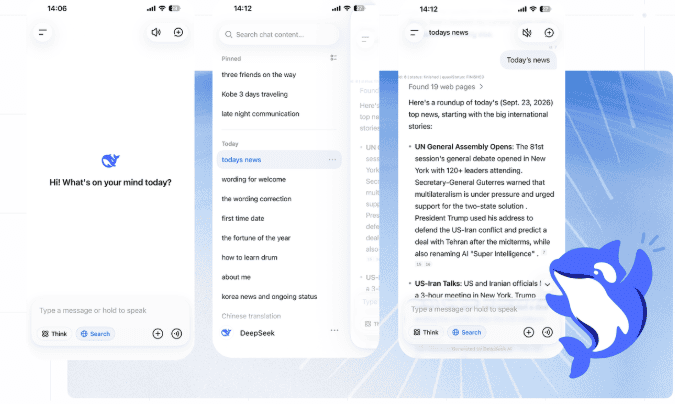
- Open an official DeepSeek service. Use DeepSeek Web or follow the iOS and Android links on the official download page.
- Sign in to your account. DeepSeek’s current terms require users to register through one of the account options displayed by the service.
- Start a new conversation. A clean chat reduces the risk that unrelated earlier instructions will affect the research task.
- Enable the current search control. Use the search option shown near the message composer or inside the available tools. Its wording and position may vary.
- Define the scope. State the topic, country, date range, required source types, and information you need.
- Request source support. Ask DeepSeek to place a source beside each material factual claim and to separate facts from inference.
- Review the answer. Open the source links that matter instead of relying only on the generated summary.
- Refine the search. Ask for newer sources, primary documents, another viewpoint, or a narrower query when the first result is incomplete.
DeepSeek’s original app announcement listed web search as a built-in feature, and the official app page continues to provide a useful distinction between search and deeper reasoning. However, use the controls shown in your current interface rather than relying on the older button arrangement.
A better prompt for DeepSeek Search
A broad request such as “research this product” gives the model too much freedom. A stronger search prompt defines the decision, freshness requirement, geographic scope, preferred sources, and evidence standard.
Research [specific question] as of [exact date].

Scope:
- Country or market: [location]
- Time period: [date range]
- Audience: [who will use the answer]

Source requirements:
- Prioritize official documents, original research, and primary sources.
- Use independent reporting when a claim is disputed.
- Exclude affiliate pages and copied summaries.
- Cite the source supporting each material claim.
- Include the publication date and the date of the event when they differ.
- Separate what the source states from your interpretation.
- Flag disagreements between reliable sources.
- State clearly when the evidence is insufficient.

Output:
1. Direct answer
2. Key evidence
3. Important limitations
4. Practical conclusion
5. Sources checked
A detailed prompt can improve relevance and transparency, but it cannot guarantee that every source will be current, complete, or interpreted correctly.
Example: checking a current product feature
Verify whether [product feature] is officially available as of November 6, 2026.

Use the following source order:
1. The official product page
2. Official documentation
3. Official release notes
4. A reputable independent technical source

For every conclusion:
- include the supporting link
- state the source date
- distinguish current availability from an announced future feature
- identify platform, region, account, or plan restrictions
- do not infer availability from an old screenshot
DeepSeek Search vs. thinking and Expert Mode
Web search and reasoning perform different jobs. Search retrieves external information; reasoning analyzes the question and the information available to the model.
| Feature | Primary purpose | Use it when | Main limitation |
|---|---|---|---|
| Web search | Find recent or external information | The answer depends on news, prices, laws, specifications, schedules, or recent research | Retrieved sources can still be weak, outdated, or misinterpreted |
| Thinking or reasoning | Analyze a difficult problem in more depth | The task involves mathematics, code, planning, comparison, or several logical steps | More reasoning does not guarantee factual accuracy |
| Expert or model-selection mode | Select a more capable model or behavior where the current interface offers it | The task needs stronger analysis or agent capabilities | Its label, availability, and compatible tools can change |
| Search plus reasoning | Retrieve evidence and analyze it | The task requires both fresh information and a reasoned conclusion | It is not automatically a systematic review or expert assessment |
DeepSeek made V4 Pro available through Expert Mode in August 2026, but later app release notes stated that Fast, Expert, and Vision modes had been unified. Treat current interface labels as product details that may change rather than permanent instructions.
Do not assume that DeepThink or another reasoning option automatically searches the internet. Likewise, enabling Search does not guarantee that the model will perform the deepest available analysis.
How to verify DeepSeek’s sources
A real citation does not prove that the generated sentence is correct. DeepSeek may attach the wrong source to a claim, misunderstand a page, combine a source with unsupported model knowledge, or confuse an article’s publication date with the date of the event.
- Identify the decision-critical claims. Focus on facts that affect money, safety, compliance, purchasing, or an important conclusion.
- Open the original page. Do not rely only on the title, snippet, or DeepSeek’s summary.
- Find the supporting passage. Confirm that the source explicitly supports the claim.
- Check both dates. The publication date and event date may be different.
- Prefer primary sources. Use official documentation, original research, court or government records, company filings, and first-party announcements where appropriate.
- Trace repeated claims. Several articles may all repeat one unverified original report.
- Compare critical facts. Use another independent authoritative source when the conclusion has meaningful consequences.
- Separate evidence from inference. A conclusion generated by DeepSeek may be reasonable without being directly stated in a source.
For medical, legal, financial, scientific, and cybersecurity questions, use DeepSeek Search to locate evidence—not as a substitute for qualified professional review or a specialist research database.
What DeepSeek web search can and cannot access
DeepSeek can discover and summarize publicly accessible pages that its search and retrieval systems can process. It should not be treated as unrestricted access to the entire internet.
| Potentially useful for | Do not assume it can access |
|---|---|
| Public company announcements | Private accounts or internal company systems |
| Public documentation and release notes | Pages that require your personal login |
| Public news and government pages | Every paywalled article |
| Public research pages and repositories | Every subscription academic database |
| Public product pages and schedules | Content blocked by a site’s access policies |
| Pages with extractable text | Every interactive, visual, or JavaScript-dependent element |
The official Fetch documentation states that retrieval is subject to the target site’s availability and access policies. It can also fail when a URL is unavailable, the content type is unsupported, site policy blocks access, or no usable Markdown can be extracted.
Web search is also not the same as a systematic literature review, legal discovery process, internal enterprise search, or a dedicated academic database search. Those workflows require specialized coverage, reproducible methods, and additional quality controls.
Useful DeepSeek search workflows
| Task | Useful instruction | What to verify manually |
|---|---|---|
| Recent software change | Prioritize official documentation and release notes; identify the applicable version | Version number, release channel, and effective date |
| Law or regulation | Use official government or regulator sources and state the jurisdiction | Effective date, scope, amendments, and professional interpretation |
| Current product comparison | Use official specification and pricing pages for each product | Plan, market, tax, availability, and comparison date |
| Academic research | Locate original papers, DOI records, and institutional pages | Study design, publication status, sample, and limitations |
| News verification | Separate the latest event from follow-up commentary | Event time, original source, and independent confirmation |
| Local information | Specify the city, country, date, and required official source | Time zone, location, operating status, and last update |
DeepSeek Search API vs. Fetch API vs. web_search
Developers have three distinct routes for adding current web information to an application. Choosing the correct one prevents unnecessary model calls and makes the data flow easier to understand.
| Developer route | Input | Output | Who writes the final answer? | Best use |
|---|---|---|---|---|
| Search API | A search query | Ranked structured results in JSON | Your application or a separate model call | Discovery, RAG, search interfaces, and source selection |
| Fetch API | One known URL | Page title and Markdown content | Your application or a separate model call | Reading a selected page |
Responses API web_search | A model prompt plus a tool definition | A model-generated answer and search tool records | DeepSeek-V4-Pro | Agents that should search while composing an answer |
Anthropic-compatible web_search | A Messages API request with a server tool | Tool-use blocks, search results, and generated text | DeepSeek-V4-Pro | Claude-compatible applications and tools |
| Harness search and fetch | An agent tool request | Results passed into the agent workflow | The configured conversation model | Repository, research, and automation agents |
How to use the DeepSeek Search API
The standalone Search API is useful when your application needs the results themselves rather than an immediate conversational answer. The official Search API reference documents the endpoint as:
POST https://api.deepseek.com/v1/tools/searchThe required query must contain between 1 and 128 Unicode characters. The optional count accepts 1 to 50 results and defaults to 10.
A minimal cURL request is:
curl --silent --show-error --max-time 60 \
  "https://api.deepseek.com/v1/tools/search" \
  --header "Authorization: Bearer ${DEEPSEEK_API_KEY}" \
  --header "Content-Type: application/json" \
  --data '{
    "query": "DeepSeek Search API documentation",
    "count": 5,
    "need_content": false
  }'
Set DEEPSEEK_API_KEY in a secure server-side environment before running the request. Never place a production key in browser JavaScript, a public repository, a screenshot, or a shared document.
Search API request options
| Field | Purpose |
|---|---|
query | The required search query |
count | The number of results to return, from 1 to 50 |
ori_question | The user’s original question, which can help DeepSeek interpret the search query |
localization | An optional IP address used to localize results |
need_content | Requests page content in the result when available |
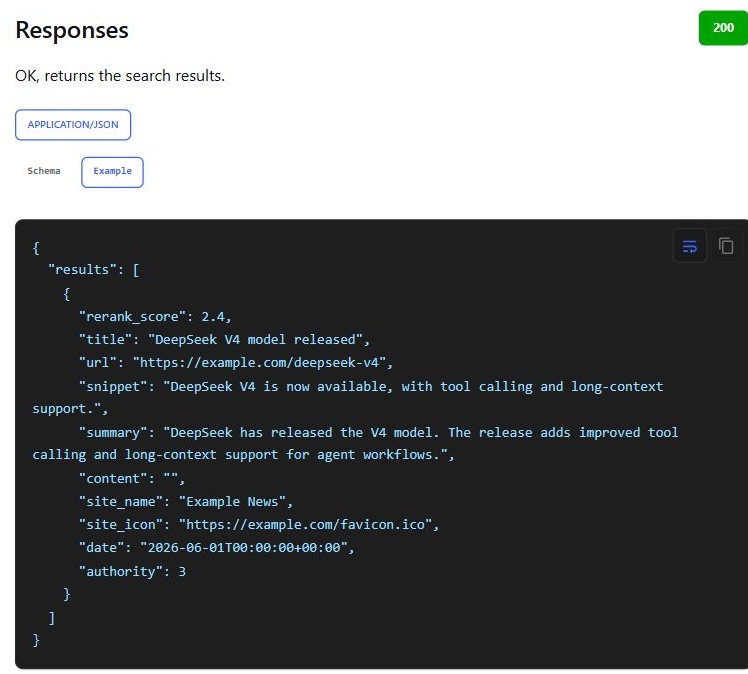
A result can include a title, URL, snippet, longer summary, page content, site name, publication date, relevance score, and an authority tier. These scores are DeepSeek’s own ranking signals; they should not be treated as independent proof that a page is accurate or trustworthy.
DeepSeek Search query operators
The standalone API supports operators that make searches more precise:
| Operator | Example | Purpose |
|---|---|---|
site: | DeepSeek site:github.com | Restrict results to a domain |
-site: | DeepSeek -site:example.com | Exclude a domain |
-term | DeepSeek -advertisement | Exclude pages containing a term |
| Exact phrase | "DeepSeek Search API" | Match a phrase exactly |
lang: | DeepSeek lang:en,fr | Restrict results to specified languages |
after: | DeepSeek after:2026-01-01 | Request pages published after a date |
before: | DeepSeek before:2026-10-01 | Request pages published before a date |
These operators are documented for the standalone Search API. Do not assume that the consumer chat passes every search operator through unchanged; use natural-language instructions there unless current interface behavior confirms otherwise.
How to use the DeepSeek Fetch API
Search discovers possible pages. Fetch reads one URL that your application has already selected.
The official Fetch API reference documents this endpoint:
POST https://api.deepseek.com/v1/tools/fetchA minimal request is:
curl --silent --show-error --max-time 60 \
  "https://api.deepseek.com/v1/tools/fetch" \
  --header "Authorization: Bearer ${DEEPSEEK_API_KEY}" \
  --header "Content-Type: application/json" \
  --data '{
    "url": "https://api-docs.deepseek.com/guides/search/"
  }'
The URL must use HTTP or HTTPS, include a host, contain no username or password, and remain within the current 8,192-character limit. A successful response contains the page title and extracted Markdown.
Fetch can return an error when the site rejects access, the URL is unavailable, the content type is unsupported, or the page has no extractable Markdown. It does not guarantee reproduction of interactive features, images, charts, or the page’s complete visual layout.
Using server-side web_search in the Responses API
The Responses API can let the model search while it generates an answer. According to the current Responses API guide, the built-in web_search tool is supported with deepseek-v4-pro and ignored with deepseek-flash.
This model requirement is important: a request can include a search tool without producing a search if the selected model does not support it.
import os

from openai import OpenAI, OpenAIError

api_key = os.environ.get("DEEPSEEK_API_KEY")
if not api_key:
    raise RuntimeError("DEEPSEEK_API_KEY is not set.")

client = OpenAI(
    api_key=api_key,
    base_url="https://api.deepseek.com",
)

try:
    response = client.responses.create(
        model="deepseek-v4-pro",
        tools=[{"type": "web_search"}],
        input=(
            "Research the current DeepSeek Search API pricing. "
            "Use official DeepSeek sources and state the verification date."
        ),
    )

    print(response.output_text)
    print(response.usage)
except OpenAIError as exc:
    print(f"DeepSeek request failed: {exc}")
The response usage can report successful searches and page reads separately from model tokens. Search and Fetch operations are billed independently from the input and output tokens consumed while the model prepares the answer.
The official Anthropic-compatible API also supports server-side web search. Its responses can contain tool-use blocks, web-search results, generated text, and usage counters. Declaring the tool does not guarantee that the model will use it unless the request and tool-selection behavior require a search.
DeepSeek Search and Fetch pricing
The following developer pricing was verified on November 6, 2026. It applies to the standalone APIs and successful server-side Search or Fetch operations triggered through supported DeepSeek API integrations.
| Service | Current price | What becomes billable? |
|---|---|---|
| Search API | $0.75 per 1,000 successful requests | An HTTP 200 response with at least one search result |
| Fetch API | $0.75 per 1,000 successful requests | An HTTP 200 response that returns page content |
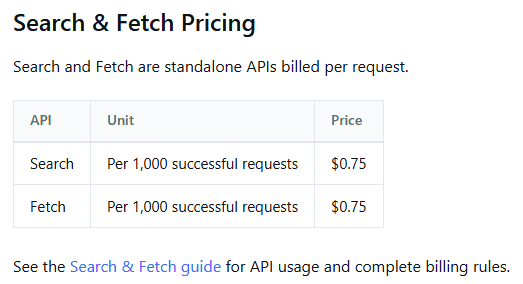
Failed requests, empty Search results, and timeouts are not billed under the current rules. Increasing count changes the number of Search results returned but not the per-request price.
Model charges are separate. When deepseek-v4-pro searches and then writes an answer, the account can incur Search or Fetch request charges plus the applicable input, cached-input, reasoning, and output token charges. Check the current models and pricing page before estimating a production workflow.
Current rate limits
| API | Current account-level limit |
|---|---|
| Search | 100 requests per second |
| Fetch | 25 requests per second, plus a separate per-domain limit |
The limits apply at the account level, regardless of which API key is used. They are separate from model concurrency limits. Requests that exceed the applicable Search or Fetch limit return HTTP 429.
Is DeepSeek web search free?
DeepSeek currently presents its official consumer web and mobile assistant as free, and it does not list a separate consumer charge for using web search where the feature is available. This does not establish permanent unlimited search access or guarantee that every account, mode, platform, or region has identical availability.
The developer Search and Fetch APIs are paid services. A free consumer search feature does not provide free API requests or model-token usage for a developer application.
DeepSeek search privacy
Do not enter confidential search queries merely because search is convenient. A query can reveal project names, planned transactions, health concerns, legal problems, customer identities, security vulnerabilities, or other sensitive information.
The current DeepSeek Privacy Policy says the covered services may collect prompts, uploaded files, photos, chat history, device and network information, usage logs, and approximate location based on an IP address. It also states that personal data collected through the services is directly collected, processed, and stored in the People’s Republic of China.
There is an important detail to evaluate carefully. DeepSeek’s October 2026 changelog says its web and API search use an in-house search engine. The February 2026 privacy policy still says DeepSeek may integrate third-party APIs for search services and share input keywords with those providers.
These statements are not necessarily mutually exclusive because different products, fallbacks, regions, or supporting services may have different data paths. However, they do mean users should not assume that every search query remains entirely within one isolated system.
- Do not search for passwords, API keys, private tokens, or authentication details.
- Avoid confidential client, employee, medical, legal, financial, or security information.
- Use generic descriptions instead of secret project names where possible.
- Check your employer’s data-classification and AI-use policies.
- Review a third-party DeepSeek interface’s privacy policy separately.
- Developers must disclose their own downstream application’s data practices to end users.
The policy also says eligible users may have the right to opt out of using personal data for model training or technology optimization and can manage, copy, or delete chat history through available settings.
Common DeepSeek search problems
| Problem | What to check |
|---|---|
| The search control is missing | Update the official app, inspect the current tools menu, and remember that modes and controls were reorganized during 2026 |
| An old tutorial shows different buttons | Follow the current interface rather than DeepThink, Instant, Expert, or Vision screenshots from an older version |
| Search is temporarily unavailable | Check the official DeepSeek status page for Search Service or Chat Service incidents |
| The answer provides no sources | Enable the current search control and explicitly request source links for each material claim |
| The sources are irrelevant | Add a country, date range, official-source requirement, or narrower subject to the prompt |
| The answer ignores the required date | Repeat the cutoff date and ask DeepSeek to exclude sources outside it |
| A source link does not support the claim | Treat the claim as unverified and ask for a primary source or another independent source |
| Search API returns HTTP 400 | Correct the request body, query length, result count, headers, or JSON format |
| Search API returns HTTP 401 | Check whether the API key is missing or invalid |
| Search API returns HTTP 402 | Check the account balance and top up the developer account if required |
| Search or Fetch returns HTTP 429 | Reduce request frequency and observe the account-level QPS limit |
| Fetch returns HTTP 403 | The request was rejected by a security policy; do not attempt to bypass the restriction |
| Fetch returns HTTP 404 | The URL may be unavailable, blocked, unsupported, or missing extractable content |
web_search is never called | Confirm that the request uses deepseek-v4-pro; the Responses API currently ignores this built-in tool with deepseek-flash |
Frequently asked questions
Can DeepSeek search the live web?
Yes. DeepSeek provides web search through its consumer assistant and also offers developer Search, Fetch, and server-side web-search tools. The company currently describes its web and API search as powered by an in-house search engine.
Is DeepSeek web search available on mobile?
Web search is an official feature of the DeepSeek app. The control’s current label and placement may differ between iOS, Android, app versions, and account rollouts, so use the tools shown in the current official app.
Can DeepSeek search one specific website?
In the consumer chat, ask DeepSeek to limit its research to the named official domain and verify the returned links. The standalone Search API formally supports the site: operator for domain-restricted searches.
Can DeepSeek filter search results by date or language?
The standalone Search API supports after:, before:, and lang: operators. In the consumer assistant, state the date range and language in natural language and inspect the resulting sources.
Can DeepSeek access paywalled pages?
Do not assume it can. Search may discover a paywalled page, but Fetch and the consumer assistant remain subject to the site’s availability and access policies. A title or snippet is not evidence that the complete article was retrieved.
Is DeepSeek Search the same as deep research?
No. Web search retrieves sources and helps generate an answer. A rigorous deep-research workflow may require repeated searches, explicit source inclusion criteria, conflicting-evidence review, complete document reading, reproducible methods, and human verification.
Can a locally installed DeepSeek model search the internet?
Not by itself. A local model needs a separate search tool, browser, retrieval service, or agent framework connected to it. Once an external search service is added, the complete workflow is no longer necessarily offline.
The bottom line
DeepSeek web search is useful when a question depends on recent or external information. For most users, the correct workflow is to enable search in the official assistant, define the topic and date precisely, request primary sources, and open the cited pages before relying on the answer.
Developers should choose the standalone Search API when they need structured result discovery, Fetch when they already know which page to read, and server-side web_search when deepseek-v4-pro should search while composing an answer. Search charges, model-token charges, privacy, and source reliability remain separate considerations.
Official sources checked
Information verified on November 6, 2026. DeepSeek can change its search interface, supported models, prices, limits, and privacy terms. Check the current official documentation before publishing instructions or deploying a production integration.
- Official DeepSeek website and official app download page
- Official DeepSeek API changelog
- Official Search and Fetch guide
- Official Search API reference and Fetch API reference
- Official Responses API guide and Anthropic-compatible API guide
- Official models and pricing and rate-limit documentation
- Current DeepSeek Privacy Policy
- Official DeepSeek service-status page