

Published: November 7, 2026.
DeepSeek for research works best as an assistant for reading, organizing, and questioning evidence—not as a replacement for the evidence itself. You can use it to refine a research question, extract information from papers, compare findings, and develop a draft that you verify against the original sources.
The important boundary is accuracy. DeepSeek’s own privacy policy warns that generated responses may not be factually accurate. A convincing explanation, a working link, or a polished bibliography does not establish that a conclusion is supported.
Think of a DeepSeek research assistant as a workflow you supervise: define the question, collect sources, extract evidence, compare results, and check the final claims. The steps below show how to do that without handing over responsibility for your research.
Where DeepSeek fits in a research project
Start with a specific task and an output you can inspect. “Extract the study design and limitations from this paper” gives you something concrete to check. “Research this topic and write my literature review” combines too many decisions into one response.
| Research task | Useful output to request | Your responsibility |
|---|---|---|
| Refining a topic | Focused questions, search terms, and possible scope boundaries | Check feasibility and avoid assuming a suggested question is original. |
| Reading a paper | A structured summary with references to identifiable passages | Confirm the methods, findings, numbers, and qualifications. |
| Comparing studies | A literature review matrix showing agreements and differences | Check whether the studies examine comparable populations, methods, and outcomes. |
| Planning data analysis | Suggested analytical steps, code, or questions about assumptions | Run and validate the analysis in an appropriate environment. |
| Drafting a synthesis | A provisional explanation based on verified notes | Verify every substantive claim and retain conflicting evidence. |
For a first project, use one published paper and one narrowly defined question. Check the extraction before expanding to multiple sources. This gives you a manageable way to judge whether the assistance is useful for your particular material.
Before you begin: check access, search tools, and privacy
Use the links on the official DeepSeek website to open its web chat or find the official app. Start a separate conversation for your project so unrelated instructions and material do not become part of your working context.
Web search and reasoning are different capabilities. DeepSeek’s current change log documents web and API search, while its Thinking Mode documentation describes reasoning controls. A longer reasoning response is not evidence that the system searched for recent publications.
For current information, use the search control available in your version and inspect the resulting sources. Do not assume that typing “search the web” activates a tool. For document analysis, DeepSeek’s official app documentation lists file upload and text extraction, but an uploaded attachment is not proof that every page, table, or equation was processed correctly.
Decide what you are allowed to upload
DeepSeek’s privacy policy says it may collect prompts and uploaded files, describes processing and storage of personal data in China, and warns users not to submit sensitive personal data. Review the policy that applies to your specific service; third-party applications have their own data-handling responsibilities.
Do not submit sensitive personal information. Before sharing other nonpublic material—such as an unpublished manuscript, internal report, or proprietary dataset—check your institution’s authorization for that service and workflow. Removing names alone should not be treated as permission to upload.
For an initial trial, choose public research material you are permitted to use. Keep participant records, confidential peer-review documents, and restricted organizational information out of the experiment.
How to use DeepSeek for research: a source-first workflow
1. Turn a broad topic into an answerable question
Specify what you want to understand, the relevant population or setting, and the kind of evidence that would answer the question. Add a comparison or time frame when it matters.
For example, “effective study methods” is a broad topic. “Does retrieval practice outperform concept mapping when learning from educational texts?” gives you a comparison to investigate. It does not assume that one method wins.
Help me refine this research topic: [TOPIC].

Project type and audience: [PROJECT AND AUDIENCE].
Constraints: [TIME, AVAILABLE SOURCES, OR OTHER LIMITS].

Propose three answerable research questions.
For each, identify the population or context, any relevant comparison,
the outcome of interest, and reasonable scope boundaries.

Suggest search terms, but do not invent publications or references.
Do not claim that a question is novel.
Label assumptions and identify decisions I still need to make.
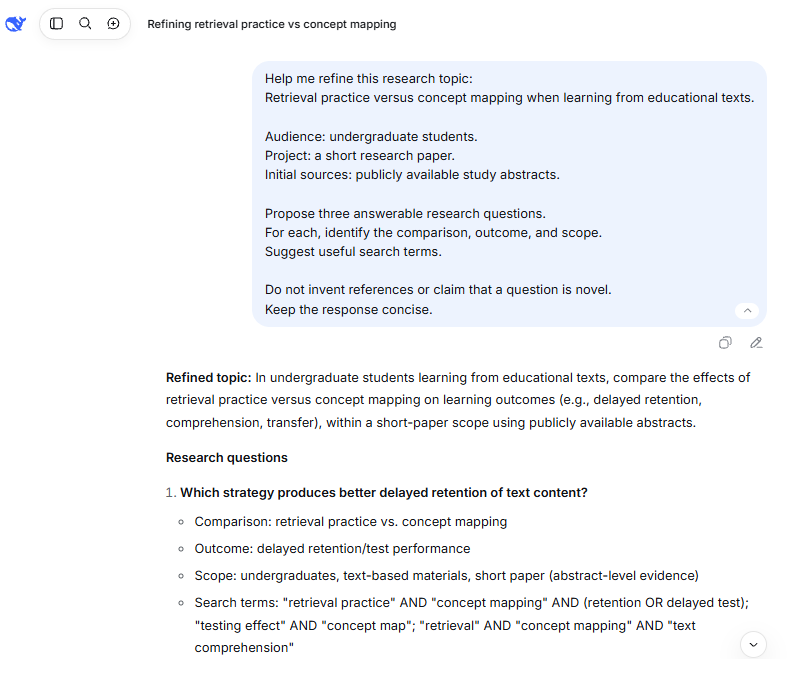
What to check: Choose a question that matches your assignment or project and available evidence. Treat a suggested research gap as a hypothesis to investigate, not proof that nobody has studied the topic.
2. Find sources and build a source inventory
Use DeepSeek to develop search language, then look for actual publications through your discipline’s databases, your library, and scholarly search tools. For the example question, a starting search could be "retrieval practice" "concept mapping". Refine it as you learn the field’s terminology.
Google Scholar’s search guidance explains how to find recent papers, follow “Cited by” and “Related articles,” and locate accessible versions through library links or “All versions.” These are useful next steps when a chat response supplies only a title or an abstract.
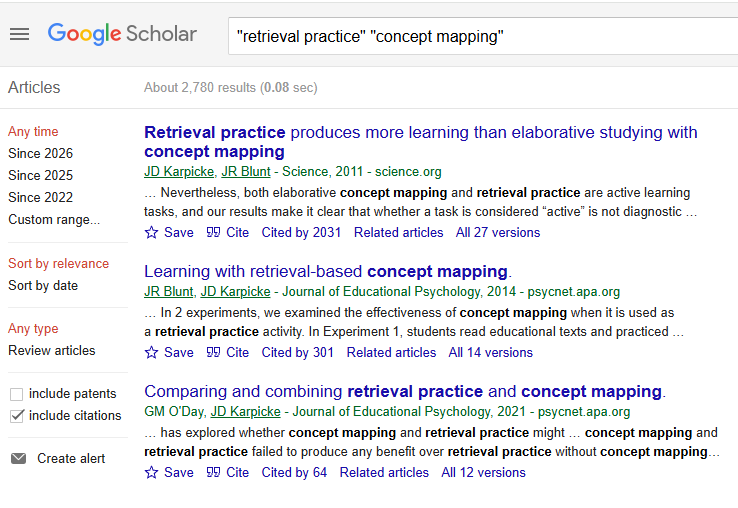
Give each source a stable identifier such as S1 or S2. Save its title, authors, publication year, DOI or stable URL, publication type, and the material you actually obtained: full text, abstract, or selected sections. Do not let an abstract-only record quietly become a full-paper summary later.
Keep this inventory outside the conversation. A reference manager such as Zotero can store, organize, and cite bibliographic sources. Use the original records to populate your library rather than asking DeepSeek to reconstruct missing reference details.
3. Summarize each paper before combining sources
Provide a paper or a clearly labeled excerpt you are permitted to share. For a long document, begin with the sections relevant to your question rather than requesting a sweeping summary immediately.
Ask for a structured extraction that preserves the distinction between what the authors report and what the assistant infers. A useful research paper summary should tell you what was studied, how it was studied, what was found, and what limits the interpretation.
Analyze source S1 using only the material supplied below or attached.

Identify the available material: abstract, selected sections, or full text.
Extract:
- Research question
- Study design, setting, and sample, when reported
- Main findings, including numbers only when present in the source
- Limitations explicitly stated by the authors
- Questions that require further checking

For each finding, provide an identifiable section, table, or supplied
page number. Do not invent page numbers, quotations, or references.

Separate the authors' statements from your interpretation.
Use "Not available in the supplied text" for missing information.

Source material: [SOURCE TEXT OR ATTACHMENT]
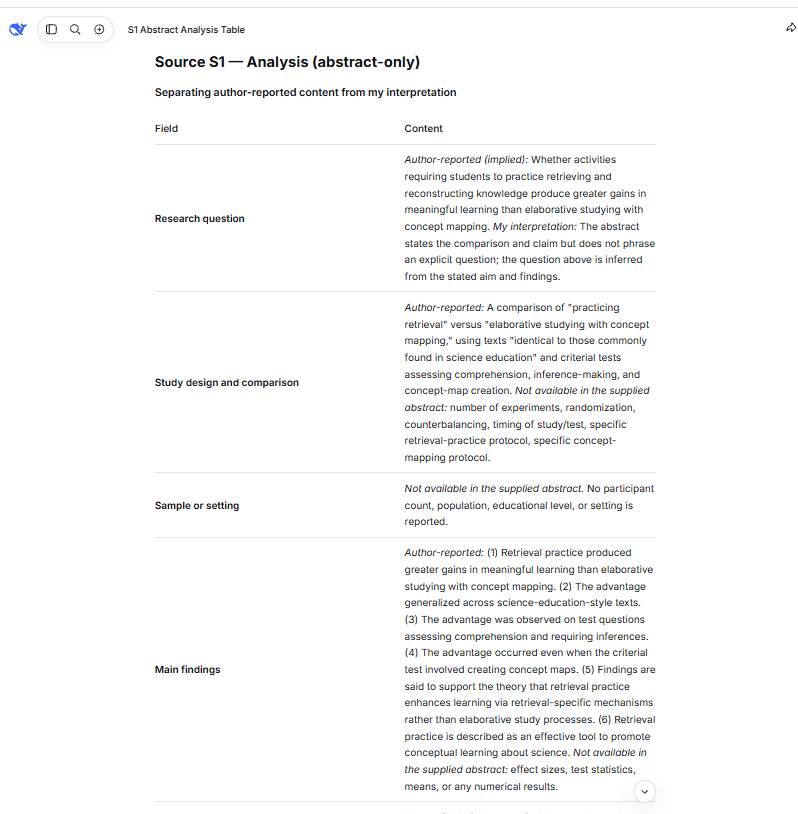
What to check: Compare the extraction with the original. Pay particular attention to sample descriptions, units, comparison groups, and the difference between an observed relationship and a causal claim. The assistant’s statement that it read the full paper is not a substitute for checking its coverage.
When only an abstract is available, keep the summary at abstract level. Missing methodological detail should remain missing—not be filled in with what a typical study might have done.
4. Build a literature review matrix that preserves differences
After checking individual summaries, compare the sources. A literature review matrix is useful because it makes differences visible before they disappear into a smooth paragraph.
Use a consistent structure: source ID, study setup, relevant finding, and limitations with a source location. Keep the population, comparison, outcome, and follow-up period visible when those details affect interpretation.
Compare the verified source notes below using only sources S1 through [SN].

Create a matrix with these columns:
Source ID | Study setup | Relevant finding | Caveat and source location

Then explain:
1. Where the sources agree
2. Where they conflict
3. Where different methods or outcomes make comparison uncertain

Do not treat multiple reports of the same study as independent evidence.
Do not invent missing details or calculate a pooled result.
Use "Not reported" when appropriate.
Support each comparison with the relevant source IDs.
Separate source findings from your interpretation.

Verified notes: [SOURCE NOTES]
What to check: A different result is not automatically a contradiction. The studies may use different interventions, measurements, or populations. Ask which difference matters, then inspect the methods rather than accepting a generic explanation.
For a larger collection, process manageable batches with the same fields and preserve the original source IDs. Keep rejected or duplicate records in your research notes with a reason, rather than silently deleting them from the trail.
5. Draft from verified evidence, not from an open-ended request
Once you have checked the matrix, ask DeepSeek to organize the evidence around your question. Supply the verified notes and restrict the draft to those materials. This makes the boundaries of the writing task explicit.
Draft a [TYPE OF RESEARCH SUMMARY] answering [RESEARCH QUESTION].

Use only the verified notes and source metadata supplied below.
Attach source IDs and available section locations to substantive claims.
Preserve conflicting findings and important qualifications.

Separate:
- Findings reported by the sources
- Interpretation across sources
- Questions the available evidence cannot answer

Do not introduce new studies, citations, statistics, or claims of novelty.
Do not describe this source collection as comprehensive.

After the draft, identify sentences that need additional evidence
or a closer check against the original source.

Verified evidence: [NOTES AND SOURCE METADATA]
What to check: Look for claims that appeared only during drafting. Phrases such as “research consistently shows,” “the most effective approach,” or “no previous studies” require evidence beyond a small collection of papers.
Keep the source IDs until the claim-level audit is complete. Then apply the citation style your project requires using checked bibliographic records.
Worked example: comparing two studies without hiding disagreement
Consider the question: Does retrieval practice outperform concept mapping when learning from educational texts? Retrieval practice means trying to recall information; concept mapping means representing relationships between concepts.
This is an illustrative workflow using two real study abstracts, not a live test of DeepSeek or a comprehensive review of learning research. The purpose is to show what a source-grounded comparison should preserve.
Open the original records linked below. Save the citation metadata and abstract for each, label them S1 and S2, and use the extraction and comparison prompts above. For this exercise, deliberately restrict the analysis to the abstracts.
| Source | Finding described in the abstract | Question for full-text review |
|---|---|---|
| S1: Karpicke and Blunt, 2011 | Reported an advantage for retrieval practice over concept mapping, including on comprehension and inference questions. | How were the learning activities, study opportunities, and assessments arranged? |
| S2: Mayrhofer, Kuhbandner, and Frischholz, 2023 | Reported that the advantage disappeared when the concept-mapping condition also included additional memorization. | How did the revised procedures address the comparison used in earlier work? |
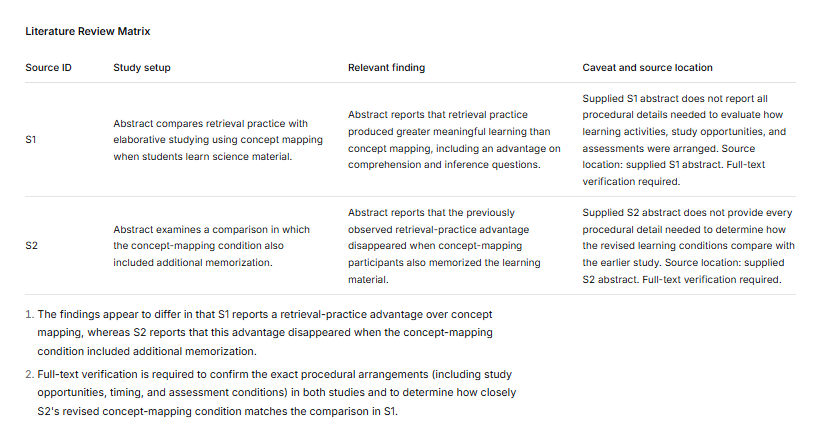
An illustrative synthesis would be: “These two abstracts do not establish a universal ranking of the learning strategies. S1 reports an advantage for retrieval practice, while S2 questions whether additional memorization explains that advantage under the procedures examined. Comparing the methods is therefore necessary before drawing a broader conclusion.”
The next step is not to ask DeepSeek to choose a winner. Obtain the full papers, inspect the learning conditions and outcome measures, and search for additional relevant evidence. The two-source exercise identifies an issue to investigate; it does not settle the field.
If the generated matrix omits S2’s qualification, introduces sample sizes absent from the supplied abstracts, or claims that one strategy always works better, reject that portion of the output and return to the sources.
How to verify DeepSeek citations and research claims
A reference needs more than a plausible title. Check its identity, publication status, and relationship to the sentence it supposedly supports.
Confirm that the reference identifies the right source
Match the title, authors, year, journal or publisher, and DOI when available. Crossref’s metadata tools support searches by title, citation, author, and DOI. A publisher record or relevant scholarly database can provide another route.
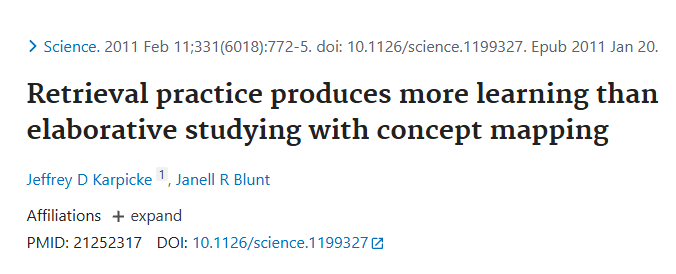
If the details do not match, set the reference aside until you resolve the discrepancy. Do not repair a suspicious citation by inventing a likely DOI or attaching a similarly titled paper. Some legitimate sources lack DOIs, so absence of a DOI alone is not a reason to reject a source.
Check the version and publication status
Determine whether you are reading a preprint, a published article, or an updated version. Check the publisher page for corrections or retractions. Where available, Crossmark provides information about updates to the scholarly record. Its absence should not be treated as confirmation that nothing has changed.
Read the passage that supports the claim
Open the relevant section, table, or figure yourself. Confirm that the source supports the actual wording—not merely the general topic. A valid DOI confirms an identifier, not the truth of the draft’s interpretation or the quality of the study.
For a quantitative statement, check the value, unit, comparison, and conditions. For a quotation, compare the wording with the original. When only an abstract is available, do not present detailed methods or conclusions as though you inspected the full paper.
Keep the conclusion within the evidence
Check whether the draft broadens a result beyond the studied population, setting, or outcome. Rewrite overgeneralized claims, add necessary qualifications, or remove them. Keep a simple audit note for each important claim: source, exact location, and whether the wording is supported, needs qualification, or should be deleted.
Asking DeepSeek to challenge its own draft can help identify questions to investigate. It is not independent verification; the decisive check is against the source.
What to do when document analysis breaks down
The summary misses sections. Work with smaller, labeled portions of the document. Ask for a section-by-section extraction and compare its coverage with the original. Keep the title and source ID attached to every excerpt so later comparisons do not lose their origin.
A table, chart, or scanned page is misread. Do not continue interpreting incorrect extraction. Supply a clearer permitted excerpt or manually checked transcription. Before asking for analysis, verify selected labels and values against the original. A text summary alone is not evidence that a visual element was understood.
A source cannot be opened. Mark the record as inaccessible or abstract-only. Seek a legitimate library or repository copy, or limit the claim to the material you obtained. Do not ask the assistant to reconstruct the missing article from its title.
The conversation loses track of sources. Return to your external inventory and checked notes. Process another batch separately, preserve source IDs, and combine the verified extractions afterward. More material in one conversation is not automatically a better research process.
Using the API or a desktop research agent
For an automated DeepSeek research assistant, the official Search and Fetch APIs provide separate functions: Search discovers web pages, while Fetch retrieves page content. Fetching remains subject to a website’s availability and access policies; discovery does not guarantee access to the full source.
Document handling also depends on the product. The current Files API documentation describes image uploads, not a general-purpose endpoint for submitting every research PDF. Do not transfer consumer-app upload instructions directly into an API workflow.
DeepSeek Harness is a separate, plugin-based desktop and agent product in public preview. Its tools and permissions should be evaluated separately from ordinary chat. You do not need an agent setup to follow the source-first workflow in this guide.
Is DeepSeek free for research? DeepSeek advertises its official app as free. API model usage has separate usage-based pricing, and Search and Fetch have their own documented charges. Do not assume that a free app means a free automated research pipeline.
Know when your project needs more than a chat assistant
Statistical analysis needs actual execution and validation
Use DeepSeek to propose code, explain an analytical choice, or identify assumptions to examine. Keep those suggestions separate from completed results. Only describe an analysis as executed when the relevant environment actually ran it and you inspected the output.
Check variable definitions, missing-data handling, units, and whether the proposed method answers your question. Preserve the script, data version, and output so another person can review the work. A plausible code block or written p-value is not a substitute for a reproducible analysis.
A systematic review needs a documented methodology
Do not label a generated literature summary a systematic review simply because it includes headings and references. For intervention reviews, the Cochrane Handbook describes planned searching, study selection, and documentation, with involvement from an experienced information specialist.
DeepSeek may assist with bounded tasks within your approved process, but the search coverage, eligibility decisions, and verification procedures still need to be established. PRISMA 2020 is a reporting guideline; adding a checklist or generating a flow diagram does not demonstrate that the underlying review was conducted correctly.
A thesis or journal submission needs policy checks and disclosure
Check your university, supervisor, funder, and target journal’s rules before using AI-assisted text or analysis in submitted work. Record the tool, the version when available, the task, and how you checked the output. Do not assume that permission to improve grammar also covers drafting substantive analysis.
For example, ICMJE’s guidance for medical-journal authors calls for disclosure of AI assistance and keeps responsibility for accuracy, integrity, originality, and attribution with human authors. That is a specific publishing framework, not a universal policy for every discipline.
Confidential reviewing requires separate care. ICMJE’s reviewer guidance emphasizes journal policy and manuscript confidentiality. Access to a manuscript does not automatically authorize uploading it to an AI service.
Start with one question and a traceable result
The useful output of a DeepSeek research session is not merely a longer answer. It is a clearer question, a checked extraction, a comparison that preserves disagreement, or a draft whose claims you can trace to evidence.
Begin with one paper, verify what the assistant extracts, and expand only when the workflow remains easy to audit. Let DeepSeek help organize the work while you retain control of the sources, methods, and conclusions.
Product documentation, policies, and linked sources checked on November 6, 2026.