

Published: November 7, 2026.
Yes, you can run DeepSeek locally on Windows, macOS, or Linux. For most people, the easiest practical method is to install Ollama and run a smaller distilled DeepSeek reasoning model rather than attempting to load DeepSeek’s full flagship weights.
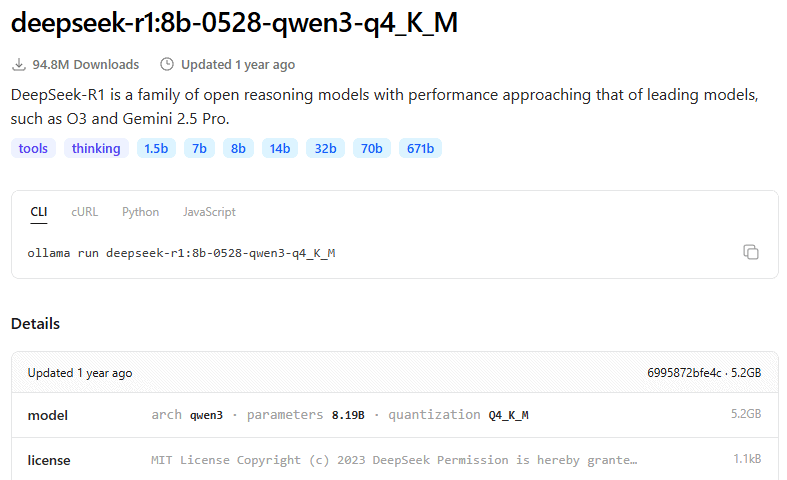
This guide uses the official DeepSeek-released DeepSeek-R1-0528-Qwen3-8B distilled model, packaged by Ollama as a 4-bit local model. The exact Ollama tag is deepseek-r1:8b-0528-qwen3-q4_K_M, and its listed download size is approximately 5.2 GB.
That 8B model is a realistic starting point for many computers with 16 GB of RAM or a suitable GPU. Computers with less available memory can start with the 1.5B version, while higher-memory systems can consider 14B or 32B models.
Running DeepSeek locally does not usually mean running the same enormous model behind DeepSeek’s latest hosted service. It normally means running a smaller official distilled model or a quantized conversion on your own hardware.
The easiest local DeepSeek setup
| Your goal | Recommended option | Model to start with |
|---|---|---|
| Fastest command-line setup | Ollama | deepseek-r1:8b-0528-qwen3-q4_K_M |
| Graphical desktop interface | LM Studio | DeepSeek-R1-0528-Qwen3-8B GGUF Q4_K_M |
| Very limited memory | Ollama | deepseek-r1:1.5b-qwen-distill-q4_K_M |
| Maximum control over GGUF settings | llama.cpp | A verified DeepSeek GGUF conversion |
| Multi-user GPU server | vLLM or SGLang | Official Hugging Face checkpoint |
Ollama is the primary method in this guide because it supports Windows, macOS, and Linux, manages model downloads, provides a terminal chat, accelerates supported GPUs, and exposes a local API without requiring a DeepSeek API key.
Which DeepSeek model are you actually running?
DeepSeek is a company and a family of models, not one downloadable application. Its hosted website, official cloud API, open-weight model checkpoints, distilled reasoning models, and third-party quantized packages are separate products.
DeepSeek’s current V4.1 architecture is extremely large. DeepSeek describes V4.1-Flash as a 552-billion-parameter mixture-of-experts model, so it is not a practical first target for an ordinary laptop or desktop.
The full DeepSeek-R1 model is also large: the official R1 repository lists 671 billion total parameters, with 37 billion activated for each token. Ollama’s 4-bit package for the full R1 model is approximately 404 GB before accounting for context memory, runtime buffers, or operating-system overhead.
The practical consumer options are the smaller R1 distilled models. DeepSeek officially released several of these models using Qwen or Llama base architectures, including 1.5B, 7B, 8B, 14B, 32B, and 70B variants.
A distilled model is not just a compressed full model
DeepSeek-R1-0528-Qwen3-8B is based on the Qwen3 8B architecture. DeepSeek continued its post-training with reasoning traces distilled from the much larger DeepSeek-R1-0528 model.
This allows an 8B model to reproduce some reasoning behavior from the larger model while remaining small enough for local inference. It does not make the 8B model identical to full R1 in knowledge, reliability, context behavior, tool use, or reasoning quality.
The official model card also warns that its configuration files must come from DeepSeek’s repository rather than being replaced with the original Qwen3 configuration. The architecture is related to Qwen3 8B, but the tokenizer and model configuration are specific to DeepSeek’s release.
Choose a model that fits your computer
The table below is a planning guide, not a list of guaranteed minimum requirements. Download sizes come from the current Ollama model catalog, while the memory recommendations include conservative headroom for the operating system, runtime, and a modest context window.
| Ollama model | Listed download | Practical starting point | Best use |
|---|---|---|---|
deepseek-r1:1.5b-qwen-distill-q4_K_M | 1.1 GB | 8 GB system RAM | Testing, simple questions, and CPU-only systems |
deepseek-r1:8b-0528-qwen3-q4_K_M | 5.2 GB | 16 GB RAM or about 8 GB of available GPU or unified memory | Best general starting point for many users |
deepseek-r1:14b-qwen-distill-q4_K_M | 9.0 GB | 24–32 GB total memory with adequate free capacity | Better output when the system can support it |
deepseek-r1:32b-qwen-distill-q4_K_M | 20 GB | High-memory desktop or workstation | More demanding reasoning and coding |
deepseek-r1:70b-llama-distill-q4_K_M | 43 GB | Workstation-class memory or multiple GPUs | Advanced local deployments |
deepseek-r1:671b-0528-q4_K_M | 404 GB | Specialized multi-GPU or server infrastructure | Not an ordinary PC target |
Start with the 8B model when you are unsure. Move down to 1.5B if the model cannot load or the computer becomes unresponsive. Move up only after confirming that the current model, context length, and other applications leave sufficient free memory.
Download size is not the same as required memory
A model file contains its stored weights, but inference also needs memory for metadata, runtime buffers, temporary calculations, and the KV cache that stores the conversation context. The operating system and other applications need memory at the same time.
A rough estimate for weight storage is:
parameter count × bits per weight ÷ 8For example, 8 billion parameters stored at approximately 4 bits per weight would require roughly 4 GB for the raw weight values. The actual GGUF file and loaded process will be larger because that formula excludes metadata, higher-precision tensors, runtime buffers, and context memory.
Context length can use substantial additional memory
The Ollama catalog lists a context window of up to 128K tokens for the selected 8B model. That is a model capability, not a promise that a normal computer can allocate the full window.
Ollama adjusts its default context allocation according to available VRAM, and larger contexts require more memory for the KV cache. For initial testing, a modest 4K or 8K context is safer than immediately attempting 128K.
Long coding sessions, large documents, agent workflows, and extended chat histories increase memory use even when the model file remains unchanged. Reduce the context before replacing the model if an otherwise suitable model fails to load.
Ollama vs. LM Studio vs. other local runtimes
| Runtime | Best for | Interface | Main consideration |
|---|---|---|---|
| Ollama | Quick local setup and application integration | Desktop app, terminal, and API | Offers both local and cloud models, so verify the tag |
| LM Studio | Users who prefer a graphical interface | Desktop GUI, CLI, and API | Many DeepSeek downloads are community GGUF or MLX conversions |
| llama.cpp | Detailed control over GGUF inference | Terminal and local server | Requires more manual model and backend configuration |
| vLLM or SGLang | GPU servers, batching, and concurrent users | OpenAI-compatible server | Better suited to Linux servers than ordinary laptops |
Ollama and LM Studio are local runtimes; neither is an official DeepSeek application. They download or import model files and perform inference using their own execution engines.
A self-hosted API created by Ollama, LM Studio, vLLM, or SGLang is also not the official DeepSeek API. It is an endpoint operated on your hardware or infrastructure.
How to run DeepSeek locally with Ollama
The following steps follow the current official Ollama and DeepSeek documentation. They were not executed for this article.
This method uses the exact local tag deepseek-r1:8b-0528-qwen3-q4_K_M. Avoid relying only on the unqualified deepseek-r1 alias because the model behind an alias can change over time.
Step 1: Install Ollama on Windows
Open PowerShell and run the current command shown on the official Ollama download page:
irm https://ollama.com/install.ps1 | iex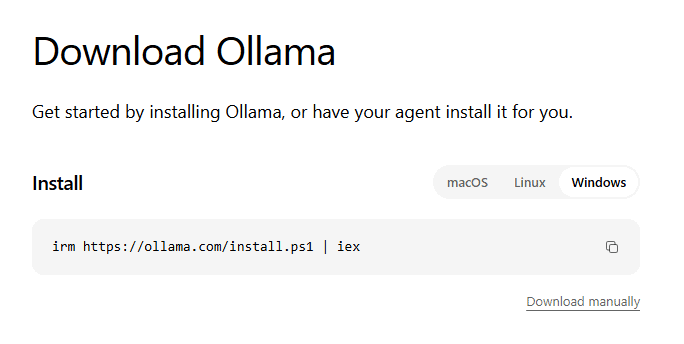
You can alternatively download the Windows installer manually from the same official page. After installation, open a new PowerShell or Command Prompt window.
Step 2: Install Ollama on macOS or Linux
Open Terminal and run:
curl -fsSL https://ollama.com/install.sh | shOn Linux, start the server with ollama serve if the installation did not create or start a background service. The desktop application normally manages the server on Windows and macOS.
Step 3: Confirm that Ollama is installed
ollama --versionIf the terminal says that ollama is not recognized or not found, close the terminal, open a new one, and confirm that the installation completed. On Linux, also confirm that the Ollama service or ollama serve process is running.
Step 4: Download the 8B local model
ollama pull deepseek-r1:8b-0528-qwen3-q4_K_MThis command downloads a local 4-bit package of the official DeepSeek-R1-0528-Qwen3-8B distilled model. The current Ollama catalog lists the package at approximately 5.2 GB.
For a lower-memory system, use the smaller official distill instead:
ollama pull deepseek-r1:1.5b-qwen-distill-q4_K_MA successful pull ends after Ollama downloads the model layers, verifies their digests, and writes the local manifest. Make sure the drive has additional free space beyond the listed model size.
Step 5: Start a local DeepSeek chat
ollama run deepseek-r1:8b-0528-qwen3-q4_K_MWhen the prompt appears, try a short request such as:
Explain how DNS works in five numbered steps.A successful setup will generate a response directly in the terminal. Type /bye to leave the interactive chat.
Reasoning models may take longer before beginning their final answer than ordinary chat models. Long reasoning output does not necessarily mean the computer has frozen.
Step 6: Verify that the model is local
List the model files stored on the computer:
ollama lsThe model should appear with a local file size. A cloud-only model normally uses a tag ending in :cloud and does not store the full model weights on the computer.
While the model is generating or still loaded in memory, run:
ollama psThe PROCESSOR column shows how the model is loaded:
100% GPUmeans the model is fully loaded on a supported GPU.100% CPUmeans it is running from system memory on the CPU.- A CPU/GPU percentage split means only part of the model was offloaded to the GPU.
Inspect the model metadata with:
ollama show deepseek-r1:8b-0528-qwen3-q4_K_MStep 7: Stop or remove the model
Unload the running model from memory:
ollama stop deepseek-r1:8b-0528-qwen3-q4_K_MDelete the downloaded model files when you no longer need them:
ollama rm deepseek-r1:8b-0528-qwen3-q4_K_MStopping a model only frees its active memory. Removing it deletes the local model package and means it must be downloaded again before the next use.
Use DeepSeek through a local API
Ollama exposes local endpoints at http://localhost:11434. Its native API uses the /api path, such as /api/chat. Its separate OpenAI-compatible API uses /v1, such as /v1/chat/completions. The OpenAI SDK example below therefore uses http://localhost:11434/v1/ as its base URL.
The local server does not require an Ollama or DeepSeek API key. The OpenAI Python client still requires a non-empty key value, but Ollama ignores that value for local requests.
Install the OpenAI Python client:
python -m pip install openaiThen use this local-only example:
from openai import APIConnectionError, OpenAI

MODEL = "deepseek-r1:8b-0528-qwen3-q4_K_M"

client = OpenAI(
    base_url="http://localhost:11434/v1/",
    api_key="ollama",  # Required by the client but ignored locally.
)

try:
    response = client.chat.completions.create(
        model=MODEL,
        messages=[
            {
                "role": "user",
                "content": (
                    "Explain symmetric and asymmetric encryption "
                    "in five concise bullet points."
                ),
            }
        ],
        temperature=0.6,
        max_tokens=512,
    )
except APIConnectionError as exc:
    raise SystemExit(
        "Could not reach Ollama. Open the Ollama app or run 'ollama serve'."
    ) from exc

print(response.choices[0].message.content)
This request goes to the Ollama server on the same computer. It does not use https://api.deepseek.com and does not require a DeepSeek Platform account.
Ollama supports a subset of the OpenAI API rather than every feature of OpenAI’s hosted platform. Check the current Ollama OpenAI compatibility documentation before depending on tools, response formats, or advanced endpoints.
Run DeepSeek locally with LM Studio instead
LM Studio is a graphical alternative for users who do not want to manage a terminal-first workflow. It supports Windows, Linux, and Apple Silicon Macs, and it can provide an OpenAI-compatible local server.
LM Studio currently recommends at least 16 GB of RAM. On Windows, it recommends at least 4 GB of dedicated VRAM and requires AVX2 support on x64 processors. On macOS, its current desktop application supports Apple Silicon and requires macOS 14 or newer; Intel Macs are not currently supported.
1. Install LM Studio
Download the correct installer from the official LM Studio website and complete the normal installation process.
2. Search for the exact DeepSeek model
Open the Discover tab and search for:
lmstudio-community/DeepSeek-R1-0528-Qwen3-8B-GGUFThis is an LM Studio Community GGUF conversion of the official deepseek-ai/DeepSeek-R1-0528-Qwen3-8B model. DeepSeek released the upstream model, while the GGUF quantization was produced by a community publisher.
Verify the model creator, upstream repository, license, architecture, and quantization before downloading. Do not select a model solely because “DeepSeek” appears in its title.
3. Select an appropriate quantization
The current community repository lists these examples:
| Quantization | Approximate file size | Tradeoff |
|---|---|---|
| Q3_K_L | 4.43 GB | Lower memory use with a greater quality tradeoff |
| Q4_K_M | 5.03 GB | Balanced starting point for many users |
| Q6_K | 6.73 GB | Higher fidelity with more memory use |
| Q8_0 | 8.71 GB | Large file with less quantization loss |
LM Studio’s documentation recommends choosing a 4-bit option or higher when the computer can support it. Q4_K_M is therefore a practical first choice, but it is not automatically the best option for every task.
4. Load the model with a modest context
Open the Chat tab, select the downloaded model, and review the memory estimate before loading. Begin with a context length such as 4,096 or 8,192 tokens rather than allocating the model’s maximum context immediately.
LM Studio can automatically choose GPU offloading, or advanced users can adjust the proportion manually. If the load estimate is close to the system’s total memory, select a smaller quantization, reduce context, or use the 1.5B model.
5. Start the optional local server
Open the Developer tab and switch on Start server. LM Studio supports its native REST API plus OpenAI-compatible and Anthropic-compatible endpoints.
Keep the server bound to 127.0.0.1 unless another device genuinely needs access. LM Studio warns that binding to 0.0.0.0 exposes the server beyond localhost and recommends authentication for network access.
What GGUF, MLX, Q4, and BF16 mean
| Term | Meaning | Why it matters |
|---|---|---|
| GGUF | A model-file format widely used by llama.cpp-based runtimes | Common in Ollama, LM Studio, and llama.cpp workflows |
| MLX | Apple’s machine-learning framework and related model format ecosystem | Designed for efficient use of Apple Silicon unified memory |
| Q4 | A class of approximately 4-bit quantizations | Reduces file and memory size but may reduce output quality |
| Q8 | An approximately 8-bit quantization | Uses more memory and usually preserves more weight fidelity |
| BF16 | A 16-bit numerical format used for less-compressed model weights | Requires substantially more memory than Q4 or Q8 |
| KV cache | Memory used to retain tokens from the active context | Grows as context length, batch size, or concurrency increases |
Quantization changes the model weights. It is not the same as simply compressing a ZIP file because the model performs inference using lower-precision values after loading.
Lower-bit quantization can make an otherwise unusable model fit on the computer, but it may affect reasoning, factual recall, instruction following, or output stability. Test the exact quantization on representative tasks before using it in a production workflow.
Can DeepSeek run without a GPU?
Yes. Smaller DeepSeek models can run using system RAM and the CPU, but response speed depends heavily on the processor, memory bandwidth, model size, quantization, and context length.
CPU-only inference is most realistic with the 1.5B or 7B/8B quantized models. A model may load successfully on the CPU but generate too slowly for comfortable interactive use.
Ollama currently supports acceleration through NVIDIA GPUs, supported AMD configurations, Apple Metal, and Vulkan on compatible Windows and Linux systems. Check the current Ollama hardware-support page for exact GPU and driver compatibility.
NVIDIA GPUs
A supported NVIDIA GPU can hold all or part of the model in VRAM. If the model exceeds available VRAM, Ollama may split it between GPU memory and system RAM, which usually reduces performance.
AMD and Intel GPUs
Compatibility varies by operating system, GPU generation, driver, ROCm support, and Vulkan support. Do not assume that every AMD or Intel GPU will be accelerated merely because the computer can display graphics.
Apple Silicon
Apple Silicon uses unified memory shared by the CPU and GPU rather than separate system RAM and VRAM pools. Ollama can use Metal acceleration, while LM Studio supports both llama.cpp-based GGUF models and MLX models on supported Macs.
Unified memory still has to accommodate macOS, applications, the model, runtime buffers, and context. A Mac advertised with 16 GB of memory does not provide all 16 GB exclusively to the model.
Is local DeepSeek private and offline?
On-device inference can keep prompts and generated responses on the computer. Ollama states that it does not receive prompts or responses when a local model is used, and LM Studio states that downloaded models, local chat, document processing, and its local server can operate without internet access.
However, installing the runtime, searching for models, downloading model files, fetching runtimes, and checking for updates require or may create network traffic. Optional web search, plugins, connectors, cloud models, remote MCP servers, and third-party applications can also transmit data.
How to verify offline operation
- Download the runtime and exact local model while connected to the internet.
- Confirm that the model appears in
ollama lswith a local size. - Avoid model tags ending in
:cloud. - Sign out of optional cloud services when they are not needed.
- Disable optional cloud features when the runtime provides a local-only setting.
- Disconnect the network and launch the downloaded model again.
- Use an operating-system firewall or network monitor when the threat model requires independent verification.
Ollama documents a local-only setting named disable_ollama_cloud and the OLLAMA_NO_CLOUD=1 environment variable. Restart Ollama after changing either setting.
Protect the local API
Ollama’s local API does not require authentication by default. That is generally acceptable when it remains restricted to the loopback address and only trusted local software can reach it.
- Keep the server on
127.0.0.1unless network access is required. - Do not forward the Ollama or LM Studio port directly to the public internet.
- Use authentication, a reverse proxy, firewall rules, or a private VPN before network exposure.
- Do not enable CORS unless a trusted browser application requires it.
- Protect prompt logs, chat histories, and model-generated files.
- Review applications and MCP servers connected to the local model.
Troubleshooting local DeepSeek
| Problem | Likely cause | Practical fix |
|---|---|---|
| The model will not load | Insufficient free RAM or VRAM | Close other applications, lower context, or use the 1.5B model |
| Out-of-memory error | Weights plus KV cache exceed available memory | Reduce context, use a smaller quantization, or select a smaller model |
| Generation is extremely slow | The model is running partly or entirely on the CPU | Run ollama ps, choose a smaller model, or correct GPU support |
| GPU is not being used | Unsupported GPU, driver issue, or runtime fallback | Check Ollama’s hardware page and inspect the PROCESSOR column |
| Cannot connect to port 11434 | Ollama is not running or another process uses the port | Open Ollama or run ollama serve, then retry the local endpoint |
| Model download fails | Network, proxy, storage, or permission issue | Check free disk space, HTTPS access, proxy settings, and logs |
| Computer becomes unresponsive | The model consumes nearly all available memory | Stop the model, reduce context, and move to a smaller tag |
| Output repeats or becomes incoherent | Very low quantization, excessive context, or model/runtime mismatch | Use the verified tag, update the runtime, and test Q4_K_M or higher |
| Unexpected network activity | Updates, model search, web tools, or cloud features | Disable optional cloud features and test while disconnected |
| The model is not actually local | A cloud tag or hosted endpoint was selected | Use a downloaded tag without :cloud and confirm it with ollama ls |
Reduce the context before changing hardware
A high context setting can be the difference between a model fitting and failing. If an 8B model works at 4K but fails at 32K or 128K, the issue may be KV-cache growth rather than the model weights themselves.
Do not allocate a long context merely because the catalog lists it as supported. Select the shortest context that reliably handles the actual task.
Check whether the model is fully offloaded
Use ollama ps while the model is active. A CPU/GPU split explains why a model may work but respond more slowly than expected.
A larger model partially running on the CPU can be slower than a smaller model loaded entirely on the GPU. Model size alone does not determine the best user experience.
Is running DeepSeek locally free?
The official DeepSeek-R1 repository and R1 model series are released under the MIT License, and DeepSeek states that the series supports commercial use and distillation. The official DeepSeek-R1-0528-Qwen3-8B model card also lists the MIT License.
Running that model on your own device does not create a per-token DeepSeek API charge. Local use still has costs, including hardware, electricity, disk storage, maintenance, engineering time, and possible commercial support.
Review the license attached to the exact model file, runtime, base model, conversion, and application before commercial deployment. A community GGUF conversion may have additional documentation or packaging considerations even when the upstream model uses the MIT License.
Local DeepSeek will not exactly match the hosted service
A local 8B distilled model should not be presented as the same model used by DeepSeek’s current website or API. The hosted service may use a newer and much larger model, different system prompts, tools, retrieval, safety layers, sampling settings, and server-side optimizations.
Local output also changes with:
- The exact checkpoint and revision.
- The model’s base architecture and distillation process.
- The quantization level.
- The runtime and chat template.
- The system prompt.
- Temperature and sampling settings.
- Context length and available memory.
- CPU or GPU offloading.
Use a repeatable evaluation set before relying on a local model for coding, research, document analysis, business decisions, or automated workflows.
When the official DeepSeek API is a better choice
Local inference is useful when offline access, data control, custom integrations, or avoiding per-token API charges matters. The official hosted API may be more appropriate when you need DeepSeek’s current large model, native multimodal features, large-scale concurrency, high throughput, or no local GPU management.
DeepSeek’s current official API uses the cloud base URL https://api.deepseek.com and exposes models such as deepseek-flash. Requests sent there are cloud requests, even when the calling application runs on your computer.
| Requirement | Better starting point |
|---|---|
| Offline use after download | Local Ollama or LM Studio model |
| Sensitive data kept inside controlled infrastructure | Local or properly secured self-hosted deployment |
| Latest large DeepSeek capabilities | Official DeepSeek API |
| No suitable local hardware | Official API or a reviewed hosted provider |
| Graphical local chat | LM Studio |
| Simple local API and terminal workflow | Ollama |
| High-concurrency GPU serving | vLLM or SGLang on server hardware |
Which local setup should you choose?
For most users with approximately 16 GB of system memory, start with Ollama and deepseek-r1:8b-0528-qwen3-q4_K_M. Keep the initial context modest, verify memory use with ollama ps, and move to a smaller model if the computer relies heavily on CPU offloading.
Choose LM Studio when you prefer a graphical model browser, load-time memory estimates, and a desktop chat interface. Verify that the selected GGUF or MLX file is a reputable conversion of the official DeepSeek model.
Do not begin with the full 671B R1 model or the current V4.1 flagship family on a normal computer. A smaller official distilled model provides a far more realistic introduction to running DeepSeek locally.
Official sources checked
- Official DeepSeek-R1-0528-Qwen3-8B model card
- Official DeepSeek-R1 GitHub repository
- Official DeepSeek-V4.1-Flash announcement
- Current Ollama DeepSeek-R1 model tags
- Ollama official quickstart
- Ollama context-length documentation
- Ollama local and cloud API documentation
- LM Studio system requirements
- LM Studio offline-operation documentation
- LM Studio Community DeepSeek GGUF repository
Information, model listings, and documentation checked on November 6, 2026.