

Published: November 7, 2026.
To use DeepSeek for coding, give it a specific programming task, supply the relevant code and requirements, and check the proposed solution in your own environment. A small function, reproducible bug, or focused review makes a useful first task because you can define what success looks like.
Start with official DeepSeek Chat when you want to discuss a snippet. For changes across a project, consider a coding tool that connects a DeepSeek model to your files and development commands. DeepSeek’s official documentation describes its API and supported agent integrations.
This DeepSeek coding guide walks through an original Python debugging exercise, reusable prompts, current model choices, and a project setup. The reference exercise was tested locally; the guide does not present it as a measured evaluation of DeepSeek’s responses.
Choose the right way to use DeepSeek
Decide how much access the assistant needs before choosing a tool. Asking about one function and allowing an agent to modify a repository are different workflows.
| Route | Useful starting task | What you need to check |
|---|---|---|
| Hosted chat | Explain a function, discuss an error, or request a small implementation. | Provide the relevant code and run the result in your development environment. |
| Coding agent or project tool | Work on a change involving existing files and tests. | Verify the configured provider, file permissions, command permissions, and API billing. |
| Direct API | Build a script or application that sends coding requests. | Manage authentication, request format, usage, and returned output in your own application. |
| Local model deployment | Evaluate a particular downloadable model on your own infrastructure. | Check that model’s license, runtime support, memory requirements, and actual inference location. |
The surrounding application determines whether the model can inspect files, apply a patch, or run a command. In DeepSeek’s tool-calling workflow, the application executes a requested function and returns its result to the model. Pasting a local file path into an ordinary chat does not, by itself, grant access to that file.
Can you start for free? DeepSeek advertises free chat in its official consumer app. API usage is separately metered, and an independent tool may have its own charges. Free consumer access does not establish free API calls, unlimited usage, or free operation of every connected agent.
For a first attempt, use a small, nonconfidential example in chat. You can try the exercise below without setting up an API key or downloading model weights.
Fix a Python bug and verify the result
Suppose a configuration setting arrives as text. The string "false" should disable a feature, but the existing parser returns True. This is a useful debugging task because the problem has a precise input and a checkable result.
Example scope: The code uses Python 3.10+ syntax and no third-party packages. The reference solution and checks below were run with Python 3.12.14. They are original tutorial code, not a captured DeepSeek reply.
1. Reproduce the bug
Run this small example in a local Python file:
def parse_env_flag(value: str | None, default: bool = False) -> bool:
    return default if value is None else bool(value)


print(parse_env_flag("false"))
The observed output was:
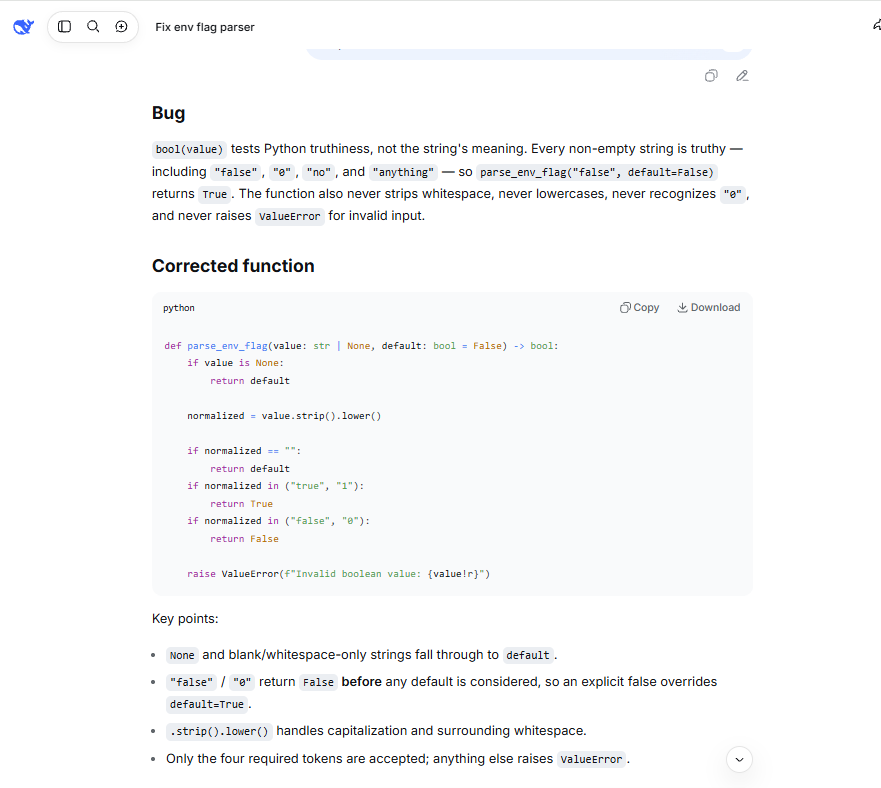
TrueThe cause is Python’s truth-value behavior: a nonempty string is truthy. Calling bool("false") checks the string’s truth value; it does not interpret the word as a configuration value.
2. Send a request with explicit requirements
Open DeepSeek Chat, sign in if prompted, and paste the following request. It includes the failure, the accepted inputs, the required output, and the code to change.
Fix this Python environment-variable parser. Use Python 3.10+.

parse_env_flag("false") currently returns True; it should return False.

Assume value is a string or None and default is a Boolean.
Keep the function signature unchanged. Use no third-party packages.

Required behavior:
- "true" and "1" return True.
- "false" and "0" return False.
- Ignore capitalization and surrounding whitespace.
- None, an empty string, or whitespace-only input returns default.
- An explicit false value must override default=True.
- Any other string raises ValueError.
- Do not add other accepted tokens.

Briefly explain the bug, provide the corrected function, and write
checks for these requirements. Distinguish expected results from
any results you actually execute.

def parse_env_flag(value: str | None, default: bool = False) -> bool:
    return default if value is None else bool(value)
The contract matters as much as the code. For this exercise, "yes" and "off" are invalid, even though another application might accept them. A solution that silently accepts extra values changes the requirement.
3. Check the proposed solution against independent expectations
Here is a reference implementation with its acceptance checks. Save the complete block as flag_demo.py. To assess a response you receive, replace only the function with the proposed version and keep the checks unchanged.
def parse_env_flag(value: str | None, default: bool = False) -> bool:
    if value is None:
        return default
    text = value.strip().lower()
    if text == "":
        return default
    if text in {"true", "1"}:
        return True
    if text in {"false", "0"}:
        return False
    raise ValueError(f"Invalid boolean value: {value!r}")


cases = [
    ("true", False, True),
    ("  TrUe\t", False, True),
    ("1", False, True),
    (" 1 ", False, True),
    ("false", True, False),
    (" FALSE ", True, False),
    ("0", True, False),
    ("\t0\n", True, False),
    (None, False, False),
    (None, True, True),
    ("", False, False),
    ("", True, True),
    (" ", False, False),
    (" ", True, True),
    ("\t\n", False, False),
    ("\t\n", True, True),
]

for raw, default, expected in cases:
    actual = parse_env_flag(raw, default=default)
    assert actual is expected, (
        f"{raw!r}, default={default}: expected {expected}, got {actual}"
    )

invalid_values = ("yes", "off", "2", "false!")
for raw in invalid_values:
    try:
        parse_env_flag(raw)
    except ValueError:
        pass
    else:
        raise AssertionError(f"Expected ValueError for {raw!r}")

print(f"Passed {len(cases) + len(invalid_values)} checks.")
From the directory containing the file, run:
python3 flag_demo.pyIf your Python 3 installation uses the command python, use python flag_demo.py. Run normally, without Python’s -O optimization option, which disables these assert checks.
The reference script produced this exact output and exited successfully:
Passed 20 checks.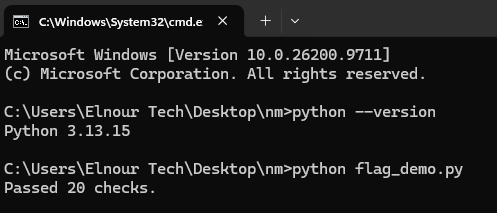
Those checks cover accepted true and false values, capitalization, surrounding whitespace, missing values, both defaults, and invalid strings. In particular, "false" with default=True must still return False. An explicit setting should not be mistaken for a missing setting.
Running the same checks against the original implementation failed with:
AssertionError: 'false', default=True: expected False, got TrueThe corrected function handles missing input, normalizes text, matches the allowed values, and rejects everything else. Passing this exercise establishes those behaviors for these cases; it does not prove that every possible application of the function is correct.
4. Return useful evidence when a fix fails
If a suggested implementation fails, send the smallest failing case and the current function back to the model. Use a follow-up like this, replacing the bracketed fields with what actually happened:
The proposed function failed this requirement:

Input and default: [exact values]
Expected result: [required result]
Actual result or traceback: [paste the observed result]
Current function: [paste the version you ran]

Make the smallest correction while preserving the original contract.
Do not change a correct test just to make the implementation pass.
Add a regression check for this failure and explain the change briefly.
Rerun the full set of checks after a change. If the code passes in isolation but fails in your project, provide the relevant caller, actual data shape, and runtime version. That additional context is more useful than asking the model to rewrite everything.
Choose a current model without confusing the names
For direct API use, the current model table lists these identifiers and underlying versions:
| API identifier | Documented model version |
|---|---|
deepseek-flash | DeepSeek-V4.1-Flash-1017 |
deepseek-v4-pro | DeepSeek-V4-Pro-0813 |
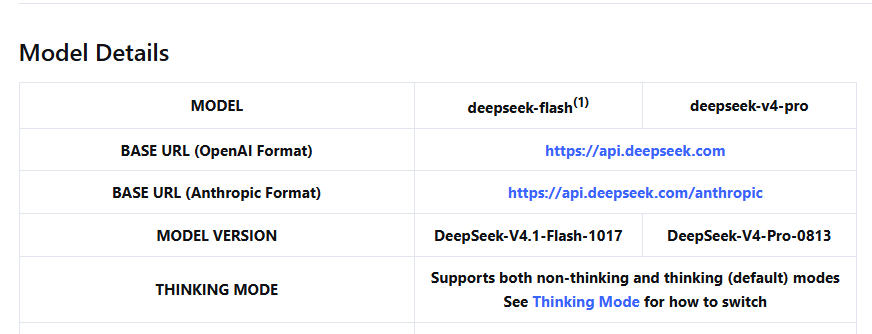
Flash currently has lower listed token rates, making it a reasonable starting point for a cost-conscious evaluation. Compare Pro on the same representative task if the first result needs substantial correction. Judge the accepted change, tests, review effort, latency, and total usage rather than the model name alone.
Both API models support thinking and non-thinking modes. The thinking-mode documentation explains the controls and notes that thinking is enabled by default. For a difficult bug, compare whether the additional reasoning helps satisfy your tests; do not assume it removes the need for verification.
API identifiers, consumer interface labels, and a coding tool’s display names can differ. Some older Flash API aliases remain accepted but route to the current Flash version. For a new configuration, use the identifier documented for your provider.
Do you need DeepSeek-Coder? You do not need to download that model family to use the current hosted API. DeepSeek-Coder and DeepSeek-Coder-V2 are specifically named model releases; their older benchmarks and setup examples do not automatically describe today’s hosted service.
If you want local inference, choose a specific model and check its model card and runtime requirements. For Coder-V2, the repository distinguishes its code license from its model license. A model download is not a guarantee that it fits your laptop or is suitable for your intended deployment.
Budget for the workflow: The official API distinguishes input and output tokens, cached input, and peak/off-peak rates. Check the live pricing page before a larger run. Include repeated attempts and tool-generated requests when judging the cost of a completed task.
Three coding prompts for everyday work
A useful coding prompt states the task, environment, expected behavior, and constraints. The following templates cover different jobs; replace the bracketed fields with your own code and requirements.
Generate a small implementation
Write a [language and version] function for this task:
[describe one concrete task]

Inputs and types: [details]
Required output: [details]
Examples: [input -> expected output]
Edge cases and invalid inputs: [required behavior]
Allowed dependencies: [none, or a specific approved list]

Provide the implementation and tests based on these requirements.
If a requirement is ambiguous, identify the ambiguity before making
a behavior-changing assumption. Do not invent library APIs.
Check: Confirm the function signature, error behavior, and dependency names. Verify the expected results yourself before accepting model-written tests.
Refactor while preserving behavior
Refactor the code below for readability in [runtime/framework version].

Preserve its public signature, return types, ordering, side effects,
and documented exceptions. Keep dependencies unchanged.

Existing code: [paste code]
Existing tests and required behavior: [paste relevant checks]

Return a focused diff and a short explanation. Identify any behavior
you cannot establish from the supplied context. Keep optional design
changes separate from the requested refactor.
Check: Run the existing tests and inspect the diff for changes to data ordering, mutation, exceptions, and external calls. Shorter code is not sufficient evidence that behavior stayed the same.
Review a change for concrete defects
Review this diff for correctness and security-relevant mistakes.

Environment: [language, framework, and relevant versions]
Intended behavior: [requirements]
Relevant surrounding code: [paste context]
Diff: [paste diff]

For each finding, identify the affected code, the input or condition
that triggers it, the consequence, and a suggested verification test.
Separate demonstrated defects from concerns that need more context.
Do not report style preferences as functional bugs.
Check: Reproduce significant findings and verify any claimed framework behavior in its documentation. Treat a review with no findings as one input to your review process, not a security certification.
Use DeepSeek in a project with OpenCode
For work involving existing files, one documented option is OpenCode connected to the DeepSeek API. The steps here use OpenCode 2. Follow its official installation instructions for your operating system; avoid mixing installation packages or configuration examples from a different major version.
- Prepare a small project or working branch. Choose a bounded change and review the tool’s file and command permissions before starting a task.
- Create a DeepSeek API key in the official platform and check the account’s available balance and usage terms.
- Open a terminal in the project directory and start
opencode. An editor’s integrated terminal can serve this purpose. - Enter
/connect, choose DeepSeek, and provide the key through the credential prompt. Keep it out of source files and chat messages. - Enter
/modelsand select an available DeepSeek model. Confirm that the selected provider is the one you intend to use. - Request one bounded task. Review file changes and proposed commands, then run the relevant tests before keeping the change.
These connection steps are supported by DeepSeek’s OpenCode integration guide and the OpenCode 2 provider commands. They are documentation-based instructions; an authenticated integration session was not performed for this guide.
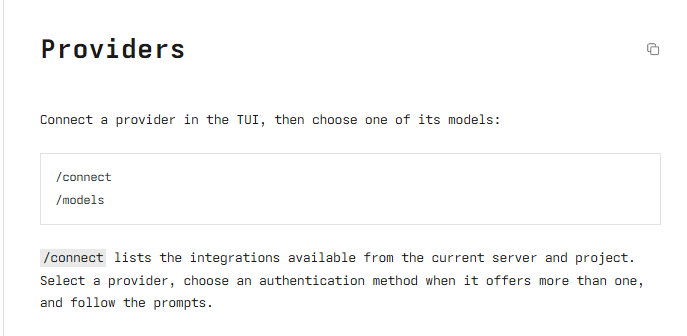
DeepSeek’s integration page still shows an older Flash display name. Use the installed tool’s current model list and cross-check the provider’s model documentation instead of treating an old screenshot label as the current API identifier.
A suitable first project request is:
Locate the function that parses feature flags and the tests that cover it.
First explain its current behavior and identify any missing context.

Propose the smallest change needed to make the string "false" return False
without changing the documented behavior of other inputs.

List the files and commands needed before making changes. After the patch,
run the relevant tests if permitted and report their actual results.
Do not modify unrelated files or add dependencies.
Use the tool’s permission settings to control file edits and command execution. A prompt asking for restraint is useful, but it does not replace the application’s permissions. A local terminal interface can still send code to a remote model provider.
Call DeepSeek from a Python script
Use the direct API when you want to build your own coding helper or automate requests. You need a DeepSeek API key and an account with usable API balance. DeepSeek’s first-call guide documents the openai Python package and the compatible base URL used below.
In your Python environment, install the package:
python -m pip install openaiSave this as ask_deepseek.py. It reads DEEPSEEK_API_KEY from the environment. If the variable is absent, it requests the key through a hidden terminal prompt rather than storing it in the file.
import os
from getpass import getpass

from openai import OpenAI

api_key = os.environ.get("DEEPSEEK_API_KEY") or getpass("DeepSeek API key: ")
client = OpenAI(api_key=api_key, base_url="https://api.deepseek.com")

response = client.chat.completions.create(
    model="deepseek-flash",
    messages=[
        {
            "role": "user",
            "content": (
                "In Python 3.10+, explain why bool('false') returns True. "
                "Then write a function that accepts only 'true' or 'false', "
                "ignores case and surrounding whitespace, and raises "
                "ValueError for other strings. Include four test cases."
            ),
        }
    ],
    extra_body={"thinking": {"type": "disabled"}},
    max_tokens=1200,
)

if response.choices[0].finish_reason == "length":
    raise RuntimeError("The response was truncated; narrow the task or raise the output limit.")

print(response.choices[0].message.content)
Run it from a terminal with the same Python environment:
python ask_deepseek.pyUse python3 in both commands if that is how your system invokes Python 3. The example deliberately disables thinking for a small request, uses a bounded output allowance, and prints the returned text. It does not execute generated code. Its request format follows the current Chat Completions reference; no live API call was made for this guide.
If the request fails, inspect the error before changing your programming prompt. DeepSeek’s error reference distinguishes authentication failures (401), insufficient balance (402), invalid parameters (422), and rate limits (429). A more detailed coding request will not fix a missing credential or exhausted balance.
Review the change before you keep it
Use the same acceptance standard whether the answer comes from chat, an API, or an agent. Before merging or deploying a change, check:
- Behavior: Does it satisfy the written requirements, including failures and edge cases?
- Compatibility: Do the imports, methods, types, and configuration options exist in the versions your project uses?
- Scope: Did the change preserve public interfaces and avoid unrelated rewrites?
- Verification: Did you run the relevant tests, type checks, and linting rather than rely on a claimed pass?
- Data handling: Does the code expose credentials, log sensitive data, or send information somewhere unexpected?
- Operational impact: Have you inspected file deletion, database writes, dependency installation, and other commands with effects beyond the example?
For private code, confirm that your organization permits the selected service and deployment route before uploading source files or logs. Remove secrets and personal data that the task does not require. DeepSeek’s privacy policy describes input collection for services within its scope; a third-party application may have additional policies.
Keep API keys in an appropriate secret store or environment configuration. DeepSeek’s Open Platform terms specifically instruct users to protect keys and keep them out of browser and other client-side code.
If the answer repeatedly relies on missing project context, supply the relevant interfaces and failing tests before requesting another rewrite. If the task needs a capability your tool lacks, such as repository access or an approved data-handling arrangement, choose a tool or deployment that provides it. Evaluate another model on the same task when review effort remains excessive.
For your next attempt, choose one small change, write down the expected result, and keep the acceptance checks fixed while you compare proposed solutions. That gives you a concrete basis for deciding whether DeepSeek helps with your work.
Last verified: November 5, 2026.