
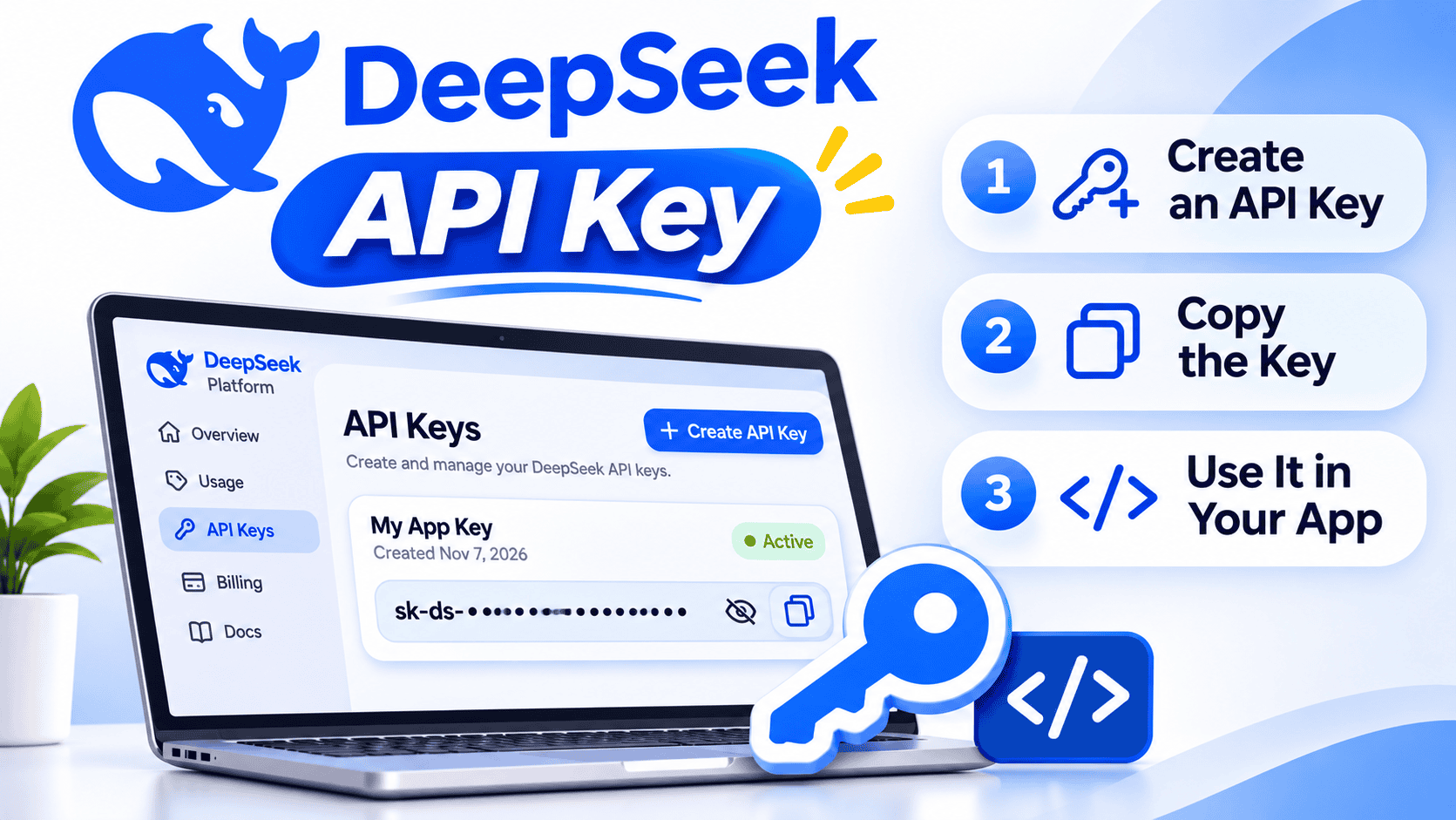

A DeepSeek API key is the secret credential your application uses to authenticate requests to DeepSeek’s developer platform. To get one, sign in to the official DeepSeek API Keys page, create a key using the control currently shown in the dashboard, copy it securely, confirm that your account has usable balance, and test it through DeepSeek’s official API.
Creating a credential and paying for model usage are separate steps. DeepSeek publishes usage-based API prices, and requests can consume either granted balance or funds you have added to the account. A free DeepSeek chat account or a ChatGPT subscription does not automatically include paid DeepSeek API usage.
Last reviewed: November 7, 2026.
Use only the official platform: Create your key through
platform.deepseek.com. Avoid shared keys, marketplace sellers, “API key generators,” browser extensions, and websites claiming to issue official DeepSeek credentials outside the DeepSeek account dashboard.
What is a DeepSeek API key?
A DeepSeek API key is a secret string created under your DeepSeek account. Your application sends it in an HTTP Authorization header so DeepSeek can identify the account responsible for the request and its usage charges.
DeepSeek’s API uses Bearer authentication:
Authorization: Bearer your_deepseek_api_keyThe key is only one part of an API request. Your application also needs the correct DeepSeek base URL, endpoint, request body, and model ID.
| Item | Current DeepSeek value or role |
|---|---|
| API key | A secret credential created in your DeepSeek platform account |
| OpenAI-compatible base URL | https://api.deepseek.com |
| Anthropic-compatible base URL | https://api.deepseek.com/anthropic |
| General-purpose model ID | deepseek-flash |
| Additional first-party model ID | deepseek-v4-pro |
| Authentication scheme | HTTP Bearer authentication |
| Billing account | Your DeepSeek platform balance, not an OpenAI or ChatGPT subscription |
A DeepSeek API key is not:
- Your normal account password
- An OpenAI API key
- An Anthropic API key
- An OpenRouter or third-party gateway key
- A model name
- A promise of free API inference
- A credential that should be shared with another person
DeepSeek’s Open Platform Terms say the API key is a necessary credential for API access and must not be shared, publicly disclosed, or exposed in browser or other client-side code.
How to get a DeepSeek API key
- Open the official API Keys page. Go directly to platform.deepseek.com/api_keys and verify that the domain is
deepseek.combefore entering credentials. - Sign in to your DeepSeek account. DeepSeek’s Open Platform and consumer chat service use the same underlying account.
- Complete any account requirements shown. Verification, billing options, and availability can differ by account or region. Follow only the instructions displayed on the official platform.
- Use the current create-key control. Interface wording may change. Create a new credential and add a descriptive label if the dashboard currently provides a naming field.
- Copy the secret immediately. DeepSeek’s public documentation reviewed for this guide does not promise that the complete secret can always be displayed again. Treat a lost key as a reason to create a replacement rather than searching logs or code for the old value.
- Store it outside your source code. Use an environment variable for local development and a managed secret store for production.
- Check your available balance. A correctly created key can still return an insufficient-balance error.
- Send a small test request. Use the official endpoint and a current model ID before connecting the key to a larger application.
Do not copy a credential from a tutorial, online forum, shared document, public repository, or video description. A shared key can be revoked without notice, may expose another person’s account, and may violate the provider’s terms.
Is a DeepSeek API key free?
DeepSeek’s published pricing charges for API usage rather than listing a separate fee for generating the credential. That does not mean model requests are free.
Your account may contain:
- Granted balance: Promotional or granted credit that has not expired
- Topped-up balance: Funds added to the platform account
- Total balance: The currently available combination of granted and topped-up funds
DeepSeek says model expenses are deducted from granted balance first when both granted and topped-up balances are available. The official documentation does not promise every account a permanent free API allowance. Check your own dashboard or balance response instead of assuming that a newly created key includes credit.
The free DeepSeek consumer chat and the developer API are separate usage experiences. Free access to the website or mobile app does not establish that API calls will be free.
If your account has insufficient balance, DeepSeek documents HTTP 402 and directs users to the official Top Up page. Payment methods, minimum amounts, availability, taxes, and regional requirements should be checked directly in the current account dashboard.
Check your DeepSeek balance before testing the key
The official balance endpoint helps separate an authentication problem from a billing problem:
GET https://api.deepseek.com/user/balanceSet the key in your terminal, then call the endpoint without placing the literal secret in the command:
curl --silent --show-error --max-time 60 \
  "https://api.deepseek.com/user/balance" \
  --header "Authorization: Bearer ${DEEPSEEK_API_KEY}"
A successful response can include:
is_available: Whether the account has sufficient balance for API requeststotal_balance: The currently available totalgranted_balance: Unexpired granted credittopped_up_balance: Funds added to the accountcurrency: The currency associated with that balance entry
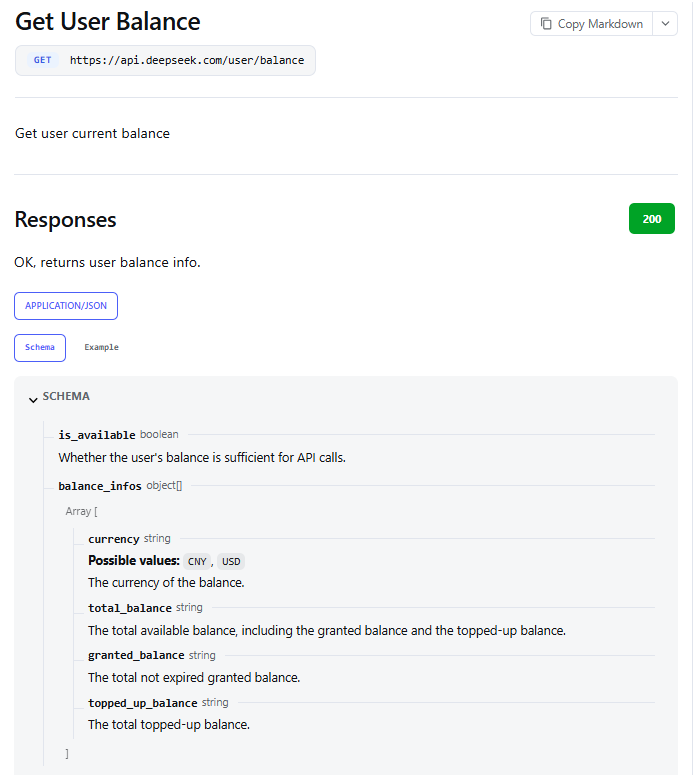
If the endpoint returns HTTP 401, inspect the credential and authentication header. If it returns successfully but is_available is false, the key may be valid while the account lacks usable balance.
Store the key in an environment variable
Use a consistent variable name such as DEEPSEEK_API_KEY. This prevents the credential from being written directly into every source file, although an environment variable alone does not solve logging, access-control, deployment, or rotation risks.
macOS and Linux
export DEEPSEEK_API_KEY="your_deepseek_api_key"This usually applies to the current shell session. Persistent configuration depends on your shell and operating system. Avoid placing a real secret in a shell configuration file that is synchronized publicly or readable by other users.
Check that the variable exists without printing its value:
test -n "$DEEPSEEK_API_KEY" && echo "DeepSeek key is set" || echo "DeepSeek key is missing"Windows PowerShell
$env:DEEPSEEK_API_KEY="your_deepseek_api_key"Check its presence without displaying the secret:
if ($env:DEEPSEEK_API_KEY) {
    Write-Output "DeepSeek key is set"
} else {
    Write-Output "DeepSeek key is missing"
}
Local .env file
A local development project can load the key from a .env file:
DEEPSEEK_API_KEY=your_deepseek_api_keyAdd secret-bearing environment files to .gitignore:
.env
.env.*
!.env.example
An .env.example file may contain the variable name without the real secret:
DEEPSEEK_API_KEY=Restart the terminal, development server, notebook kernel, or container after changing environment variables when the running process does not reload them automatically.
Production storage
In production, prefer the secret-management system provided by your cloud platform, deployment service, CI/CD platform, container orchestrator, or enterprise secrets manager.
- Restrict who can read or modify the secret.
- Separate development, staging, and production credentials.
- Record ownership and the applications using each key.
- Redact the key from application logs and error trackers.
- Prevent the secret from appearing in build artifacts.
- Plan how each application will receive a replacement during rotation.
- Remove credentials that are no longer used.
Test the API key with cURL
A small cURL request tests the credential, endpoint, account balance, model ID, and request body without adding an SDK configuration layer.
curl --silent --show-error --max-time 60 \
  "https://api.deepseek.com/chat/completions" \
  --header "Content-Type: application/json" \
  --header "Authorization: Bearer ${DEEPSEEK_API_KEY}" \
  --data '{
    "model": "deepseek-flash",
    "messages": [
      {
        "role": "user",
        "content": "Reply with: DeepSeek API key works."
      }
    ],
    "thinking": {
      "type": "disabled"
    },
    "max_tokens": 40,
    "stream": false
  }'
A successful response should contain a choices array with an assistant message. Do not use the precise wording of the response as the only test; the important result is a successful authenticated API response containing the expected response structure.
If the command fails:
- Confirm that the environment variable exists.
- Check for accidental spaces, line breaks, or extra quotation marks in the stored value.
- Verify that the key belongs to DeepSeek rather than another provider.
- Use
https://api.deepseek.comas the first-party base domain. - Confirm that the account has usable balance.
- Use a current DeepSeek model ID.
- Read the HTTP status and the redacted error body before changing the key.
Test the key in Python
The following example uses the widely available requests package and keeps the credential outside the source file:
from __future__ import annotations

import os
import sys

import requests

api_key = os.getenv("DEEPSEEK_API_KEY")
if not api_key:
    raise SystemExit("Set the DEEPSEEK_API_KEY environment variable.")

response = requests.post(
    "https://api.deepseek.com/chat/completions",
    headers={
        "Authorization": f"Bearer {api_key}",
        "Content-Type": "application/json",
    },
    json={
        "model": "deepseek-flash",
        "messages": [
            {
                "role": "user",
                "content": "Reply with: DeepSeek API key works.",
            }
        ],
        "thinking": {
            "type": "disabled",
        },
        "max_tokens": 40,
        "stream": False,
    },
    timeout=60,
)

if response.status_code == 401:
    raise SystemExit("Authentication failed. Check the DeepSeek API key.")

if response.status_code == 402:
    raise SystemExit("The DeepSeek account has insufficient balance.")

try:
    response.raise_for_status()
except requests.HTTPError:
    raise SystemExit(
        f"DeepSeek request failed with HTTP {response.status_code}."
    )

data = response.json()
print(data["choices"][0]["message"]["content"])
The example deliberately avoids printing the full error response because provider errors, proxies, or application logs can occasionally contain account-specific details. Log only what your troubleshooting process genuinely needs.
Use the key with the OpenAI SDK
DeepSeek supports an OpenAI-compatible API format. You can use the OpenAI SDK as a client library while authenticating with a DeepSeek credential and sending requests to DeepSeek’s servers.
import os
from openai import OpenAI

client = OpenAI(
    api_key=os.environ["DEEPSEEK_API_KEY"],
    base_url="https://api.deepseek.com",
)

response = client.chat.completions.create(
    model="deepseek-flash",
    messages=[
        {
            "role": "user",
            "content": "Reply with: DeepSeek API key works.",
        }
    ],
    extra_body={
        "thinking": {
            "type": "disabled",
        }
    },
)

print(response.choices[0].message.content)
This request uses a DeepSeek key, DeepSeek model, DeepSeek account balance, and DeepSeek endpoint. Installing the openai package does not turn the credential into an OpenAI key or include ChatGPT access.
Why a DeepSeek API key is not working
| Status or symptom | Official meaning | What to inspect | Retry unchanged? |
|---|---|---|---|
| HTTP 400 | Invalid request format | JSON body, endpoint, headers, message structure, and unsupported fields | No |
| HTTP 401 | Authentication failed | Key value, Bearer header, environment variable, provider, and base URL | No |
| HTTP 402 | Insufficient balance | Account balance, granted credit, topped-up funds, and billing account | No |
| HTTP 422 | Invalid parameters | Model ID, parameter names, value ranges, and unsupported options | No |
| HTTP 429 | Rate or concurrency limit reached | Request pace, concurrent connections, retries, and account-level limits | Only after slowing down or waiting |
| HTTP 500 | Server error | Official status page, request ID, and whether a bounded retry succeeds | Usually after a short pause |
| HTTP 503 | Server overloaded | Service status and current traffic conditions | Usually with bounded backoff |
| Environment variable is missing | The application did not receive the credential | Shell session, deployment configuration, variable name, and process restart | No |
| Model error | The ID may be misspelled, retired, or unsupported for the request | Current Models and Pricing documentation or Models API | No |
Fix HTTP 401 authentication errors
- Confirm that the application is loading
DEEPSEEK_API_KEY. - Check that you copied the entire key without extra spaces, quotation marks, or line breaks.
- Confirm that the key was created under the DeepSeek account you intend to use.
- Verify the header begins with
Authorization: Bearer. - Confirm that the request is going to DeepSeek’s official base domain.
- Make sure the credential has not been deleted or replaced.
- Create a replacement if you cannot establish that the stored value is intact.
Adding money is not the first fix for HTTP 401. A balance problem has a different status code.
Fix HTTP 402 insufficient-balance errors
- Call the balance endpoint or open the official billing area.
- Confirm that
is_availableis true. - Check whether granted credit has expired.
- Verify that you are signed in to the account that owns the key.
- Add funds through the official Top Up page when needed.
- Retry only after the balance becomes available.
Generating another key under the same account does not create a new balance.
Fix HTTP 429 rate-limit errors
DeepSeek calculates its documented model concurrency limits at the account level, regardless of which API key sends the request. Creating several credentials does not multiply the account’s concurrency allowance.
- Reduce concurrent requests.
- Use a queue for bursty workloads.
- Add bounded exponential backoff.
- Check whether an SDK is already retrying automatically.
- Avoid stacking several unbounded retry layers.
- Request additional capacity through the official process when the workload justifies it.
Use separate keys for development and production
Separate credentials can improve attribution and make rotation less disruptive. Valid separations may include:
- Local development
- Staging
- Production
- A coding agent
- An automation platform
- A specific backend service
If the current dashboard permits labels, use neutral names such as local-dev, staging, or production-api. Avoid placing customer names, email addresses, confidential project names, or other unnecessary personal information in a key label.
Separate keys may improve:
- Usage attribution
- Targeted revocation
- Environment isolation
- Incident response
- Rotation planning
They do not automatically provide:
- More account balance
- Higher account-level concurrency
- Separate billing accounts
- Different model permissions
- Independent privacy terms
Monitor usage by API key
DeepSeek’s official Help Center includes guidance for viewing usage by API key. Use the current platform usage interface to compare activity associated with separate credentials and investigate unexpected spikes.
Track at least:
- Which application owns each key
- Its environment
- The person or team responsible for it
- Creation or rotation date
- Recent usage
- Expected spending range
- Whether the integration is still active
Usage and balance are different measurements. Usage explains what has been consumed during a period; balance shows how much usable credit remains.
Investigate activity when:
- Usage continues after an application was retired.
- A development credential suddenly produces production-level traffic.
- Spending rises without a corresponding product change.
- Requests come from an integration you no longer recognize.
- Activity continues after you believe a key was removed.
What to do if a DeepSeek API key is leaked
Treat any key placed in a public repository, screenshot, support ticket, analytics event, browser bundle, mobile app, chat message, shared document, or public log as compromised.
- Revoke or delete the exposed key immediately. Use the control currently available on the official API Keys page.
- Create a replacement. Do not reuse the exposed value.
- Update legitimate applications. Replace the secret in development, deployment, CI/CD, automation, and secret-management systems.
- Confirm the old key no longer works. Test only enough to establish revocation.
- Review usage by key. Look for requests made after the probable exposure time.
- Check the account balance. Compare expected and actual consumption.
- Search for additional copies. Review repositories, build logs, deployment output, screenshots, documentation, shell history, notebooks, and error trackers.
- Remove the value from current code and configuration. Replacing the credential does not remove the exposed text from files or Git history.
- Clean repository history when necessary. Follow the hosting platform’s official sensitive-data removal process.
- Contact DeepSeek support. Escalate unfamiliar usage or suspected unauthorized spending without sending the complete key.
- Document the incident. Record what leaked, when it happened, where it appeared, which systems were updated, and how recurrence will be prevented.
Deleting a Git commit, repository, message, or screenshot does not invalidate a credential that someone may already have copied. Revocation is the first containment step.
GitHub’s current secret-remediation guidance similarly advises treating exposed credentials as compromised and revoking them before relying on repository-history cleanup.
How to rotate a key without unnecessary downtime
When the platform permits more than one active key, use an overlap period rather than deleting the active production credential before applications receive the replacement.
- Create the replacement key.
- Store it in the approved secret-management system.
- Update one environment or service at a time.
- Deploy the new configuration.
- Confirm successful authenticated requests.
- Check logs for systems still using the old credential.
- Revoke or delete the old key.
- Confirm that the retired value can no longer authenticate.
- Update the key inventory and rotation date.
DeepSeek’s public documentation reviewed for this guide does not describe automatic key rotation, overlapping key versions, or a universal expiration policy. Build your procedure around the controls actually displayed in the current platform rather than assuming a dedicated “Rotate” button exists.
Never embed the key in a browser or mobile app
DeepSeek’s Open Platform Terms explicitly warn developers not to expose API keys in browser or other client-side code.
A credential included in any of the following can usually be extracted:
- React or Vue bundles
- Public browser JavaScript
- Chrome extensions
- Electron client code
- Android APK files
- iOS application bundles
- Client-side
localStorage - Public static configuration files
Use a server-side architecture instead:
- The user authenticates with your application.
- The browser or mobile client sends a request to your backend.
- Your backend verifies the user and validates the input.
- Your server loads the DeepSeek key from protected storage.
- Your server sends the request to DeepSeek.
- Your server returns only the necessary result to the client.
The backend should restrict allowed models, cap request sizes, apply per-user rate and spending limits, reject arbitrary destination URLs, and avoid returning provider credentials or raw authorization headers.
Do not assume the key has scopes or IP restrictions
The public DeepSeek documentation reviewed for this article does not describe a universal set of per-key controls for:
- Read-only access
- Model-specific permissions
- Endpoint restrictions
- IP allowlists
- Domain or origin restrictions
- Automatic expiration dates
- Per-key spending caps
- Per-key request quotas
The authenticated platform may change over time, so inspect the current key-creation interface before concluding that a control is available or unavailable.
When provider-side restrictions are insufficient, enforce controls in your own architecture:
- Keep the credential behind a server-side proxy.
- Authenticate every application user.
- Restrict permitted models and operations.
- Add per-user and per-service rate limits.
- Set internal spending alerts and budgets.
- Monitor usage by environment.
- Separate production from development credentials.
- Rotate keys on a documented schedule.
Official DeepSeek keys and third-party keys are different
A first-party DeepSeek key works with DeepSeek’s official endpoint and account balance. A third-party provider that hosts DeepSeek models issues its own credential and can use different model IDs, prices, routing, retention policies, limits, and support procedures.
| Credential | Who issues it? | Which account is billed? | Which base URL applies? |
|---|---|---|---|
| DeepSeek API key | DeepSeek | DeepSeek platform account | DeepSeek’s official API base URL |
| OpenAI API key | OpenAI | OpenAI API account | OpenAI’s API endpoint |
| OpenRouter key | OpenRouter | OpenRouter account | OpenRouter’s endpoint |
| Cloud marketplace credential | The cloud or marketplace provider | That provider’s billing account | The provider-specific endpoint |
| Automation-platform connection | The integration platform or connected provider | Depends on the integration | Depends on the documented connection type |
Before pasting a DeepSeek key into another product, verify that the product officially supports DeepSeek’s first-party endpoint. Review what the third party stores, whether it logs the credential, and how to delete the connection later.
When to contact DeepSeek support
Contact official support when:
- A newly created key persistently returns HTTP 401 after careful verification.
- The dashboard and balance endpoint disagree.
- Usage attributed to a key is unfamiliar.
- Unauthorized spending may have occurred.
- The platform does not let you revoke a compromised key.
- A billing or top-up problem remains unresolved.
- A server-side failure persists after the official status page reports normal operation.
DeepSeek lists api-service@deepseek.com for API support and also refers developers to the current in-platform contact option.
A useful support report can include:
- Date, time, and time zone
- Account region
- A safely redacted key suffix or key label
- Endpoint and HTTP method
- Model ID
- HTTP status
- Redacted error body
- Request ID when available
- Steps needed to reproduce the problem
- Whether sufficient balance is available
- Whether the key was recently replaced
Never send support the full API key, account password, session cookie, complete Authorization header, confidential prompt, private document, or unredacted billing information.
DeepSeek API key security checklist
- Create the credential only through the official DeepSeek platform.
- Keep the key outside source code.
- Add local environment files to
.gitignore. - Use a managed secret store in production.
- Never expose the key in browser or mobile client code.
- Separate development, staging, and production credentials.
- Restrict who can read deployment secrets.
- Redact credentials from logs, screenshots, analytics, and support reports.
- Enable repository secret scanning and push protection where available.
- Monitor balance and usage for unexplained activity.
- Remove unused keys.
- Rotate credentials according to a documented schedule.
- Revoke a leaked key before cleaning repository history.
- Keep an inventory of every application using each credential.
- Do not create additional keys to evade account-level limits.
Frequently asked questions
How do I get a DeepSeek API key?
Sign in through the official DeepSeek API Keys page, create a credential using the control currently shown in the dashboard, copy it securely, confirm that your account has usable balance, and test it through the official API.
Is creating a DeepSeek API key free?
DeepSeek’s published pricing bills model usage rather than listing a separate key-generation charge. The credential does not guarantee free inference. Your account needs sufficient topped-up or unexpired granted balance for paid API requests.
Does DeepSeek provide free API credit?
Some accounts may contain granted balance, but DeepSeek does not promise every account a permanent free API allowance in the current public pricing documentation. Check your own balance and any expiration shown for granted credit.
Can I use an OpenAI API key with DeepSeek?
No. DeepSeek requests require a credential issued by DeepSeek or by the specific third-party provider hosting the model. OpenAI and DeepSeek credentials, endpoints, billing accounts, and usage policies are separate.
Can I use a DeepSeek key with the OpenAI SDK?
Yes. Configure the OpenAI SDK with the DeepSeek key, https://api.deepseek.com as the base URL, and a current DeepSeek model ID. The SDK is the client library; the request is still processed and billed by DeepSeek.
Can I see the full key again after creating it?
DeepSeek’s public API documentation reviewed for this article does not promise that the complete secret can always be retrieved later. Copy it immediately and store it securely. If the value is lost, create a replacement and remove the unused credential.
Does a DeepSeek API key expire?
The public documentation reviewed here does not specify one universal automatic expiration period for every API key. Check the current platform interface for account-specific controls and rotate credentials according to your own security policy.
Why does my key return HTTP 401?
HTTP 401 means authentication failed. Check the key, environment variable, Bearer header, provider, base URL, accidental whitespace, and whether the credential has been deleted or replaced.
Why does it return HTTP 402?
HTTP 402 means the account has insufficient usable balance. Check the official balance endpoint or dashboard, confirm whether granted credit remains valid, and top up the correct account when needed.
Do multiple keys increase DeepSeek rate limits?
No. DeepSeek currently documents its model concurrency limits at the account level regardless of which API key is used. Separate credentials are useful for attribution, isolation, and rotation—not for bypassing limits.
Can I put the key in React or a mobile app?
Do not embed a long-lived DeepSeek credential in public browser or mobile client code. Send the request through a protected backend that authenticates users, validates input, applies limits, and loads the key from server-side secret storage.
What should I do if the key appears on GitHub?
Revoke or delete it immediately, create a replacement, update legitimate applications, review usage, and then follow GitHub’s official sensitive-data removal process. Deleting the latest commit alone does not invalidate a credential that may already have been copied.
Sources checked
- DeepSeek API authentication overview
- Official DeepSeek API Keys page
- DeepSeek first API call documentation
- DeepSeek balance endpoint
- DeepSeek models, billing, and pricing
- DeepSeek API error codes
- DeepSeek rate limits and account-level concurrency
- DeepSeek API Help Center and FAQ
- DeepSeek Open Platform Terms of Service
- DeepSeek service status
- GitHub leaked-secret remediation guidance
- GitHub sensitive-data removal guidance