

Published: November 7, 2026.
A DeepSeek API error is fastest to fix when you first determine whether the client received an HTTP response. Capture the status code and a sanitized copy of the error body, confirm the request actually went to api.deepseek.com, and reproduce the failure with a minimal request. Do not keep retrying an unchanged 400, 401, 402, or 422 request; reserve bounded retries for transient failures such as 429, 500, and 503.
This guide focuses on the official hosted DeepSeek API. A proxy, model marketplace, IDE extension, coding agent, or API gateway can replace DeepSeek’s original message with its own error, so the destination hostname matters as much as the exception name.
Start here: classify the failure before changing code
- Check whether an HTTP status exists. A status such as
401or429means a server returned a response. A connection or timeout exception without a status belongs to a different diagnostic path. - Record the provider and endpoint. Log the hostname, path, HTTP method, API format, model name, and whether streaming was enabled.
- Capture the error safely. Keep the status and sanitized
error.message,error.type, anderror.codefields when present. Remove credentials, private prompts, and customer data. - Reduce the request. Reproduce the failure with the smallest valid cURL or SDK request. This separates account or provider problems from application logic.
- Retry only the right class of failure. Correct client, authentication, and billing errors first. Use a limited backoff policy only for failures that can resolve without changing the request.
Security note: Never paste a full API key,
Authorizationheader, proprietary system prompt, or unredacted user data into a ticket, forum post, screenshot, or public log. Rotate the key immediately if it may have been exposed.
| What you see | Likely failure layer | First action | Retry unchanged? |
|---|---|---|---|
| No HTTP status | DNS, TLS, proxy, firewall, connection, or client timeout | Run a minimal request from the same machine and inspect the underlying network exception | Only after checking the cause |
400 or 422 | Request format, parameter, feature, or conversation-state problem | Read the error message and compare the payload with the exact endpoint schema | No |
401 | Authentication | Verify the key, header, environment variable, and destination host | No |
402 | Account balance | Check the account balance and funding status | Not until the account is funded |
429 | Concurrency, QPS, or provider capacity | Reduce parallel work, queue requests, and apply bounded backoff | Yes, after reducing pressure |
500 or 503 | DeepSeek server or capacity issue | Check the status page and retry briefly with jitter | Yes, but only a limited number of times |
| Invalid JSON, blank content, or an incomplete stream | Protocol parser, JSON Output, or interrupted generation | Confirm the API format, stream terminator, finish_reason, and raw sanitized response | Not until the failure is classified |
DeepSeek API error codes and the correct first fix
DeepSeek’s core error reference currently documents seven main statuses for model API requests. The error body is important because the same status can cover more than one concrete cause.
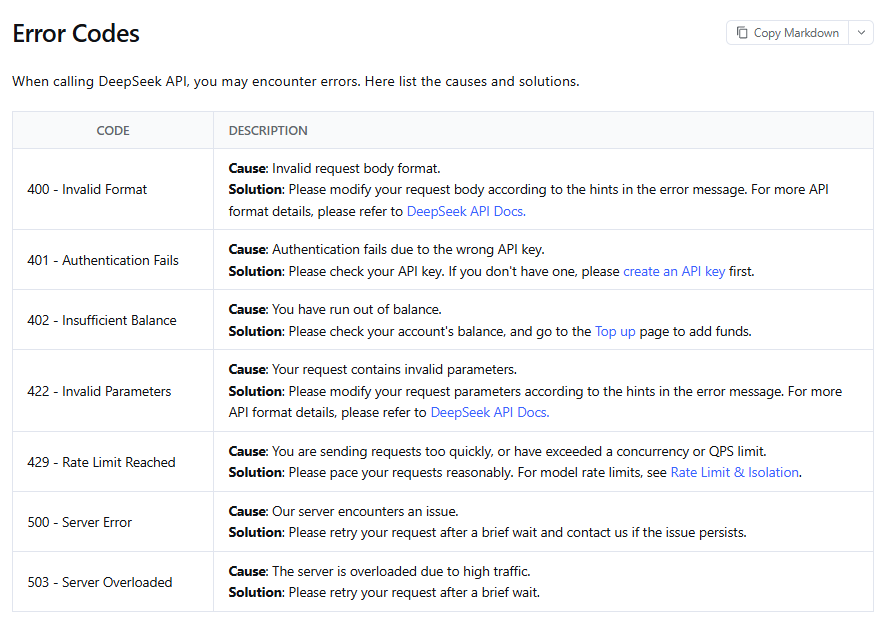
| Code | Official category | Correct first fix | Automatic retry? |
|---|---|---|---|
400 | Invalid Format | Correct the request body or an unsupported field combination using the message and endpoint documentation | No |
401 | Authentication Fails | Correct the API key or authentication header | No |
402 | Insufficient Balance | Check the balance and fund the account | No, until the account state changes |
422 | Invalid Parameters | Correct the parameter named or implied by the error message | No |
429 | Rate Limit Reached | Lower concurrency or QPS, queue work, and back off | Yes, bounded |
500 | Server Error | Retry after a short wait; escalate if persistent | Yes, bounded |
503 | Server Overloaded | Wait briefly, reduce pressure, and retry | Yes, bounded |
How to fix DeepSeek API error 400
A 400 means DeepSeek rejected the request format or a field combination for the API you called. Do not start by changing random values. Read the returned message, identify the exact protocol—Chat Completions, Responses, Anthropic-compatible, Search, or Fetch—and compare the payload with that protocol’s current schema.
Verified examples of 400 conditions include using stream_options without stream: true in Chat Completions, forcing a required or named tool while Chat Completions is in thinking mode, omitting required conversation reasoning data during thinking-mode tool-call turns, or placing an image in an unsupported message role in the Responses API.
How to fix DeepSeek API error 422
DeepSeek labels 422 as Invalid Parameters. The JSON may be parseable, but one or more parameters, values, or protocol-specific objects are not accepted. Inspect the message for the rejected field, then check its type, allowed range, enum value, nesting, and compatibility with the chosen model and API format.
Do not treat 400 and 422 as interchangeable. For example, the Anthropic-compatible API documents a 422 when a client-defined tool incorrectly includes "type": "custom"; a normal client tool should provide name, input_schema, and an optional description without that type field.
How to fix DeepSeek API error 401
- Confirm
DEEPSEEK_API_KEYexists in the same runtime that launches the application, not only in your interactive shell. - Remove accidental leading or trailing whitespace. Avoid surrounding quote characters that became part of the stored secret.
- For the OpenAI-compatible API, send
Authorization: Bearer YOUR_KEY. - Confirm the request is going to DeepSeek rather than a different gateway. The documented OpenAI-format base URL is
https://api.deepseek.com; the Anthropic-format base URL ishttps://api.deepseek.com/anthropic. - Check whether the key was deleted, disabled, rotated, or copied from the wrong DeepSeek account.
- If the key appeared in source control, logs, screenshots, or chat, revoke it and create a replacement instead of continuing to test it.
An exception such as openai.AuthenticationError can still describe a DeepSeek request. It names the compatible SDK class, not necessarily the company that received the request. The configured base_url and actual destination host identify the provider.
How to fix DeepSeek API error 402
A 402 means the account does not have sufficient balance for the request. Retrying the same call cannot repair the account state. Check the DeepSeek console or the authenticated Get User Balance endpoint, confirm that the key belongs to the expected account, and top up before retrying.
How to fix DeepSeek API error 429
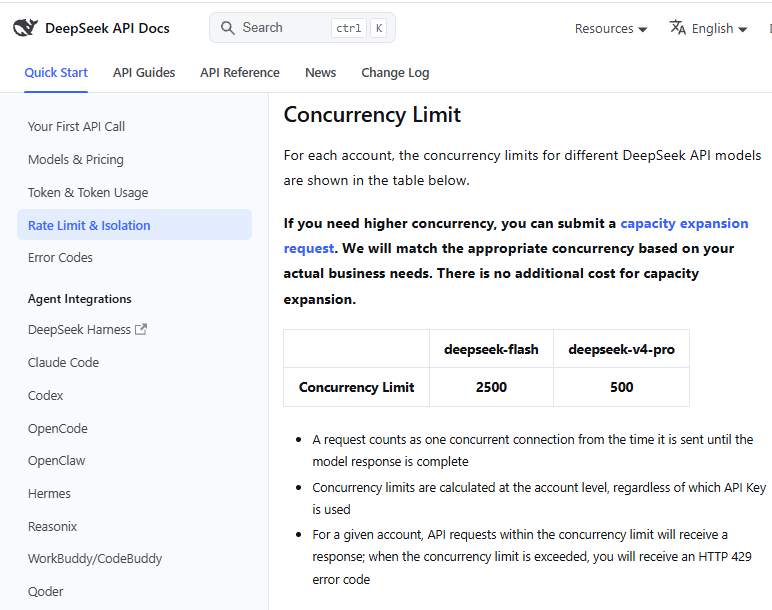
A 429 does not always mean “requests per minute.” For current model API traffic, DeepSeek publishes account-level concurrency limits: a request consumes one concurrent connection from submission until the response finishes. The calculation spans API keys under the same account, so creating more keys does not create more model concurrency.
Search and Fetch use separate account-level QPS limits instead of the model concurrency pool, and Fetch also has a per-domain limit. Diagnose the endpoint before choosing a remedy.
- Cap in-flight requests with a semaphore, worker pool, or queue.
- Do not immediately replay every failed task at once; that creates a retry storm.
- Use exponential backoff with jitter and a strict attempt budget.
- Apply backpressure to callers when the queue grows beyond a safe application threshold.
- For sustained legitimate demand, follow DeepSeek’s current capacity-expansion process rather than rotating keys.
How to fix DeepSeek API errors 500 and 503
A 500 is a server error, while 503 indicates overload in the core DeepSeek error reference. Retry after a brief delay, add jitter, and stop after a small number of attempts. If failures continue, check the official DeepSeek status page and preserve a sanitized example for support.
Do not convert a persistent outage into an infinite retry loop. A production client should open a circuit, slow new work, or fall back according to the application’s reliability policy.
DeepSeek-specific request mistakes that cause 400 or 422 errors
| API format | Mistake | Documented result | Fix |
|---|---|---|---|
| Chat Completions | Send stream_options without stream: true | 400 | Enable streaming or remove stream_options |
| Chat Completions with tools | Fail to pass prior reasoning_content back during thinking-mode tool conversations | 400 | Preserve the complete required assistant state on subsequent turns |
| Chat Completions in thinking mode | Use tool_choice: "required" or force a named tool | 400 | Disable thinking mode before forcing a tool, or use a supported choice |
| Responses API | Put an input image in a system or assistant message | 400 | Place supported images in a user/developer item or supported tool output |
| Responses API | Provide both image_url and file_id, or neither | 400 | Provide exactly one image source |
| Anthropic-compatible API | Add type: "custom" to a client-defined tool | 422 | Omit type and provide name plus input_schema |
Compatibility does not mean every field behaves exactly like the upstream API. Some unsupported Responses API fields are ignored instead of rejected, while other combinations return an error. Verify whether a field is supported, ignored, partially supported, or prohibited before assuming the request had the intended effect.
JSON Output can look empty without returning an HTTP error
When using Chat Completions JSON Output, set response_format to {"type":"json_object"} and explicitly instruct the model to return JSON, preferably with the expected shape. DeepSeek documents that content it cannot recognize as JSON may be replaced with spaces, so the response can appear blank even with finish_reason: "stop".
Validate the returned string before parsing it. Also inspect finish_reason: a value of length can indicate truncated output or context pressure. Correct the prompt and output budget before treating the result as a transport failure.
Search and Fetch use a different error map
Do not apply the core model error table blindly to /v1/tools/search or /v1/tools/fetch. DeepSeek documents additional endpoint-specific statuses for these tools.
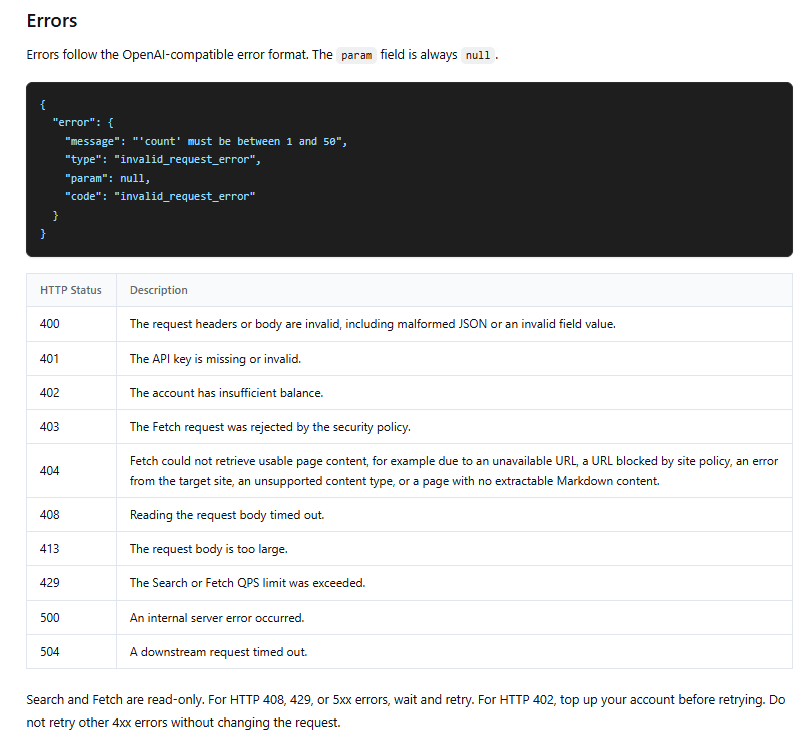
| Code | Search or Fetch meaning | Correct response |
|---|---|---|
403 | A Fetch request was rejected by the security policy | Do not retry unchanged; review the target and policy |
404 | Fetch could not obtain usable page content | Check the URL, site access policy, content type, and whether extractable content exists |
408 | Reading the request body timed out | Wait and retry with a bounded policy |
413 | The request body is too large | Reduce the request body before retrying |
504 | A downstream request timed out | Wait and retry with a bounded policy |
The Search and Fetch guide recommends retrying 408, 429, and 5xx failures after waiting. A 402 requires funding first, and other 4xx responses should not be retried until the request or resource changes.
No HTTP status: diagnose timeouts and connection failures
If the client raises an exception without an HTTP status, the request may not have reached a point where DeepSeek could return an API error. In the OpenAI Python SDK, connection problems raise APIConnectionError and timeouts raise APITimeoutError; an HTTP 4xx or 5xx response instead raises an APIStatusError subclass.
- Resolve
api.deepseek.comfrom the same host or container that runs the application. - Test HTTPS access while accounting for corporate proxies, outbound firewall rules, private DNS, and custom certificate authorities.
- Confirm the configured base URL was not concatenated with an incompatible path by a wrapper.
- Separate connect timeouts from read timeouts. A connection failure happens before the session is established; a read timeout can occur while waiting for or consuming a response.
- Run the minimal cURL request below from the same network. If cURL works, inspect the SDK version, proxy settings, transport, and application deadline.
- Check the official status page before concluding that a local timeout is a DeepSeek outage.
DeepSeek may keep a request open while it waits for inference. Non-streaming connections can receive empty lines, and streaming connections can receive SSE keep-alive comments. A custom parser must tolerate those keep-alives rather than treating the first blank or comment line as malformed JSON.
Fix invalid JSON and incomplete streaming responses
The correct parser depends on the API format. Do not feed an SSE stream into a single-response JSON parser, and do not wait for an OpenAI-style terminator when the selected protocol uses a different final event.
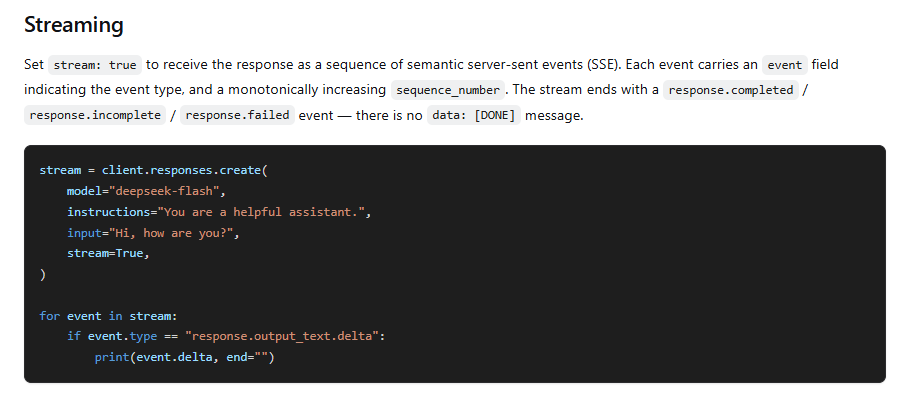
| Format | Normal stream ending | Important parser behavior |
|---|---|---|
| Chat Completions | data: [DONE] | Parse data-only SSE chunks and ignore keep-alive comments |
| Responses API | response.completed, response.incomplete, or response.failed | Process semantic events and sequence numbers; there is no [DONE] |
| Anthropic-compatible Messages | message_stop | Allow ping events and keep-alives; a pre-generation timeout can arrive as an unnamed data frame containing an error object |
- Check the HTTP status and content type before parsing the body.
- Do not call
json.loads()on the complete raw SSE transcript. - Ignore SSE comment lines beginning with a colon.
- Treat a connection that closes before the protocol’s final event as incomplete.
- Do not blindly replay a streaming request after partial output; the application may duplicate text, tool actions, or charges.
- Log the final event type and sanitized error fields, not the entire private stream.
Run a minimal request to isolate the failure
Set DEEPSEEK_API_KEY in the environment, then run this non-streaming request. It uses the current OpenAI-compatible base, a current model identifier, and disables thinking to keep the smoke test small.
curl --include --silent --show-error \
  "https://api.deepseek.com/chat/completions" \
  -H "Content-Type: application/json" \
  -H "Authorization: Bearer ${DEEPSEEK_API_KEY}" \
  -d '{
    "model": "deepseek-flash",
    "messages": [
      {"role": "user", "content": "Reply with OK."}
    ],
    "thinking": {"type": "disabled"},
    "max_tokens": 16
  }'
Avoid sharing output from curl -v unless you have verified that the outgoing authorization header and other secrets are redacted.
- The request succeeds: the key, account, network, endpoint, and minimal model call work. Add your application fields back gradually until the failure returns.
- It returns
401: fix the key, header, or destination host. - It returns
402: check and fund the account. - It returns
429: inspect account-wide concurrency and other traffic using the same account. - It returns
500or503: retry briefly and check service status. - It receives no response: continue with DNS, TLS, proxy, firewall, and timeout diagnostics.
Handle DeepSeek API errors safely in Python
The example below uses the OpenAI-compatible Python SDK against DeepSeek. It disables the SDK’s built-in retries so the application has one visible retry budget. The three-attempt budget, backoff values, and 60-second timeout are engineering choices for this small smoke test, not official DeepSeek limits; adjust them to the workload and avoid using the same deadline for long reasoning or streaming jobs.
import os
import random
import time

import openai
from openai import OpenAI


api_key = os.getenv("DEEPSEEK_API_KEY")
if not api_key:
    raise RuntimeError("DEEPSEEK_API_KEY is not set")

client = OpenAI(
    api_key=api_key.strip(),
    base_url="https://api.deepseek.com",
    max_retries=0,
    timeout=60.0,
)

retryable_statuses = {429, 500, 503}
max_attempts = 3
last_error = None

for attempt in range(1, max_attempts + 1):
    try:
        response = client.chat.completions.create(
            model="deepseek-flash",
            messages=[
                {"role": "user", "content": "Reply with OK."}
            ],
            max_tokens=16,
            extra_body={"thinking": {"type": "disabled"}},
        )
        print(response.choices[0].message.content)
        break

    except openai.APITimeoutError as exc:
        last_error = exc
        category = "timeout"
        retryable = True

    except openai.APIConnectionError as exc:
        last_error = exc
        category = "connection failure"
        retryable = True

    except openai.APIStatusError as exc:
        last_error = exc
        category = f"HTTP {exc.status_code}"
        retryable = exc.status_code in retryable_statuses

        safe_details = {
            "status": exc.status_code,
            "exception": type(exc).__name__,
            "request_id": getattr(exc, "request_id", None),
        }
        print(safe_details)

        if not retryable:
            raise

    if not retryable or attempt == max_attempts:
        raise RuntimeError(
            f"DeepSeek request failed after {attempt} attempt(s)"
        ) from last_error

    delay = min(2 ** (attempt - 1), 8) + random.uniform(0, 0.5)
    print(f"{category}; retrying in {delay:.1f}s")
    time.sleep(delay)
The code intentionally does not print the complete exception body or request. In production, record only the fields needed for diagnosis. If the provider supplies a request identifier, preserve it; if it is absent, do not invent one.
Be aware that the OpenAI Python SDK normally retries selected connection failures and HTTP statuses automatically. Either use its retry configuration or implement your own policy, but avoid stacking both without understanding the total number of attempts. Stream consumption needs special care because replaying after partial output can duplicate work.
When a third-party tool says the DeepSeek API failed
- Find the actual request hostname in the tool’s diagnostic log. If it is not a DeepSeek-owned endpoint, the tool or gateway may be the source of the status.
- Identify whether the tool uses Chat Completions, Responses, or the Anthropic-compatible Messages API. Do not reuse payload fields or streaming logic across formats.
- Check whether the tool replaces model names, adds unsupported fields, forces thinking mode, or drops
reasoning_contentbetween tool-call turns. - Reproduce the request directly against the official DeepSeek API with a separate minimal script. A successful direct call points to the wrapper or provider integration.
- Use the third party’s documentation for its own
401,429, billing, free-tier, and proxy errors. Do not present them as official DeepSeek limits.
What to collect before contacting DeepSeek support
- UTC timestamp and the approximate duration of the incident.
- Provider hostname, endpoint path, HTTP method, and API format.
- HTTP status and sanitized error type, code, and message.
- Model identifier, streaming state, and whether tools, thinking, images, or files were used.
- SDK name and version, runtime version, operating environment, and proxy configuration where relevant.
- A minimal reproducible request with the key, private content, and customer data removed.
- Request or trace identifier only when the response actually supplied one.
- Retry count and whether the same request succeeds from another network or client.
For a persistent official API problem that cannot be explained by the documentation or status page, use the current DeepSeek API support channel listed in the documentation: api-service@deepseek.com.
Prevent repeat failures in production
- Validate required environment variables and the intended base URL during application startup.
- Centralize error classification so authentication, billing, request, limit, server, and network failures follow different paths.
- Use account-aware concurrency controls instead of assuming each API key has an independent quota.
- Apply bounded retries with jitter, backpressure, and a circuit breaker for persistent transient failures.
- Set application-appropriate connect, read, and total deadlines.
- Use a protocol-specific stream parser and test normal completion, failure events, keep-alives, and abrupt connection closure.
- Validate tool arguments and JSON output before using them.
- Monitor account balance, in-flight request counts, queue depth, error rate by status, and the official service status.
- Run regression tests against current model identifiers and request schemas when SDKs or DeepSeek APIs change.
- Keep keys out of source code and rotate them after any suspected exposure.
Frequently asked questions
Why is the DeepSeek API not working?
First determine whether you received an HTTP status. A 4xx usually requires a request, credential, account, or limit correction; 500 and 503 are server-side classes; no status points to the network, transport, or client deadline. Then reproduce the issue with the minimal request in this guide.
Why is my DeepSeek API key not working?
Common causes are an unset environment variable, hidden whitespace, the wrong account, a rotated or disabled key, an incorrect authentication header, or a request sent to the wrong provider. Confirm the actual hostname and test the key without exposing it in logs.
What is the difference between DeepSeek errors 400 and 422?
DeepSeek’s core reference labels 400 Invalid Format and 422 Invalid Parameters. Use the returned message and endpoint schema to identify the rejected body shape, field, value, or feature combination; do not rely on the status alone.
Which DeepSeek API errors should I retry?
For core model calls, use bounded retries for 429, 500, and 503. Correct 400, 401, 402, and 422 before retrying. Search and Fetch additionally document retry guidance for 408 and 504. Connection and timeout retries should also be limited and should respect whether replaying the operation is safe.
Will creating another API key fix a 429 error?
Not when the relevant limit is account-level. DeepSeek currently calculates model concurrency across keys in the same account, and Search and Fetch QPS limits are also account-level. Reduce pressure, queue work, or follow the official capacity process.
How do I know whether DeepSeek is down?
Check the official status page and compare it with a minimal request from your environment. A public incident plus failures across independent clients suggests a provider issue; one application failing while the minimal request succeeds points to local code or configuration.
Why do I get invalid JSON or an unexpected end of input?
You may be parsing an SSE stream as one JSON document, failing to ignore keep-alive comments, waiting for the wrong protocol terminator, or receiving a stream that closed before its final event. With JSON Output, blank-looking content can also be spaces substituted for unrecognized JSON, and finish_reason: "length" can indicate truncation.
Does an OpenAI SDK error mean the request went to OpenAI?
No. DeepSeek supports OpenAI-compatible APIs, so an OpenAI SDK can raise classes such as AuthenticationError, RateLimitError, or APIStatusError for a request sent to DeepSeek. Verify the configured base URL and destination hostname.
Official sources checked
- DeepSeek Error Codes
- DeepSeek first API call and current base URLs
- DeepSeek Rate Limit & Isolation
- DeepSeek Chat Completions API reference
- DeepSeek Responses API guide
- DeepSeek Anthropic-compatible API guide
- DeepSeek Search & Fetch guide
- OpenAI Python SDK error-handling documentation
Technical details were verified against the current official documentation on November 6, 2026.