

Last reviewed: November 7, 2026
The quickest way to request DeepSeek JSON Output through Chat Completions is to set response_format to {"type":"json_object"}, explicitly tell the model to return JSON, describe the required fields, and reserve enough output tokens for the complete object.
For stronger structural constraints, use the Responses API with text.format.type set to json_schema. DeepSeek currently documents JSON Schema output through the Responses API, while Chat Completions documents text and json_object as its supported response-format types.
Neither option removes the need for application-side checks. Production code should confirm that the response completed, reject empty or truncated content, parse the JSON, validate its fields and types, enforce business rules, and authorize any resulting action before writing to a database or calling another service.
DeepSeek JSON Output options at a glance
| Method | Best use | Current request format | Main limitation |
|---|---|---|---|
| Prompt-only JSON | Experiments where occasional formatting failure is acceptable | Ask for JSON in the prompt without an API output-format setting | The API is not being asked to enforce JSON mode. |
| Chat Completions JSON Object | Returning valid JSON text that the application will validate | response_format={"type":"json_object"} | Valid JSON does not guarantee the required keys, types, values, or business logic. |
| Responses API JSON Object | JSON text in a Responses API workflow | text={"format":{"type":"json_object"}} | The application still needs its own schema validation. |
| Responses API JSON Schema | Stronger structural control over the final response | text={"format":{"type":"json_schema","name":"...","schema":{...}}} | Schema compliance does not prove that extracted facts are correct. |
| Strict Tool Calls | Allowing the model to request an application-controlled function | Beta endpoint plus strict: true in every function definition | A structurally valid tool request is not automatically authorized or safe to execute. |
Current DeepSeek models that support JSON Output
DeepSeek’s current model table lists two primary hosted model IDs:
| Model ID | Current documented version | JSON Output | Responses API | Thinking mode |
|---|---|---|---|---|
deepseek-flash | DeepSeek-V4.1-Flash-1017 | Supported | Supported | Thinking and non-thinking modes |
deepseek-v4-pro | DeepSeek-V4-Pro-0813 | Supported | Supported | Thinking and non-thinking modes |
Both models currently have a documented one-million-token context window and a maximum output of 393,216 tokens. That maximum is not a recommended default. Structured responses should remain bounded to the smallest practical size so failures, latency, and validation remain manageable.
For new integrations, use the current model IDs instead of copying legacy names from older tutorials. Applications that need to discover current capabilities programmatically can call DeepSeek’s Models endpoint.
Minimal Chat Completions JSON request
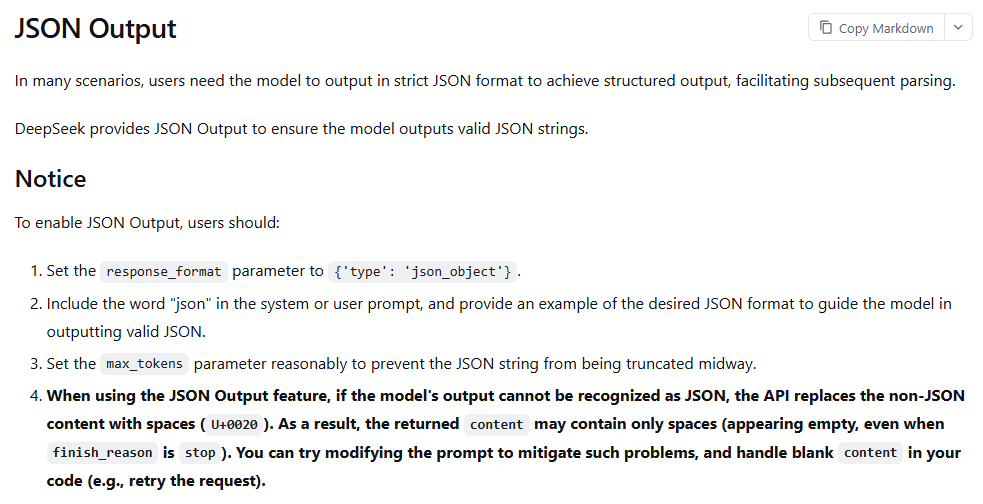
DeepSeek’s JSON Output guide identifies three essential requirements:
- Set
response_formatto{"type":"json_object"}. - Include the word “JSON” in a system or user message and describe or demonstrate the intended structure.
- Set a reasonable output-token budget so the object is not cut off before its closing braces.
The following cURL request disables thinking mode because the task is simple classification. Thinking mode can remain enabled when the task benefits from reasoning, but the final JSON must still come from the documented final-content field.
curl --fail-with-body --max-time 90 \
  "https://api.deepseek.com/chat/completions" \
  -H "Authorization: Bearer ${DEEPSEEK_API_KEY}" \
  -H "Content-Type: application/json" \
  -d '{
    "model": "deepseek-flash",
    "messages": [
      {
        "role": "system",
        "content": "Return one JSON object only. Use exactly the keys category, priority, summary, and needs_human_review. Do not add Markdown or prose."
      },
      {
        "role": "user",
        "content": "Classify this support ticket as JSON: I was charged twice and need a refund."
      }
    ],
    "response_format": {
      "type": "json_object"
    },
    "thinking": {
      "type": "disabled"
    },
    "max_tokens": 500
  }'
The structured text appears in choices[0].message.content. Before parsing it, inspect choices[0].finish_reason. A normal text result generally ends with stop. A result ending with length may contain only part of the intended JSON document.
Production Python example with parsing and validation
The official DeepSeek example demonstrates json.loads(), but a production integration needs more safeguards. The following example:
- Reads the API key from an environment variable.
- Rejects missing choices and abnormal finish reasons.
- Rejects empty or whitespace-only content.
- Separates JSON parsing errors from schema errors.
- Rejects unexpected properties.
- Validates exact field types and enum values.
- Applies a business rule after schema validation.
- Limits model-output correction attempts.
from __future__ import annotations

import json
import os
from typing import Literal

from openai import OpenAI
from pydantic import BaseModel, ConfigDict, Field, ValidationError


class TicketClassification(BaseModel):
    model_config = ConfigDict(extra="forbid", strict=True)

    category: Literal["billing", "technical", "account", "other"]
    priority: Literal["low", "medium", "high"]
    summary: str = Field(min_length=1, max_length=240)
    needs_human_review: bool


client = OpenAI(
    api_key=os.environ["DEEPSEEK_API_KEY"],
    base_url="https://api.deepseek.com",
    timeout=60.0,
)

SYSTEM_PROMPT = """
Return one JSON object and no prose or Markdown.
Use exactly these keys:
- category: one of billing, technical, account, other
- priority: one of low, medium, high
- summary: a concise string, 1 to 240 characters
- needs_human_review: a JSON boolean

If the ticket is ambiguous, use category "other" and set
needs_human_review to true. Do not invent facts that are not in the ticket.
""".strip()


def classify_ticket(
    ticket_text: str,
    max_attempts: int = 2,
) -> TicketClassification:
    correction = ""

    for attempt in range(1, max_attempts + 1):
        response = client.chat.completions.create(
            model="deepseek-flash",
            messages=[
                {"role": "system", "content": SYSTEM_PROMPT},
                {
                    "role": "user",
                    "content": (
                        f"Classify this ticket as JSON:\n"
                        f"{ticket_text}{correction}"
                    ),
                },
            ],
            response_format={"type": "json_object"},
            max_tokens=500,
            extra_body={"thinking": {"type": "disabled"}},
        )

        if not response.choices:
            raise RuntimeError("DeepSeek returned no completion choices.")

        choice = response.choices[0]

        if choice.finish_reason != "stop":
            raise RuntimeError(
                f"Incomplete or unusable completion: "
                f"{choice.finish_reason!r}. "
                "Reduce the requested output or increase the output budget."
            )

        raw = choice.message.content

        if raw is None or not raw.strip():
            if attempt < max_attempts:
                correction = (
                    "\nPrevious output was blank. "
                    "Return one non-empty JSON object."
                )
                continue

            raise RuntimeError(
                "DeepSeek returned empty or whitespace-only content."
            )

        try:
            parsed = json.loads(raw)
        except json.JSONDecodeError as exc:
            if attempt < max_attempts:
                correction = (
                    "\nPrevious output was not valid JSON. "
                    "Return only one valid JSON object."
                )
                continue

            raise RuntimeError(
                "DeepSeek returned malformed JSON."
            ) from exc

        if not isinstance(parsed, dict):
            raise RuntimeError(
                "Expected a JSON object at the document root."
            )

        try:
            ticket = TicketClassification.model_validate(parsed)
        except ValidationError as exc:
            if attempt < max_attempts:
                correction = (
                    "\nPrevious JSON failed the required schema. "
                    "Correct the fields and return only the complete "
                    "JSON object."
                )
                continue

            raise RuntimeError(
                "DeepSeek JSON failed schema validation."
            ) from exc

        if (
            ticket.priority == "high"
            and not ticket.needs_human_review
        ):
            raise RuntimeError(
                "Business rule failed: "
                "high-priority tickets require review."
            )

        return ticket

    raise RuntimeError(
        "No valid structured response was produced."
    )


result = classify_ticket(
    "I was charged twice and need a refund today."
)
print(result.model_dump_json(indent=2))
Pydantic models validate untrusted input against declared types and constraints. Setting extra="forbid" prevents silently accepting fields the application never requested.
This code retries only model-format failures that may improve with another generation. It does not retry a truncated result unchanged, and it does not let a schema-valid object bypass the application’s own business rule.
Using JSON Schema with the Responses API
Chat Completions currently documents json_object, but DeepSeek’s Responses API reference also documents json_schema. The configuration belongs under text.format, not under the Chat Completions response_format field.
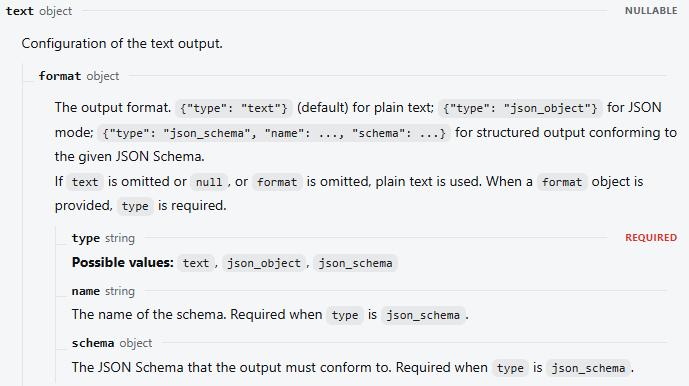
The format object requires:
typeset tojson_schema.- A schema
name. - A JSON Schema object in
schema.
import json
import os
from typing import Literal

from openai import OpenAI
from pydantic import BaseModel, ConfigDict, ValidationError


class TicketClassification(BaseModel):
    model_config = ConfigDict(extra="forbid", strict=True)

    category: Literal["billing", "technical", "account", "other"]
    priority: Literal["low", "medium", "high"]
    summary: str
    needs_human_review: bool


ticket_schema = {
    "type": "object",
    "properties": {
        "category": {
            "type": "string",
            "enum": [
                "billing",
                "technical",
                "account",
                "other",
            ],
        },
        "priority": {
            "type": "string",
            "enum": ["low", "medium", "high"],
        },
        "summary": {
            "type": "string",
        },
        "needs_human_review": {
            "type": "boolean",
        },
    },
    "required": [
        "category",
        "priority",
        "summary",
        "needs_human_review",
    ],
    "additionalProperties": False,
}

client = OpenAI(
    api_key=os.environ["DEEPSEEK_API_KEY"],
    base_url="https://api.deepseek.com",
    timeout=60.0,
)

response = client.responses.create(
    model="deepseek-flash",
    input=(
        "Classify this support ticket: "
        "I was charged twice."
    ),
    instructions=(
        "Return only the requested structured result. "
        "Do not invent facts."
    ),
    reasoning={"effort": "none"},
    text={
        "format": {
            "type": "json_schema",
            "name": "ticket_classification",
            "schema": ticket_schema,
        }
    },
    max_output_tokens=500,
)

if response.status != "completed":
    reason = getattr(
        response.incomplete_details,
        "reason",
        None,
    )
    raise RuntimeError(
        f"Response was {response.status!r}; "
        f"reason={reason!r}."
    )

raw = response.output_text
if not raw or not raw.strip():
    raise RuntimeError(
        "DeepSeek returned no final structured output."
    )

try:
    parsed = json.loads(raw)
except json.JSONDecodeError as exc:
    raise RuntimeError(
        "DeepSeek returned malformed JSON."
    ) from exc

try:
    validated = TicketClassification.model_validate(parsed)
except ValidationError as exc:
    raise RuntimeError(
        "DeepSeek output failed client-side validation."
    ) from exc

print(validated.model_dump_json(indent=2))
The server-side schema reduces structural variability, but client validation remains necessary. It protects the application if the provider behavior changes, a third-party gateway rewrites the request, a response is corrupted, or a future integration bypasses the original structured-output path.
JSON Schema also controls only structure. A schema can require priority to be one of three strings, but it cannot independently prove that the model selected the correct priority for the source ticket.
Node.js example with Zod validation
The same completion, content, parsing, and validation checks apply in Node.js. Keep the DeepSeek key on a trusted server; never expose it in browser JavaScript or a public mobile-app bundle.
import OpenAI from "openai";
import { z } from "zod";

const TicketClassification = z
  .object({
    category: z.enum([
      "billing",
      "technical",
      "account",
      "other",
    ]),
    priority: z.enum(["low", "medium", "high"]),
    summary: z.string().min(1).max(240),
    needs_human_review: z.boolean(),
  })
  .strict();

const apiKey = process.env.DEEPSEEK_API_KEY;
if (!apiKey) {
  throw new Error("DEEPSEEK_API_KEY is not set.");
}

const client = new OpenAI({
  apiKey,
  baseURL: "https://api.deepseek.com",
  timeout: 60_000,
});

const completion =
  await client.chat.completions.create({
    model: "deepseek-flash",
    messages: [
      {
        role: "system",
        content:
          "Return one JSON object only. Use category, " +
          "priority, summary, and needs_human_review. " +
          "Do not add Markdown or prose.",
      },
      {
        role: "user",
        content:
          "Classify this ticket as JSON: " +
          "I cannot sign in after resetting my password.",
      },
    ],
    response_format: {
      type: "json_object",
    },
    max_tokens: 500,
  });

const choice = completion.choices[0];

if (!choice || choice.finish_reason !== "stop") {
  throw new Error(
    `Incomplete completion: ${
      choice?.finish_reason ?? "missing choice"
    }`,
  );
}

const raw = choice.message.content?.trim();

if (!raw) {
  throw new Error(
    "DeepSeek returned empty or whitespace-only content.",
  );
}

let parsed;

try {
  parsed = JSON.parse(raw);
} catch (error) {
  throw new Error(
    "DeepSeek returned malformed JSON.",
    { cause: error },
  );
}

const checked =
  TicketClassification.safeParse(parsed);

if (!checked.success) {
  throw new Error(
    `Schema validation failed: ${
      checked.error.message
    }`,
  );
}

if (
  checked.data.priority === "high" &&
  !checked.data.needs_human_review
) {
  throw new Error(
    "Business rule failed: " +
    "high-priority tickets require review.",
  );
}

console.log(checked.data);
Zod’s safeParse() method returns an explicit success or error result, allowing the application to distinguish schema failure from JSON parsing failure.
How to design a reliable JSON prompt
JSON mode controls syntax more strongly than a normal prompt, but the prompt still defines what the object is supposed to mean. A useful output contract should state:
- The required root type, such as one object rather than an array.
- Every permitted field name.
- The intended type of every field.
- Allowed enum values.
- How unknown or missing information must be represented.
- Whether additional properties are forbidden.
- Whether empty strings are allowed.
- Whether the model may infer information that is not explicitly present.
- That no prose, Markdown fences, or commentary may appear outside the JSON.
Return one JSON object only.

Required keys:
- product_name: string or null
- issue_type: one of "billing", "technical", "delivery", "other"
- evidence: array of exact supporting phrases from the input
- needs_review: boolean

Rules:
- Do not add keys.
- Do not add Markdown or prose.
- Use null when the product name is not stated.
- Do not infer facts that are absent from the input.
- Set needs_review to true when the issue is ambiguous.
Do not force the model to fabricate a value just because a field is required. For extraction workflows, explicitly allow null, an empty list, or a review flag when the source does not contain enough evidence.
The correct production validation order
A robust DeepSeek structured-output pipeline should validate each layer in order:
- Confirm that the HTTP request succeeded.
- Confirm that the API returned the expected completion or response object.
- Confirm that generation completed normally.
- Reject
length,incomplete,failed, filtered, aborted, or resource-interrupted responses as appropriate. - Confirm that final content exists.
- Trim and reject whitespace-only content.
- Parse with a real JSON parser.
- Confirm the expected root type.
- Validate required properties.
- Reject unexpected properties when the contract requires a closed object.
- Validate exact runtime types.
- Validate enum values, formats, ranges, and string lengths.
- Validate relationships between fields.
- Compare extracted facts with the source when accuracy matters.
- Apply business and authorization rules.
- Only then store the object or trigger an external action.
According to the JSON Schema object reference, properties are not required merely because they appear under properties. They must also be listed under required. Likewise, unspecified properties remain allowed unless additionalProperties is set to false or otherwise constrained.
Why DeepSeek may return empty JSON content
DeepSeek documents an unusual JSON-mode failure case: if the generated output cannot be recognized as JSON, the API may replace the unrecognized content with space characters. The returned message can therefore appear empty or contain only whitespace even when finish_reason is stop.
Always test the trimmed string:
raw = choice.message.content

if raw is None or not raw.strip():
    raise RuntimeError(
        "Empty or whitespace-only JSON content."
    )
When blank output occurs:
- Confirm that the prompt explicitly uses the word “JSON.”
- Describe the exact root type and fields.
- Provide one compact example when the structure is ambiguous.
- For simple extraction, test non-thinking mode.
- Retry only a small, bounded number of times.
- Record the model ID, finish reason, prompt version, token usage, and failure category without logging sensitive input.
Adding the word “JSON” improves compliance with DeepSeek’s documented requirement, but it does not justify an infinite retry loop or eliminate the need to detect blank content.
How to handle truncated or incomplete JSON
In Chat Completions, finish_reason="length" means generation reached an output limit or the conversation exceeded the available context. The returned string may stop in the middle of a property, string, array, or closing brace.
In the Responses API, inspect response.status. DeepSeek currently documents these statuses:
| Status | Meaning | Application action |
|---|---|---|
completed | The response completed normally. | Continue with content, parsing, and validation checks. |
incomplete | The output was cut off, including cases where max_output_tokens was reached. | Reject it. Reduce the requested output, split the input, or adjust the output budget. |
failed | The response failed and includes error information. | Classify the failure and retry only when the error is temporary. |
Do not accept a partial response merely because JSON.parse() or json.loads() happens to succeed. A list may be syntactically valid while containing only the first few requested records. Completion state and application-level completeness both matter.
Better responses to truncation include:
- Request fewer records per call.
- Reduce verbose fields.
- Use identifiers instead of repeated source text when appropriate.
- Split a large document into controlled batches.
- Set an output budget based on measured workload size.
- Reject and regenerate the complete unit rather than appending an unverified fragment.
Can DeepSeek JSON Output be streamed?
Yes, but a normal JSON parser cannot safely parse every text delta as an independent document. A quotation mark, escape sequence, property value, or closing brace may be split across chunks.
Chat Completions streaming
With Chat Completions, collect only final-answer content deltas into a buffer. Keep reasoning_content separate when thinking mode is enabled. Wait for the terminal finish reason, reject abnormal completion, then parse the assembled content once.
Responses API streaming
DeepSeek’s Responses API guide uses semantic server-sent events. Output text arrives through response.output_text.delta events, and the stream ends with one of:
response.completedresponse.incompleteresponse.failed
The Responses stream does not use a final data: [DONE] marker. Parse the buffered final-answer text only after receiving response.completed. Never write partial streamed fields to a database or trigger an external action before the terminal event and validation succeed.
Should thinking mode be enabled for JSON Output?
DeepSeek currently enables thinking mode by default at the high effort level. The best setting depends on the task.
| Task | Useful starting point | Reason |
|---|---|---|
| Simple classification or field extraction | Test non-thinking mode | It may reduce reasoning tokens, latency, and the opportunity for output-channel confusion. |
| Complex document interpretation | Compare thinking and non-thinking modes | Reasoning may improve judgment, but only measurement can show whether the extra cost and latency help. |
| Tool-driven workflow | Follow current tool and reasoning requirements | Tool choice and reasoning behavior have mode-specific constraints. |
For Chat Completions, DeepSeek documents the thinking toggle through the request’s thinking object. When using the OpenAI Python SDK, it can be passed through extra_body. In the Responses API, use the reasoning.effort field; none disables thinking.
When thinking is enabled, Chat Completions returns reasoning in reasoning_content and the final answer in content. Parse the final JSON from content, not from the reasoning channel.
DeepSeek JSON Output vs Tool Calls
Use JSON Output when the application needs a structured result. Use Tool Calls when the model should request that the application perform a named operation.
| Requirement | Prefer |
|---|---|
| Extract information into an object for later review | JSON Object or JSON Schema |
| Return a classification, report, or normalized record | JSON Object or JSON Schema |
| Ask the application to look up an order | Tool Call |
| Ask the application to create a ticket or send a message | Tool Call with server-side authorization |
| Require stronger structural constraints on function arguments | Strict Tool Calls when the current Beta limitations are acceptable |
DeepSeek’s strict Tool Calls documentation currently requires the Beta base URL, strict: true for each function, all object properties to be required, and additionalProperties set to false. The documented strict-schema subset supports objects, strings, numbers, integers, booleans, arrays, enums, and anyOf, with limitations on some schema keywords.
Even strict arguments are untrusted requests. Before executing a tool:
- Allow only known function names.
- Validate the arguments again on the server.
- Recheck the user’s authorization.
- Reject unknown properties.
- Constrain paths, URLs, identifiers, and numeric values.
- Use parameterized database queries.
- Apply rate and resource limits.
- Require human approval for consequential actions.
Common DeepSeek JSON Output problems
| Problem | Likely cause | Correct response |
|---|---|---|
Content is empty but finish reason is stop | The unrecognized non-JSON output may have been replaced by spaces. | Trim the content, improve the JSON instruction, and use a bounded retry. |
finish_reason is length | The output or context limit was reached. | Reject the response, reduce the requested data, or adjust the output budget. |
| JSON parses but required fields are missing | JSON Object mode controls syntax, not the complete application schema. | Use Pydantic, Zod, Ajv, or JSON Schema validation. |
| Unexpected fields appear | The prompt or validator allows additional properties. | Set additionalProperties:false and reject extras client-side. |
| Responses-style schema fails in Chat Completions | The parameter was copied between different API interfaces. | Use response_format with json_object for Chat Completions, or move JSON Schema to Responses text.format. |
| Output contains Markdown fences | The prompt did not clearly prohibit surrounding prose or the request is not using the intended output mode. | Request one JSON document only and reject wrappers instead of stripping arbitrary text in production. |
| Streaming parser fails on every chunk | Each delta is only a fragment of the final JSON document. | Buffer final content and parse after normal stream completion. |
| Schema-valid values are factually wrong | Structural validation cannot verify source accuracy. | Compare extracted values with the source, use deterministic checks, or route uncertain records for review. |
| The same request works through one provider but not another | Providers may expose different model IDs, parameters, schema support, or compatibility layers. | Use the exact provider’s documentation and keep provider-specific adapters separate. |
How to design safe retries
Classify the failure before retrying. Different failures require different responses:
- Temporary API or network failure: use a small retry limit with increasing delay and jitter.
- Empty JSON content: strengthen the output instruction and retry once or twice.
- Malformed JSON: retry with a concise correction if the request used the correct output mode.
- Schema failure: provide limited validation feedback or route the record for review.
- Truncation: reduce the output or change the token budget; do not repeat the identical request blindly.
- Authentication or malformed request: fix the configuration instead of retrying unchanged.
- Ambiguous source data: return a review state rather than regenerating until the model invents certainty.
Retries must not duplicate side effects. Generate and validate the structured object before creating a payment, sending a message, modifying a record, or invoking an external tool.
Testing DeepSeek structured output before production
Create unit tests for the parser and validator without calling the model for every test. Feed the application representative strings and objects covering:
- A normal valid object.
- Empty and whitespace-only content.
- Malformed JSON.
- A valid array when an object is required.
- A missing required field.
- An unexpected property.
- A wrong primitive type.
- An invalid enum value.
- An out-of-range number.
- An invalid date or identifier.
- Contradictory field combinations.
- A truncated object.
- A refusal or filtered response.
- A dropped stream.
- Input attempting to override the output contract.
Then run a smaller live evaluation against representative source data. Measure accepted-record rate, empty outputs, truncations, parse failures, schema failures, retries, latency, token use, and the percentage of records requiring human review.
Production security checklist
- Treat every model response as untrusted input.
- Keep API keys in environment variables or a secrets manager.
- Never ship a DeepSeek key in frontend JavaScript or a mobile application.
- Do not interpolate model values directly into SQL.
- Use parameterized queries and database constraints.
- Do not execute model-generated shell commands.
- Allowlist tools, paths, domains, and operations.
- Validate authorization separately from the JSON schema.
- Do not trust model-generated URLs without verification.
- Do not use a model confidence field as an access-control decision.
- Redact unnecessary personal or confidential information before sending it.
- Avoid logging full sensitive prompts or unredacted outputs.
- Require human approval for payments, account changes, messages, destructive operations, and other consequential actions.
Final implementation guidance
Use Chat Completions JSON Object mode when your application needs valid JSON text and already owns the validation layer. Use Responses API JSON Schema when stronger structural control is valuable and your schema fits the documented interface. Use Tool Calls when the model must request an application-controlled operation rather than merely return a structured result.
Whichever path you choose, the safe sequence remains the same: verify completion, reject blank or truncated output, parse the final content, validate the structure, verify important values, enforce business and authorization rules, and only then store data or perform an action.
The main production mistake is treating “valid JSON” as “trusted data.” DeepSeek JSON mode solves a formatting problem. Your application must still solve correctness, security, authorization, and operational reliability.
Frequently asked questions
What should response_format contain for DeepSeek JSON Output?
For Chat Completions, use {"type":"json_object"}. Also instruct the model to return JSON in a system or user message and describe the expected structure.
Does DeepSeek support JSON Schema?
Yes. DeepSeek currently documents json_schema through the Responses API under text.format. Chat Completions currently documents text and json_object for its response_format field.
Why did DeepSeek return only spaces?
DeepSeek documents that output it cannot recognize as JSON may be replaced with space characters. Trim the returned string, reject blank content, improve the JSON instruction, and use only a bounded retry.
Does JSON mode guarantee all required fields?
No. JSON Object mode is intended to guarantee valid JSON syntax, not your complete application schema. Validate required fields, types, enums, ranges, and unexpected properties in your own code.
Can DeepSeek JSON Output be streamed?
Yes, but buffer the final-answer text and parse it only after normal stream completion. Do not attempt to parse every text delta as a complete JSON document.
Should thinking mode be disabled for JSON extraction?
It is a useful starting point for simple extraction or classification, but it is not a universal rule. Compare thinking and non-thinking modes on representative data and measure accuracy, latency, token use, and failure rates.
Can I save DeepSeek JSON directly to a database?
Do not save it before validation. Check completion, parse the JSON, validate the schema, verify important values, enforce business rules, and use normal database protections such as parameterized queries and constraints.
Why does JSON Schema work with one provider but fail with another?
DeepSeek models hosted by different providers may use different endpoints, model IDs, compatibility layers, and supported output modes. Follow the documentation for the provider that actually receives the request rather than assuming official DeepSeek API behavior applies everywhere.
Sources checked
- DeepSeek JSON Output guide
- DeepSeek Chat Completions API reference
- DeepSeek Responses API reference
- DeepSeek Responses API compatibility and streaming guide
- DeepSeek Thinking Mode guide
- DeepSeek Tool Calls and strict-mode guide
- DeepSeek current models and capabilities
- DeepSeek Models endpoint
- Pydantic model-validation documentation
- Zod validation documentation
- JSON Schema object validation reference