

Last reviewed: November 7, 2026
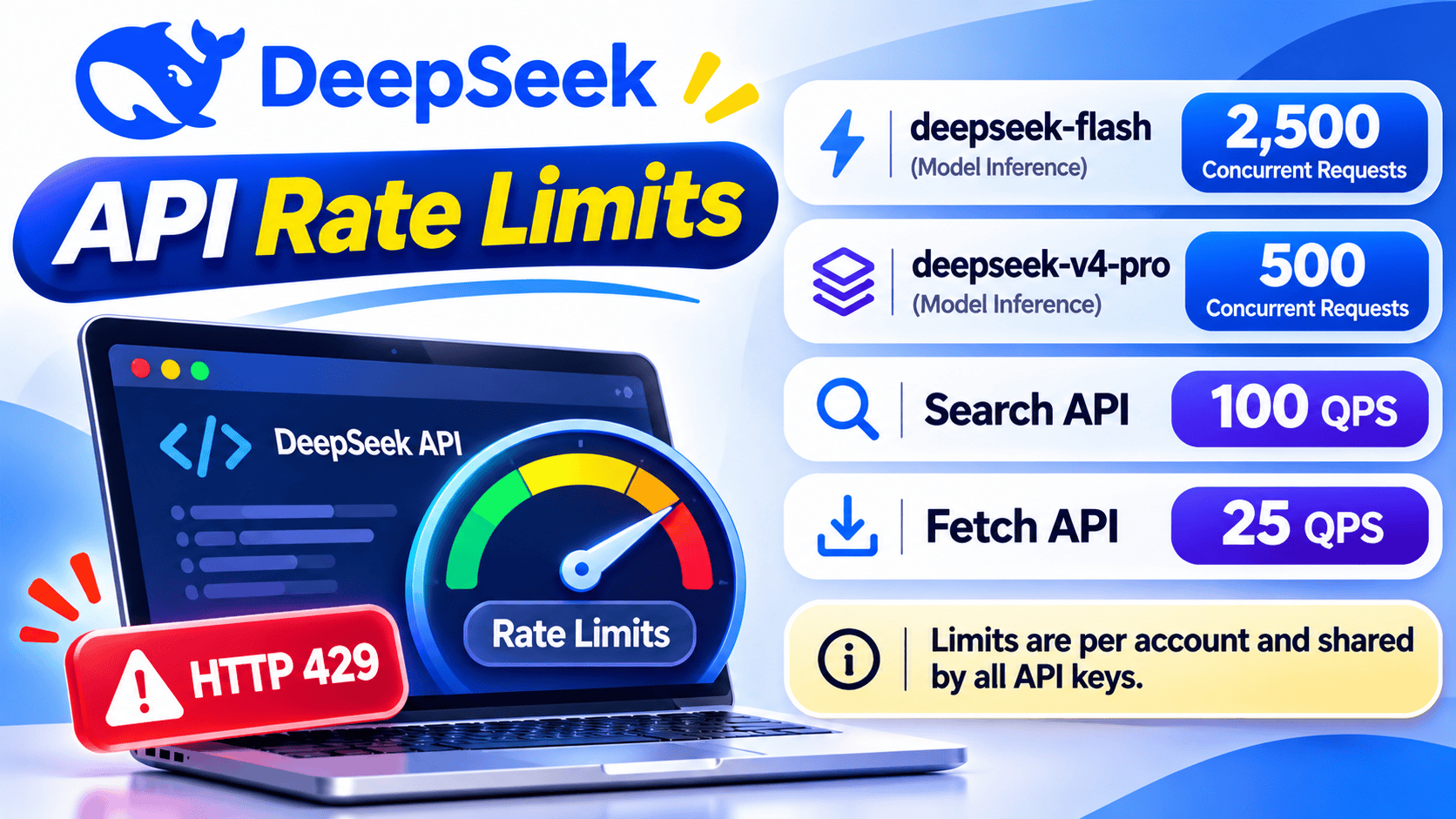
DeepSeek currently publishes account-level concurrency limits for model inference rather than a standard public table of requests per minute or tokens per minute. The documented limits are 2,500 concurrent requests for deepseek-flash and 500 concurrent requests for deepseek-v4-pro.
Every request occupies one concurrency slot from the time it is sent until the model response finishes. All API keys under the same account share the applicable limit, so creating more keys does not create additional capacity. Requests above the limit receive HTTP 429.
DeepSeek Search and Fetch use separate request-rate limits: Search allows 100 requests per second, while Fetch allows 25 requests per second and is also subject to an additional per-domain limit whose numeric value is not publicly documented.
The safest response to a DeepSeek 429 error is to reduce pressure first: cap in-flight model requests, control Search and Fetch request-start rates, queue excess work, and then apply a small number of delayed retries with jitter. Retrying immediately without reducing demand can create a retry storm and extend the failure.
Current DeepSeek API rate limits
The following limits were checked against DeepSeek’s official Rate Limit & Isolation documentation and Search and Fetch guide on November 7, 2026.
| API or model | Published limit | Counting scope | When exceeded |
|---|---|---|---|
deepseek-flash | 2,500 concurrent requests | Per account, shared by all API keys | HTTP 429 |
deepseek-v4-pro | 500 concurrent requests | Per account, shared by all API keys | HTTP 429 |
| Search API | 100 QPS | Per account, shared by all API keys | HTTP 429 |
| Fetch API | 25 QPS | Per account, shared by all API keys | HTTP 429 |
| Fetch per target domain | Additional QPS limit; number not publicly documented | Per domain | HTTP 429 |
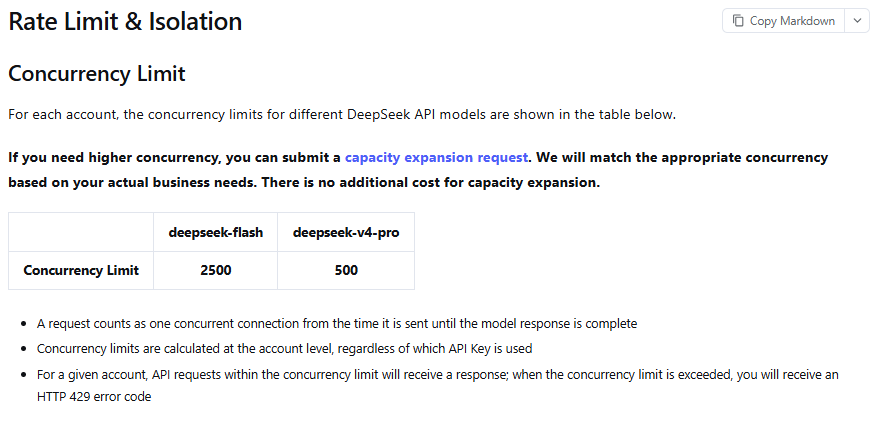
Search and Fetch quotas are independent. Search traffic does not consume the Fetch quota, and Fetch traffic does not consume the Search quota. Both are also separate from the model concurrency pools.
DeepSeek’s current public documentation does not provide a standard RPM or TPM table for direct model inference. Do not replace the published concurrency limits with unofficial requests-per-minute or tokens-per-minute figures copied from another provider or inferred from one user’s traffic.
Concurrency, QPS, RPM, and TPM are not interchangeable
Rate-limit discussions become confusing when several different measurements are treated as if they mean the same thing.
| Term | What it measures | How it applies to DeepSeek |
|---|---|---|
| Concurrency | Requests that have started but have not completed | Used for current model-inference limits |
| QPS | Requests started per second | Used for Search and Fetch |
| RPM | Requests started per minute | No standard public model-inference RPM table is currently documented |
| TPM | Tokens processed per minute | No standard public model-inference TPM table is currently documented |
| Context length | Maximum input and conversation capacity for one request | Not a rate limit |
| Maximum output | Maximum number of generated tokens in one response | Not a rate limit |
| Account balance | Available prepaid or granted funds | An insufficient balance returns HTTP 402, not a rate-limit error |
| Server capacity | Whether DeepSeek’s infrastructure can currently serve traffic normally | An overloaded server can return HTTP 503 |
A concurrency limit controls how many requests can remain active at once. It does not directly tell you how many requests can finish in one minute because completion volume depends heavily on request duration.
A useful planning estimate is:
Estimated completed requests per minute ≈ maintained concurrency × 60 ÷ average request duration in seconds
For example, if an application maintains 200 in-flight requests and the average end-to-end duration is 12 seconds, the planning estimate is approximately 1,000 completed requests per minute:
200 × 60 ÷ 12 = 1,000
This is not an official DeepSeek RPM quota or a guaranteed throughput figure. Real results vary with prompt size, output length, thinking mode, tools, model scheduling, network latency, failures, retries, cancellations, and queue behavior.
Are DeepSeek API limits per account or per API key?
DeepSeek calculates the documented model concurrency and Search and Fetch QPS limits at the account level. Every key created under the same account contributes to the same applicable pool.
Multiple API keys are still useful for legitimate operational reasons:
- Separating development, staging, and production
- Restricting access by application or team
- Rotating credentials after a suspected leak
- Attributing usage and cost to different services
- Revoking one compromised integration without affecting every application
They do not create independent concurrency or QPS allowances. Applications that share an account should therefore coordinate capacity centrally rather than allowing each service to behave as if it owns the entire quota.
Current models and legacy aliases
DeepSeek’s current Models and Pricing page maps the following model IDs:
| Recommended model ID | Current documented version | Concurrency limit |
|---|---|---|
deepseek-flash | DeepSeek-V4.1-Flash-1017 | 2,500 |
deepseek-v4-pro | DeepSeek-V4-Pro-0813 | 500 |
The legacy names deepseek-v4-flash and deepseek-v4-flash-vision-exp are temporarily accepted but are routed to the current V4.1 Flash model. New code should use deepseek-flash.
Do not design separate quota pools around legacy aliases unless DeepSeek explicitly documents separate capacity for them. The aliases route to the current Flash service rather than representing independently provisioned active models.
What counts as a concurrent request?
A request counts from the moment it is sent until the model response is complete. This means long-running requests occupy capacity for longer than short ones.
Factors that can increase slot occupancy include:
- Large prompts or long conversation histories
- Long requested outputs
- Higher thinking effort
- Tool or agent workflows that require multiple rounds
- Slow network delivery
- Long-lived streaming responses
- Requests waiting for inference to begin
Practical throughput can therefore fall even when the number of requests sent per minute remains unchanged. Capacity planning should measure total request duration and stream duration rather than counting starts alone.
Do streaming requests still consume concurrency?
Yes. Streaming changes how output is delivered, but the request remains active until the stream finishes, fails, or is cancelled and terminated.
Receiving the first token does not release the provider slot. An application-level semaphore must remain held for the entire stream lifetime, including the final chunk or terminal event.
async with model_semaphore:
    stream = await client.chat.completions.create(
        model="deepseek-flash",
        messages=[
            {"role": "user", "content": prompt}
        ],
        stream=True,
    )

    async for chunk in stream:
        process_chunk(chunk)
The async with block should not end immediately after the stream object is created. Ending it early would cause the application to count the slot as free while DeepSeek is still serving the response.
DeepSeek does not publicly document whether a client-disconnected stream releases server-side concurrency immediately or after cancellation propagates. Design client accounting conservatively and monitor actual in-flight behavior.
DeepSeek keep-alive lines are not extra requests
DeepSeek’s rate-limit documentation describes a keep-alive mechanism for requests that remain connected while waiting for inference:
- Non-streaming requests may receive empty lines.
- Streaming requests may receive SSE comments formatted as
: keep-alive.
These records are not final model content, additional API calls, or separate billed requests. A raw HTTP or SSE parser should ignore them according to the protocol rather than trying to decode them as JSON output.
If inference has not started after 10 minutes, DeepSeek documents that the server closes the connection. Your application may use a shorter client timeout based on its own user experience and reliability requirements.
How the user_id parameter affects isolation
DeepSeek supports a user_id parameter for content-safety handling, KVCache isolation, and scheduling isolation. It is not an independent API key, billing account, or automatic quota multiplier.
For regular API accounts, requests from every user_id are still combined when DeepSeek calculates account concurrency.
For accounts with expanded capacity, DeepSeek may enforce both an account-wide limit and a per-user_id limit. The documented per-user ceiling in that situation is 2,500 for deepseek-flash and 500 for deepseek-v4-pro, while the expanded account can have a larger total allocation.
DeepSeek recommends using ASCII letters, digits, underscores, and hyphens. The UTF-8 value must not exceed 512 bytes, and it should not contain private information such as a name, email address, phone number, or customer record.
With the OpenAI Python SDK, DeepSeek documents placing the provider-specific field in extra_body:
response = await client.chat.completions.create(
    model="deepseek-flash",
    messages=[
        {"role": "user", "content": "Summarize this text."}
    ],
    extra_body={
        "user_id": "tenant_42_user_318"
    },
)
Search and Fetch have separate QPS limits
DeepSeek’s Search and Fetch services use request-start rates rather than the model concurrency limits:
- Search: 100 requests per second per account
- Fetch: 25 requests per second per account
- Fetch per domain: an additional limit exists, but the numeric ceiling is not publicly documented
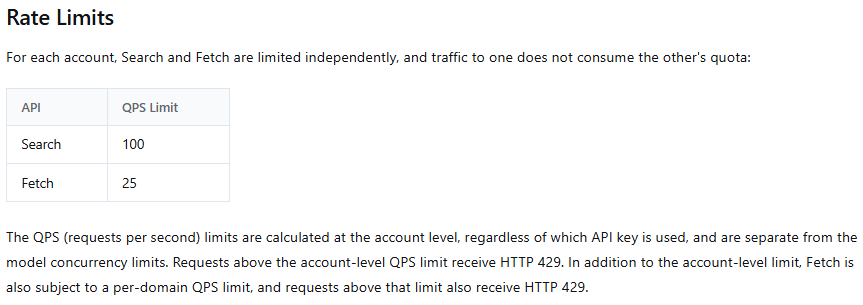
A concurrency semaphore alone does not guarantee QPS compliance. For example, a client with ten workers could finish requests quickly enough to start more than 100 searches during one second.
Use a separate token bucket, leaky bucket, sliding-window limiter, or equivalent request-rate mechanism for each service. Keep the Search limiter separate from Fetch, and track Fetch requests by target hostname so one domain does not consume the entire workload before a per-domain 429 appears.
Leave operational headroom below the published ceilings. Clock boundaries, distributed workers, network timing, and retries can create short bursts that exceed a provider limit even when the average rate appears acceptable.
DeepSeek API error codes: 429 is not the only failure
DeepSeek’s current error-code documentation distinguishes several failures that require different responses.
| HTTP code | Meaning | Correct response |
|---|---|---|
400 | Invalid request-body format | Correct the request using the returned error details. Do not retry unchanged. |
401 | Authentication failed | Check the API key and authorization configuration. |
402 | Insufficient balance | Check and fund the account. This is not a rate-limit error. |
422 | Invalid parameters | Correct the named parameter before retrying. |
429 | Concurrency or QPS limit reached | Reduce in-flight requests or request-start rate, then retry cautiously. |
500 | Internal server error | Wait briefly and retry within a bounded policy. Escalate if it persists. |
503 | Server overloaded | Pause and retry later. Check the official status page when the problem persists. |
HTTP 429 means the client exceeded an applicable concurrency or QPS control. HTTP 503 means DeepSeek’s server is overloaded due to traffic. Both may justify a delayed retry, but the root causes are not the same.
When 500 or 503 errors persist across minimal valid requests, check the official DeepSeek status page before changing production configuration.
How to troubleshoot a DeepSeek 429 error
- Confirm which provider returned the response. Check the base URL. A gateway, model marketplace, coding tool, or cloud host may impose its own limits.
- Identify the endpoint. Determine whether the request targeted model inference, Search, Fetch, or another service.
- Record the model and time. Capture the current model ID, UTC timestamp, HTTP status, sanitized response body, and request ID when available.
- Measure account-wide activity. Count requests from all applications, environments, workers, agents, and keys that share the account.
- Measure in-flight requests. For model calls, count requests that have started but have not completed.
- Measure request-start rate. For Search and Fetch, calculate starts per second rather than only concurrent tasks.
- Inspect queues and worker pools. A deployment may create more work after autoscaling even when each instance appears below its local limit.
- Look for synchronized retries. Several clients using the same retry delay can send another burst simultaneously.
- Check slow workloads. Long prompts, long outputs, higher reasoning effort, streams, and tool loops keep model slots active longer.
- Reduce pressure. Pause new background work, lower worker counts, and apply backpressure before retrying failed calls.
- Test a minimal request. If a controlled request still fails while measured traffic is low, inspect service status or contact DeepSeek.
Do not assume DeepSeek has a one-minute reset window. Its public concurrency documentation describes active requests rather than a fixed minute-based bucket.
A production-safe request architecture
A reliable application should not forward every incoming task to DeepSeek immediately. Insert an admission and scheduling layer between user traffic and the provider.
- Accept work into a bounded queue. Reject, delay, or degrade gracefully when the queue reaches its maximum.
- Use separate worker pools. Keep Flash, V4 Pro, Search, and Fetch traffic independently controllable.
- Apply per-model semaphores. Limit the number of model requests that can remain active.
- Apply QPS limiters. Control Search and Fetch request starts separately.
- Reserve capacity for interactive traffic. Do not let a batch job consume every slot needed for user-facing requests.
- Enforce per-tenant fairness. Prevent one customer or agent swarm from monopolizing the shared account.
- Set deadlines and cancellation. Remove work that is no longer useful rather than allowing stale requests to consume resources.
- Use a circuit breaker. Pause traffic temporarily when provider errors remain elevated.
- Protect side effects. Separate generation from execution and use idempotency controls.
An in-process semaphore is sufficient for one small application instance. A deployment with several processes, containers, regions, or services needs a shared queue or distributed limiter because each local process cannot see the others’ active requests.
Asynchronous Python example with concurrency control and retries
The following example uses Python 3.10 or later and the OpenAI-compatible Python client with DeepSeek. The application limits its own concurrency below the provider ceilings, disables the SDK’s built-in retries, and applies one visible bounded retry policy. An outer asyncio.wait_for covers waiting for a concurrency slot, API requests, and retry delays under the same total deadline. The remaining time is checked again after a slot becomes available, before sending a request.
The example values of 200 Flash requests and 50 V4 Pro requests are application-side starting points, not DeepSeek’s published limits. Tune them from your own traffic, latency, and headroom requirements.
from __future__ import annotations

import asyncio
import os
import random
import time
from typing import Final

import openai
from openai import AsyncOpenAI


BASE_URL: Final = "https://api.deepseek.com"

client = AsyncOpenAI(
    api_key=os.environ["DEEPSEEK_API_KEY"],
    base_url=BASE_URL,
    timeout=60.0,
    max_retries=0,
)

model_semaphores = {
    "deepseek-flash": asyncio.Semaphore(200),
    "deepseek-v4-pro": asyncio.Semaphore(50),
}

retryable_statuses = {429, 500, 503}


async def _generate_with_retries(
    prompt: str,
    model: str = "deepseek-flash",
    *,
    max_attempts: int = 4,
    total_deadline_seconds: float = 120.0,
) -> str:
    if model not in model_semaphores:
        raise ValueError(f"Unsupported model: {model}")

    semaphore = model_semaphores[model]
    deadline = time.monotonic() + total_deadline_seconds
    last_error: BaseException | None = None

    for attempt in range(max_attempts):
        remaining = deadline - time.monotonic()

        if remaining <= 0:
            raise TimeoutError(
                "The total request deadline was exceeded."
            ) from last_error

        try:
            async with semaphore:
                # Queue waiting consumes the same total deadline.
                remaining = deadline - time.monotonic()
                if remaining <= 0:
                    raise TimeoutError(
                        "The total request deadline was exceeded."
                    ) from last_error

                response = await client.chat.completions.create(
                    model=model,
                    messages=[
                        {
                            "role": "user",
                            "content": prompt,
                        }
                    ],
                    max_tokens=512,
                    timeout=min(60.0, remaining),
                )

            if not response.choices:
                raise RuntimeError(
                    "DeepSeek returned no completion choices."
                )

            content = response.choices[0].message.content

            if content is None or not content.strip():
                raise RuntimeError(
                    "DeepSeek returned no usable content."
                )

            return content

        except asyncio.CancelledError:
            raise

        except openai.APIStatusError as exc:
            last_error = exc

            if (
                exc.status_code not in retryable_statuses
                or attempt + 1 >= max_attempts
            ):
                raise

        except (
            openai.APIConnectionError,
            openai.APITimeoutError,
        ) as exc:
            last_error = exc

            if attempt + 1 >= max_attempts:
                raise

        base_delay = min(8.0, 0.5 * (2 ** attempt))
        delay = base_delay + random.uniform(
            0.0,
            base_delay * 0.25,
        )

        remaining = deadline - time.monotonic()

        if delay >= remaining:
            raise TimeoutError(
                "Not enough time remains for another retry."
            ) from last_error

        await asyncio.sleep(delay)

    raise RuntimeError("Retry loop ended unexpectedly.")


async def generate(
    prompt: str,
    model: str = "deepseek-flash",
    *,
    max_attempts: int = 4,
    total_deadline_seconds: float = 120.0,
) -> str:
    if max_attempts < 1:
        raise ValueError("max_attempts must be at least 1.")
    if total_deadline_seconds <= 0:
        raise ValueError("total_deadline_seconds must be positive.")

    # Cover queue waiting, requests, retry backoff, and cancellation.
    try:
        return await asyncio.wait_for(
            _generate_with_retries(
                prompt,
                model,
                max_attempts=max_attempts,
                total_deadline_seconds=total_deadline_seconds,
            ),
            timeout=total_deadline_seconds,
        )
    except asyncio.TimeoutError as exc:
        raise TimeoutError(
            "The total request deadline was exceeded."
        ) from exc


async def main() -> None:
    result = await generate(
        "Explain the difference between concurrency and QPS."
    )
    print(result)


if __name__ == "__main__":
    asyncio.run(main())
The semaphore is held for the complete non-streaming API call and is released automatically after success or exception. Retries sleep outside the semaphore, so a failed task does not reserve a slot while waiting.
The official OpenAI Python SDK currently retries HTTP 429, connection failures, and selected server errors automatically by default. Setting max_retries=0 prevents the SDK’s hidden retries from multiplying the explicit application-level retry loop.
For a large batch, do not create an unlimited number of pending tasks and rely only on the semaphore. Feed work from a bounded asyncio.Queue or an external task queue so memory use and waiting time remain controlled.
How to retry without creating a retry storm
A retry policy should classify the error before scheduling another attempt.
| Failure | Retry? | Required action |
|---|---|---|
400 invalid format | No, not unchanged | Correct the body or JSON. |
401 authentication failure | No, not unchanged | Correct or rotate the credential. |
402 insufficient balance | No, not until funded | Check the account balance. |
422 invalid parameters | No, not unchanged | Correct the named parameter. |
429 limit reached | Possibly | Reduce concurrency or QPS before retrying. |
500 internal error | Yes, within a bounded policy | Wait, add jitter, and escalate if persistent. |
503 overloaded | Yes, within a bounded policy | Pause new pressure and retry later. |
| Connection error or timeout | Possibly | Retry only when duplicate work is controlled. |
A safe retry policy should include:
- A small maximum attempt count
- Increasing delay between attempts
- Random jitter so clients do not retry together
- A total deadline
- Cancellation support
- Pressure reduction after
429 - A circuit breaker during prolonged provider instability
- Sanitized logging
- Protection against duplicate external actions
DeepSeek’s public rate-limit and error pages do not currently promise a standard Retry-After or x-ratelimit-* header contract. If a valid Retry-After appears on an actual response, honor it, but do not build the entire capacity strategy around an undocumented header.
Protect side effects with idempotency
The DeepSeek generation request may be read-only, but your application may use the result to create a ticket, send a message, charge an account, modify a database, or deploy code.
A timeout creates uncertainty: the provider may have completed the original request even though the client did not receive the result. Retrying the entire workflow without safeguards can duplicate downstream actions.
- Generate the model result separately from executing the action.
- Validate the result before use.
- Assign an application-level idempotency key to the intended action.
- Check whether the action already completed.
- Execute it only once.
- Record the outcome transactionally where possible.
- Require human approval for consequential operations.
Capacity planning for model concurrency
Track measured workload data rather than planning from the provider ceiling alone.
- In-flight requests by model
- Queue depth and queue wait time
- Time to first token
- Total request or stream duration
- p50, p95, and p99 latency
- Prompt and output tokens
- Thinking-mode usage
- HTTP
429,500, and503rates - Timeout and cancellation rates
- Retry attempts
- Interactive versus batch demand
- Traffic by customer or tenant
- Cost per completed or accepted result
Longer requests lower effective throughput because every active request occupies its slot for longer. If average duration doubles while concurrency remains fixed, the planning estimate for completed requests per minute is cut approximately in half.
Do not run continuously at the exact provider maximum. Keep headroom for latency spikes, internal retries, background jobs, autoscaling, and traffic from other applications sharing the account.
Monitoring Search and Fetch capacity
Search and Fetch require different operational metrics from model inference:
- Search request starts per second
- Fetch request starts per second
- Fetch requests by target domain
- HTTP
429rate by endpoint - Search and Fetch latency
- HTTP
408and504timeouts - Empty search-result rate
- Fetch failures caused by target-site policy or availability
- Queue depth by service
- Retry count and final failure rate
DeepSeek’s Search and Fetch documentation says that HTTP 408, 429, and 5xx failures may be retried after waiting. HTTP 402 requires funding the account, while other 4xx errors should not be retried without changing the request.
How to request higher DeepSeek concurrency
DeepSeek’s official rate-limit page links to a capacity-expansion request and states that the company will match concurrency to actual business needs. It also states that capacity expansion itself has no additional cost.
Normal token and tool usage remains billable. The public documentation does not promise a specific approved amount, approval time, or service-level agreement.
Prepare evidence before submitting a request:
- Model IDs used
- Current and peak concurrency
- Timestamps of recent
429responses - Queue-depth measurements
- p50, p95, and p99 request duration
- Interactive and batch workload mix
- Expected traffic growth
- Current queueing and backpressure controls
- Traffic distribution by user or tenant
- Business reason for the requested capacity
Additional provider capacity does not eliminate the need for semaphores, bounded queues, fairness controls, retries, timeouts, or monitoring.
Third-party DeepSeek providers have their own limits
DeepSeek models accessed through OpenRouter, a cloud platform, an API aggregator, a coding subscription, a company gateway, or another host may use entirely different RPM, TPM, QPS, concurrency, daily, or plan-based quotas.
Before applying the official DeepSeek numbers, verify:
- The request base URL
- The company that authenticates and bills the call
- The exact model alias
- The provider’s rate-limit documentation
- Whether provider fallback is enabled
- The error-response format
- Any free-tier or subscription restrictions
- Documented rate-limit headers
If an agent or gateway returns 429, inspect its logs and upstream response to identify which layer imposed the limit. The error may come from the application, the gateway, the model host, a Search tool, or DeepSeek itself.
Local DeepSeek models do not use hosted API quotas
A locally hosted DeepSeek model does not inherit the official cloud API’s account-level limits. Its capacity depends on the deployment, including:
- Model size and quantization
- Available CPU, GPU, and memory
- Serving framework
- Batching and scheduler configuration
- Prompt and context length
- Output length
- Number of workers
- Disk and network performance
Local capacity is still finite. The serving layer needs its own queueing, overload protection, request deadlines, and observability even when no external provider returns HTTP 429.
Production checklist
- Use the current model IDs:
deepseek-flashanddeepseek-v4-pro. - Count model requests for the full response or stream lifetime.
- Coordinate limits across every key and application sharing the account.
- Use separate concurrency pools by model.
- Use separate QPS limiters for Search and Fetch.
- Track Fetch pressure by target domain.
- Use a bounded queue and apply backpressure.
- Reserve capacity for interactive traffic.
- Enforce per-user or per-tenant fairness.
- Reduce pressure before retrying a
429. - Use bounded backoff with jitter.
- Do not retry permanent client errors unchanged.
- Hold streaming permits until the stream terminates.
- Ignore empty keep-alive lines and SSE comments correctly.
- Protect downstream actions with idempotency.
- Monitor queueing, latency, errors, retries, tokens, and accepted results.
- Verify third-party limits separately.
- Request capacity expansion only after measuring the real bottleneck.
Final guidance
DeepSeek’s current model limits are based on account-level concurrency: 2,500 active requests for deepseek-flash and 500 for deepseek-v4-pro. Search and Fetch use independent account-level QPS limits of 100 and 25, with Fetch also subject to an unpublished per-domain ceiling.
The most important implementation rule is to control demand before it reaches the provider. Use bounded queues, separate model semaphores, Search and Fetch rate limiters, per-tenant fairness, deadlines, and observable retries.
HTTP 429 is not solved by immediate repetition. Reduce active or newly started requests first, then retry only within a bounded policy. Keep HTTP 402, 500, and 503 on separate diagnostic paths.
Finally, treat published limits as provider ceilings rather than application targets. A production system should operate with headroom and scale from measured request duration, queue wait time, error rates, and cost per accepted result.
Frequently asked questions
What are the current DeepSeek API rate limits?
DeepSeek currently documents account-level concurrency limits of 2,500 for deepseek-flash and 500 for deepseek-v4-pro. Search is limited to 100 QPS, and Fetch is limited to 25 QPS plus an additional per-domain limit.
Are DeepSeek API limits per key or per account?
They are calculated per account. All API keys created under that account share the applicable model concurrency and Search or Fetch QPS limits.
Does DeepSeek publish RPM or TPM limits?
The current public model-inference documentation publishes concurrency limits rather than a standard RPM or TPM table. Do not convert the concurrency numbers into official RPM or TPM quotas.
Does streaming reduce DeepSeek concurrency usage?
No. A streaming request continues to occupy concurrency until the stream completes, fails, or is terminated. Receiving the first token does not release the slot.
What is the difference between HTTP 429 and 503?
HTTP 429 means the request exceeded an applicable concurrency or QPS limit. HTTP 503 means DeepSeek’s server is overloaded because of high traffic. A 429 requires reducing client pressure; a persistent 503 should also trigger provider-status checks.
Does user_id give each customer a separate quota?
Not for regular accounts. All user_id values are combined for account concurrency. Expanded-capacity accounts may also receive per-user scheduling limits, but user_id is not a method for multiplying normal account capacity.
Does DeepSeek guarantee a Retry-After header?
The current public rate-limit and error documentation does not define a guaranteed Retry-After contract. Honor the header when it is present and valid, but maintain your own bounded backoff, jitter, queueing, and capacity metrics.
Can I request higher DeepSeek concurrency?
Yes. DeepSeek’s official rate-limit page links to a capacity-expansion request and says the expansion itself has no additional cost. Approval, capacity amount, timing, and service levels are not publicly guaranteed.
Do OpenRouter and other hosts use the same DeepSeek limits?
Not necessarily. A third-party host can impose its own RPM, TPM, concurrency, daily, or plan limits. Use that provider’s documentation and confirm which base URL returned the error.