

Last reviewed: November 7, 2026
Yes, you can use DeepSeek in Claude Code. DeepSeek publishes an official integration that points the unmodified Claude Code client to DeepSeek’s Anthropic-compatible endpoint at https://api.deepseek.com/anthropic. Claude Code remains Anthropic’s application, but the model requests and selected project context are sent to DeepSeek for inference and billed to your DeepSeek API account.
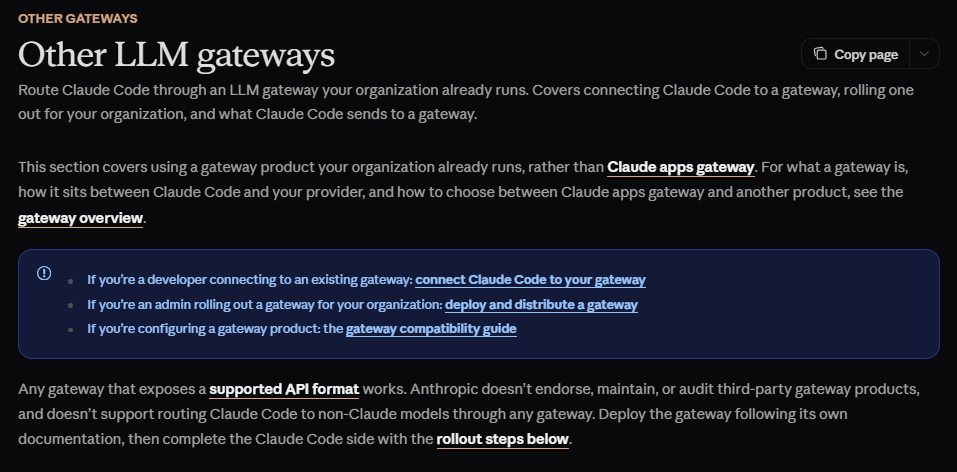
There is an important support distinction: DeepSeek documents this setup, but Anthropic says it does not support routing Claude Code to non-Claude models through a gateway. The configuration can work, but Anthropic does not maintain, audit, or guarantee compatibility with the DeepSeek route. A future Claude Code update may introduce request fields or behavior that DeepSeek’s compatibility layer does not yet support.
This guide shows how to install the current Claude Code client, configure DeepSeek temporarily or persistently, understand the model mapping, verify that DeepSeek is the actual backend, troubleshoot errors, protect your API key, and restore the normal Claude configuration.
What you need before starting
| Requirement | Why you need it |
|---|---|
| Current Claude Code installation | Claude Code provides the terminal agent, project tools, permissions, Skills, Hooks, and local file workflow. |
| DeepSeek API account | The model requests are authenticated and billed through DeepSeek rather than a Claude subscription. |
| DeepSeek API key | Claude Code sends it to DeepSeek as a Bearer authorization token. |
| Available DeepSeek balance | API requests can return HTTP 402 when the account has insufficient balance. |
| A non-sensitive test repository | You should verify the integration before exposing confidential or production source code. |
| Terminal appropriate for your system | Bash, PowerShell, and Windows CMD use different environment-variable syntax. |
How the DeepSeek Claude Code integration works
Claude Code normally sends model requests to Anthropic. The DeepSeek setup changes three parts of that connection:
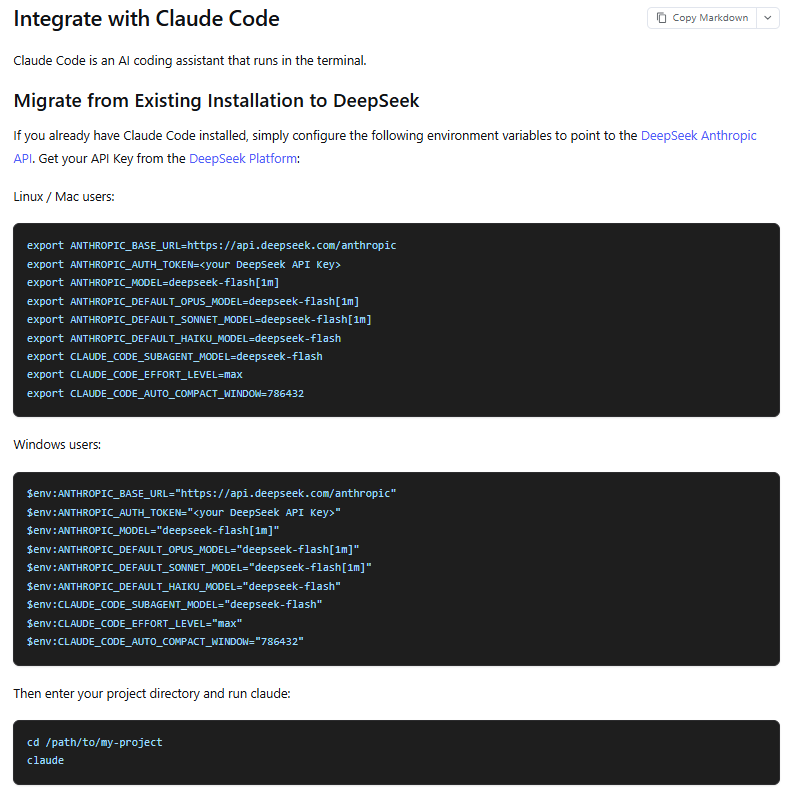
ANTHROPIC_BASE_URLpoints the client to DeepSeek’s Anthropic-compatible endpoint.ANTHROPIC_AUTH_TOKENsupplies your DeepSeek API key as a Bearer token.- Model variables tell Claude Code to request current DeepSeek models rather than Claude models.
The local Claude Code application still reads files, proposes edits, runs approved commands, loads CLAUDE.md, and coordinates client-side tools. DeepSeek generates the model responses and tool requests. Protocol compatibility does not mean every Anthropic API feature behaves identically.
Your Claude subscription does not pay for these DeepSeek requests. While a custom gateway credential is active, Claude Code sends that credential instead of using the saved claude.ai subscription for model calls, and the subscription’s usage allowance does not apply.
Step 1: Install or update Claude Code
For the Claude Code client itself, follow Anthropic’s current installation documentation. Anthropic currently recommends its native installer. Some older integration guides still show a global npm installation, but that is no longer the primary installation path in the Claude Code quickstart.
Install on macOS, Linux, or WSL
curl -fsSL https://claude.ai/install.sh | bashInstall on Windows PowerShell
irm https://claude.ai/install.ps1 | iexInstall on Windows CMD
curl -fsSL https://claude.ai/install.cmd -o install.cmd && install.cmd && del install.cmdOn native Windows, Git for Windows is recommended so Claude Code can use its Bash tool. WSL does not require Git for Windows. Homebrew and WinGet are also supported, but those installations require manual package upgrades rather than the native installer’s automatic background updates.
Open a new terminal after installation and verify the client:
claude --versionIf the command is not recognized, the installation directory is not yet available on your PATH. Follow the installation troubleshooting link in the official Claude Code quickstart rather than reinstalling repeatedly.
Step 2: Create and protect a DeepSeek API key
Create the key from the official DeepSeek Platform. The required credential is a DeepSeek API key—not an Anthropic API key and not your Claude subscription login.
Before proceeding, check that the DeepSeek account has an available topped-up or granted balance. DeepSeek deducts model and tool charges from that balance, and requests can return HTTP 402 when it is exhausted.
Treat the key as a secret:
- Do not commit it to Git.
- Do not place it in a shared
.claude/settings.jsonfile. - Do not paste it into screenshots, support posts, or issue reports.
- Do not expose it in browser-side code or a distributed application.
- Use a separate key for development and production when possible.
- Rotate the key immediately if it may have leaked.
Replacing the placeholder directly inside a shell command may save the key in your command history. A protected environment-variable manager, credential helper, secret manager, or private launch script is safer for repeated use.
Step 3: Configure DeepSeek temporarily
A temporary setup is the safest way to test the integration because the values apply only to the current terminal and the processes launched from it. Close the terminal to discard the temporary configuration.
The commands below follow DeepSeek’s current Claude Code integration settings. They use DeepSeek Flash for the main session, aliases, and subagents, enable maximum reasoning effort, and tell Claude Code to treat the main model as having a one-million-token context window.
macOS, Linux, or WSL
unset ANTHROPIC_API_KEY

export ANTHROPIC_BASE_URL="https://api.deepseek.com/anthropic"
export ANTHROPIC_AUTH_TOKEN="YOUR_DEEPSEEK_API_KEY"
export ANTHROPIC_MODEL="deepseek-flash[1m]"
export ANTHROPIC_DEFAULT_OPUS_MODEL="deepseek-flash[1m]"
export ANTHROPIC_DEFAULT_SONNET_MODEL="deepseek-flash[1m]"
export ANTHROPIC_DEFAULT_HAIKU_MODEL="deepseek-flash"
export CLAUDE_CODE_SUBAGENT_MODEL="deepseek-flash"
export CLAUDE_CODE_EFFORT_LEVEL="max"
export CLAUDE_CODE_AUTO_COMPACT_WINDOW="786432"

cd /path/to/your/project
claude
Windows PowerShell
Remove-Item Env:ANTHROPIC_API_KEY -ErrorAction SilentlyContinue

$env:ANTHROPIC_BASE_URL="https://api.deepseek.com/anthropic"
$env:ANTHROPIC_AUTH_TOKEN="YOUR_DEEPSEEK_API_KEY"
$env:ANTHROPIC_MODEL="deepseek-flash[1m]"
$env:ANTHROPIC_DEFAULT_OPUS_MODEL="deepseek-flash[1m]"
$env:ANTHROPIC_DEFAULT_SONNET_MODEL="deepseek-flash[1m]"
$env:ANTHROPIC_DEFAULT_HAIKU_MODEL="deepseek-flash"
$env:CLAUDE_CODE_SUBAGENT_MODEL="deepseek-flash"
$env:CLAUDE_CODE_EFFORT_LEVEL="max"
$env:CLAUDE_CODE_AUTO_COMPACT_WINDOW="786432"

Set-Location "C:\path\to\your\project"
claude
Windows CMD
set ANTHROPIC_API_KEY=

set ANTHROPIC_BASE_URL=https://api.deepseek.com/anthropic
set ANTHROPIC_AUTH_TOKEN=YOUR_DEEPSEEK_API_KEY
set ANTHROPIC_MODEL=deepseek-flash[1m]
set ANTHROPIC_DEFAULT_OPUS_MODEL=deepseek-flash[1m]
set ANTHROPIC_DEFAULT_SONNET_MODEL=deepseek-flash[1m]
set ANTHROPIC_DEFAULT_HAIKU_MODEL=deepseek-flash
set CLAUDE_CODE_SUBAGENT_MODEL=deepseek-flash
set CLAUDE_CODE_EFFORT_LEVEL=max
set CLAUDE_CODE_AUTO_COMPACT_WINDOW=786432

cd /d C:\path\to\your\project
claude
Removing ANTHROPIC_API_KEY first prevents an existing Anthropic Console key from conflicting with the DeepSeek Bearer token. Claude Code documents ANTHROPIC_AUTH_TOKEN as a custom value that it prefixes with Bearer, which matches DeepSeek’s supported authentication format.
What each configuration variable does
| Variable | Purpose |
|---|---|
ANTHROPIC_BASE_URL | Routes Claude Code model requests to DeepSeek’s Anthropic-compatible endpoint. |
ANTHROPIC_AUTH_TOKEN | Sends the DeepSeek API key in the Authorization: Bearer header. |
ANTHROPIC_MODEL | Selects the model for the main session. |
ANTHROPIC_DEFAULT_OPUS_MODEL | Changes what Claude Code’s opus alias and the planning phase of opusplan resolve to. |
ANTHROPIC_DEFAULT_SONNET_MODEL | Changes what the sonnet alias and execution phase of opusplan resolve to. |
ANTHROPIC_DEFAULT_HAIKU_MODEL | Controls the haiku alias and some background tasks. |
CLAUDE_CODE_SUBAGENT_MODEL | Sets the default model for subagents, agent-team workers, and workflow agents that do not specify another model. |
CLAUDE_CODE_EFFORT_LEVEL | Sets reasoning effort. DeepSeek currently supports low, high, and max; Claude Code values such as medium and xhigh are mapped by DeepSeek to high. |
CLAUDE_CODE_AUTO_COMPACT_WINDOW | Controls when Claude Code compacts the conversation before the model’s context is exhausted. |
What deepseek-flash[1m] means
The actual DeepSeek API model ID is deepseek-flash. The [1m] suffix is interpreted by Claude Code, not by DeepSeek.
Claude Code uses the suffix to treat an otherwise unrecognized gateway model as having a one-million-token context window. It strips [1m] before sending the model ID to the provider, so DeepSeek receives deepseek-flash.
DeepSeek currently documents both deepseek-flash and deepseek-v4-pro with a 1,048,576-token context window. The integration guide’s compaction setting of 786432 starts compaction at 75% of that capacity, leaving headroom for tool results, reasoning, and additional turns.
Step 4: Save the configuration without committing your key
Claude Code can load environment variables from its settings files. Use the scope that matches your intended workflow:
| File | Scope | Recommended use |
|---|---|---|
~/.claude/settings.json | Your account on this machine, across local projects | Personal non-secret DeepSeek defaults used in every project |
.claude/settings.local.json | Only you, in one project | Personal project-specific overrides; add it to .gitignore when creating it manually |
.claude/settings.json | Everyone who clones the repository | Shared team settings only; never store an API key here |
| Managed settings | Organization-controlled | Central policies, approved endpoints, and company secret distribution |
On Windows, ~/.claude/settings.json corresponds to %USERPROFILE%\.claude\settings.json.
The following example saves only non-secret routing and model settings. Continue supplying ANTHROPIC_AUTH_TOKEN through a protected environment variable or your organization’s secret tooling.
{
  "$schema": "https://json.schemastore.org/claude-code-settings.json",
  "env": {
    "ANTHROPIC_BASE_URL": "https://api.deepseek.com/anthropic",
    "ANTHROPIC_MODEL": "deepseek-flash[1m]",
    "ANTHROPIC_DEFAULT_OPUS_MODEL": "deepseek-flash[1m]",
    "ANTHROPIC_DEFAULT_SONNET_MODEL": "deepseek-flash[1m]",
    "ANTHROPIC_DEFAULT_HAIKU_MODEL": "deepseek-flash",
    "CLAUDE_CODE_SUBAGENT_MODEL": "deepseek-flash",
    "CLAUDE_CODE_EFFORT_LEVEL": "max",
    "CLAUDE_CODE_AUTO_COMPACT_WINDOW": "786432"
  }
}
Claude Code settings are strict JSON. Comments and trailing commas make the file invalid.
A value inside a settings-file env block replaces the same variable inherited from the shell in most local sessions. This is a frequent cause of “Claude Code ignored my new environment variable” problems. Use /status inside Claude Code to see which settings sources were loaded, and run claude doctor to identify rejected settings.
Removing a variable from a settings file does not unset it inside an already running session. Exit and relaunch Claude Code after removing persistent provider or authentication values.
Choosing between DeepSeek Flash and V4 Pro
| Model | Best starting point for | Important characteristics |
|---|---|---|
deepseek-flash | Everyday coding, repository exploration, routine fixes, subagents, and cost-sensitive workloads | Current version: DeepSeek-V4.1-Flash-1017; supports text and image input; lower token prices; one-million-token context |
deepseek-v4-pro | Difficult reasoning, complex architecture work, or tasks where stronger capability justifies higher cost | Current version: DeepSeek-V4-Pro-0813; text input only; higher token prices; one-million-token context |
The official DeepSeek Claude Code setup deliberately pins the main aliases to Flash. This prevents selecting an Opus-labelled option from unexpectedly switching to the more expensive V4 Pro model.
To make V4 Pro the main model while keeping subagents on Flash, change the main model and Opus mapping:
export ANTHROPIC_MODEL="deepseek-v4-pro[1m]"
export ANTHROPIC_DEFAULT_OPUS_MODEL="deepseek-v4-pro[1m]"
export CLAUDE_CODE_SUBAGENT_MODEL="deepseek-flash"
Use the equivalent $env: syntax in PowerShell. V4 Pro does not process image input, so Flash is the correct model when a task depends on screenshots or other supported images.
Why Claude Code may still show Claude model names
A Claude-looking label in the interface does not prove that a Claude model answered the request.
DeepSeek’s Anthropic-compatible endpoint currently maps model-family names as follows when Claude-style names reach the service:
| Name sent by the client | DeepSeek model used | Billing |
|---|---|---|
Names beginning with claude-opus | deepseek-v4-pro | V4 Pro token rates |
Names beginning with claude-sonnet | deepseek-flash | Flash token rates |
Names beginning with claude-haiku | deepseek-flash | Flash token rates |
Unsupported model names that begin with claude can still be mapped by DeepSeek. Unsupported names that do not begin with claude return HTTP 400.
Because the official setup pins the Opus, Sonnet, and Haiku aliases to DeepSeek IDs, the safest approach is to keep those variables explicit rather than relying on server-side family mapping.
Step 5: Verify that Claude Code is using DeepSeek
Do not verify the backend by asking the model, “Who are you?” Model self-identification can be inaccurate. Use configuration and billing evidence instead.
- Check the client version. Run
claude --version. - Check the base URL without exposing the key. Print only
ANTHROPIC_BASE_URLin the terminal. - Run
/status. Confirm the current model and the settings sources loaded by Claude Code. - Use a non-sensitive repository. Create a small test project or use a public sample.
- Ask Claude Code to inspect the project. Have it list the top-level files and explain the project structure.
- Request a reversible edit. For example, ask it to improve one comment or add a small unit test.
- Run the project’s test or lint command. Review any command before approving it.
- Inspect the diff. Do not accept a change only because the agent says it succeeded.
- Open DeepSeek’s usage or billing dashboard. Confirm that token usage appeared after the test.
- Confirm the billed model. Unexpected V4 Pro charges can indicate an Opus mapping or model override.
The DeepSeek dashboard is stronger evidence of the backend than the model’s own text response.
What works and what has compatibility limits?
DeepSeek supports the main Anthropic Messages format needed by Claude Code, including streaming, system instructions, client-defined tools, tool results, and thinking blocks. It does not implement every Anthropic field or content block.
| Feature | Current status with DeepSeek | Practical meaning |
|---|---|---|
| Text conversations and streaming | Supported | The normal interactive coding loop can use DeepSeek responses. |
| File reading, editing, and shell tools | Handled locally by Claude Code through client-defined tools | These workflows can work because DeepSeek supports tool definitions and tool results. Keep permissions enabled only as needed. |
CLAUDE.md, Skills, Hooks, and project instructions | Primarily Claude Code client features | They can still load locally, although a DeepSeek model may interpret them differently from Claude. |
| Subagents | Supported by the documented setup | The integration guide assigns deepseek-flash as the default subagent model. |
| Server-side Web Search | Supported | DeepSeek can execute the search and continue generating the response; search and model charges apply. |
| Image input | Supported by deepseek-flash | Images can appear in user and tool-result content. V4 Pro does not process them. |
| Anthropic document content blocks | Not supported | A workflow that sends an Anthropic document block can fail or require another representation. |
| Anthropic citations field | Ignored | Do not expect Anthropic-native citation behavior from the compatibility endpoint. |
Server-side mcp_servers field | Ignored | DeepSeek does not provide Anthropic’s server-side MCP implementation through this field. |
mcp_tool_use and mcp_tool_result blocks | Not supported | Local Claude Code MCP servers may still be exposed as ordinary client-defined tools, but test each integration instead of assuming full parity. |
| Server-side code-execution result blocks | Not supported | Local shell execution is different from Anthropic server-side code execution. |
| Remote Control | Disabled with a non-Anthropic ANTHROPIC_BASE_URL | The local session can work, but Anthropic’s Remote Control feature is unavailable through the custom endpoint. |
| Claude in Chrome | Not available through a DeepSeek-only API-key session | Chrome integration requires a direct Anthropic plan and Claude login. |
DeepSeek also ignores fields such as service_tier, container, top_k, and Anthropic cache-control hints. Its tool_choice behavior differs in several cases: any is treated as auto, and selecting one named tool in thinking mode can return HTTP 400.
This is why protocol compatibility should not be described as complete feature parity.
Does MCP work with DeepSeek in Claude Code?
There are two different MCP paths to distinguish:
- Claude Code local MCP tools: Claude Code can connect to an MCP server locally and present its operations to the model as client-controlled tools. These may work through DeepSeek’s supported tool-calling path, but each server should be tested.
- Anthropic server-side MCP fields: DeepSeek currently ignores the
mcp_serversrequest field and does not support Anthropic’smcp_tool_useormcp_tool_resultcontent blocks.
Therefore, “DeepSeek does not support Anthropic server-side MCP” is accurate. “No MCP server can work in Claude Code with DeepSeek” is too broad.
Using Web Search in Claude Code with DeepSeek
DeepSeek’s Claude Code integration supports server-side Web Search. When the model decides that current information is required, it can call DeepSeek’s search service, receive results, and continue generating the answer without the local client executing a search command.
Web Search creates two types of cost:
- The Search request itself, billed per successful request.
- Model input and output tokens used to process and summarize the retrieved content.
DeepSeek’s current Search and Fetch documentation lists Search and Fetch at $0.75 per 1,000 successful requests. Search has an account-level limit of 100 requests per second, while Fetch has an account-level limit of 25 requests per second plus an additional per-domain limit.
A search-enabled answer still requires source verification. Tool access does not guarantee that every selected page is authoritative or that the final summary represents it accurately.
How much does Claude Code with DeepSeek cost?
DeepSeek API usage is billed separately from any Claude subscription. Prices below were checked on November 7, 2026, and are in US dollars per one million tokens.
| Model and condition | Cached input | Uncached input | Output |
|---|---|---|---|
deepseek-flash, off-peak | $0.003 | $0.15 | $0.60 |
deepseek-flash, peak | $0.006 | $0.30 | $1.20 |
deepseek-v4-pro, off-peak | $0.022 | $0.66 | $1.98 |
deepseek-v4-pro, peak | $0.044 | $1.32 | $3.96 |
DeepSeek defines peak hours as 01:00–04:00 and 06:00–10:00 UTC, Monday through Friday, excluding Chinese public holidays. Other times use the lower off-peak prices.
Agentic coding can generate more calls and tokens than a single chat response. Repository exploration, tool results, subagents, retries, long reasoning, Web Search, and repeated test cycles all contribute to cost.
Maximum reasoning effort is not automatically the best choice for every task. DeepSeek recommends low for simple tasks, high for daily agent work, and max for more complex scenarios. Test high for routine coding if max adds more latency or output than the task needs.
Common problems and fixes
| Problem | Likely cause | What to check |
|---|---|---|
claude is not found | Claude Code is not installed or its directory is missing from PATH. | Use Anthropic’s current native installer, open a new terminal, and run claude --version. |
| Claude Code keeps asking for an Anthropic login | The custom endpoint or DeepSeek token is not active in the process that launched Claude Code. | Confirm ANTHROPIC_BASE_URL and ANTHROPIC_AUTH_TOKEN in the same terminal, then relaunch. |
| Claude Code asks whether to use an API key | An ANTHROPIC_API_KEY is also present. | Unset the Anthropic API key before launching the DeepSeek session. |
| New shell values are ignored | A settings-file env block is replacing them. | Run /status, inspect user and project settings, remove stale values, and restart the session. |
| The wrong model appears | Alias variables, /model, --model, or a managed setting has higher effective precedence. | Review ANTHROPIC_MODEL, the default family variables, project settings, and organizational restrictions. |
| Unexpected V4 Pro charges | An Opus-labelled request was mapped to deepseek-v4-pro. | Pin ANTHROPIC_DEFAULT_OPUS_MODEL to deepseek-flash[1m] when you want Flash-only usage. |
HTTP 400 | Invalid request format, unsupported model, incompatible tool choice, or thinking conflict | Update Claude Code, use current model IDs, and inspect DeepSeek’s returned message. |
HTTP 401 | Invalid DeepSeek API key | Confirm the key, remove extra whitespace, and rotate it if exposure is possible. |
HTTP 402 | Insufficient DeepSeek balance | Check the DeepSeek Platform balance and billing account. |
HTTP 422 | Unsupported or invalid field | Compare the request with DeepSeek’s Anthropic compatibility table. |
HTTP 429 | Account concurrency or Search/Fetch QPS limit reached | Reduce concurrent agents or request starts before applying bounded retries. |
HTTP 500 or 503 | DeepSeek server error or overload | Retry after a brief wait and check the official status page when failures persist. |
| VS Code does not use DeepSeek | The extension did not inherit temporary variables from another terminal. | Use a local settings file for non-secret values and inject the token securely into the process that starts the IDE. |
| Image input fails | The session is using V4 Pro or an unsupported message position. | Use deepseek-flash and submit the image in supported user or tool-result content. |
| MCP tool fails | The workflow expects an unsupported server-side MCP field or content block. | Determine whether Claude Code can expose the MCP operation as a local client-defined tool instead. |
| Streaming ends unexpectedly | The connection closed before the final message_stop event. | Treat the response as incomplete rather than accepting a partial result. |
Use DeepSeek’s current error-code reference for the final diagnosis. Do not retry 400, 401, 402, or 422 unchanged. Temporary 429, 500, and 503 failures may justify limited retries after addressing the cause.
Keep separate Claude and DeepSeek configurations
The simplest switching method is to use temporary terminal sessions: one shell contains the DeepSeek variables, while another uses the normal Claude authentication.
For stronger separation, use a dedicated Claude Code configuration directory:
export CLAUDE_CONFIG_DIR="$HOME/.claude-deepseek"
export ANTHROPIC_BASE_URL="https://api.deepseek.com/anthropic"
export ANTHROPIC_AUTH_TOKEN="$DEEPSEEK_API_KEY"
export ANTHROPIC_MODEL="deepseek-flash[1m]"

claude
This keeps the DeepSeek session’s settings, history, and plugins in a separate directory. Set DEEPSEEK_API_KEY through secure local secret tooling before running the command; do not place the secret directly in a committed switching script.
You can also use separate terminal profiles or private wrapper scripts. Label them clearly so that you know which provider receives project context before opening a sensitive repository.
How to switch Claude Code back to Anthropic
Exit the current session before removing the DeepSeek variables.
macOS, Linux, or WSL
unset ANTHROPIC_BASE_URL
unset ANTHROPIC_AUTH_TOKEN
unset ANTHROPIC_MODEL
unset ANTHROPIC_DEFAULT_OPUS_MODEL
unset ANTHROPIC_DEFAULT_SONNET_MODEL
unset ANTHROPIC_DEFAULT_HAIKU_MODEL
unset CLAUDE_CODE_SUBAGENT_MODEL
unset CLAUDE_CODE_EFFORT_LEVEL
unset CLAUDE_CODE_AUTO_COMPACT_WINDOW
unset CLAUDE_CONFIG_DIR
Windows PowerShell
$variables = @(
  "ANTHROPIC_BASE_URL",
  "ANTHROPIC_AUTH_TOKEN",
  "ANTHROPIC_MODEL",
  "ANTHROPIC_DEFAULT_OPUS_MODEL",
  "ANTHROPIC_DEFAULT_SONNET_MODEL",
  "ANTHROPIC_DEFAULT_HAIKU_MODEL",
  "CLAUDE_CODE_SUBAGENT_MODEL",
  "CLAUDE_CODE_EFFORT_LEVEL",
  "CLAUDE_CODE_AUTO_COMPACT_WINDOW",
  "CLAUDE_CONFIG_DIR"
)

foreach ($name in $variables) {
  Remove-Item "Env:$name" -ErrorAction SilentlyContinue
}
Windows CMD
set ANTHROPIC_BASE_URL=
set ANTHROPIC_AUTH_TOKEN=
set ANTHROPIC_MODEL=
set ANTHROPIC_DEFAULT_OPUS_MODEL=
set ANTHROPIC_DEFAULT_SONNET_MODEL=
set ANTHROPIC_DEFAULT_HAIKU_MODEL=
set CLAUDE_CODE_SUBAGENT_MODEL=
set CLAUDE_CODE_EFFORT_LEVEL=
set CLAUDE_CODE_AUTO_COMPACT_WINDOW=
set CLAUDE_CONFIG_DIR=
Also remove DeepSeek entries from:
- Your shell profile, such as
~/.zshrc,~/.bashrc, or~/.bash_profile ~/.claude/settings.json- The project’s
.claude/settings.local.json - The shared
.claude/settings.json, if non-secret provider settings were added there - Windows User Environment Variables, if the values were saved with
setxor System Properties
Open a new terminal, start Claude Code, run /status, and use /login if you want to return to a Claude subscription. Removing only the shell variable is insufficient when a settings file still defines the same value.
Security considerations for private repositories
Claude Code runs locally, but the selected prompts, source-code context, tool results, and other content needed for the model request are sent to the configured DeepSeek endpoint. A local client is not the same as local inference.
Before using the configuration with company code, review the current DeepSeek Open Platform Terms and applicable privacy documentation. Follow your employer’s AI, source-code, data-residency, and vendor-approval policies.
- Test first with public or synthetic code.
- Use a disposable branch, worktree, container, or virtual machine.
- Do not expose production credentials to the agent.
- Deny access to
.envfiles and other secret stores. - Review every shell command before approving it.
- Review the full diff and run tests before committing.
- Restrict MCP servers and plugins to trusted sources.
- Do not assume that sandboxing or permission prompts eliminate every risk.
A personal API key should not be distributed to a team through a repository. Teams should use organization-owned credentials, controlled secret distribution, appropriate access restrictions, and centralized monitoring.
Final guidance
Using DeepSeek in Claude Code is practical when you want Claude Code’s local coding interface and tools with DeepSeek’s models and API pricing. The essential configuration is a DeepSeek Anthropic-compatible base URL, a DeepSeek Bearer token, and explicit model settings.
The setup is documented by DeepSeek but is not supported by Anthropic as a non-Claude model route. Treat it as a compatibility integration that must be rechecked after major Claude Code or DeepSeek updates.
Start with deepseek-flash[1m], verify the backend through DeepSeek usage records, and switch to V4 Pro only when the task justifies the additional cost. Keep your key out of shared settings, understand which features have compatibility limitations, and maintain a tested rollback path to the normal Claude configuration.
Frequently asked questions
Do I need a Claude subscription to use DeepSeek in Claude Code?
The DeepSeek-backed model calls use your DeepSeek API key and are billed to DeepSeek, not to a Claude subscription. Some separate Claude Code features, including Claude in Chrome, require a direct Anthropic plan and login.
Is DeepSeek officially supported in Claude Code?
DeepSeek officially documents the configuration on its side. Anthropic states that it does not support routing Claude Code to non-Claude models through a gateway. The setup is therefore DeepSeek-documented but not Anthropic-supported as a model route.
Which DeepSeek model should I use?
Start with deepseek-flash for routine coding, image-capable tasks, subagents, and lower cost. Use deepseek-v4-pro for difficult text-only tasks where its higher cost is justified.
Why does Claude Code still show Opus, Sonnet, or Haiku?
Those may be client-side aliases or display labels. DeepSeek maps Claude Opus names to V4 Pro and Claude Sonnet or Haiku names to Flash unless explicit model variables replace the mapping. Check DeepSeek billing rather than trusting the displayed family name alone.
Does the [1m] suffix get sent to DeepSeek?
No. Claude Code uses [1m] to assume a one-million-token context window and strips the suffix before sending the model ID to the provider.
Can Claude Code MCP servers work with DeepSeek?
Local Claude Code MCP operations may work when the client exposes them as normal tool definitions. DeepSeek does not support Anthropic’s server-side mcp_servers field or MCP-specific content blocks, so each integration needs testing.
Why are my new environment variables being ignored?
A user, project-local, shared, or managed settings file may be replacing the shell values through its env block. Run /status, inspect every active settings scope, remove stale entries, and relaunch Claude Code.
Is confidential source code safe with this setup?
The code and context selected for model requests may be sent to DeepSeek. Use the integration with confidential repositories only after employer approval and a review of the applicable terms, data handling, retention, security requirements, and permission configuration.
Sources checked
- DeepSeek Claude Code integration guide
- DeepSeek Anthropic API compatibility guide
- DeepSeek current models and pricing
- DeepSeek Thinking Mode documentation
- DeepSeek Search and Fetch documentation
- DeepSeek API error codes
- Claude Code current installation quickstart
- Claude Code environment-variable reference
- Claude Code settings files and precedence
- Claude Code model and context configuration
- Claude Code gateway support documentation
- Claude Code legal and authentication documentation