

Published: November 7, 2026.
DeepSeek OCR is an open-weight, OCR-specialized vision-language model designed to convert document images into text or layout-aware Markdown. DeepSeek-OCR 2, sometimes searched for as DeepSeek OCR-2 or simply OCR-2, is the newer version and introduces a redesigned visual encoder intended to improve reading order across complex document layouts.
For a new document-parsing project, DeepSeek-OCR 2 is generally the version to evaluate first. It produced stronger author-reported results than the original model on OmniDocBench v1.5, supports local inference through Transformers, and can be served through vLLM. It is not, however, a dedicated hosted model in the official DeepSeek API.
The most important distinction is that DeepSeek-OCR 2 is a downloadable model checkpoint. Running it locally, exposing it through your own OpenAI-compatible endpoint, and using a third-party OCR website are three different deployment methods with different privacy, pricing, and operational implications.
What are DeepSeek-OCR and DeepSeek-OCR 2?
DeepSeek-OCR is an end-to-end document-understanding model released as part of DeepSeek’s research into what the authors call optical context compression. Instead of extracting every character through a traditional detection-and-recognition pipeline, it compresses a page into visual tokens and uses a language-model decoder to generate the requested text or structured output.
The original model combines a visual encoder called DeepEncoder with a 3-billion-parameter mixture-of-experts decoder. DeepEncoder uses a SAM-based visual component, a convolutional token compressor, and a CLIP-based component to represent high-resolution pages with fewer visual tokens.
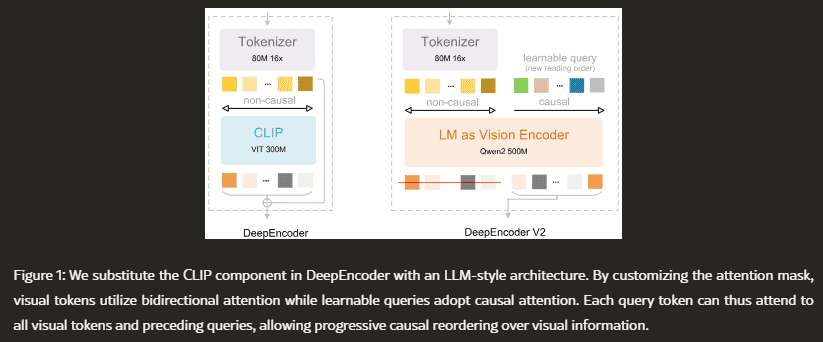
DeepSeek-OCR 2 keeps the same general encoder-decoder approach but replaces the CLIP-based portion of the original encoder with DeepEncoder V2. The new encoder uses an LM-style architecture and learnable causal-flow queries to organize visual information before the language decoder generates the final document.
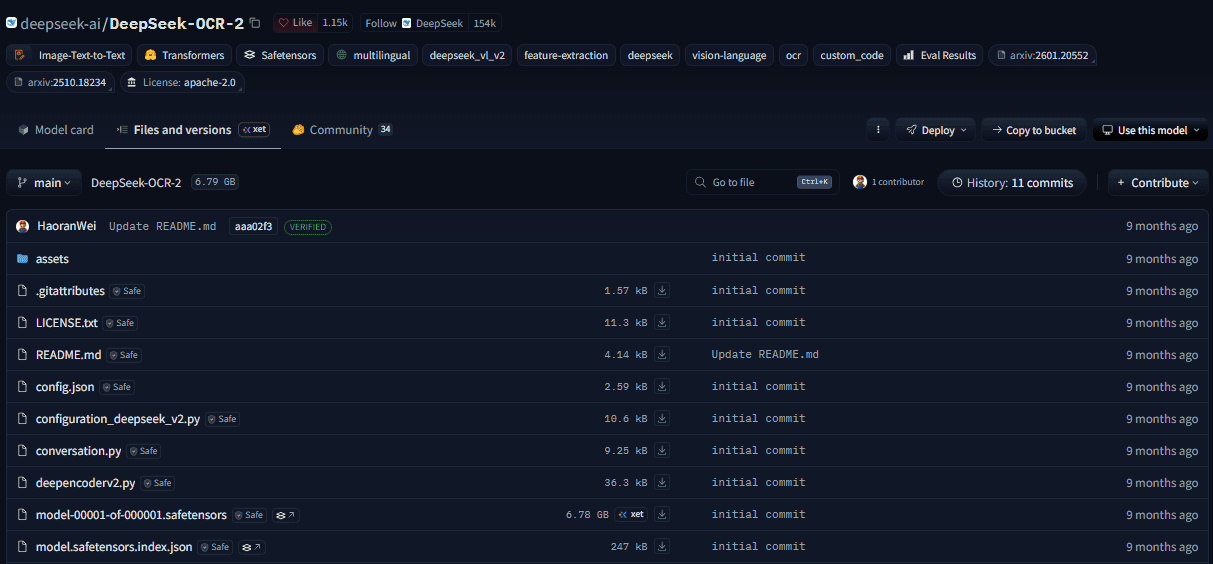
The official resources are the original DeepSeek-OCR repository, the DeepSeek-OCR 2 repository, and their corresponding Hugging Face model cards. Community demos and websites using “DeepSeek OCR” in their names are not automatically operated by DeepSeek.
DeepSeek OCR vs. OCR-2
DeepSeek-OCR 2 is the successor to the original model, but the original checkpoint remains available and may still be relevant for an existing deployment or a project that needs its native low-token resolution modes.
| Category | DeepSeek-OCR | DeepSeek-OCR 2 |
|---|---|---|
| Official model ID | deepseek-ai/DeepSeek-OCR | deepseek-ai/DeepSeek-OCR-2 |
| Main research focus | Optical context compression | Visual Causal Flow and improved reading order |
| Visual encoder | DeepEncoder with SAM, token compression, and CLIP | DeepEncoder V2 with an LM-style encoder and causal-flow queries |
| Documented visual-token range | Native modes from 64 to 400 tokens, plus dynamic multi-crop modes | 256 to 1,120 tokens through a dynamic multi-crop configuration |
| Language decoder | 3B mixture-of-experts decoder | 3B mixture-of-experts decoder with about 500M active parameters |
| Primary evaluation context | Original OmniDocBench evaluation | OmniDocBench v1.5 |
| Repository license | MIT License | Apache License 2.0 |
| Best starting point | Existing pipelines or projects requiring the original resolution modes | New document-parsing and layout-aware OCR projects |
The model names should not be confused with “OCR 2.0” as a general document-understanding concept or with other models such as GOT-OCR2.0. The official DeepSeek successor is named DeepSeek-OCR 2, while its repository and model identifier use DeepSeek-OCR-2.
What changed in DeepSeek-OCR 2?
The central change is not a larger language decoder. DeepSeek retained the same general decoder design and focused on improving how the encoder represents and orders information from the page.
DeepEncoder V2 replaces a fixed visual sequence
Many vision-language models divide an image into patches and flatten those patches into a fixed sequence, usually following a top-left-to-bottom-right raster order. That sequence may work for a simple page, but it does not necessarily match the logical reading order of a multi-column article, table, form, caption, or sidebar.
DeepEncoder V2 keeps globally connected visual tokens but adds an equally sized set of learnable causal-flow queries. The visual tokens use bidirectional attention, allowing them to interact across the page, while each causal-flow query can attend to all visual tokens and to earlier query tokens.
Only the resulting causal-query representations are passed to the language decoder. In practical terms, the encoder attempts to organize the visual evidence into a more useful semantic sequence before the decoder begins generating the document.
The model uses global and local page views
DeepSeek-OCR 2 uses one 1,024 × 1,024 global page view and up to six 768 × 768 local views. The global view produces 256 visual tokens, and each local crop contributes 144 tokens. The total therefore ranges from 256 to 1,120 visual tokens per image.
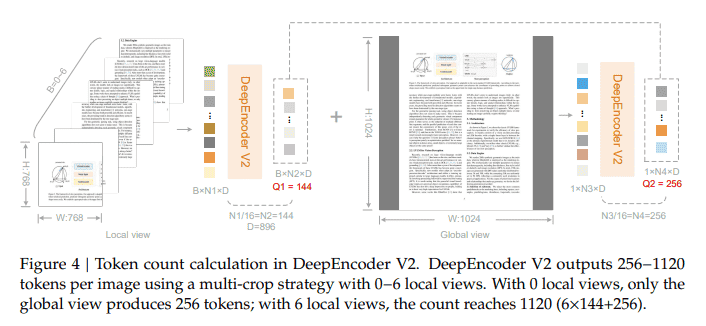
This multi-crop approach helps the model preserve details from dense or high-resolution pages without forcing every page into the same number of image patches. It still creates a tradeoff: more crops can preserve more detail, but they also increase preprocessing, memory use, and inference work.
Optical context compression refers to visual tokens
Optical context compression does not mean reducing a PDF’s storage size. It refers to representing a page containing many text elements with a smaller number of visual tokens that a language decoder can interpret.
The original research reported that accuracy declined as the ratio between original text tokens and visual tokens became more aggressive. This means token efficiency is not free: excessive compression can remove small text, symbols, or layout details that the decoder needs.
What can DeepSeek OCR extract?
DeepSeek-OCR 2 can be prompted for either plain text or layout-aware document conversion. Its intended uses include document OCR, PDF-to-Markdown conversion, reading-order recovery, and structured extraction from pages containing a mixture of text, tables, formulas, and figures.
| Output goal | Official prompt pattern |
|---|---|
| Plain OCR without layout grounding | <image>\nFree OCR. |
| Document-to-Markdown with grounding | <image>\n<|grounding|>Convert the document to markdown. |
The grounded Markdown response may include special reference and detection tags that associate document elements with page regions. Those tags can be useful for traceability and layout reconstruction, but they usually require post-processing before the content is published or indexed.
The model can attempt to preserve headings, paragraphs, tables, formulas, and figures, but the output is generated rather than guaranteed. A visually convincing table or formula can still contain incorrect values, missing symbols, reordered cells, or fabricated structure.
How accurate is DeepSeek-OCR 2?
The main official comparison comes from the DeepSeek-OCR 2 paper’s evaluation on OmniDocBench v1.5. The benchmark includes 1,355 Chinese and English document pages across nine categories, including academic papers, books, magazines, reports, exam papers, and newspapers.
The table below contains results reported by the model authors. They should not be interpreted as independent guarantees for every document type.
| OmniDocBench v1.5 metric | DeepSeek-OCR | DeepSeek-OCR 2 |
|---|---|---|
| Maximum visual tokens per page | 1,156 | 1,120 |
| Overall score, higher is better | 87.36 | 91.09 |
| Text edit distance, lower is better | 0.073 | 0.048 |
| Formula CDM, higher is better | 84.14 | 90.31 |
| Table TEDS, higher is better | 85.25 | 87.75 |
| Reading-order edit distance, lower is better | 0.085 | 0.057 |
The overall score increased by 3.73 points, while reading-order edit distance decreased from 0.085 to 0.057. These results support the authors’ claim that the new encoder improves document ordering under the benchmark conditions.
An overall score of 91.09 is not the same as 91.09% accuracy on every invoice, contract, textbook, receipt, or medical document. OmniDocBench combines multiple metrics, document categories, and evaluation rules. Real-world field accuracy must be measured separately.
The newer model did not improve every document category
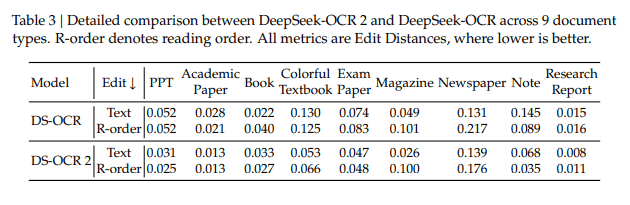
DeepSeek-OCR 2 recorded a newspaper text edit distance of 0.139, compared with 0.131 for the original model. The authors linked this weakness to the visual-token limit on extremely text-dense pages and to having fewer newspaper samples in the relevant training data.
The paper also reports that repeated output remains possible. In production observations without complete ground-truth labels, the reported repetition rate fell from 6.25% to 4.17% for online image logs and from 3.69% to 2.88% for PDF data production.
Those production figures measure repetition, not total OCR accuracy. They do not capture omitted text, incorrect values, table errors, hallucinated content, or formatting mistakes.
Is there an official DeepSeek OCR API?
DeepSeek-OCR 2 is not currently listed as a dedicated model in the official hosted DeepSeek API. The official API model list provides deepseek-flash and deepseek-v4-pro, not a model identifier named DeepSeek-OCR-2.
The current deepseek-flash model accepts image inputs, but it is a separate general-purpose multimodal model. Using it to read an image is not the same as running the open-weight DeepSeek-OCR 2 checkpoint.
| Access method | What it means |
|---|---|
| Official DeepSeek API | A hosted DeepSeek service using the models listed in the official API documentation. |
| Local Transformers inference | You download and run the official OCR-2 checkpoint on your own GPU. |
| Self-hosted vLLM endpoint | You operate the OCR-2 checkpoint behind your own OpenAI-compatible server. |
| Third-party inference provider | An independent company hosts a checkpoint and sets its own pricing and privacy terms. |
| Community demo or Space | A public demonstration that may use the model but is not necessarily maintained by DeepSeek. |
A self-hosted vLLM server can behave like an API, but it does not become the official DeepSeek API. Your organization remains responsible for the GPU, authentication, encryption, scaling, logging, document retention, updates, and security controls.
There is no official per-page DeepSeek-OCR 2 API price for local or self-hosted inference. The model weights do not create a per-request DeepSeek fee, but infrastructure, storage, engineering, and GPU usage still create costs.
DeepSeek-OCR 2 system requirements
The official Hugging Face model card identifies DeepSeek-OCR 2 as a 3-billion-parameter BF16 model. DeepSeek’s tested Transformers environment uses Python 3.12.9, CUDA 11.8, PyTorch 2.6.0, Transformers 4.46.3, Tokenizers 0.20.3, and FlashAttention 2.7.3.
These are reference versions, not proof that every newer combination is incompatible. They are useful when reproducibility matters because they reduce the number of moving parts during initial setup.
The current vLLM recipe states that a single GPU with at least 8 GB of VRAM is typically sufficient for BF16 inference. Treat 8 GB as a minimum rather than a comfortable production target. Large page crops, long Markdown output, batching, concurrency, and CUDA overhead can require substantially more headroom.
| Requirement | Practical guidance |
|---|---|
| GPU | An NVIDIA CUDA GPU is the clearest route for the official Transformers example. Check current vLLM hardware support for other platforms. |
| VRAM | Use 8 GB only as a minimum reference and plan more capacity for production workloads. |
| Precision | The official checkpoint is distributed in BF16. |
| Operating environment | A Linux-based environment usually creates the least friction for CUDA, FlashAttention, and vLLM. |
| Storage | Allow space for model weights, Python environments, rendered PDF pages, output files, and temporary images. |
| Security review | The official example uses trust_remote_code=True, so review and pin the remote code before production use. |
How to install DeepSeek-OCR 2
The following installation path follows the tested environment published in the official DeepSeek-OCR 2 repository. It was not executed for this article.
git clone https://github.com/deepseek-ai/DeepSeek-OCR-2.git
cd DeepSeek-OCR-2

conda create -n deepseek-ocr2 python=3.12.9 -y
conda activate deepseek-ocr2

pip install torch==2.6.0 torchvision==0.21.0 torchaudio==2.6.0 \
  --index-url https://download.pytorch.org/whl/cu118

pip install -r requirements.txt
pip install flash-attn==2.7.3 --no-build-isolation
If FlashAttention fails to build, verify the CUDA toolkit, PyTorch CUDA build, compiler, Python version, and GPU architecture before changing package versions. Upgrading one dependency independently can create a combination that was never tested together.
How to run DeepSeek OCR locally with Transformers
The official Transformers workflow loads the tokenizer and model with remote model code enabled, moves the model to a CUDA GPU in BF16, and calls the model’s custom infer method.
from pathlib import Path
import os

import torch
from transformers import AutoModel, AutoTokenizer

os.environ["CUDA_VISIBLE_DEVICES"] = "0"

MODEL_ID = "deepseek-ai/DeepSeek-OCR-2"
IMAGE_PATH = Path("samples/page.jpg")
OUTPUT_DIR = Path("outputs")

if not torch.cuda.is_available():
    raise RuntimeError(
        "This reference workflow requires an NVIDIA CUDA GPU."
    )

if not IMAGE_PATH.is_file():
    raise FileNotFoundError(
        f"Input image not found: {IMAGE_PATH}"
    )

OUTPUT_DIR.mkdir(parents=True, exist_ok=True)

tokenizer = AutoTokenizer.from_pretrained(
    MODEL_ID,
    trust_remote_code=True,
)

model = AutoModel.from_pretrained(
    MODEL_ID,
    _attn_implementation="flash_attention_2",
    trust_remote_code=True,
    use_safetensors=True,
)

model = model.eval().cuda().to(torch.bfloat16)

result = model.infer(
    tokenizer,
    prompt="<image>\n<|grounding|>Convert the document to markdown.",
    image_file=str(IMAGE_PATH),
    output_path=str(OUTPUT_DIR),
    base_size=1024,
    image_size=768,
    crop_mode=True,
    save_results=True,
)

print(result)
To request plain text without layout grounding, replace the prompt with <image>\nFree OCR.. Grounded Markdown is usually more useful for document parsing, but it also creates layout tags and structure that should be cleaned and validated before downstream use.
The trust_remote_code=True option allows Python code supplied with the model repository to execute in your environment. For a production deployment, review that code and pin a trusted repository revision instead of automatically loading whichever revision is current at runtime.
How to serve DeepSeek-OCR 2 with vLLM
Transformers is appropriate for experiments and straightforward single-image workflows. vLLM is generally a better fit when an application needs batching, concurrent requests, or an HTTP endpoint.
The current upstream vLLM recipe supports DeepSeek-OCR 2 and recommends installing the current stable vLLM release rather than relying only on the older custom wheel included in the original repository instructions.
uv venv
source .venv/bin/activate

uv pip install -U vllm --torch-backend auto

vllm serve deepseek-ai/DeepSeek-OCR-2 \
  --trust-remote-code \
  --logits_processors vllm.model_executor.models.deepseek_ocr:NGramPerReqLogitsProcessor \
  --no-enable-prefix-caching \
  --mm-processor-cache-gb 0 \
  --tensor-parallel-size 1
The custom n-gram logits processor is intended to reduce repeated OCR output while preserving specific table tags. The current recipe also disables prefix caching and the multimodal processor cache because OCR requests commonly contain different page images rather than repeatedly reused prompts and media.
A local server created with this command can be accessed through an OpenAI-compatible client, but the endpoint belongs to your infrastructure. It should not use the official DeepSeek API base URL or be described as a hosted DeepSeek service.
How DeepSeek OCR processes PDF files
DeepSeek-OCR 2 processes page images rather than passing an entire PDF directly through an image-only model argument. The official PDF script opens the file with PyMuPDF, renders each page at 144 DPI, converts the page into an image, performs OCR, and then combines the page-level results.
The official workflow can generate Markdown-like output, retain grounding tags, extract figure images, and create an annotated PDF showing detected document regions. This means PDF processing includes a preprocessing and assembly pipeline around the model itself.
A reliable PDF-to-Markdown workflow
- Check whether the PDF already contains usable embedded text.
- Use native text extraction for clean digital PDFs when it preserves the content correctly.
- Render scanned or layout-dependent pages into images at a consistent resolution.
- Run OCR page by page while preserving the original page number.
- Store both the cleaned Markdown and the raw grounded response.
- Retain page images or coordinates so extracted content can be traced back to its source.
- Detect empty pages, repeated passages, truncated output, and unusually long responses.
- Validate tables, totals, dates, formulas, identifiers, and other consequential fields separately.
Increasing the PDF rendering resolution may help with small text, but it also increases memory use, crop counts, and processing time. Test multiple settings on representative pages rather than assuming that the highest DPI always produces the strongest result.
Best use cases for DeepSeek-OCR 2
| Use case | Why it may fit | Main risk |
|---|---|---|
| PDF-to-Markdown conversion | Attempts to preserve paragraphs, headings, tables, formulas, figures, and reading order. | The generated Markdown still requires normalization and source comparison. |
| RAG document ingestion | Can convert scanned pages into structured text while retaining page-level context. | Omissions or hallucinations can contaminate retrieval results. |
| Searchable archives | Self-hosting can support large collections of historical or internal documents. | Old scans, stains, unusual fonts, and handwriting need separate evaluation. |
| Academic paper parsing | Designed to work with formulas, tables, figures, and multi-column pages. | Mathematical symbols and reading order must still be checked. |
| Training-data preparation | Can produce structured document text for large-scale data pipelines. | Automated filters and sampled human review remain necessary. |
| Private document processing | Self-hosting can keep images inside controlled infrastructure. | Your team becomes responsible for access control, encryption, logs, and retention. |
DeepSeek-OCR 2 may be unnecessary for a clean digital PDF whose embedded text can already be extracted accurately. A conventional OCR engine may also be easier to operate for clean single-column scans, CPU-only environments, or workflows that require deterministic character recognition rather than generated Markdown.
Language and handwriting support
The original DeepSeek-OCR paper reports training on approximately 30 million PDF pages covering about 100 languages. Chinese and English accounted for most of that document data, while examples in the paper included Arabic and Sinhala.
This supports multilingual experimentation, but it does not prove equal accuracy across every language, script, or right-to-left layout. The main OmniDocBench v1.5 evaluation for OCR-2 covers Chinese and English pages, so other languages require their own validation set.
The OCR-2 paper does not publish a dedicated handwriting benchmark. Do not describe the model as a handwriting specialist based only on selected demos or individual examples. Projects centered on handwritten forms or notes should compare it with handwriting-focused systems using representative samples.
DeepSeek OCR limitations
DeepSeek-OCR 2 is a generative vision-language model. It does not return a guaranteed transcription or a calibrated confidence score for every extracted character.
Potential errors include:
- Missing text or entire page regions.
- Repeated paragraphs or table rows.
- Incorrect reading order.
- Misread amounts, dates, names, or identifiers.
- Incorrect mathematical symbols.
- Broken merged cells or table relationships.
- Normalized wording that differs from the source.
- Hallucinated text or structure.
- Truncated output on dense pages.
- Reduced accuracy on low-resolution scans, small text, and unusual fonts.
A page can produce well-formatted Markdown while still containing factual extraction errors. Visual quality should never be treated as proof of transcription accuracy.
High-stakes documents require validation
Unverified OCR output should not automatically approve payments, update medical records, interpret contracts, submit tax data, verify identities, or make compliance decisions. Preserve the source page and require deterministic checks or human review for consequential fields.
Do not upload confidential files to unverified demos
A public Hugging Face Space or third-party DeepSeek OCR website may have an unknown operator, checkpoint revision, retention policy, logging configuration, or security posture. Avoid uploading contracts, identity documents, medical records, financial statements, or proprietary files unless the service has been independently reviewed and approved.
Production-readiness checklist
- Build a representative test set for every document category and language you plan to support.
- Measure field-level accuracy instead of relying only on a general benchmark score.
- Evaluate text omission, duplication, truncation, and reading-order errors.
- Test tables and formulas separately from ordinary paragraph text.
- Preserve page numbers, source images, and grounding information.
- Use native PDF extraction before OCR when embedded text is reliable.
- Pin the model and remote-code revision used in production.
- Monitor dependency changes across PyTorch, Transformers, FlashAttention, CUDA, and vLLM.
- Add authentication and rate limits to self-hosted endpoints.
- Define document retention and deletion rules.
- Use human review for legal, medical, financial, identity, and compliance documents.
- Re-run the evaluation before changing the model, prompt, image resolution, or inference framework.
Should you use DeepSeek-OCR or OCR-2?
| Your situation | Recommended starting point |
|---|---|
| You are building a new self-hosted parser for complex pages | Evaluate DeepSeek-OCR 2 first. |
| You already operate a stable DeepSeek-OCR pipeline | Benchmark OCR-2 on the same validation set before migrating. |
| You need the original model’s native low-token modes | Keep the original DeepSeek-OCR checkpoint in the comparison. |
| You process clean single-column scans on CPUs | Test a conventional OCR engine first. |
| You need a managed service without GPU operations | Choose a documented hosted OCR or document-AI service. |
| You require a dedicated official DeepSeek OCR API | No dedicated OCR-2 model is currently listed in the official API. |
| You process high-stakes documents | Use field-level validation and human review regardless of the model. |
DeepSeek-OCR 2 is the stronger DeepSeek version to test first when reading order, tables, formulas, Markdown conversion, and self-hosted processing matter. Its benchmark improvements are meaningful, but the final decision should be based on your documents, infrastructure, validation rules, privacy requirements, and tolerance for generative errors.
Official sources checked
- DeepSeek-OCR 2 official GitHub repository
- DeepSeek-OCR 2 official Hugging Face model card
- DeepSeek-OCR 2: Visual Causal Flow paper
- Original DeepSeek-OCR GitHub repository
- DeepSeek-OCR: Contexts Optical Compression paper
- Current vLLM recipe for DeepSeek-OCR 2
- Official DeepSeek API model list
- Official DeepSeek models and pricing page
Information and documentation checked on November 6, 2026.