
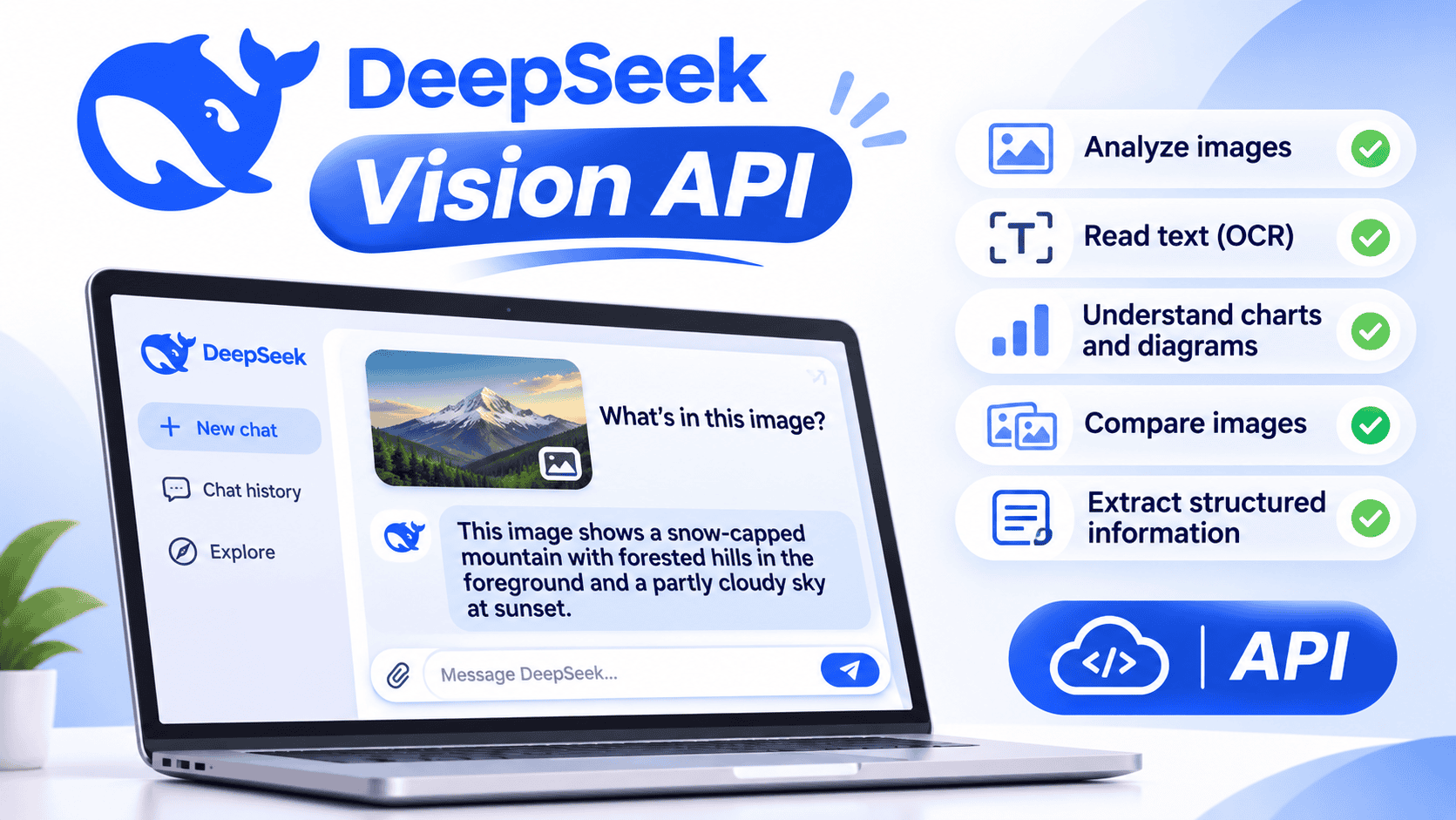

The DeepSeek Vision API is DeepSeek’s hosted image-understanding capability for developers. It is not a separate endpoint or a model named deepseek-vision. To analyze images, use the current deepseek-flash model through DeepSeek’s Chat Completions, Responses, or Anthropic-compatible API.
You can send an image as a Base64 data URL, provide a publicly reachable HTTPS image URL, or upload it through the Files API and reuse the returned file_id. DeepSeek can describe images, read visible text, inspect screenshots, interpret charts, compare several images, and extract structured information. Its response is text; image input does not make it an image-generation or image-editing API.
Last reviewed: November 7, 2026.
Use
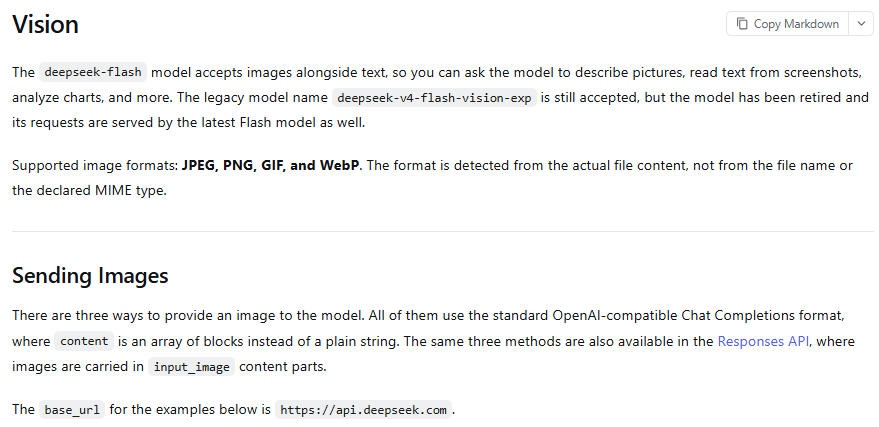
deepseek-flashfor new Vision integrations. The legacy IDdeepseek-v4-flash-vision-expis still accepted for compatibility, but that experimental model has been retired. Requests using the legacy name are routed to the current Flash model and billed at the Flash rate.
DeepSeek Vision API at a glance
| Item | Current behavior |
|---|---|
| Vision-capable model ID | deepseek-flash |
| Current underlying version | DeepSeek-V4.1-Flash-1017 |
| OpenAI-compatible base URL | https://api.deepseek.com |
| Anthropic-compatible base URL | https://api.deepseek.com/anthropic |
| Input | Text and images |
| Output | Text responses |
| Supported image formats | JPEG, PNG, GIF, and WebP |
| Primary input methods | Base64 data URL, external HTTP(S) URL, or Files API file_id |
| Other first-party model | deepseek-v4-pro does not support Vision |
| Legacy Vision ID | deepseek-v4-flash-vision-exp is accepted but routed to the latest Flash model |
| Image generation | Not provided by the Vision input capability |
What the DeepSeek Vision API can do
The current Flash model can combine a written instruction with one or more images. Practical workloads include:
- Describing photographs, diagrams, and illustrations
- Reading visible text from screenshots and document images
- Extracting fields from receipts, invoices, forms, and labels
- Explaining charts, graphs, dashboards, and visual reports
- Identifying visible interface elements and error messages
- Comparing before-and-after screenshots
- Checking whether two product images differ
- Analyzing images returned by an application tool
- Turning visual information into structured JSON
These capabilities do not guarantee exact transcription or measurement. DeepSeek Vision is a general multimodal model, not a deterministic OCR engine, barcode scanner, medical imaging system, or source of record. Important values must be checked against the original image or underlying data.
What DeepSeek Vision is not
- It is not a model called
deepseek-vision. New API requests should usedeepseek-flash. - It is not an image generator. The current Vision workflow accepts an image and returns text.
- It is not a generic document-upload API. The documented Vision formats are JPEG, PNG, GIF, and WebP—not arbitrary PDF, DOCX, spreadsheet, or video files.
- It is not the same product as DeepSeek-OCR. DeepSeek-OCR and OCR-2 are separate released model projects intended for local or self-managed inference.
- It is not supported by
deepseek-v4-pro. Use the Flash model when the request contains images.
Python quickstart: analyze a local image with Base64
The simplest way to send a local image is to encode its bytes as Base64 and place them inside a data: URL. The following example uses the OpenAI Python SDK as the client library, while requests are authenticated, processed, and billed by DeepSeek.
Install the SDK
python -m pip install --upgrade openaiSet your DeepSeek API key
On macOS or Linux:
export DEEPSEEK_API_KEY="your_deepseek_api_key"On Windows PowerShell:
$env:DEEPSEEK_API_KEY="your_deepseek_api_key"Send the image
from pathlib import Path
import base64
import mimetypes
import os

from openai import APIError, APITimeoutError, OpenAI

SUPPORTED_TYPES = {
    "image/jpeg",
    "image/png",
    "image/gif",
    "image/webp",
}

api_key = os.getenv("DEEPSEEK_API_KEY")
if not api_key:
    raise SystemExit("Set the DEEPSEEK_API_KEY environment variable.")

image_path = Path("screenshot.png")
if not image_path.is_file():
    raise SystemExit(f"Image not found: {image_path}")

media_type, _ = mimetypes.guess_type(image_path.name)
if media_type not in SUPPORTED_TYPES:
    raise SystemExit(
        "Use a valid JPEG, PNG, GIF, or WebP image."
    )

encoded_image = base64.b64encode(
    image_path.read_bytes()
).decode("ascii")

client = OpenAI(
    api_key=api_key,
    base_url="https://api.deepseek.com",
    timeout=60.0,
    max_retries=2,
)

try:
    response = client.chat.completions.create(
        model="deepseek-flash",
        messages=[
            {
                "role": "user",
                "content": [
                    {
                        "type": "text",
                        "text": (
                            "Describe this image. If text is unreadable, "
                            "say so instead of guessing."
                        ),
                    },
                    {
                        "type": "image_url",
                        "image_url": {
                            "url": (
                                f"data:{media_type};base64,"
                                f"{encoded_image}"
                            ),
                            "detail": "original",
                        },
                    },
                ],
            }
        ],
        max_tokens=800,
        extra_body={
            "thinking": {
                "type": "disabled",
            }
        },
    )

    print(response.choices[0].message.content or "")

except APITimeoutError as exc:
    raise SystemExit("The DeepSeek request timed out.") from exc

except APIError as exc:
    raise SystemExit(
        f"DeepSeek request failed: {type(exc).__name__}"
    ) from exc
The example disables Thinking Mode to reduce latency and keep a first Vision request simple. Thinking is enabled by default in the current DeepSeek models and can be useful for complex chart analysis or multi-step visual reasoning, but it can also increase output-token use.
The code uses the filename to construct the data URL’s media type. DeepSeek detects the actual image format from the file bytes, not merely the extension or declared MIME type. A production application should inspect and validate the actual file content before sending it.
Choose Base64, an external URL, or the Files API
| Method | Best for | Main advantage | Main limitation |
|---|---|---|---|
| Base64 data URL | Small local or temporary images | One request with no separate upload step | The encoded image counts toward the 48 MiB request-body limit |
| External HTTP(S) URL | Images already hosted at a reachable URL | No Base64 conversion or separate file upload | DeepSeek must be able to download the image within the documented limits |
Files API file_id | Reused images or supported images larger than the inline limit | Upload once and reference the file in later requests | Requires file lifecycle, storage, expiration, and deletion management |
When to use Base64
Base64 is convenient when the image exists only on the application server and is small enough to fit comfortably inside the request. It avoids public hosting, but it increases the JSON payload and counts toward the request-body limit.
Base64 is encoding, not encryption. Anyone who receives the encoded string can reconstruct the original image.
When to use an external URL
Use an external URL when the image is already reachable through HTTP or HTTPS and does not require unsupported authentication. The URL can point to a short-lived signed resource, but it must remain valid long enough for DeepSeek to download the image.
response = client.chat.completions.create(
    model="deepseek-flash",
    messages=[
        {
            "role": "user",
            "content": [
                {
                    "type": "text",
                    "text": "Explain the chart and identify its units.",
                },
                {
                    "type": "image_url",
                    "image_url": {
                        "url": "https://example.com/chart.png",
                        "detail": "original",
                    },
                },
            ],
        }
    ],
    extra_body={
        "thinking": {
            "type": "disabled",
        }
    },
)

print(response.choices[0].message.content or "")
An image URL may fail when it requires cookies, uses an expired signature, redirects unexpectedly, exceeds the URL or image limit, takes too long to download, or returns HTML instead of image bytes.
When to use the Files API
The Files API is the better choice when the same image will appear in several requests, when the inline body would become too large, or when an individual supported image is larger than the inline limit.
from pathlib import Path
import os

from openai import OpenAI

api_key = os.getenv("DEEPSEEK_API_KEY")
if not api_key:
    raise SystemExit("Set the DEEPSEEK_API_KEY environment variable.")

image_path = Path("dashboard.png")
client = OpenAI(
    api_key=api_key,
    base_url="https://api.deepseek.com",
    timeout=60.0,
)

with image_path.open("rb") as image_file:
    uploaded = client.files.create(
        file=image_file,
        purpose="user_data",
    )

try:
    response = client.chat.completions.create(
        model="deepseek-flash",
        messages=[
            {
                "role": "user",
                "content": [
                    {
                        "type": "text",
                        "text": "Summarize the dashboard and list anomalies.",
                    },
                    {
                        "type": "file",
                        "file_id": uploaded.id,
                    },
                ],
            }
        ],
        extra_body={
            "thinking": {
                "type": "disabled",
            }
        },
    )

    print(response.choices[0].message.content or "")

finally:
    client.files.delete(uploaded.id)
The example deletes the uploaded file after the request. For a reusable production file, set an appropriate expiration or delete it after the final authorized use. DeepSeek permits an expiration from one hour to 30 days; omitting the expiration fields keeps the file permanently until it is deleted.
The Files API currently accepts supported image formats only. Its name does not establish support for arbitrary PDFs, Word documents, spreadsheets, or videos.
Chat Completions, Responses, and Anthropic formats differ
| API format | Image block | Image sources | Where images are allowed |
|---|---|---|---|
| Chat Completions | image_url or file | Base64 URL, external URL, file_data, or file_id | Direct user images belong in user messages; documented tool-result messages can also carry image content |
| Responses API | input_image | image_url or file_id | user and developer messages, plus supported function or custom-tool outputs |
| Anthropic-compatible Messages | image with a source object | base64, url, or file | User messages and supported tool_result content |
Do not copy an image_url block from Chat Completions into a Responses or Anthropic request. Each format uses a different object shape even when the same underlying image is sent.
Use images with the Responses API
The Responses API carries images in input_image parts. Use either image_url or file_id, but not both in the same part.
import os
from openai import OpenAI

client = OpenAI(
    api_key=os.environ["DEEPSEEK_API_KEY"],
    base_url="https://api.deepseek.com",
    timeout=60.0,
)

response = client.responses.create(
    model="deepseek-flash",
    input=[
        {
            "role": "user",
            "content": [
                {
                    "type": "input_text",
                    "text": "Describe the chart and identify its units.",
                },
                {
                    "type": "input_image",
                    "image_url": "https://example.com/chart.png",
                    "detail": "original",
                },
            ],
        }
    ],
    reasoning={
        "effort": "none",
    },
)

print(response.output_text)
The Responses API returns HTTP 400 when an input_image contains neither image_url nor file_id, or when it contains both. The detail field is ignored when a file_id is used.
Responses also allows images in the output of supported function_call_output and custom_tool_call_output items. This enables an agent to call a screenshot tool and pass the captured image back to the model for analysis.
Use DeepSeek Vision through the Anthropic SDK
The Anthropic-compatible API uses an image block with a nested source object instead of OpenAI-style image_url.
import base64
import os
from pathlib import Path

import anthropic

image_data = base64.b64encode(
    Path("receipt.jpg").read_bytes()
).decode("ascii")

client = anthropic.Anthropic(
    api_key=os.environ["DEEPSEEK_API_KEY"],
    base_url="https://api.deepseek.com/anthropic",
)

message = client.messages.create(
    model="deepseek-flash",
    max_tokens=800,
    thinking={
        "type": "disabled",
    },
    messages=[
        {
            "role": "user",
            "content": [
                {
                    "type": "text",
                    "text": "Extract the merchant, date, and total.",
                },
                {
                    "type": "image",
                    "source": {
                        "type": "base64",
                        "media_type": "image/jpeg",
                        "data": image_data,
                    },
                },
            ],
        }
    ],
)

print(message.content)
File-backed Anthropic image blocks require the current anthropic-beta: files-api-2025-04-14 header. Anthropic-format document and container_upload blocks are not supported by DeepSeek merely because image blocks work.
Current DeepSeek Vision limits
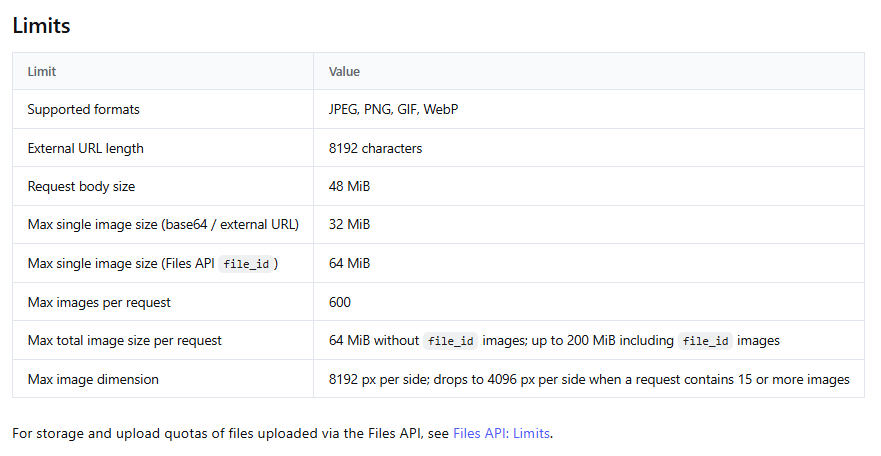
The following limits were checked on November 7, 2026. They can change, so verify the current Vision and Files API documentation before hard-coding them into production validation.
| Limit | Current value |
|---|---|
| Supported formats | JPEG, PNG, GIF, WebP |
| Maximum external URL length | 8,192 characters |
| Maximum request-body size | 48 MiB |
| Maximum inline Base64 image | 32 MiB |
| Maximum external URL image | 32 MiB |
Maximum Files API file_id image | 64 MiB |
| Maximum images per request | 600 |
Maximum total image bytes without file_id | 64 MiB |
Maximum total image bytes including file_id images | 200 MiB |
| Maximum image dimension | 8,192 pixels per side |
| Maximum dimension with 15 or more images | 4,096 pixels per side |
| External-image download time | Must complete within 60 seconds |
| Files API upload time | Must complete within 10 minutes |
| Maximum stored files per user | 10,000 |
| Maximum Files API storage per user | 25 GiB |
| Maximum filename length | 512 bytes |
| Optional file-expiration range | 1 hour to 30 days |
| Permanent Files API storage | Omit the expiration fields, then delete the file when no longer needed |
The maximum supported image count is a hard ceiling, not a recommended batch size. Large batches can increase latency, cost, ambiguity, and the chance that the model associates a description with the wrong image.
Choose the right detail level
| Value | Current behavior | Good use |
|---|---|---|
low | Downscales the image to 512×512 before inference | Overall scene understanding when small details do not matter |
high | Keeps the original image; currently equivalent to original | Compatibility with code written for high-detail APIs |
original | Keeps the original image | Small text, screenshots, forms, charts, and diagrams |
auto | Currently equivalent to original | Default-quality processing without manually selecting another value |
Use low only when fine detail is unnecessary. Downscaling can remove small labels, punctuation, account digits, chart values, or interface text. Increasing reasoning effort cannot restore pixels that were discarded before inference.
The detail option applies to image_url inputs. It is ignored when the image is referenced through a Files API file_id.
How DeepSeek converts images into tokens
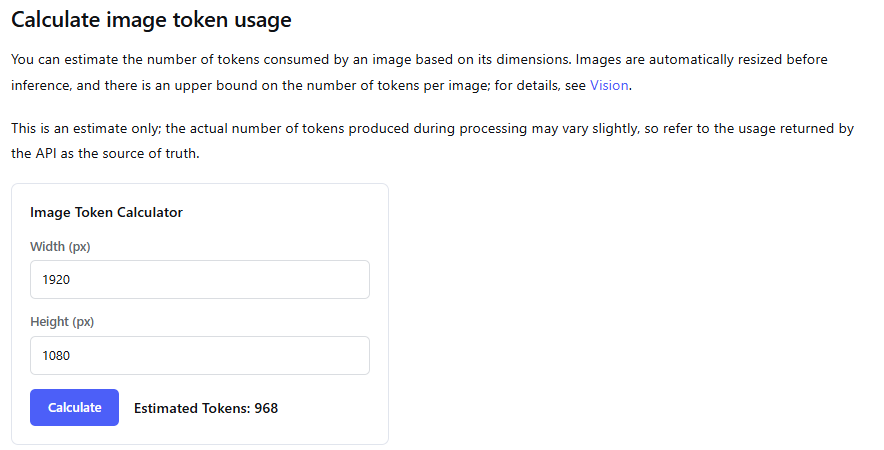
DeepSeek converts each image into input tokens based on its dimensions after automatic resizing. Those visual tokens are billed together with the text input tokens in the request.
- Images below roughly the pixel count of 544×544 are scaled up while preserving aspect ratio.
- Larger images are scaled down toward roughly the pixel count of 1,300×1,300 while preserving aspect ratio.
- Each image currently has an upper bound of 1,024 image tokens.
- Every image in a multi-image request is counted separately.
- A 5,000×5,000 image may consume the same maximum image-token allowance as a 2,000×2,000 image after resizing.
- The usage object returned by the API is the billing source of truth.
Use DeepSeek’s current image-token calculator for an estimate before sending a request. The estimate can vary slightly from actual usage.
DeepSeek Vision pricing
DeepSeek does not publish one fixed price per image. Image tokens are treated as model input tokens, then combined with text input, reasoning, and output usage.
For deepseek-flash, the following list prices were checked on November 7, 2026:
| Usage type | Off-peak price per 1M tokens | Peak price per 1M tokens |
|---|---|---|
| Cached input | $0.003 | $0.006 |
| Uncached input | $0.15 | $0.30 |
| Output | $0.60 | $1.20 |
Peak hours are currently 01:00–04:00 UTC and 06:00–10:00 UTC, Monday through Friday, excluding Chinese public holidays. Other periods use the off-peak rates.
Total cost can include image input tokens, prompt text, reasoning tokens, the visible answer, repeated images across several calls, and any separate external services used by the application. Do not estimate production cost from file size alone.
Use DeepSeek Vision for OCR-like extraction
DeepSeek Vision can read visible text, but it should be treated as OCR-like extraction rather than guaranteed character-for-character transcription. Make the instruction explicit, tell the model not to guess, and validate sensitive fields locally or through human review.
A useful extraction instruction is:
Extract the merchant, transaction date, subtotal, tax, and total.

Rules:
- Copy only values that are visibly present.
- Use null when a field is missing.
- List fields that are unreadable.
- Do not infer cropped or obscured digits.
- Return valid JSON only.
You can combine Vision with JSON Output:
import json

# Reuse media_type and encoded_image from the Base64 quickstart above.
data_url = f"data:{media_type};base64,{encoded_image}"

response = client.chat.completions.create(
    model="deepseek-flash",
    messages=[
        {
            "role": "system",
            "content": (
                "Return valid JSON only. Do not guess unreadable values."
            ),
        },
        {
            "role": "user",
            "content": [
                {
                    "type": "text",
                    "text": (
                        "Extract merchant, date, subtotal, tax, and total. "
                        "Use null for missing values and list unreadable fields."
                    ),
                },
                {
                    "type": "image_url",
                    "image_url": {
                        "url": data_url,
                        "detail": "original",
                    },
                },
            ],
        },
    ],
    response_format={
        "type": "json_object",
    },
    max_tokens=800,
    extra_body={
        "thinking": {
            "type": "disabled",
        }
    },
)

content = response.choices[0].message.content or ""
if not content.strip():
    raise RuntimeError("DeepSeek returned blank JSON content.")

record = json.loads(content)
print(record)
JSON validity does not prove extraction accuracy. Compare dates, totals, names, account numbers, legal text, medical values, and handwritten information with the original image before using them in another system.
Analyze charts more reliably
A vague prompt such as “What does this chart show?” can produce a plausible summary that overlooks units or unreadable labels. Ask for the components needed to verify the interpretation:
Analyze this chart in this order:

1. State the title.
2. Identify both axes and their units.
3. List the legend categories.
4. Report only values that are visibly readable.
5. Describe the main trend.
6. Identify any visible anomaly.
7. Mark unreadable labels instead of guessing.
8. Separate direct observations from interpretation.
When exact values matter, use the underlying dataset rather than relying exclusively on pixels in a chart. A visual model can misread a tick label, confuse a series color, or estimate a point between gridlines.
Inspect UI screenshots and error messages
DeepSeek Vision can help identify visible interface elements, transcribe an error, or explain what screen the user is viewing. A useful request should specify what evidence the model should return:
- The exact visible error message
- The application or page name if shown
- The active tab, dialog, or workflow step
- Visible buttons and form fields
- Any disabled control
- Which details are unreadable
- Whether the conclusion is observation or inference
A screenshot shows what was visible at one moment; it does not prove the underlying database state, service status, account permissions, or network condition.
Compare multiple images
Place images in a deliberate order and label them in the accompanying text. Do not rely on ambiguous phrases such as “the first one” after a long sequence of mixed content.
content = [
    {
        "type": "text",
        "text": (
            "Image A is the previous interface. "
            "Image B is the new interface. "
            "List visible changes and do not infer hidden behavior."
        ),
    },
    {
        "type": "text",
        "text": "Image A",
    },
    {
        "type": "image_url",
        "image_url": {
            "url": "https://example.com/before.png",
            "detail": "original",
        },
    },
    {
        "type": "text",
        "text": "Image B",
    },
    {
        "type": "image_url",
        "image_url": {
            "url": "https://example.com/after.png",
            "detail": "original",
        },
    },
]

response = client.chat.completions.create(
    model="deepseek-flash",
    messages=[
        {
            "role": "user",
            "content": content,
        }
    ],
    extra_body={
        "thinking": {
            "type": "disabled",
        }
    },
)
Although the API permits many images in one request, smaller groups are usually easier to label, validate, and troubleshoot. Measure reliability and total token cost on batches that resemble your production workload.
DeepSeek Vision API vs DeepSeek-OCR
| Area | Hosted DeepSeek Vision API | DeepSeek-OCR and OCR-2 |
|---|---|---|
| Access method | DeepSeek hosted API using deepseek-flash | Separate model repositories and self-managed inference workflows |
| Primary purpose | General image understanding, visual reasoning, screenshots, charts, and OCR-like extraction | Specialized OCR and visual-text processing research or deployment |
| Infrastructure | Managed by DeepSeek | Managed by the developer or selected hosting provider |
| Billing | Token-based API billing | Hardware, hosting, engineering, and operational costs |
| Model ID in hosted Vision request | deepseek-flash | Do not insert an OCR repository name into the hosted Vision API unless DeepSeek officially offers it there |
| Best fit | Applications that need a managed general multimodal model | Teams that specifically need self-managed OCR models and can operate the infrastructure |
The existence of DeepSeek-OCR does not establish that it is the hidden engine used by the hosted Vision API. Treat them as separate products unless DeepSeek publishes evidence connecting a specific hosted endpoint to a specific OCR checkpoint.
Can the DeepSeek Vision API read PDFs?
The current Vision and Files API documentation lists JPEG, PNG, GIF, and WebP—not PDF—as supported image formats. To analyze a PDF visually, render only the relevant pages to a supported image format, preserve sufficient resolution, and send those page images.
Converting a PDF page to an image changes the workflow:
- Searchable text becomes pixels unless separately extracted.
- Small fonts may become unreadable at low resolution.
- Each page contributes separate image tokens.
- Tables and footnotes may require page-level or region-level crops.
- Private documents should not be sent to an unapproved online converter.
Common DeepSeek Vision errors and fixes
| Problem | Likely cause | What to check |
|---|---|---|
| The image is ignored | A non-Vision model was selected | Use deepseek-flash; Vision is not supported by deepseek-v4-pro |
| HTTP 400 for the message | An image was placed in an unsupported role or content shape | Use the documented user-message shape for the selected API format |
| HTTP 400 in Responses | An input_image has neither source field or has both | Provide exactly one of image_url and file_id |
| Base64 is rejected | Invalid data URL, truncated data, wrong media type, corrupt bytes, or oversized body | Check the prefix, encoding, actual bytes, and request size |
| External URL fails | URL is private, expired, too long, slow, redirected, or not an image | Open it without authentication and verify the response content and timing |
file_id is rejected | The file expired, was deleted, belongs to another account, or uses an unsupported content block | Retrieve the file metadata and confirm the request shape |
| File upload fails | Wrong format, missing purpose, oversized file, or upload timeout | Use a supported image and purpose="user_data" |
| Text is unreadable | Low resolution, aggressive downscaling, blur, compression, or a poor crop | Use original detail and send a clearer region |
| Wrong chart values | Small labels, overlapping lines, or model estimation | Ask for direct observations and verify against the source data |
| HTTP 401 | Authentication failure | Check the DeepSeek API key and Authorization configuration |
| HTTP 402 | Insufficient account balance | Check the DeepSeek platform balance |
| HTTP 422 | Invalid parameter | Check model ID, content objects, detail value, and other request fields |
| HTTP 429 | Rate or concurrency limit | Reduce request pace and concurrent image workloads |
| HTTP 500 or 503 | Server error or overload | Check status and retry after a short delay with bounded backoff |
Do not blindly retry HTTP 400, 401, 402, or 422. Correct the request, credential, balance, or parameter first. Temporary 429 and 5xx responses may be retried with bounded exponential backoff.
Protect sensitive images
Images can expose more data than the prompt text. Screenshots frequently contain API keys, email addresses, customer names, account IDs, medical details, financial values, internal URLs, and private messages.
- Crop or redact information the task does not require.
- Do not upload credentials, private keys, session cookies, or recovery codes.
- Avoid permanent public URLs for confidential images.
- Do not describe Base64 as a security control.
- Set Files API expiration when a permanent file is unnecessary.
- Delete stored files after their authorized use.
- Do not write complete Base64 strings to application logs.
- Validate user-supplied URLs before forwarding them.
- Restrict allowed URL schemes and block private-network destinations in your own proxy or fetch layer.
- Follow organizational policies for medical, legal, identity, payment, and customer data.
- Review DeepSeek’s current platform terms and applicable privacy documentation before processing sensitive images.
A Files API expiration controls the stored-file object described by the Files API. It should not be interpreted as a complete statement about every log, security record, backup, or other category of data processing unless DeepSeek’s applicable policy says so.
Prepare images for production
- Validate actual file bytes. Do not trust only the extension or uploaded MIME type.
- Reject oversized input early. Enforce a lower application limit when that improves latency and cost control.
- Correct orientation. Rotate camera and scanner images before inference.
- Crop irrelevant regions. Remove empty margins and unrelated interface areas.
- Preserve an original copy. Do not overwrite the source during preprocessing.
- Avoid destructive compression. Fine text and chart labels can disappear.
- Choose detail by task. Use original detail for OCR-like extraction and small UI text.
- Bound batch size. Do not use the API maximum as the default application batch.
- Use timeouts and bounded retries. Prevent stalled image workflows from consuming unlimited resources.
- Delete temporary files. Clean application storage and Files API objects according to policy.
- Validate every structured result. Reject missing, malformed, or implausible values.
Test Vision accuracy before production
A few attractive demonstrations do not establish production reliability. Build a representative evaluation set that reflects the actual cameras, screenshots, documents, languages, and failure cases in your application.
Include samples such as:
- A clear photograph
- A low-light or blurred image
- A screenshot with small text
- A dense dashboard
- A simple and a complex chart
- A receipt and invoice
- A rotated page
- A handwritten note
- Several images in one request
- An unsupported format
- An oversized image
- An expired signed URL
- An expired or deleted
file_id - A sensitive image that requires redaction
Measure what matters to the application:
- Field-level extraction accuracy
- Exact-text accuracy
- Chart-value accuracy
- Object-identification accuracy
- Instruction-following rate
- Invalid-JSON rate
- Unmarked unreadable fields
- Hallucinated values
- Latency
- Image and text tokens
- Total cost per accepted result
- Human-review time
Record the model ID and version, input method, image dimensions, detail value, prompt, test date, and scoring method. A future model update can change results even when the application code remains the same.
DeepSeek Vision API production checklist
- Use
deepseek-flash, not a fabricated or retired model ID. - Use the content-block shape required by the selected API format.
- Validate actual image bytes and supported formats.
- Enforce application-specific size and image-count limits.
- Select Base64, URL, or Files API according to privacy, size, and reuse needs.
- Use original detail when small text or fine visual evidence matters.
- Track actual token usage returned by the API.
- Validate OCR-like and structured output locally.
- Require human review for high-stakes information.
- Redact sensitive information before upload.
- Keep API keys on a trusted server.
- Use explicit timeouts and bounded retries.
- Delete temporary Files API objects.
- Log request IDs and safe metadata without storing full images unnecessarily.
- Maintain regression tests for representative images.
- Monitor DeepSeek’s Vision guide, model page, pricing, and changelog for changes.
Frequently asked questions
Does DeepSeek have a Vision API?
Yes. DeepSeek provides hosted image understanding through the deepseek-flash model using its Chat Completions, Responses, and Anthropic-compatible APIs.
Is there a model called deepseek-vision?
No current first-party model ID named deepseek-vision is listed in DeepSeek’s official model documentation. Use deepseek-flash for image input.
Does deepseek-v4-pro support images?
No. DeepSeek’s current model table marks Vision as supported by deepseek-flash and not supported by deepseek-v4-pro.
What happened to deepseek-v4-flash-vision-exp?
The experimental model was retired. DeepSeek still accepts the legacy ID for compatibility, but requests are served by the latest Flash model and billed at the Flash price. New code should use deepseek-flash.
Which image formats are supported?
The current supported formats are JPEG, PNG, GIF, and WebP. DeepSeek detects the format from the actual file content rather than relying only on the filename or declared MIME type.
Can DeepSeek Vision read text?
It can perform OCR-like reading and structured extraction from screenshots and document images. It is a general multimodal model, so important transcription must be validated against the original.
Can DeepSeek Vision read PDFs?
PDF is not listed as a supported Vision image format. Render the required PDF pages to JPEG or PNG and send those images, or use a separate document-processing workflow.
Can DeepSeek Vision generate images?
No. The Vision capability accepts images for understanding and returns text. Image input should not be confused with image generation or editing.
What is the best way to send a local image?
Use a Base64 data URL for a small one-time local image. Use the Files API when the image will be reused or is too large for inline input. Use an external URL only when DeepSeek can reach the image safely within the current limits.
How much does a Vision request cost?
There is no single fixed per-image price. DeepSeek converts each image into input tokens based on resized dimensions and bills them with the prompt text. Reasoning and output tokens add to the total.
Why does DeepSeek return HTTP 400 for an image?
Common causes include using the wrong model, placing the image in an unsupported role, sending the wrong API content-block shape, supplying both mutually exclusive source fields, invalid Base64, or exceeding an image or request limit.
Sources checked
- DeepSeek Vision guide
- DeepSeek Models and Pricing
- DeepSeek API changelog
- DeepSeek Chat Completions reference
- DeepSeek Responses API guide
- DeepSeek Responses API reference
- DeepSeek Anthropic-compatible API guide
- DeepSeek Files API guide
- DeepSeek file-upload reference
- DeepSeek token and image-token usage guide
- DeepSeek Thinking Mode guide
- DeepSeek JSON Output guide
- DeepSeek API error codes
- Official DeepSeek-OCR repository
- DeepSeek Open Platform Terms of Service
- DeepSeek Privacy Policy