

Yes, you can use the OpenAI SDK with DeepSeek. Install the official openai client library, authenticate with a DeepSeek API key, point the client to https://api.deepseek.com, and select a current DeepSeek model such as deepseek-flash or deepseek-v4-pro.
The OpenAI SDK is only the client library in this setup. Your requests go to DeepSeek—not OpenAI—because the client uses DeepSeek’s base URL, key, models, billing account, and server behavior. The request format is compatible enough to reuse familiar SDK methods, but DeepSeek is not a feature-for-feature replacement for every OpenAI API capability.
Last reviewed: November 7, 2026.
Quick configuration: use the
openaipackage, setDEEPSEEK_API_KEY, configure Python withbase_url="https://api.deepseek.com"or JavaScript withbaseURL: "https://api.deepseek.com", and pass a current DeepSeek model ID.
What changes when you point the OpenAI SDK at DeepSeek?
You keep the OpenAI client library and familiar methods, but change the provider-specific configuration.
| Setting | Use with DeepSeek | Important detail |
|---|---|---|
| Client library | openai | The package is maintained by OpenAI, but it can send requests to a compatible custom endpoint. |
| API key | A key created in the DeepSeek platform | Do not use an OpenAI API key or assume a ChatGPT subscription provides DeepSeek credits. |
| Python option | base_url | Use snake case in the Python SDK. |
| JavaScript option | baseURL | Use camel case in the JavaScript and TypeScript SDK. |
| Base URL | https://api.deepseek.com | Pass the API root, not the full /chat/completions path. |
| General-purpose model | deepseek-flash | DeepSeek currently maps this ID to DeepSeek-V4.1-Flash-1017. |
| Higher-priced model | deepseek-v4-pro | DeepSeek currently maps this ID to DeepSeek-V4-Pro-0813. |
| Billing | DeepSeek account balance | OpenAI and DeepSeek billing remain separate. |
| Feature behavior | Defined by DeepSeek | An OpenAI-compatible request shape does not guarantee identical tools, parameters, state, or streaming events. |
OpenAI also documents separate billing for ChatGPT subscriptions and API usage. Even when the same SDK is used, a ChatGPT Plus subscription does not fund DeepSeek requests, and an OpenAI API balance cannot be used as a DeepSeek balance.
Prerequisites
- A DeepSeek platform account and API key
- Available DeepSeek API balance
- Python 3.10 or later for the current OpenAI Python package
- Node.js 22 or later for the current OpenAI JavaScript package
- A server-side environment where the API key can remain secret
The current OpenAI JavaScript SDK also supports TypeScript 4.9 or later, Bun, Deno, and several serverless runtimes. Browser execution is disabled by default because embedding a long-lived API key in client-side code exposes it to users.
Use the OpenAI Python SDK with DeepSeek
1. Install the SDK
python -m pip install --upgrade openaiYou can verify the installed SDK version with:
python -c "import openai; print(openai.__version__)"2. Store your DeepSeek key in an environment variable
On macOS or Linux:
export DEEPSEEK_API_KEY="your_deepseek_api_key"On Windows PowerShell:
$env:DEEPSEEK_API_KEY="your_deepseek_api_key"Do not commit the key to Git, place it in a public notebook, or include it in a screenshot.
3. Send a Chat Completions request
Chat Completions is the simplest starting point because it closely resembles older OpenAI SDK integrations and gives you explicit control over the message history.
from __future__ import annotations

import os

from openai import APIError, APITimeoutError, OpenAI

api_key = os.getenv("DEEPSEEK_API_KEY")
if not api_key:
    raise SystemExit("Set the DEEPSEEK_API_KEY environment variable.")

client = OpenAI(
    api_key=api_key,
    base_url="https://api.deepseek.com",
    timeout=60.0,
    max_retries=2,
)

try:
    response = client.chat.completions.create(
        model="deepseek-flash",
        messages=[
            {
                "role": "system",
                "content": "Answer clearly and concisely.",
            },
            {
                "role": "user",
                "content": "Explain what an API client library does.",
            },
        ],
        extra_body={
            "thinking": {
                "type": "disabled",
            }
        },
    )

    print(response.choices[0].message.content or "")

except APITimeoutError as exc:
    raise SystemExit("The DeepSeek request timed out.") from exc

except APIError as exc:
    raise SystemExit(
        f"DeepSeek request failed: {type(exc).__name__}"
    ) from exc
This example disables DeepSeek Thinking Mode deliberately. Thinking is enabled by default in the current models, but a basic non-thinking request is easier to understand, typically returns sooner, and avoids exposing reasoning fields that the application does not need.
What each configuration value does
api_keyauthenticates the request with your DeepSeek account.base_urlredirects the OpenAI SDK from OpenAI’s servers to DeepSeek’s API.modelidentifies the DeepSeek model that should answer the request.timeoutprevents the application from waiting indefinitely.max_retriescontrols the SDK’s built-in retry behavior.extra_bodylets the Python SDK send a DeepSeek-specific field that is not part of the standard typed Chat Completions parameters.
Use the OpenAI Node.js SDK with DeepSeek
1. Install the package
npm install openaiThe current OpenAI JavaScript SDK supports Node.js 22 and 24 LTS, with Node.js 22 as the minimum supported Node version.
2. Create a server-side request
import OpenAI from "openai";

const apiKey = process.env.DEEPSEEK_API_KEY;

if (!apiKey) {
  throw new Error("Set the DEEPSEEK_API_KEY environment variable.");
}

const client = new OpenAI({
  apiKey,
  baseURL: "https://api.deepseek.com",
  timeout: 60_000,
  maxRetries: 2,
});

try {
  const response = await client.chat.completions.create({
    model: "deepseek-flash",
    messages: [
      {
        role: "system",
        content: "Answer clearly and concisely.",
      },
      {
        role: "user",
        content: "Explain what an API client library does.",
      },
    ],
    thinking: {
      type: "disabled",
    },
  });

  console.log(response.choices[0]?.message?.content ?? "");

} catch (error) {
  if (error instanceof OpenAI.APIError) {
    console.error(
      `DeepSeek request failed with status ${error.status ?? "unknown"}.`
    );
  } else {
    console.error("DeepSeek request failed.");
  }

  process.exitCode = 1;
}
The JavaScript option is baseURL, while Python uses base_url. Using the wrong casing means the custom provider address may not be applied.
Keep this code on a trusted server. Do not place DEEPSEEK_API_KEY in React, Vue, browser JavaScript, or a public mobile bundle. The OpenAI JavaScript SDK disables browser use by default because users can inspect and extract embedded credentials.
Use the API root, not the full endpoint, as the base URL
For the OpenAI SDK, use:
https://api.deepseek.comDo not configure the client like this:
https://api.deepseek.com/chat/completionsThe SDK method adds the resource path. If the full resource path is used as the base URL, the client may construct an invalid duplicated route.
Raw HTTP calls are different. A direct cURL request uses the complete resource URL, such as https://api.deepseek.com/chat/completions. The distinction is between an SDK API root and a raw HTTP endpoint.
Some DeepSeek endpoints, including Search and Fetch, contain /v1/ in their full raw HTTP paths. That does not mean you should append a resource-specific path to the SDK’s documented base URL.
Choose a current DeepSeek model ID
| Model ID | Current model version | Inputs | Good starting use |
|---|---|---|---|
deepseek-flash | DeepSeek-V4.1-Flash-1017 | Text and images | General chat, coding, structured output, vision, and cost-sensitive applications |
deepseek-v4-pro | DeepSeek-V4-Pro-0813 | Text | Workloads that justify the higher model price or require its supported server-side tools |
DeepSeek’s current documentation recommends deepseek-flash for the Flash model. Older names such as deepseek-v4-flash may still be accepted as aliases, but new code should use the current preferred ID rather than copying an old tutorial.
List currently available models through the SDK
import os
from openai import OpenAI

client = OpenAI(
    api_key=os.environ["DEEPSEEK_API_KEY"],
    base_url="https://api.deepseek.com",
    timeout=60.0,
)

models = client.models.list()

for model in models.data:
    print(model.id)
A model appearing in the list does not prove that it supports every feature. Check DeepSeek’s model documentation before assuming that a listed model supports images, server-side web search, Tool Calls, or a particular output format.
Chat Completions or Responses API?
DeepSeek supports both through the OpenAI SDK, but its Responses implementation is only partially compatible with OpenAI’s full Responses feature set.
| Capability | Chat Completions | DeepSeek Responses API |
|---|---|---|
| SDK method | client.chat.completions.create() | client.responses.create() |
| Primary input | messages | input and optional instructions |
| Convenient text output | response.choices[0].message.content | response.output_text |
| Conversation state | Your application resends message history | Stateless; your application resends the required input history |
previous_response_id | Not applicable | Not supported |
| Stored responses | No managed conversation state implied | store is not supported and remains false |
| Background mode | Not applicable to standard chat calls | Not supported |
| Streaming | Chat-completion chunks | Semantic response events |
| Functions | Supported | Supported with a different tool-object shape |
| Server-side web search | Not a standard Chat Completions built-in | Supported with deepseek-v4-pro |
| Unsupported parameters | Depend on the Chat Completions reference | Several OpenAI fields are silently ignored |
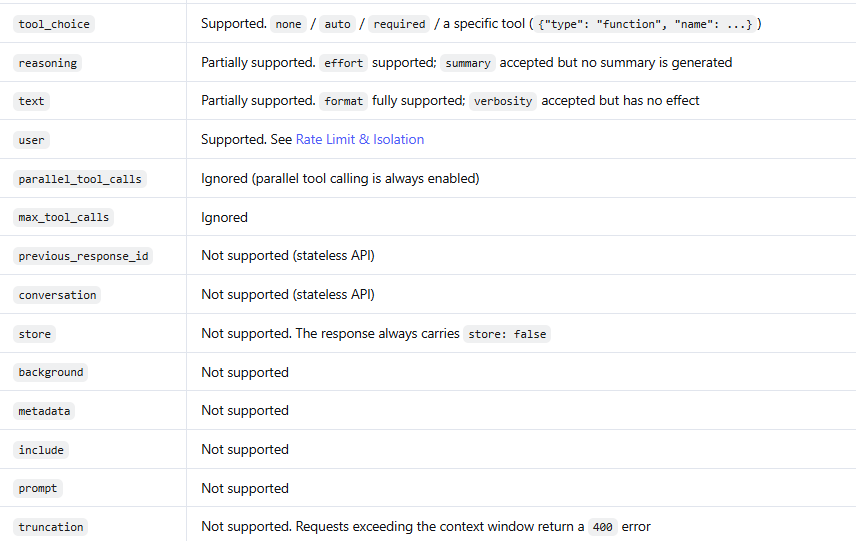
Chat Completions is the safer choice when migrating a conventional messages-based application. Responses is useful when your existing code already uses client.responses.create(), when you need its event model, or when you need a supported Responses-specific capability.
Minimal Responses API example
import os
from openai import OpenAI

client = OpenAI(
    api_key=os.environ["DEEPSEEK_API_KEY"],
    base_url="https://api.deepseek.com",
    timeout=60.0,
    max_retries=2,
)

response = client.responses.create(
    model="deepseek-flash",
    instructions="Answer clearly and concisely.",
    input="Explain the difference between an SDK and an API.",
    reasoning={
        "effort": "none",
    },
)

print(response.output_text)
DeepSeek’s Responses API is stateless. It does not support previous_response_id, conversation, store, or background. If your OpenAI integration depends on those fields, changing only the base URL will not preserve the same behavior.
DeepSeek also documents several unsupported Responses parameters as silently ignored. A successful HTTP response therefore does not prove that every supplied feature was honored.
Stream DeepSeek responses through the OpenAI SDK
Chat Completions streaming in Python
import os
from openai import OpenAI

client = OpenAI(
    api_key=os.environ["DEEPSEEK_API_KEY"],
    base_url="https://api.deepseek.com",
    timeout=60.0,
)

stream = client.chat.completions.create(
    model="deepseek-flash",
    messages=[
        {
            "role": "user",
            "content": "Give me three practical uses for an API client.",
        }
    ],
    stream=True,
    extra_body={
        "thinking": {
            "type": "disabled",
        }
    },
)

for chunk in stream:
    delta = chunk.choices[0].delta

    if delta.content:
        print(delta.content, end="", flush=True)

print()
At the raw wire level, Chat Completions streaming ends with data: [DONE]. The SDK normally abstracts that marker and yields typed chunks.
Responses API streaming in Python
import os
from openai import OpenAI

client = OpenAI(
    api_key=os.environ["DEEPSEEK_API_KEY"],
    base_url="https://api.deepseek.com",
    timeout=60.0,
)

stream = client.responses.create(
    model="deepseek-flash",
    input="Give me three practical uses for an API client.",
    reasoning={
        "effort": "none",
    },
    stream=True,
)

for event in stream:
    if event.type == "response.output_text.delta":
        print(event.delta, end="", flush=True)

    elif event.type == "response.failed":
        raise RuntimeError("The DeepSeek response failed.")

print()
Responses streaming uses semantic events and ends with response.completed, response.incomplete, or response.failed. It does not end with the Chat Completions [DONE] marker. Do not reuse one streaming parser unchanged for both APIs.
Control DeepSeek Thinking Mode
Thinking Mode is enabled by default with a default effort of high. It can improve complex reasoning and coding performance, but it may increase latency and output-token usage.
Enable Thinking Mode in Python Chat Completions
response = client.chat.completions.create(
    model="deepseek-flash",
    messages=[
        {
            "role": "user",
            "content": "Find and explain the bug in this algorithm.",
        }
    ],
    reasoning_effort="high",
    extra_body={
        "thinking": {
            "type": "enabled",
        }
    },
)

reasoning = response.choices[0].message.reasoning_content
answer = response.choices[0].message.content

print(answer)
For Chat Completions in the Python SDK, DeepSeek documents the provider-specific thinking field inside extra_body. The standard reasoning_effort field controls the requested effort level.
In Thinking Mode, temperature, presence_penalty, and frequency_penalty have no effect. DeepSeek accepts them for compatibility rather than rejecting the request.
When Tool Calls are included in a multi-turn Chat Completions workflow, preserve the full assistant messages, including reasoning_content. Removing that history can cause a 400 error on the next request.
Do not assume that reasoning text is appropriate to store permanently. It may contain sensitive intermediate content, so apply the same access, retention, and redaction controls used for prompts and final outputs.
Request JSON output
DeepSeek supports JSON Output through the OpenAI-compatible Chat Completions method.
import json
import os
from openai import OpenAI

client = OpenAI(
    api_key=os.environ["DEEPSEEK_API_KEY"],
    base_url="https://api.deepseek.com",
    timeout=60.0,
)

response = client.chat.completions.create(
    model="deepseek-flash",
    messages=[
        {
            "role": "system",
            "content": (
                "Return valid JSON with two fields: "
                "\"topic\" and \"summary\"."
            ),
        },
        {
            "role": "user",
            "content": "Summarize what an API client library does.",
        },
    ],
    response_format={
        "type": "json_object",
    },
    max_tokens=500,
    extra_body={
        "thinking": {
            "type": "disabled",
        }
    },
)

content = response.choices[0].message.content or ""

if not content.strip():
    raise RuntimeError("DeepSeek returned blank JSON content.")

data = json.loads(content)

print(data["topic"])
print(data["summary"])
DeepSeek requires the prompt to explicitly request JSON. It also warns that content the API cannot recognize as JSON may be replaced with spaces, causing an apparently empty response even when the finish reason is stop. Always strip, parse, validate, and handle blank output.
Valid JSON does not guarantee factual accuracy or compliance with your business rules. Validate required fields, types, ranges, ownership, and permissions in application code.
Use Tool Calls without assuming the model executes functions
DeepSeek supports function tools through the OpenAI SDK. The model can request a tool name and arguments, but your application must validate, authorize, and execute the function before returning a result.
- Define an allowlisted function and JSON Schema.
- Send the tool definitions with the user request.
- Inspect
message.tool_calls. - Parse the arguments defensively.
- Reject unknown functions or unauthorized operations.
- Execute the approved local handler.
- Return a
role: "tool"message with the matchingtool_call_id. - Continue until DeepSeek returns a final answer or the application reaches a safe round limit.
Tool arguments can contain invalid JSON or fields that were not declared. Never use eval, dynamically import a model-generated function name, or treat a valid schema as authorization for a payment, deletion, message, or database update.
If your application needs a complete production-oriented Tool Calls implementation, review DeepSeek’s official Tool Calls documentation separately rather than reducing the workflow to a few incomplete lines.
Send images through the OpenAI-compatible API
The current deepseek-flash model supports image input. DeepSeek documents JPEG, PNG, GIF, and WebP images supplied through supported URL, base64, or Files API patterns.
Do not assume that deepseek-v4-pro supports images, and do not infer that PDF, DOCX, or other generic document inputs are supported merely because image input works.
For sensitive images, avoid public URLs and review the relevant data-handling requirements before uploading content to any hosted AI service.
Understand retries and timeouts before adding your own retry loop
The current OpenAI Python and JavaScript SDKs automatically retry certain transient failures twice by default using a short exponential backoff. Retried conditions include connection failures, HTTP 408, 409, 429, and server errors at or above 500 when the request body can be safely resent.
The default SDK timeout is currently 10 minutes. That may be too long for an interactive application, so the examples in this guide use 60 seconds.
Be careful when adding application-level retries. If the SDK performs two retries and your outer loop also retries the operation, one user action can produce substantially more requests than expected.
- Do not retry authentication failures without correcting the key.
- Do not retry insufficient-balance errors without adding funds.
- Do not retry invalid request formats or parameters unchanged.
- Use bounded backoff for rate limits and temporary server failures.
- Use idempotency protections when a request can trigger an external side effect.
- Record request IDs and safe diagnostic details without logging prompts, secrets, or confidential outputs unnecessarily.
Common DeepSeek OpenAI SDK errors
| Status or symptom | Likely cause | What to check | Retry unchanged? |
|---|---|---|---|
| 400 | Invalid request-body format | Endpoint shape, unsupported fields, Thinking configuration, response format, and message structure | No |
| 401 | Authentication failed | Confirm that the key is a valid DeepSeek key and that the environment variable is loaded | No |
| 402 | Insufficient DeepSeek balance | Check the account balance and billing configuration | No |
| 422 | Invalid parameter | Model ID, field names, ranges, and unsupported values | No |
| 429 | Rate or concurrency limit | Request pace, concurrent requests, SDK retries, and account limits | After slowing down |
| 500 | DeepSeek server error | Service status, request ID, and bounded retry policy | Usually after a pause |
| 503 | DeepSeek server overload | Current status and traffic conditions | Usually with backoff |
| Model not found | Outdated or misspelled ID | Models and Pricing page, changelog, or client.models.list() | No |
| Blank JSON content | The output was not recognized as JSON and was replaced with spaces | Prompt wording, JSON example, output limit, and local blank-content handling | After correcting the prompt |
| Missing or duplicated path | The full endpoint was used as the SDK base URL | Use https://api.deepseek.com as the client base URL | No |
| Feature appears to do nothing | A Responses parameter may be silently ignored | DeepSeek’s compatibility table for the exact field | No |
Do not expose a DeepSeek key in browser code
The OpenAI JavaScript SDK blocks browser use by default because credentials embedded in client-side code can be extracted. Setting dangerouslyAllowBrowser: true does not make a long-lived DeepSeek key safe.
For a web application, use this architecture:
- The browser sends an authenticated request to your own backend.
- Your backend validates the user and the requested operation.
- Your server loads the DeepSeek key from a secret store.
- Your server calls DeepSeek.
- Your server returns only the necessary result to the browser.
Rate-limit the backend route, validate input length, restrict allowed models and features, enforce spending limits, and do not let the browser supply an arbitrary provider URL.
Migration checklist for an existing OpenAI SDK application
- Create a DeepSeek key. Keep it separate from your OpenAI credentials.
- Add provider-specific environment variables. Do not overload one variable with keys from multiple providers.
- Change the base URL. Use the DeepSeek API root in the SDK client.
- Change the model ID. Select a current DeepSeek model rather than an OpenAI model or historical alias.
- Audit request parameters. Identify fields that DeepSeek supports, ignores, or handles differently.
- Audit response parsing. Confirm the text, reasoning, usage, tool, and streaming fields your code reads.
- Test Chat Completions. Verify system instructions, message history, output limits, and error handling.
- Test Responses separately. Do not assume stateful OpenAI features such as
previous_response_idwork. - Test Thinking Mode. Measure latency, token usage, output quality, and history handling.
- Test streaming. Use a parser that matches the chosen API format.
- Test JSON Output. Handle blank or truncated content and validate the decoded object.
- Test Tool Calls. Validate arguments, preserve call IDs, and enforce authorization.
- Test images if used. Confirm the model, format, size, and content-block shape.
- Review retries. Avoid multiplying automatic SDK retries with an unlimited application loop.
- Run regression tests. Use representative prompts and compare accepted-result quality, latency, and cost.
- Keep rollback available. Do not remove the previous provider until the DeepSeek path is proven for your workload.
Use separate clients when supporting OpenAI and DeepSeek together
A multi-provider application should normally create separate client instances instead of mutating one global client between requests.
import os
from openai import OpenAI

openai_client = OpenAI(
    api_key=os.environ["OPENAI_API_KEY"],
)

deepseek_client = OpenAI(
    api_key=os.environ["DEEPSEEK_API_KEY"],
    base_url="https://api.deepseek.com",
)

# Use the appropriate client and model explicitly.
deepseek_response = deepseek_client.chat.completions.create(
    model="deepseek-flash",
    messages=[
        {
            "role": "user",
            "content": "Summarize this technical note.",
        }
    ],
    extra_body={
        "thinking": {
            "type": "disabled",
        }
    },
)
Keep provider-specific feature flags for Thinking Mode, image input, tools, streaming, and Responses behavior. A shared application interface can reduce duplicated code, but it should not silently discard unsupported fields.
Track token usage and cache behavior
DeepSeek returns usage information with API responses. Treat the API response as the source of truth for billing rather than estimating tokens from character counts.
Depending on the API format, useful fields can include:
- Input or prompt tokens
- Output or completion tokens
- Reasoning tokens
- Cached input tokens
prompt_cache_hit_tokensprompt_cache_miss_tokens- Successful server-side search or fetch usage
DeepSeek applies context caching automatically on a best-effort basis. A repeated prefix may reduce billed input cost, but a cache hit is not guaranteed. Log usage totals and accepted-result cost rather than assuming every repeated prompt will receive the cached rate.
Production checklist
- Use current OpenAI SDK releases on supported Python or Node.js versions.
- Store DeepSeek keys in a managed secret store or server environment variable.
- Use the official DeepSeek base URL.
- Use current model IDs and record model versions where reproducibility matters.
- Set explicit timeouts and bounded retry policies.
- Log request IDs and safe error metadata.
- Do not log credentials, confidential prompts, or sensitive reasoning content.
- Validate all structured output locally.
- Authorize every tool operation in application code.
- Rate-limit public backend routes.
- Enforce token, request, concurrency, and spending budgets.
- Test provider-specific streaming and response fields.
- Monitor DeepSeek’s status, changelog, models, and pricing documentation.
- Keep regression tests for every feature your application relies on.
Frequently asked questions
Can I use the OpenAI SDK with DeepSeek?
Yes. Configure the OpenAI client with a DeepSeek API key, DeepSeek’s official base URL, and a current DeepSeek model ID. The SDK then sends requests to DeepSeek.
Does using the OpenAI SDK send my prompts to OpenAI?
Not when the client is configured with DeepSeek’s base URL. The SDK constructs requests, but the configured endpoint determines which provider receives them. Review any additional proxies, gateways, logging systems, or observability services in your application separately.
Do I need an OpenAI API key?
No. You need a DeepSeek API key for DeepSeek requests. An OpenAI key is needed only for requests sent to OpenAI.
Does ChatGPT Plus include DeepSeek API usage?
No. ChatGPT subscriptions, OpenAI API billing, and DeepSeek API billing are separate products and accounts.
What base URL should I use?
Use https://api.deepseek.com as the OpenAI SDK base URL. Do not pass the complete /chat/completions resource path as the client’s base URL.
What is the difference between base_url and baseURL?
base_url is the Python client option. baseURL is the JavaScript and TypeScript client option.
Is DeepSeek a drop-in replacement for OpenAI?
Not completely. Basic OpenAI-compatible requests may require only configuration changes, but model IDs, Thinking Mode, Responses state, built-in tools, unsupported parameters, streaming events, errors, and response fields can differ.
Should I use Chat Completions or Responses?
Use Chat Completions for the simplest migration from a messages-based integration. Use Responses when your application specifically needs its input, output, tool, or event structure and can accommodate DeepSeek’s stateless and partially compatible implementation.
Why did a Responses parameter have no effect?
DeepSeek silently ignores several unsupported OpenAI Responses parameters. Check DeepSeek’s current compatibility table instead of treating an HTTP 200 response as proof that every field was applied.
Does the OpenAI SDK retry DeepSeek requests automatically?
Yes. The current Python and JavaScript SDKs retry certain transient failures twice by default. Configure the retry count deliberately and avoid stacking it beneath an unbounded application retry loop.
Can I call DeepSeek directly from React?
Do not place a long-lived DeepSeek API key in public browser code. Send requests through a server-side route that stores the key securely, authenticates users, validates input, applies rate limits, and controls spending.
Sources checked
- DeepSeek first API call and OpenAI SDK configuration
- DeepSeek models, capabilities, and pricing
- DeepSeek Models API
- DeepSeek Chat Completions reference
- DeepSeek Responses API compatibility guide
- DeepSeek Responses API reference
- DeepSeek Thinking Mode guide
- DeepSeek JSON Output guide
- DeepSeek Tool Calls guide
- DeepSeek Vision guide
- DeepSeek Files API guide
- DeepSeek API error codes
- DeepSeek rate-limit and concurrency documentation
- DeepSeek context-caching documentation
- Official OpenAI Python SDK repository
- Official OpenAI JavaScript and TypeScript SDK repository
- OpenAI JavaScript SDK authentication and browser-safety documentation
- OpenAI guidance on separate ChatGPT and API billing