

DeepSeek Tool Calls let a model request an external function, but the model does not execute that function by itself. Your application receives the requested tool name and JSON arguments, validates and authorizes them, runs an approved handler, returns the result with the matching call ID, and asks the model to continue. That closed loop is the foundation of a reliable DeepSeek agent.
The current first-party models deepseek-flash and deepseek-v4-pro both support tool calling through DeepSeek’s OpenAI-compatible Chat Completions API, Responses API, and Anthropic-compatible Messages API. Thinking Mode is enabled by default, so integrations must either preserve its history fields correctly or disable it explicitly for a simpler first implementation.
Last reviewed: November 7, 2026.
The essential rule: treat every model-generated tool request as untrusted input, not authorization. Allowlist the function, validate the arguments, check the user’s permissions, execute the operation in application code, and return one result for each matching tool-call ID.
How DeepSeek Tool Calls work
Tool calling and function calling describe the same interaction pattern in this context. DeepSeek chooses from the functions you expose, but your code remains responsible for the real-world operation.
- Define the tool. Describe its name, purpose, and accepted arguments with JSON Schema.
- Send the user request and tool definitions. DeepSeek can answer directly or return one or more structured calls.
- Inspect the assistant message. In Chat Completions, requested functions appear in
message.tool_calls. - Validate locally. Parse the JSON defensively, reject unknown tools and fields, and check types, ranges, ownership, and permissions.
- Execute an approved handler. Call your database, internal service, or local function with least-privilege credentials.
- Return each result. Send a tool-result message with the exact call ID produced by the model.
- Continue the conversation. DeepSeek can produce a final answer or request another tool.
- Stop safely. Enforce limits for tool rounds, time, cost, duplicate calls, and destructive operations.
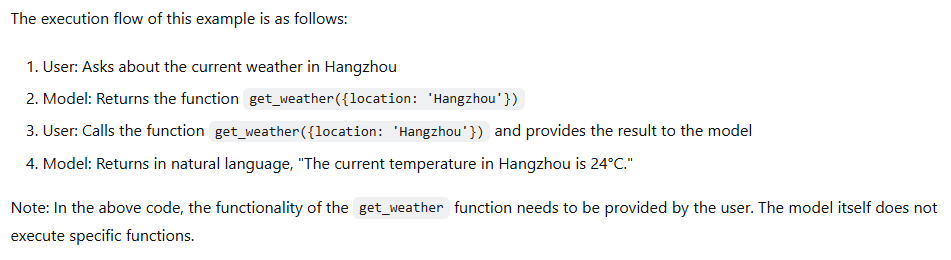
A returned call proves only that the model requested an action. It does not prove that the user owns the referenced resource, that the input is valid, or that the operation succeeded.
Choose the right DeepSeek API format
DeepSeek supports several familiar API shapes, but their tool objects, history rules, and built-in capabilities are not interchangeable.
| API format | Tool request | How to return the result | Important behavior | Best fit |
|---|---|---|---|---|
| Chat Completions | message.tool_calls with nested function | A role: "tool" message with tool_call_id | Client-defined functions only; preserve reasoning_content when tools remain in a Thinking Mode conversation | Direct OpenAI-SDK integrations and conventional chat loops |
| Responses API | function_call output items with call_id | function_call_output input items using the same call_id | Stateless; supports functions, the apply_patch custom tool, and server-side web_search with deepseek-v4-pro | Codex-style agents, semantic streaming, and inserted tool history |
| Anthropic-compatible Messages | tool_use content blocks | A following user message containing matching tool_result blocks | Uses input_schema; named-tool forcing works only in non-thinking mode; mcp_servers is ignored | Claude Code and Anthropic-SDK ecosystems |
DeepSeek’s Tool Calls guide also notes that synthetic tool calls can be inserted into existing history with the Responses and Anthropic formats. Chat Completions does not support inserting a tool call that the model did not generate.
Build a complete DeepSeek function-calling loop in Python
The example below uses Python 3.10 or later, the current OpenAI SDK, deepseek-flash, the official OpenAI-compatible endpoint, and a harmless local order-status function. It disables Thinking Mode so the first implementation has simpler history requirements. The loop handles multiple calls, rejects unknown functions, validates arguments, returns structured errors, and stops after a bounded number of rounds.
Install the SDK and set the key
python -m pip install --upgrade openai
export DEEPSEEK_API_KEY="your_api_key_here"
On Windows PowerShell, use $env:DEEPSEEK_API_KEY="your_api_key_here". Do not hard-code a production key in source control.
from __future__ import annotations

import json
import os
import re
from typing import Any, Callable

from openai import APIError, APITimeoutError, OpenAI

API_KEY = os.getenv("DEEPSEEK_API_KEY")
if not API_KEY:
    raise RuntimeError("Set the DEEPSEEK_API_KEY environment variable.")

client = OpenAI(
    api_key=API_KEY,
    base_url="https://api.deepseek.com",
    timeout=30.0,
    max_retries=2,
)

TOOLS = [
    {
        "type": "function",
        "function": {
            "name": "get_order_status",
            "description": (
                "Read the current status of an existing order. "
                "Use only when the user asks about an order and provides an order ID."
            ),
            "parameters": {
                "type": "object",
                "properties": {
                    "order_id": {
                        "type": "string",
                        "description": "Order ID in the form ORD-1234.",
                    }
                },
                "required": ["order_id"],
                "additionalProperties": False,
            },
        },
    }
]

ORDER_STATUS = {
    "ORD-1001": "shipped",
    "ORD-1002": "processing",
}


def get_order_status(order_id: str) -> dict[str, str]:
    return {
        "order_id": order_id,
        "status": ORDER_STATUS.get(order_id, "not_found"),
    }


ToolHandler = Callable[..., dict[str, Any]]
TOOL_HANDLERS: dict[str, ToolHandler] = {
    "get_order_status": get_order_status,
}


def validate_arguments(name: str, arguments: dict[str, Any]) -> dict[str, Any]:
    if name != "get_order_status":
        raise ValueError("Unknown tool.")
    if set(arguments) != {"order_id"}:
        raise ValueError("The tool requires exactly one field: order_id.")

    order_id = arguments["order_id"]
    if not isinstance(order_id, str) or not re.fullmatch(r"ORD-\d{4}", order_id):
        raise ValueError("order_id must match ORD-1234.")

    # Authentication and ownership checks belong here in a real application.
    return {"order_id": order_id}


def execute_tool_call(tool_call: Any) -> dict[str, Any]:
    name = tool_call.function.name

    if name not in TOOL_HANDLERS:
        return {"ok": False, "error": {"code": "unknown_tool"}}

    try:
        parsed = json.loads(tool_call.function.arguments)
        if not isinstance(parsed, dict):
            raise ValueError("Tool arguments must be a JSON object.")
        validated = validate_arguments(name, parsed)
        data = TOOL_HANDLERS[name](**validated)
        return {"ok": True, "data": data}
    except (json.JSONDecodeError, ValueError):
        return {"ok": False, "error": {"code": "invalid_arguments"}}
    except Exception:
        # Log a private trace ID server-side; do not expose secrets or stack traces.
        return {"ok": False, "error": {"code": "tool_execution_failed"}}


def run_agent(user_text: str, max_tool_rounds: int = 4) -> str:
    messages: list[dict[str, Any]] = [
        {
            "role": "system",
            "content": (
                "Use tools only when needed. Never claim an external action succeeded "
                "unless the tool result says it succeeded."
            ),
        },
        {"role": "user", "content": user_text},
    ]

    for round_index in range(max_tool_rounds + 1):
        response = client.chat.completions.create(
            model="deepseek-flash",
            messages=messages,
            tools=TOOLS,
            tool_choice="auto",
            extra_body={"thinking": {"type": "disabled"}},
        )

        assistant = response.choices[0].message
        messages.append(assistant.model_dump(exclude_none=True))

        if not assistant.tool_calls:
            return assistant.content or ""

        if round_index == max_tool_rounds:
            raise RuntimeError("The agent exceeded the maximum number of tool rounds.")

        for tool_call in assistant.tool_calls:
            result = execute_tool_call(tool_call)
            messages.append(
                {
                    "role": "tool",
                    "tool_call_id": tool_call.id,
                    "content": json.dumps(result, ensure_ascii=False),
                }
            )

    raise RuntimeError("The agent stopped without a final answer.")


if __name__ == "__main__":
    try:
        print(run_agent("Where is order ORD-1001?"))
    except (APIError, APITimeoutError) as exc:
        raise SystemExit(f"DeepSeek request failed: {type(exc).__name__}") from exc
Why this example is safer than a minimal demo
- The dispatch table is an allowlist. The model cannot choose an arbitrary Python function.
- Arguments are parsed defensively. Invalid JSON, extra fields, and malformed order IDs are rejected before execution.
- Every call ID is preserved. Each tool result is tied to the request that produced it.
- Failures remain failures. The application returns a structured error instead of letting the model invent success.
- The loop is bounded. Repeated tool requests cannot continue indefinitely.
- Authorization has an explicit home. A real handler should check the authenticated user and resource ownership where the comment indicates.
For mutating operations, add a confirmation step, an idempotency key, transaction boundaries, and audit logging. A valid tool schema does not prove that a transfer, deletion, refund, or account change is authorized.
Design tool schemas the model can use reliably
A good schema reduces ambiguity, but it never replaces application-side validation. Keep each tool narrow and make its use conditions explicit.
- Use a specific, action-oriented name such as
get_order_status, nothandle_data. - Explain both when the tool should be used and what information must already be present.
- Expose only parameters the handler genuinely needs.
- Use enums for finite choices such as order state, currency, or delivery method.
- Describe identifiers precisely rather than asking for a generic string.
- Avoid several tools with nearly identical descriptions.
- Keep authorization, pricing rules, ownership checks, and other business logic in application code.
- Do not pass secrets, credentials, or permission scopes as model-selected arguments.
DeepSeek warns in its Chat Completions reference that function arguments may contain invalid JSON or parameters that were never defined. Parse and validate every call even when the model usually follows the schema.
Use tool_choice according to the API and mode
| Setting | What it means | Chat Completions | Responses API | Anthropic-compatible API |
|---|---|---|---|---|
none | Do not call a tool | Supported | Supported | Supported |
auto | Answer directly or call one or more tools | Default when tools are present | Default | Supported |
required or any | Require a tool call | required works only in non-thinking mode | required is documented as supported | any is treated as auto and does not force a call |
| Named tool | Force a particular function | Non-thinking mode only; Thinking Mode returns HTTP 400 | Documented as supported with {"type":"function","name":"..."} | tool selects a named client tool only in non-thinking mode |
If auto produces a direct answer, that is not automatically a bug. The model may judge that the user’s request does not require an external operation. Improve the tool description, make the need for current or private data explicit, or use a documented forced mode when the API format and Thinking Mode setting permit it.
Thinking Mode requires complete history
Both current DeepSeek models support thinking and non-thinking operation, and Thinking Mode is enabled by default. In Chat Completions, the model returns thinking output in reasoning_content. When subsequent requests still include tools, all earlier reasoning_content values must be passed back. Dropping the field can produce HTTP 400.
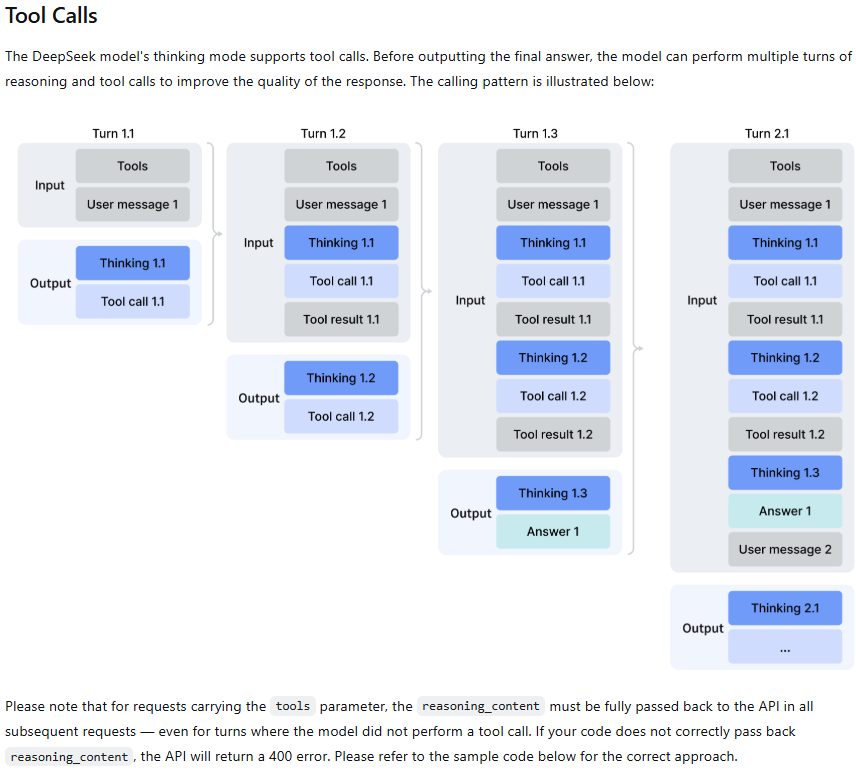
The safest pattern is to retain the complete assistant message returned by the SDK rather than rebuilding a reduced dictionary containing only content and tool_calls.
response = client.chat.completions.create(
    model="deepseek-flash",
    messages=messages,
    tools=TOOLS,
    reasoning_effort="high",
    extra_body={"thinking": {"type": "enabled"}},
)

assistant = response.choices[0].message

# Preserve the complete assistant message, including reasoning_content.
messages.append(assistant.model_dump(exclude_none=True))- Do not invent or reconstruct missing thinking content.
- Do not merge
reasoning_contentinto the function arguments or tool result. - Do not log model reasoning by default; apply the same privacy and retention controls used for prompts and outputs.
- In Chat Completions,
requiredand named tool choices are unavailable while Thinking Mode is enabled. - In the Anthropic-compatible format, preserve the complete assistant
contentarray, including thinking andtool_useblocks.
DeepSeek’s Thinking Mode guide documents the history requirement and the associated 400 error. This is especially important when a framework, proxy, or gateway serializes assistant messages on your behalf.
Strict Mode improves schema conformance, not authorization
DeepSeek’s Strict Mode is a Beta feature for function arguments. It works in thinking and non-thinking modes, but it requires the Beta base URL, strict: true on every function, and a schema within DeepSeek’s supported subset.
strict_client = OpenAI(
    api_key=API_KEY,
    base_url="https://api.deepseek.com/beta",
)

STRICT_TOOL = {
    "type": "function",
    "function": {
        "name": "get_order_status",
        "description": "Read the status of an existing order.",
        "strict": True,
        "parameters": {
            "type": "object",
            "properties": {
                "order_id": {
                    "type": "string",
                    "pattern": "^ORD-[0-9]{4}$",
                }
            },
            "required": ["order_id"],
            "additionalProperties": False,
        },
    },
}
The documented Strict Mode subset includes objects, strings, numbers, integers, booleans, arrays, enums, anyOf, and reusable definitions through $def and $ref. Every property in an object must be listed in required, and each object must set additionalProperties to false. String minLength and maxLength, along with array minItems and maxItems, are not supported.
Strict Mode can improve structural compliance and reject an unsupported schema before generation. It cannot verify that an order exists, that a user owns it, that a requested operation is safe, or that a repeated write will not run twice.
Handle multiple tool calls without assuming safe parallelism
tool_calls is an array. A response can request several functions, and the application must return one matching result for every call it accepts. Never reuse one call ID for multiple results.
- Potentially parallel: independent read-only calls such as looking up weather in two cities.
- Sequential: a call that needs an ID or value produced by an earlier call.
- Serialized: updates that modify the same record, inventory, balance, or reservation.
- Confirmation required: payments, deletions, account changes, outbound messages, and other consequential actions.
Model-generated parallel calls do not require your runtime to execute them concurrently. Evaluate dependencies and side effects first. In the Responses API, parallel_tool_calls is ignored and parallel tool calling is always enabled at the model layer; max_tool_calls is also ignored, so enforce call and round limits in your own application.
Assemble streamed arguments before parsing them
With Chat Completions streaming, the first chunk for a tool call carries its ID, type, and function metadata. Later chunks can contain only fragments of the argument string. Do not run json.loads() on each fragment.
pending: dict[int, dict[str, str | None]] = {}

for chunk in stream:
    delta = chunk.choices[0].delta

    for part in delta.tool_calls or []:
        call = pending.setdefault(
            part.index,
            {"id": None, "name": None, "arguments": ""},
        )

        if part.id:
            call["id"] = part.id
        if part.function and part.function.name:
            call["name"] = part.function.name
        if part.function and part.function.arguments:
            call["arguments"] += part.function.arguments

# Parse and validate only after the tool call is complete.
for call in pending.values():
    arguments = json.loads(call["arguments"] or "{}")
Group fragments by the tool-call index, preserve the ID and function name, concatenate the argument text, and parse only after the call is complete. The Responses API uses semantic events such as response.function_call_arguments.delta and response.function_call_arguments.done; a Chat Completions stream parser cannot be reused unchanged. Responses streams finish with response.completed, response.incomplete, or response.failed, not data: [DONE].
Tool Calls, structured output, web search, and MCP are different layers
| Capability | Use it when | Who performs the operation? |
|---|---|---|
| Client function tool | The model should request an operation in your application | Your code |
| JSON or structured output | The model’s answer itself must match a machine-readable schema | The model generates data; no external action occurs |
| Strict tool arguments | A function request must conform to DeepSeek’s supported schema subset | The model generates arguments; your code still validates and executes |
Responses API web_search | deepseek-v4-pro should search the web during a response | DeepSeek’s server |
| Search and Fetch APIs | Your application wants raw search results or page content | Your application calls separate DeepSeek endpoints |
| MCP tools | An MCP-capable client or host discovers tools and exposes them to the model | The client, host, or framework bridges the MCP server |
Server-side web search
In the Responses API, web_search is supported with deepseek-v4-pro. DeepSeek runs the search, adds results to the model context, and reports server-tool usage. The same tool is ignored with deepseek-flash. Other Responses built-ins—including file_search, code_interpreter, computer_use, and mcp—are currently ignored.
The separate Search and Fetch APIs are ordinary JSON endpoints at /v1/tools/search and /v1/tools/fetch. Your application invokes them directly and can expose them to a model as client-defined functions if that architecture is more appropriate.
MCP support
Do not equate DeepSeek’s function-calling ability with native access to arbitrary Model Context Protocol servers. The current Responses compatibility layer ignores the mcp built-in tool, and the Anthropic-compatible API ignores mcp_servers and MCP content blocks. An MCP-aware application, agent framework, or DeepSeek Harness can connect to an MCP server, convert its capabilities into tool definitions, and execute them outside the raw model API.
Production safety controls belong outside the model
A production implementation should separate model planning from application authority. The model may propose an action; policy code decides whether it is allowed.
- Allowlist handlers. Never resolve and execute an arbitrary model-generated name.
- Validate twice. Use JSON Schema for generation quality and application validation for actual safety.
- Authenticate and authorize. Check the current user, tenant, role, and resource ownership.
- Use least privilege. Give each handler only the credentials and operations it needs.
- Default to read-only. Separate lookup tools from tools that change state.
- Require confirmation. Pause before payments, deletions, publishing, account changes, and external messages.
- Make writes idempotent. Detect duplicate calls and use idempotency keys where supported.
- Bound execution. Set timeouts, retry limits, concurrency limits, tool-round limits, and spending caps.
- Protect secrets. Keep credentials outside prompts, tool arguments, results, and user-visible errors.
- Log safely. Record call IDs, handler names, timing, outcomes, and trace IDs while redacting sensitive values.
- Sandbox dangerous operations. Restrict filesystem, network, shell, and code-execution capabilities.
- Plan rollback. Use transactions or compensating actions for multi-step mutations.
Treat tool output as untrusted data
A database field, webpage, file, or third-party response can contain malicious instructions intended to manipulate the next model turn. Minimize the returned data, preserve its provenance, remove secrets, cap its length, and tell the model to treat tool output as data rather than instructions. A tool result should not automatically authorize another action.
Bound the agent loop
Stop when the model produces a final answer, the round or time budget is exhausted, the same call repeats without progress, authorization fails, a non-recoverable tool error occurs, or the user cancels. An unrestricted while True loop can create unbounded latency, cost, and side effects.
Common DeepSeek tool-calling errors and fixes
| Problem | Likely cause | What to check |
|---|---|---|
| No tool call is returned | auto allowed a direct answer, descriptions overlap, or the prompt does not require external data | Tool descriptions, user request, selected mode, and whether a documented forced choice is appropriate |
| HTTP 400 after a tool call in Thinking Mode | Earlier reasoning_content or complete assistant history was stripped | Store and replay the complete SDK message while tools remains present |
| HTTP 400 when forcing a tool | required or a named tool was used with Chat Completions Thinking Mode | Disable Thinking Mode or use a supported automatic choice |
| Arguments are invalid JSON | Model output, incomplete streaming assembly, or an ambiguous schema | Buffer all fragments, parse once, validate locally, and consider Strict Mode |
| Unknown or extra arguments | The model hallucinated a field or an old schema is still cached in application code | Reject unknown fields, refresh the tool definition, and never pass raw arguments directly to a handler |
| Tool result is rejected | Wrong call ID, role, item type, or message order | Match tool_call_id, call_id, or tool_use_id to the chosen API format |
| Strict Mode rejects the request | Wrong Beta URL, missing strict: true, optional object fields, or unsupported schema keywords | Require every object property, set additionalProperties: false, and use the documented subset |
| Streaming arguments cannot be parsed | Fragments were parsed before completion or mixed across indexes | Accumulate by call index and wait for the final call event |
| The agent repeats tools forever | Ambiguous prompt, hidden failure, missing result, or no termination policy | Return explicit errors, detect duplicate calls, and enforce round and cost limits |
| Behavior changes through a gateway | The provider changed model versions, serialization, thinking fields, or streaming events | Confirm the endpoint owner, exact model, provider documentation, and replayed history |
DeepSeek’s general error reference maps HTTP 400 to invalid request format, 401 to authentication failure, 402 to insufficient balance, 422 to invalid parameters, 429 to rate or concurrency limits, 500 to a server error, and 503 to overload. Correct 400, 401, 402, and 422 requests before retrying. Use bounded backoff for appropriate 429 and temporary 5xx failures.
Test the workflow, not just the happy path
A representative evaluation set should include requests that need no tool, one tool, several independent tools, dependent tools, missing information, an invalid value, an unauthorized action, a timeout, a service failure, malicious instructions inside a tool result, and a repeated-call scenario.
Useful metrics include:
- Correct, missed, and unnecessary tool-selection rates
- Valid-JSON and schema-validation rates
- Argument-repair frequency
- Authorization rejections
- Tool success and timeout rates
- Duplicate calls and average tool rounds
- Correct use of returned data in the final answer
- Model latency, tool latency, and total latency
- Token usage and external-service cost
- Cost per successful task
- Human-intervention rate
Do not publish reliability percentages from a handful of demonstrations. Evaluate the exact model, endpoint, framework, schemas, and production-like tasks you intend to deploy.
How Tool Calls affect cost
DeepSeek’s published pricing does not list a separate flat fee for client-defined function calls. The model turns are billed by input and output tokens, while the external database, SaaS API, or infrastructure used by your handler may have its own cost. Multi-round agents can spend more because every tool result and subsequent model request adds context and output.
DeepSeek currently charges Search and Fetch separately at $0.75 per 1,000 successful requests each. Calls triggered by supported server-side search tools can therefore add per-request charges in addition to model tokens. Failed requests, empty searches, and documented timeouts are not billed under the current Search and Fetch rules.
- Track model turns, reasoning tokens, and cache hits.
- Trim large tool results before returning them to the model.
- Set round and search limits per user request.
- Include external API, retry, and human-review costs.
- Optimize for cost per accepted task rather than token price alone.
DeepSeek Tool Calls implementation checklist
- Use a current first-party model ID and the intended API format.
- Define narrow tools with distinct names and documented parameters.
- Allowlist handlers and validate every argument locally.
- Keep authentication, authorization, and ownership checks outside the model.
- Preserve the complete assistant message and matching call IDs.
- Return one result for every accepted call.
- Preserve
reasoning_contentwhen Thinking Mode and tools continue across turns. - Buffer streamed argument fragments before JSON parsing.
- Serialize mutating operations and require confirmation where appropriate.
- Use idempotency, timeouts, bounded retries, and duplicate detection.
- Treat tool output as untrusted data.
- Enforce tool-round, time, token, and spending budgets.
- Test no-tool, error, authorization, timeout, and prompt-injection cases.
- Log traceable outcomes without exposing credentials or sensitive content.
Frequently asked questions
Does DeepSeek execute a tool automatically?
No. For client-defined functions, DeepSeek returns a requested function name and arguments. Your application validates, authorizes, and executes the operation, then returns the result to the model.
Which DeepSeek models support Tool Calls?
The current first-party model IDs deepseek-flash and deepseek-v4-pro both list Tool Calls support. At the time of review, they map to DeepSeek-V4.1-Flash-1017 and DeepSeek-V4-Pro-0813.
Can DeepSeek request several functions at once?
Yes. Tool calls are returned as a collection, and the application should handle every accepted call with its own matching result. Decide locally whether independent read operations can run concurrently and whether dependent or mutating operations must be serialized.
Why does Thinking Mode return a reasoning_content HTTP 400 error?
When a Chat Completions conversation continues to include tools, DeepSeek requires the earlier assistant reasoning_content to be passed back. The error commonly appears when a framework stores only the visible content and tool calls. Preserve and replay the complete assistant message.
What is the difference between Tool Calls and JSON Output?
Tool Calls ask your application to perform an external operation. JSON Output constrains the model’s own response format. A JSON response does not execute a function, and schema-valid tool arguments do not authorize an action.
Does the DeepSeek API support MCP tools directly?
Not through the currently documented raw compatibility fields. The Responses API ignores the mcp built-in tool, and the Anthropic-compatible API ignores mcp_servers. An MCP-capable client, harness, or framework can connect to MCP servers and expose their tools to DeepSeek as function definitions.
Are Tool Calls billed separately?
DeepSeek does not publish a separate flat charge for client-defined function calls. You pay for the model tokens used across the conversation and any cost charged by the external tool. DeepSeek Search and Fetch operations have separate per-request pricing.
Sources checked
- DeepSeek Tool Calls guide
- DeepSeek Chat Completions API reference
- DeepSeek Thinking Mode guide
- DeepSeek Responses API guide
- DeepSeek Responses API reference
- DeepSeek Anthropic-compatible API guide
- DeepSeek models and pricing
- DeepSeek Search and Fetch guide
- DeepSeek API error codes
- DeepSeek API changelog