

DeepSeek Harness is an official, open-source agent harness developed by DeepSeek AI. It connects an AI model to workspaces, files, commands, external tools, plugins, permissions, and persistent sessions so the model can complete multi-step tasks instead of only returning a chat response.
It can be used for coding, repository analysis, document work, research, scheduled tasks, and custom agent development. However, DeepSeek Harness is still preview software: the official product page calls it a public preview, while the official repository describes it as a developer preview with expected compatibility-breaking changes.
The project’s official safety notice also states that it has not undergone a security audit and must not be treated as secure or production-ready. That limitation should shape how and where you use it.
DeepSeek Harness at a glance
| Category | Current information |
|---|---|
| Product type | Open-source AI agent harness and agent runtime |
| Developer | DeepSeek AI |
| Product status | Public preview on the product page and developer preview in the repository |
| License | MIT License for the open-source repository |
| Current release checked | v0.2.2-rc.1, labeled as a pre-release |
| Main interfaces | Desktop application, browser-based Web UI, headless profiles, SDK profiles, and ACP integration |
| Desktop availability | Windows and Apple silicon Macs running macOS 13 or later |
| Web UI requirement | Node.js 24.9 or newer |
| Default local address | http://127.0.0.1:3080 |
| Main warning | Experimental, not security-audited, and not considered production-ready |
The most important distinction is that DeepSeek Harness is not itself a foundation model. It is the software layer that gives a selected model access to tools, files, sessions, permissions, and an execution loop.
What is DeepSeek Harness?
A language model normally receives input and generates output. An agent harness adds the components needed to turn that model response into a controlled sequence of actions.
DeepSeek Harness can provide a model with a workspace, file tools, command execution, session history, model adapters, approval prompts, plugins, and external integrations. The model can examine a task, select an available tool, inspect the result, and continue until it completes the task or needs user input.
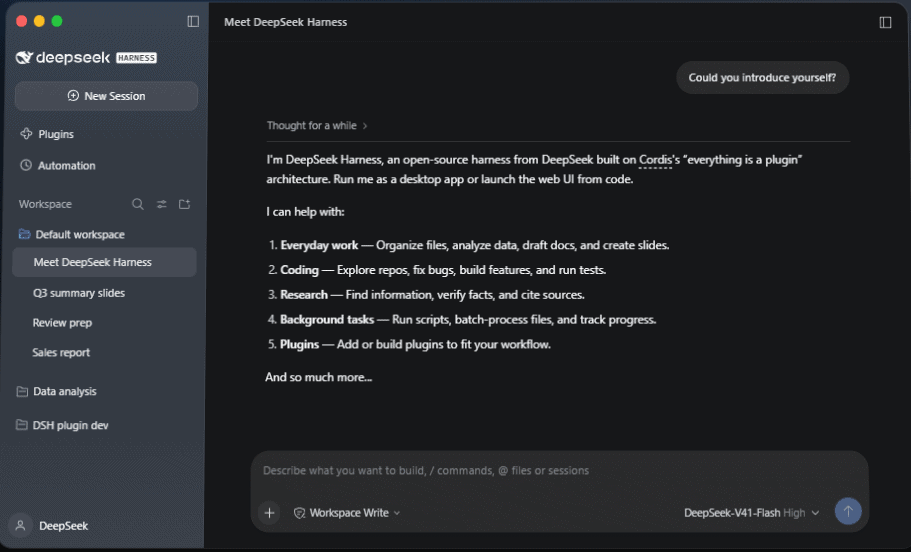
What an AI agent harness does
An AI agent harness typically manages five important parts of an agent workflow:
- Model access: It sends requests to a selected model provider and receives generated responses or tool-call instructions.
- Tools: It gives the model controlled ways to read files, edit content, run commands, search for information, or call external services.
- Execution loop: It repeatedly passes tool results back to the model until the task is finished, stopped, or blocked.
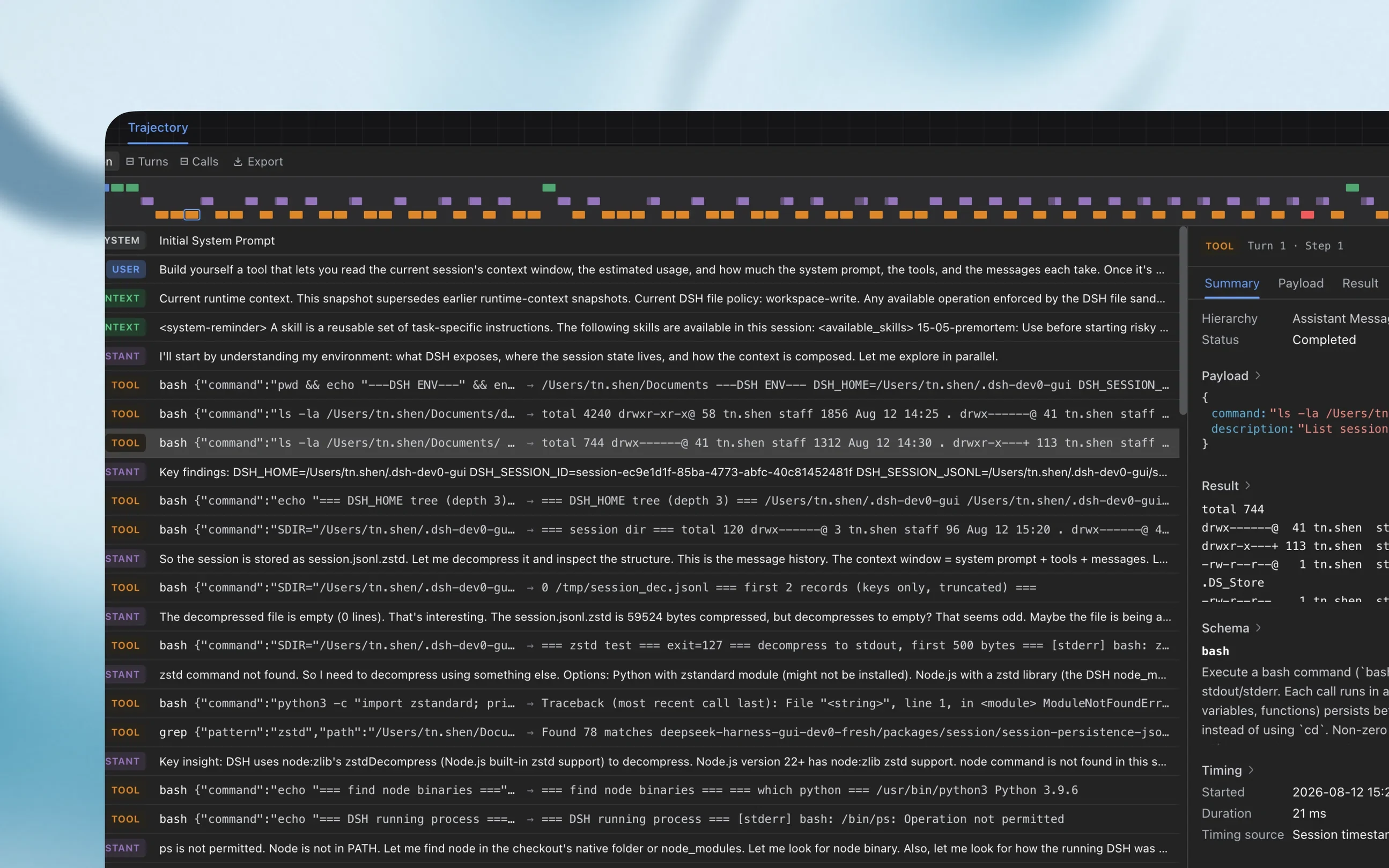
- State and sessions: It records messages, tool calls, approvals, results, and other events so work can be inspected or continued.
- Permissions: It limits which files, commands, network resources, and system capabilities the agent can access.
This is why an agent harness can do more than an ordinary chatbot. A chatbot may explain how to change a file, while an appropriately configured harness may inspect the file, propose an edit, apply it after approval, run the project’s tests, and report the result.
DeepSeek Harness vs. DeepSeek Chat and DeepSeek models
| Product or component | Primary role |
|---|---|
| DeepSeek model | Generates text, reasoning, code, structured output, and tool-call decisions |
| DeepSeek Chat | Provides a hosted conversational interface for interacting with DeepSeek models |
| DeepSeek Harness | Connects a selected model to tools, workspaces, commands, sessions, permissions, and plugins |
| DeepSeek API | Lets applications send requests to supported DeepSeek models programmatically |
| MCP server | Provides external tools and resources through the Model Context Protocol |
A result produced through DeepSeek Harness may therefore depend on several separate factors: the selected model, its provider, the prompt, the active tools, the workspace, the permission policy, and the installed plugins. A successful or unsuccessful result should not automatically be attributed to the harness alone.
How DeepSeek Harness works
- You choose a model route. This may be a DeepSeek model, a supported third-party provider, or a custom compatible model endpoint.
- You select a workspace. The workspace determines which project or directory the session is expected to use.
- You submit a task. The agent loop sends the task and relevant context to the selected model.
- The model requests tools. Depending on the active configuration, it may request file reads, edits, shell commands, web tools, MCP tools, or delegated work.
- The harness applies policies. Sandbox settings, workspace boundaries, approval rules, and user confirmation determine whether the action can proceed.
- Results return to the model. The agent evaluates each result and decides whether another step is needed.
- The session records the process. Messages, tool calls, approvals, errors, and execution results can be preserved for review.
The agent can continue through several steps without requiring the user to manually copy every result into a new prompt. The user can still review proposed operations when the active permission policy requires approval.
Why the “everything is a plugin” architecture matters
DeepSeek Harness is built on Cordis and follows an “everything is a plugin” architecture. According to the official architecture documentation, major parts of the runtime—including model adapters, the tool registry, session logging, and the agent loop—are implemented as replaceable plugins.
This design gives developers more control than a closed agent application with one fixed execution loop. A team can replace a model adapter, add a tool, change storage behavior, connect a service, or compose a specialized agent profile without rewriting one central core.
The tradeoff is complexity. A customizable plugin stack requires more configuration, dependency review, compatibility testing, and security judgment than a tightly controlled application with a small fixed feature set.
Profiles and interfaces
A DeepSeek Harness installation is assembled from profiles, bundles, plugins, and configuration patches. The official architecture currently documents shipped profiles including web, headless, sdk, sdk-minimal, and acp.
Most individual users will begin with the desktop application or Web UI. Headless, SDK, and ACP profiles are more relevant to developers building integrations, automated workflows, or applications that need to control Harness sessions programmatically.
What can DeepSeek Harness do?
The official product page presents DeepSeek Harness as a general-purpose work agent rather than a coding-only application. Its practical capabilities depend on the model, profile, preset, tools, plugins, and permissions you configure.
- Explore repositories: inspect project structure, locate important packages, trace behavior, and summarize codebases.
- Modify code: investigate bugs, edit files, build features, run commands, and execute tests.
- Work with documents: organize files, draft reports, process documents, and prepare structured content.
- Analyze data: inspect spreadsheets or other supported files and produce summaries or outputs.
- Conduct research: search for information, retrieve sources, compare evidence, and prepare cited findings when the required tools are enabled.
- Run longer tasks: execute scripts, process groups of files, monitor work, and inspect execution details.
- Create automations: configure supported reminders and scheduled tasks.
- Develop agents: create plugins, configure model providers, connect MCP servers, and build custom runtime profiles.
Some features are still explicitly marked experimental. The product page currently applies that label to features such as agent teams, automatic approval review, scheduled tasks, and voice input. Their interfaces or behavior may change between releases.
Is DeepSeek Harness free?
The open-source DeepSeek Harness repository is available under the MIT License. There is no separate Harness license fee shown in the official repository for downloading and running the open-source software.
That does not mean every task is free. The cost of operating the harness depends on the model provider and external services used during a session.
| Cost component | How it is handled |
|---|---|
| Open-source Harness code | Available under the MIT License |
| Desktop or Web UI software | No separate Harness software price is displayed on the official download or repository pages |
| DeepSeek API model usage | Billed according to the current DeepSeek model and token pricing |
| Third-party model provider | Billed according to that provider’s API, subscription, or infrastructure pricing |
| Search and fetch services | May be charged separately from model-token usage |
| Self-hosted model | May require your own hardware, cloud compute, electricity, maintenance, and deployment costs |
| Plugins and MCP services | May involve third-party subscriptions, infrastructure, or API charges |
The practical answer is that DeepSeek Harness can be free to obtain, but it is not automatically free to operate. Before starting a large or long-running task, check the current official DeepSeek API pricing or the pricing of the provider you configured.
How to install DeepSeek Harness
There are three main installation routes: use the packaged desktop application, launch the Web UI from npm, or build the repository from source. The best option depends on whether you want a ready-to-use interface or a development environment you can inspect and modify.
Option 1: Install the official desktop application
The simplest route is the official DeepSeek download page. It currently lists a desktop application for Windows and a macOS version for Apple silicon Macs running macOS 13 or later.
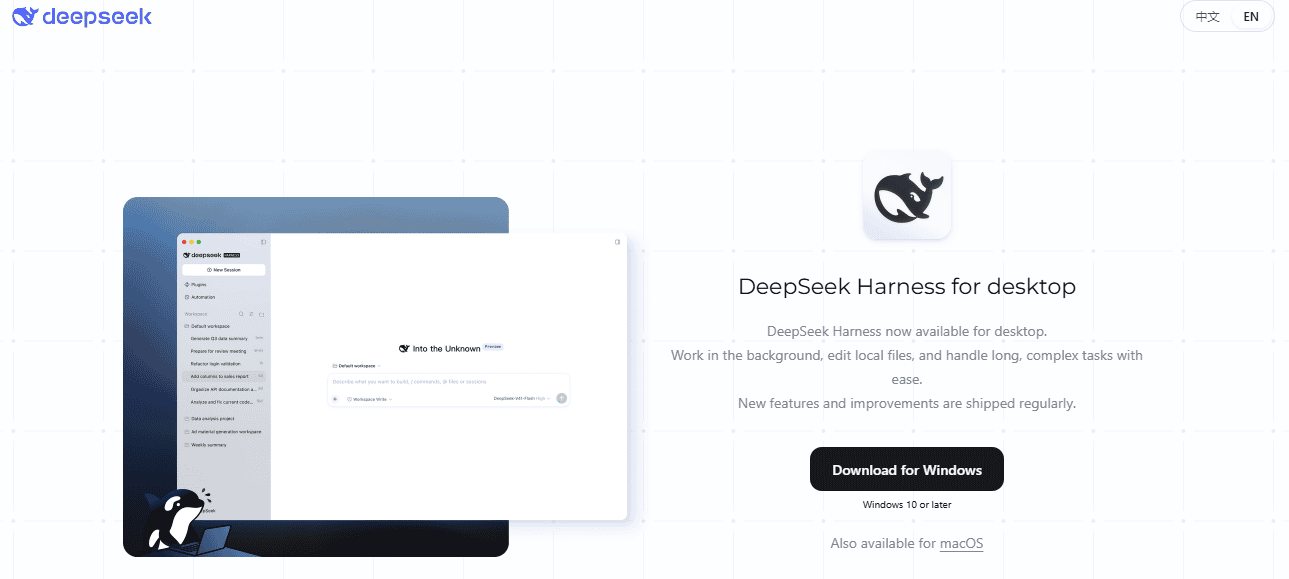
The official page did not list a Linux desktop package at the time this guide was verified. It also did not list an Intel Mac build. Users on systems without a listed desktop package can consider the official npm-based Web UI if they meet its runtime requirements.
The packaged desktop application supplies its own runtime. You do not need to install Node.js solely to launch the packaged desktop app.
Option 2: Launch the Web UI with npm
The current npm route requires Node.js 24.9 or newer. Check the version in the same terminal where you intend to start the harness:
node --versionOpen a terminal in the project or directory you plan to use, then run the official command:
npx @deepseek-ai/dsh webThe command starts the Web UI at http://127.0.0.1:3080 by default and normally opens it in your default browser. To start the server without automatically opening a browser, use:
npx @deepseek-ai/dsh web --no-openUse the package name shown in the official repository. Avoid similarly named packages, unofficial installers, or third-party download sites unless you have independently reviewed their source and publisher.
Option 3: Build DeepSeek Harness from source
Building from source is intended for contributors, plugin developers, and technical users who need to inspect or change the runtime. The official development documentation currently requires Node.js 24.9 or newer, Git 2.26 or newer, and the repository-pinned pnpm version through Corepack.
git clone https://github.com/deepseek-ai/deepseek-harness.git
cd deepseek-harness
corepack enable
pnpm install
pnpm run build
pnpm dsh web
The build command prepares the repository artifacts. The final command launches the Web profile using those built artifacts.
Because the project is still in developer preview, pin the version used in repeatable workflows and test upgrades before applying them to an important environment. Do not assume that a profile, plugin, configuration field, or API from one pre-release will remain compatible with the next.
How to configure your first session
- Start with a safe directory. Use a test repository, disposable workspace, or backed-up copy rather than a production project.
- Configure a model. Open Settings → Models and add a DeepSeek API key, supported third-party provider, or custom model endpoint.
- Select a workspace. Add the directory the agent should use and make it the active workspace.
- Review the permission mode. Begin with workspace-limited access and approval prompts rather than unrestricted access.
- Run a read-focused task. Ask the agent to inspect and summarize before allowing it to modify files or install dependencies.
- Inspect the execution. Check the files read, tools called, commands proposed, approvals requested, and final answer.
- Expand access gradually. Enable additional tools only when the workflow clearly requires them.
The official Web UI quickstart suggests beginning with a task such as:
Summarize this repository and identify its main packages.This is a useful first test because it verifies the model, workspace, session, and read tools without immediately requesting a broad edit. Compare the summary with the repository before trusting the setup with more consequential work.
Configure a DeepSeek or third-party model
The model settings support DeepSeek credentials, shipped third-party provider definitions, and custom model APIs. The official provider guide currently documents provider entries including Anthropic, OpenAI, Moonshot AI, and Zhipu AI, subject to the installed catalog and current release.
For a relay, company gateway, self-hosted model server, or provider not included in the catalog, the custom model form supports three API protocol options:
- OpenAI Chat Completions
- OpenAI Responses
- Anthropic Messages
The base URL, protocol, provider ID, model ID, and authentication method must match the endpoint you are connecting. An OpenAI-compatible label does not guarantee that every optional behavior, tool format, reasoning control, or response field is implemented identically.
A DeepSeek API key is therefore one supported route, not a requirement for every possible setup. You can use another supported provider or a compatible custom endpoint, but you remain responsible for that provider’s credentials, pricing, availability, and data policies.
Choose a workspace before sending a task
The process uses the directory from which it was launched as its default filesystem location, but a fresh Web UI still requires you to add and select a workspace. The session composer remains unavailable until a workspace has been selected.
Select only the directory needed for the task. Giving an agent access to an entire home directory or a folder containing unrelated secrets increases the impact of an incorrect command, malicious instruction, or compromised plugin.
Does DeepSeek Harness run locally?
DeepSeek describes Harness as local-first. The official data-processing statement says that inputs, model outputs, session context, tool-call records, attachments, file paths, execution results, runtime logs, service addresses, API keys, and configured personal information are stored locally by default after the product is installed and running.
Local-first does not mean that every operation remains on your computer. A remote model provider must receive the prompt and relevant context needed to generate a response. Web tools, hosted services, MCP servers, and external plugins may also receive data when you invoke them.
| Scenario | Typical data path |
|---|---|
| Local workspace operation | Files and execution data are handled by the local Harness runtime, subject to the active tools and configuration |
| DeepSeek official model service | Relevant prompts and context are sent to DeepSeek’s service under its terms and privacy policy |
| Custom model provider | Requests are sent directly to the configured provider, which processes them under its own policies |
| Web search or fetch tool | Queries, URLs, or retrieved content may be transmitted to the applicable external service |
| MCP server | Tool arguments and requested resources may be sent to the configured MCP server |
| Third-party plugin | The plugin may process local data or contact external systems according to its code and configuration |
| Diagnostic reporting | The data-processing statement says anonymized configuration information and project lists may be reported, with controls to disable reporting or change the reporting address |
The DeepSeek Harness Privacy Policy distinguishes official model services from custom model services. It says custom-model input is sent directly to the selected model provider and is not stored or processed by DeepSeek on the server side for that custom-model request.
The same policy describes account, device, network, usage, and session-log data that DeepSeek may collect when its services are used. It also states that personal data collected by DeepSeek may be processed and stored in the People’s Republic of China.
Review the policy that applies to the exact mode you plan to use. The local runtime, an official signed-in model service, a custom API provider, and an external MCP server are separate data-processing contexts.
Can DeepSeek Harness work fully offline?
DeepSeek Harness is not fully offline by default. A normal setup uses a remote model API, and optional search, fetch, MCP, plugin, or hosted tools may make additional network requests.
A substantially offline setup may be possible with a locally hosted model endpoint that uses a supported protocol, local-only tools, and no network-dependent integrations. You would still need to verify every plugin, process, telemetry setting, package, and model endpoint involved rather than assuming that a local interface guarantees zero external traffic.
Is DeepSeek Harness safe?
DeepSeek Harness should be treated as experimental software with potentially significant system access. Its official safety notice says the project has not undergone a security audit and must not be treated as secure or production-ready.
The harness can execute model-generated code and commands, load third-party plugins, and access the networks, processes, credentials, and files made available to it. Incorrect output, malicious content, unsafe configuration, software defects, or an untrusted plugin could modify files, disclose data, install unwanted dependencies, or affect the host system.
Sandboxing, approval prompts, and permission controls can reduce risk, but the safety notice explicitly warns that they do not guarantee isolation. They cannot protect a resource that the agent is already allowed to access.
Understand the permission presets
The current permission documentation describes two principal configured presets:
| Preset | Sandbox and approval behavior |
|---|---|
workspace-write | Limits writing to the workspace and asks for approval when the active policy requires it |
danger-full-access | Provides broad access and uses a no-approval policy |
Do not choose danger-full-access merely to remove interruptions. Broad access without approval can increase the impact of one incorrect command, compromised dependency, prompt injection, or misunderstood instruction.
Safer-use checklist
- Use least privilege. Grant access only to the files, tools, processes, and network resources required for the task.
- Keep approvals enabled. Review commands, dependency installations, file deletions, and broad edits before execution.
- Start in an isolated environment. Use a disposable virtual machine, container, test account, or temporary repository for unfamiliar workflows.
- Maintain backups and version control. Make it possible to inspect and reverse unintended file changes.
- Remove unnecessary secrets. Do not expose production credentials, private keys, customer data, or confidential documents without a clear need and accepted risk.
- Review third-party code. Inspect plugins, MCP servers, hooks, skills, packages, and their dependencies before installation.
- Use smaller tasks. Break broad instructions into reversible stages and verify the result after each stage.
- Review generated changes. Inspect diffs and run the project’s own tests rather than assuming that a completed tool call means the work is correct.
- Do not expose the local Web UI casually. Follow the official deployment guidance before making it reachable from another device or public network.
Plugins and Creator mode
Creator mode is intended for extending the harness. It provides Plugin Manager access and runtime inspection, and it can help create or configure persistent plugins through conversation.
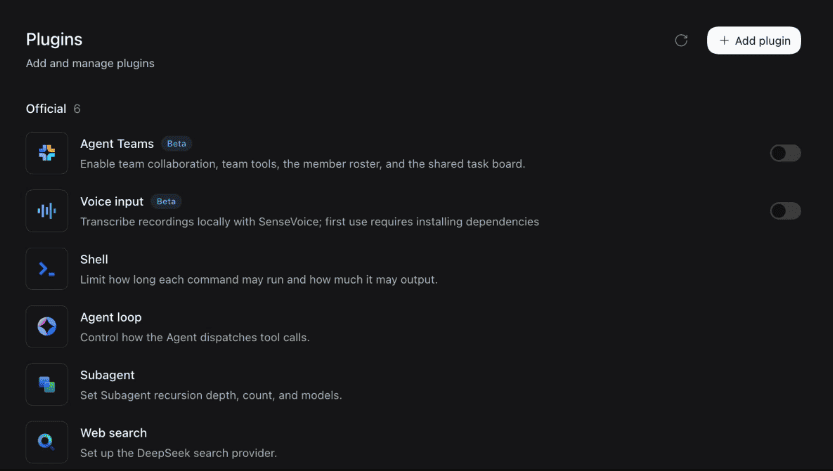
A plugin can contribute tools, model adapters, interface elements, storage services, workflows, or other runtime behavior. Plugin configuration belongs to the active profile and may continue affecting its sessions after the process restarts.
That persistence is useful, but it also increases risk. A generated or third-party plugin is executable software, not merely a prompt template. Read its package definition, source, dependencies, configuration patch, permissions, and external endpoints before installing it.
The official tool documentation also notes that package installation can execute permitted build scripts. Treat plugin installation with the same caution you would apply to adding a new dependency to a development environment.
Using MCP servers with DeepSeek Harness
DeepSeek Harness supports the Model Context Protocol for connecting external servers that supply tools, resources, and instructions. MCP servers are opt-in and do not become available until they are configured in the relevant scope.
Once configured, an MCP server can expose tools to the Harness tool registry. Calls can pass through the normal execution and permission system, while results are recorded in the session where supported.
The external server remains a separate security and privacy boundary. Before connecting one, verify:
- Who operates or maintains the server.
- Which tools and resources it exposes.
- Whether it starts a local process or connects to a remote endpoint.
- What credentials and environment variables it receives.
- What task data may be transmitted.
- Which dependencies are installed or executed.
- How its provider stores and uses the submitted data.
Permission checks inside the harness do not replace a security review of the server itself. An approved MCP tool may still send data to an external system or perform a consequential action.
Scheduled tasks and background work
The shipped Web profile includes an Automation tasks page and scheduling support in applicable presets. The official documentation currently describes one-time tasks, fixed intervals, daily schedules, weekly schedules, and five-field cron expressions with an explicit time zone.
The product page still labels scheduled tasks as experimental. Do not rely on them as the only control for a critical business process without separate monitoring, error handling, access controls, and a recovery plan.
Scheduled execution also changes the risk profile because the user may not be present when a task runs. Keep the task scope narrow, avoid broad permissions, and verify which workspace, model, credentials, and tools remain available to the session.
Current limitations
- Compatibility is not stable. The repository warns that breaking changes are expected during the developer preview.
- The current release is still a pre-release. The most recent release listed during verification was v0.2.2-rc.1 rather than a stable production release.
- It has not been security-audited. The official safety notice says it must not be considered secure or production-ready.
- Model performance varies. Results depend on the model, provider, context, tools, permissions, and prompt—not only on the harness.
- Extensibility creates maintenance work. Plugins, MCP servers, profiles, and configuration patches must be reviewed and retested after updates.
- Some promoted features are experimental. Their behavior, configuration, or availability may change.
- Official desktop coverage is limited. The download page currently lists Windows and Apple silicon macOS, but not a Linux desktop package.
- Local-first is not fully offline. Remote models and external tools still create network and data-processing dependencies.
These limitations do not prevent useful experimentation. They mean the product is best suited to environments where changes can be inspected, failures can be reversed, and users are comfortable managing permissions and technical configuration.
Who should use DeepSeek Harness?
| Good fit | Consider a different option or wait |
|---|---|
| Developers experimenting with configurable AI agents | Teams requiring a security-audited production platform |
| Users who want to switch between model providers | Users who want a fixed, low-configuration experience |
| Plugin and MCP developers | Organizations that cannot accept breaking changes |
| Technical users able to review commands and diffs | Users unable to evaluate file access, permissions, or generated code |
| Agent research, prototypes, and isolated development | Unsupervised access to production systems or sensitive data |
| Teams building a specialized agent runtime | People who only need a conversational AI interface |
DeepSeek Harness is most compelling when the runtime itself is part of the project. It gives developers control over model adapters, tools, sessions, plugins, permissions, and the agent loop.
A conventional chat service is usually simpler when you only need answers, summaries, or writing assistance. A packaged coding agent may be a better starting point when you want a more opinionated repository workflow with less runtime configuration. A mature automation platform may be more appropriate when governance, operational support, reliability, and production controls matter more than extensibility.
DeepSeek Harness alternatives
| Your main need | Type of product to consider |
|---|---|
| Simple questions and content generation | A hosted chat interface such as DeepSeek Chat |
| Daily repository work with a packaged workflow | A coding agent such as Claude Code, Codex, or OpenCode, after reviewing its current model, permission, and deployment options |
| A configurable runtime with replaceable components | DeepSeek Harness |
| Building an agent directly into your own application | An agent framework or SDK rather than a complete desktop or Web UI |
| Governed production automation | A mature orchestration platform with appropriate security, audit, reliability, and support controls |
There is no universal winner. Compare the tools based on workflow fit, model support, maturity, permissions, deployment options, maintenance burden, data handling, and the amount of runtime control you actually need.
Common setup problems
| Problem | What to check |
|---|---|
npx reports an unsupported Node engine | Run node --version in the same terminal and upgrade to Node.js 24.9 or newer |
| The session composer is unavailable | Add and select a workspace |
| No model can be selected | Open Settings → Models and configure a DeepSeek key, supported provider, or custom endpoint |
| A custom provider request fails | Verify the provider ID, base URL, API protocol, model ID, credential, and endpoint compatibility |
| An expected tool is missing | Check the active preset, profile, installed plugin, tool scope, and whether the feature is experimental |
| A plugin is installed but not active | Review the Plugin Manager result; an entry marked as requiring a restart has not become active yet |
| You cannot find a Linux desktop installer | The official download page currently lists Windows and Apple silicon macOS; use the npm Web UI when appropriate |
| The Web UI works locally but not remotely | Do not expose the local listener directly; follow the official reverse-proxy and public-deployment guidance |
When a command or configuration copied from a tutorial fails, compare that tutorial’s version with the current official releases. Preview software can change quickly, and instructions written for an earlier alpha or release candidate may no longer apply.
Frequently asked questions
Is DeepSeek Harness an official DeepSeek product?
Yes. DeepSeek Harness is published on DeepSeek’s official website and in the official deepseek-ai/deepseek-harness GitHub repository.
Is DeepSeek Harness open source?
Yes. The official repository is released under the MIT License. Third-party dependencies and plugins may have their own licenses, so review them separately.
Does DeepSeek Harness require a DeepSeek API key?
Not in every configuration. A DeepSeek API key is the standard route shown in the quickstart, but the model settings also support selected third-party providers and custom endpoints using supported protocols.
Can DeepSeek Harness use a local model?
It can connect to a self-hosted model server when that server exposes a protocol supported by the custom model configuration. Compatibility depends on the endpoint, model, tool-call behavior, and protocol implementation.
Is there a Linux desktop version?
The official download page did not list a Linux desktop application at the time of verification. Linux users can consider the official npm-based Web UI if the system meets the current Node.js requirement.
Is DeepSeek Harness ready for production?
No. The official safety notice describes it as experimental developer-preview software, says it has not undergone a security audit, and states that it must not be treated as production-ready.
Final verdict
DeepSeek Harness is a flexible open-source agent runtime for users who need more control than a conventional chatbot provides. Its Cordis-based plugin architecture makes models, tools, storage, sessions, interfaces, and even the agent loop more replaceable than they are in many packaged agent applications.
That flexibility also transfers more responsibility to the user. You must manage model costs, credentials, permissions, plugins, external services, updates, data flows, and system isolation.
For a first trial, use the official desktop or npm route, select a disposable workspace, keep approvals enabled, begin with a read-only repository summary, and inspect every material action before granting broader access. Treat the product as a promising development and experimentation environment—not as a hardened production platform.
Official sources checked
This article was verified on November 6, 2026. DeepSeek Harness is changing rapidly, so recheck the release notes, runtime requirements, pricing, safety documentation, and privacy terms before installing or using it.